
ChatGPT for Educators: Organize Your Teaching AI Workflow
Turn ChatGPT into a teaching resource powerhouse. Organize lesson plans by class, save activity ideas, and build a reusable library of materials.
Best for: Teachers managing ChatGPT lesson plans, quiz templates, and classroom AI activities by subject.
 Add to Edge
Start free | Trusted by 40,000+ users
The Educator's ChatGPT Problem
You use ChatGPT for lesson ideas, differentiated activities, assessments, parent communications-it's become essential. But every great resource gets lost in an endless conversation list.
That perfect activity you created for struggling readers? The assessment rubric that worked so well? Buried somewhere you'll never find again.
Build Your Teaching Resource Library
AI Toolbox (formerly ChatGPT Toolbox) helps you organize every teaching conversation. Create class folders, save your best lesson plans, search past resources, and export materials for your classroom.
Organize by Class or Subject
Create folders for each class, grade level, or subject. Keep Period 1 separate from Period 3, Math separate from Science.
Pin Current Units
Teaching fractions this week? Pin that conversation. Preparing for the semester exam? Pin your review materials.
Search Teaching Resources
That differentiated activity from last year? That assessment rubric? Search and find any teaching resource instantly.
Export Lesson Materials
Export ChatGPT-generated lesson plans, worksheets, and assessments as TXT files. Print, share, or add to your LMS.
How Educators Use AI Toolbox
- Create Class Folders - Set up folders for each class, subject, or grade level you teach.
- Save Great Resources - When ChatGPT creates something useful, add it to the right folder.
- Pin Current Units - Pin materials for what you're teaching right now.
- Search for Ideas - Before planning, search what you've already created.
- Export for Classroom - Download materials to print, add to LMS, or share with colleagues.
Educator Scenarios
Lesson Planning
- Organize by unit or topic
- Save activity ideas
- Export lesson plans
- Track curriculum coverage
Assessments
- Save quiz templates
- Organize rubrics
- Export test questions
- Track assessment types
Differentiation
- Save modified activities
- Organize by learning level
- Export accommodations
- Track student supports
Simple, Transparent Pricing
Start free, upgrade when you need more
Free
$0 /forever
- 2 Top-Level Folders (unlimited subfolders)
- Up to 2 Pinned Chats
- Search (up to 5 results)
- Media Gallery
- Sync across all devices
 Add to Chrome
Premium
$9.99 /month
- Everything in Free
- Unlimited folders and pinned chats
- Full prompt library
- Bulk export and unlimited bulk actions
Lifetime
$123$99 /one-time
- Everything in Premium
- Pay once - yours forever
- School + home access
- Priority 24/7 support
- All future updates
How Educators Use AI Toolbox: Step-by-Step
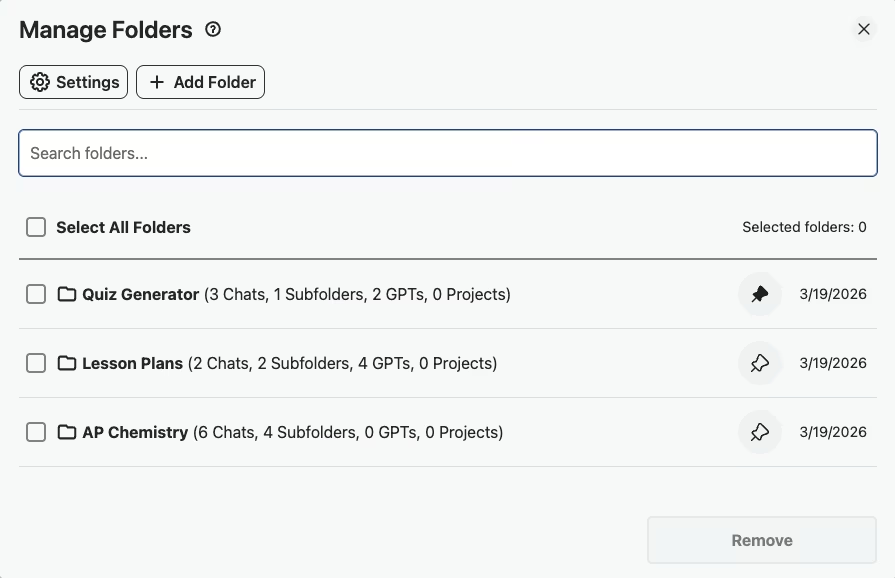
- Step 1: Create Folders by Course and Unit
Set up folders like “AP Chemistry > Unit 3” so every lesson plan, worksheet, and quiz conversation is organized by exactly where it fits in your curriculum.
- Step 2: Save Lesson Plan Templates to Your Prompt Library
When you build a prompt that reliably generates good lesson plans, save it to your Prompt Library so you can reuse it for every new unit without starting over.
- Step 3: Generate Differentiated Worksheets Using Saved Prompts
Load a saved prompt template, adjust the reading level or learning objective, and generate differentiated worksheets for different student groups in minutes.
- Step 4: Pin the Current Week's Lesson Plan Conversations
Pin your active lesson plan conversations to the top of your sidebar so they are one click away during the school week.
- Step 5: Export Quiz Questions as TXT for Your LMS
Export ChatGPT-generated quiz questions and answer keys as TXT files, then copy them into Google Classroom, Canvas, or your school's LMS.
Success Story
A STEM department of 3 teachers - shared prompt templates for generating quiz questions, lab instructions, and rubrics. They organized by grade level and subject, creating a reusable teaching resource library.
The bulk export feature let them back up an entire semester of materials in under a minute.
What Educators Say About AI Toolbox
“I teach AP Biology and AP Environmental Science. I have folders for each course with subfolders for every unit,Cell Energy, Genetics, Ecology. When I need a warm-up activity or a quiz prompt, I search my library instead of starting from scratch. It's saved me hours of lesson prep every week.”
- Marcus Jefferson, AP Science Teacher at Westfield High School
“I use ChatGPT to create differentiated worksheets for my 7th graders, and Toolbox lets me keep them organized by reading level and subject. The export feature is great,I download the worksheets as text files and paste them into my Google Docs templates for printing.”
- Sarah Lindholm, Middle School English Teacher at Ridgewood Academy
Frequently Asked Questions
How can educators use ChatGPT effectively for teaching?
Use ChatGPT for lesson plan ideas, differentiated activities, assessment creation, and parent communication drafts. With AI Toolbox, organize these by class or subject, save your best prompts, and build a reusable library of teaching resources.
Can I organize ChatGPT conversations by class period?
Yes! Create folders for each class period, grade level, or subject. Use subfolders for units or topics. Your entire teaching workflow stays organized and searchable.
How do I save ChatGPT lesson plans I create?
Add conversations with useful lesson plans to the appropriate folder. Pin frequently-used templates. Export completed plans as TXT files to add to your LMS, print for your files, or share with colleagues.
Can I use AI Toolbox to create a teaching resource library?
Absolutely. Over time, your organized folders become a searchable library of activities, assessments, rubrics, and lesson ideas. Search across years of teaching conversations to find exactly what you need.
Is AI Toolbox appropriate for school use?
Yes. AI Toolbox only stores folder names and conversation IDs locally. Your actual conversation content stays with OpenAI. We never access student information or educational records.
Organize Your Teaching AI Today
Stop recreating lessons from scratch. Build a library of reusable teaching resources.