
ChatGPT for Business: Organized AI Workflows
Transform ChatGPT from a chat tool into a business productivity system. Organize by client, project, or department-find anything instantly.
Best for: Business professionals managing 50+ ChatGPT conversations across meetings, strategy, and client work.
 Add to Edge
Start free | Trusted by 40,000+ professionals
The Business ChatGPT Problem
Your team uses ChatGPT for proposals, analyses, documentation, and brainstorming. But valuable outputs get buried in an endless conversation list with no organization.
When you need that budget analysis from last quarter or the proposal framework that won the client-good luck finding it. Without organization, ChatGPT is powerful but wasteful.
Business-Grade Organization for ChatGPT
AI Toolbox (formerly ChatGPT Toolbox) adds the organizational layer ChatGPT is missing. Create client folders, project subfolders, pin active work, and search across everything. Export documentation for stakeholders.
Organize by Client or Project
Create folders for each client, project, or department. Keep work separate, organized, and instantly accessible.
Pin Active Work
Pin your current projects and ongoing tasks to the top. Quick access to what matters most right now.
Search Across Everything
Find that proposal draft, budget analysis, or client communication from months ago in seconds.
Export for Documentation
Export conversations as documentation. Share analyses with stakeholders or archive completed projects.
How Businesses Use AI Toolbox
- Create Your Structure - Set up folders for clients, projects, or departments.
- Organize as You Work - Add conversations to the right folders after each session.
- Pin Active Projects - Keep current work at the top for quick access.
- Search When Needed - Find any past work with powerful search across all conversations.
- Export & Document - Download conversations for stakeholder reports or archives.
Business Use Cases
Project Management
- Organize by project or initiative
- Track brainstorming sessions
- Save project documentation
- Export meeting summaries
Client Work
- Separate folders per client
- Save proposal drafts
- Organize communications
- Export deliverables
Team Collaboration
- Share templates across team
- Document best practices
- Sync across devices
- Export for knowledge base
Simple, Transparent Pricing
Start free, upgrade when your team needs more
Free
$0 /forever
- Up to 2 Total Folders
- Up to 2 Pinned Chats
- Search (up to 5 results)
- Media Gallery
 Add to Chrome
Premium
$9.99 /month
- Everything in Free
- Sync across all devices
- Prompt library
- Bulk actions
Lifetime
$123$99 /one-time
- Everything in Premium
- Pay once - yours forever
- Work + home + travel
- Priority 24/7 support
- All future updates
Teams
$12 /seat/month
- Everything in Premium
- Admin dashboard
- Team seat management
- Usage analytics & insights
- Dedicated priority support
How Business Professionals Use AI Toolbox: Step-by-Step
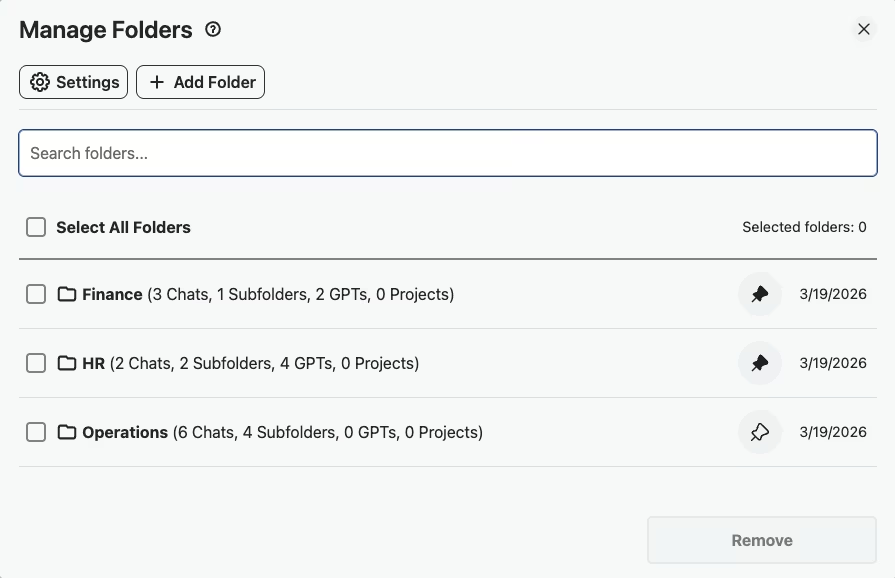
- Step 1: Create Department Folders
Set up folders like “Operations,” “HR,” “Finance,” and “Strategy” so every ChatGPT conversation is organized by function from the start.
- Step 2: Pin Active Project Conversations
Pin the conversations tied to your current projects to the top of your sidebar so they are always one click away during your workday.
- Step 3: Save SOPs and Recurring Prompts to Your Prompt Library
When you build a prompt that reliably produces good meeting agendas, budget analyses, or status reports, save it to your Prompt Library for reuse across the team.
- Step 4: Search Conversation History Before Starting Similar Tasks
Before drafting a new proposal or analysis, search your conversation history to find how you handled a similar task before,no need to start from scratch.
- Step 5: Export Meeting Prep and Analysis as TXT
Export ChatGPT-generated meeting prep notes, competitive analyses, or project summaries as TXT files to share with colleagues via email or Slack.
Success Story
An operations team of 5 at a logistics company - organized ChatGPT into departments: procurement, shipping, customer service, HR. They pinned active projects and archived completed ones quarterly.
The pin feature kept the 3-4 active projects always visible without scrolling through 200+ past conversations.
What Business Professionals Say About AI Toolbox
“We moved all our team's ChatGPT workflows into organized folders,one per department, subfolders per project. Our operations team alone had 200+ scattered conversations. Now everyone knows exactly where to find SOPs, process docs, and vendor comparison notes. It brought real structure to how we use AI.”
- Karen Matsuda, Operations Director at Crestline Logistics
“I use the search constantly. When a client asks about a proposal we drafted months ago, I pull it up in seconds instead of digging through emails and chat logs. The sync across devices is key too,I start something at the office and pick it up on my laptop at home without missing a beat.”
- David Okonkwo, Business Development Manager at Ridgepoint Consulting
Frequently Asked Questions
How can businesses use ChatGPT more effectively?
The key is organization. Most businesses lose valuable ChatGPT outputs in a chaotic conversation list. With AI Toolbox, organize by client, project, or department. Search past work instantly. Export documentation. Turn ChatGPT from a chat tool into a business productivity system.
Can I organize ChatGPT conversations by client?
Yes! Create a folder for each client with subfolders for different projects or work types. Keep all client-related AI work organized and searchable. Never lose a proposal draft or budget analysis again.
Does AI Toolbox work with ChatGPT Team and Enterprise?
Yes! AI Toolbox works with all ChatGPT plans including Free, Plus, Team, and Enterprise. It enhances the interface regardless of your subscription level.
Can my team sync ChatGPT organization across devices?
With the Pro plan, your folders and organization sync across all devices. Work on your laptop, continue on your desktop, access from your home office-everything stays organized.
Is our business data safe with AI Toolbox?
AI Toolbox only stores folder names and conversation IDs locally. Your actual conversation content stays with OpenAI. We never access, store, or transmit your business conversations or proprietary information.
Organize Your Business ChatGPT Today
Stop losing valuable AI outputs. Build an organized system that scales with your business.