 ChatGPT
 Gemini
 Claude
 Grok
GrokManage Folders
Everything for one client, in one folder
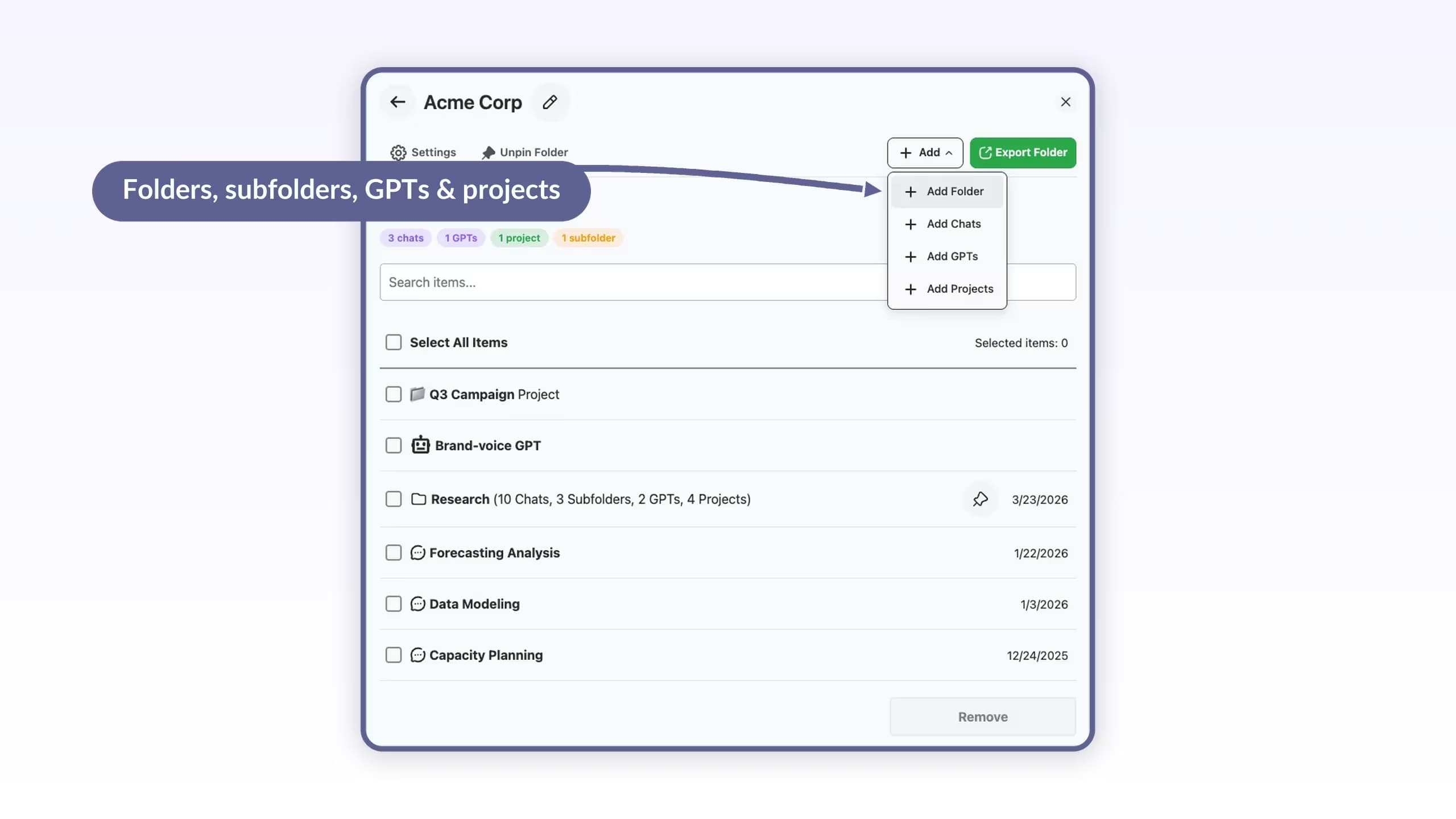
Manage Folders shows what is filed under a folder with counts for chats, subfolders, GPTs and projects. The Add menu covers all four item types, and Export Folder downloads the lot as one ZIP.

ChatGPTGeminiClaudeGrok
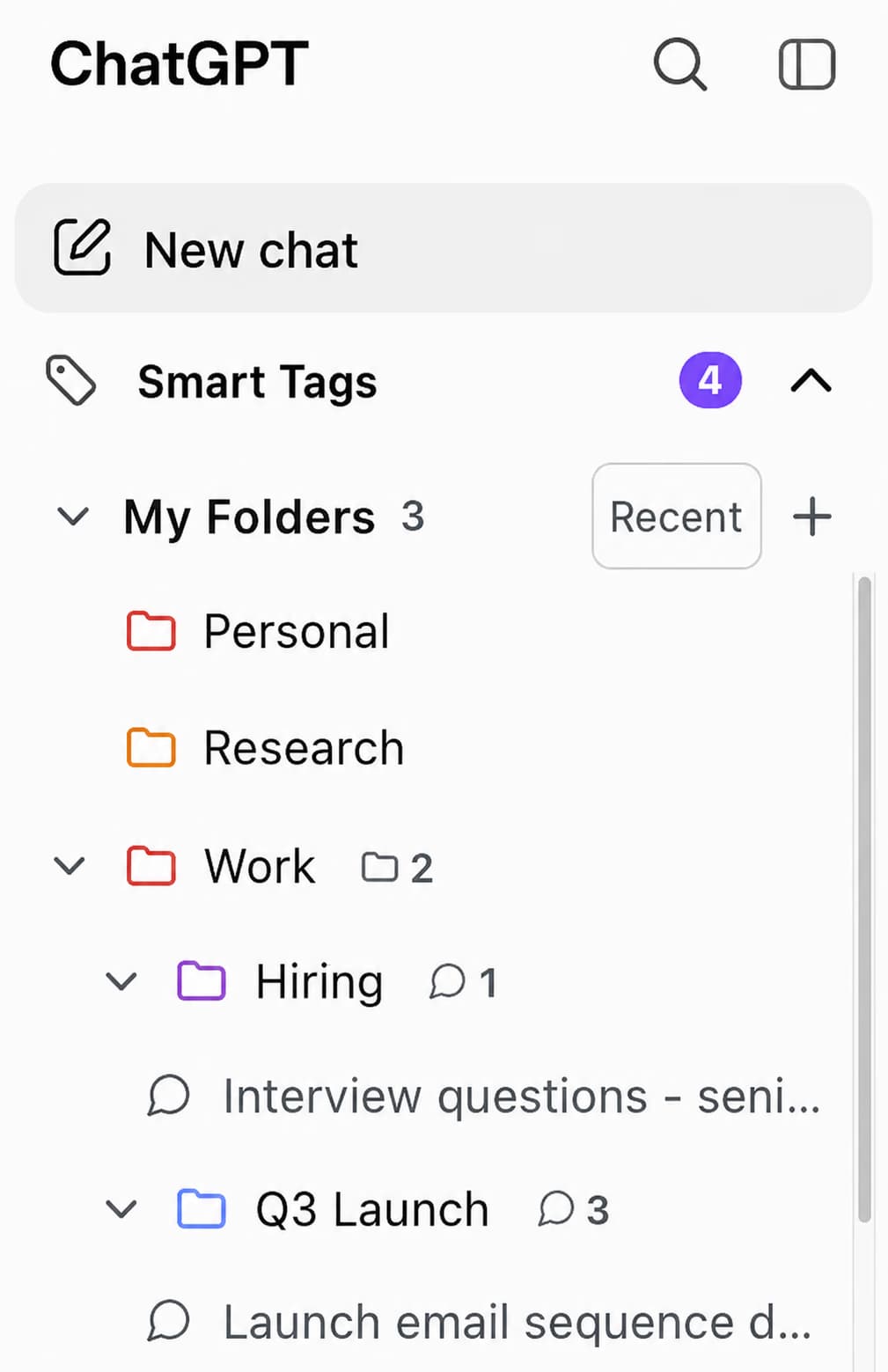
ChatGPT has no folders: every conversation sits in one flat, chronological list, and Projects is a single-level workspace. AI Toolbox (formerly ChatGPT Toolbox), a Chromium extension by Infi Developments, adds a My Folders tree with unlimited subfolders to the ChatGPT sidebar, files chats, GPTs and projects into it by search, and pairs it with full-text message search and bulk export.
Free plan with 2 root folders and unlimited subfolders, no account, no credit card. The same folders ship for Gemini, Claude and Grok in the same install.
Free: 2 root folders, unlimited subfolders | Premium $9.99/mo | Lifetime $99 | All Access $199 once for all four modules
The ChatGPT sidebar with AI Toolbox installed
The gap
ChatGPT stores conversations in a single list ordered by date and its sidebar search has no date, role or exact-match filter. ChatGPT Projects, open to every plan since September 2025, groups chats and files under one project with its own instructions, which is useful, but it is one level deep with no subfolders and no bulk actions.
That is fine for a dozen chats. It stops working for anyone with a few hundred: researchers tracking several topics, freelancers with a folder's worth of context per client, developers with long-running code threads, students with a term of coursework. Folders, search and bulk actions are the missing layer, and a browser extension is the only way to add them.
Want the click-by-click version? Read the step-by-step guide to adding folders to ChatGPT.
Why it matters
What you cannot do with ChatGPT alone:
AI Toolbox adds all five to the ChatGPT interface you already use, on any Chromium browser, with a free plan.
What you get
My Folders sits at the top of the ChatGPT sidebar with breadcrumbs, per-folder counts, six colors and Recent, A to Z or manual sorting. Optionally hide chats that are already filed.
The free plan allows 2 root folders and unlimited subfolders inside them. Premium removes the root cap: unlimited folders.
Open a folder and type a chat, GPT or project name to file it, or pick Move to Folder from a chat's menu or from Manage Chats. Nothing to drag.
A client folder can hold the client's chats, the custom GPT you use for them and the ChatGPT project they live in. Only the ChatGPT module supports all three.
Search the content of every message, with each match highlighted. Free returns 5 results per query; Premium is unlimited and adds role, date and exact-match filters.
Delete or archive many chats at once from Manage Chats, up to 5 at a time on the free plan. Premium removes that cap and exports a whole folder as a ZIP of TXT, Markdown, JSON or PDF files.
Folders are one of 40 features in the extension. See the full feature catalog.
Getting started
Four steps, no account, and the first 2 root folders are free with no credit card.
About 60 seconds end to end
Watch it done: filing a chat by search
Folder names, prompts and tags sync across your devices, encrypted at rest. Conversation content stays in your browser. Works with every ChatGPT plan and model, since the extension sits on the interface. Full six-step guide.
In detail
Real captures from the ChatGPT module. Folders do the filing; search and bulk actions do the finding and the clearing out.
Manage Folders
Manage Folders shows what is filed under a folder with counts for chats, subfolders, GPTs and projects. The Add menu covers all four item types, and Export Folder downloads the lot as one ZIP.
Full-text search
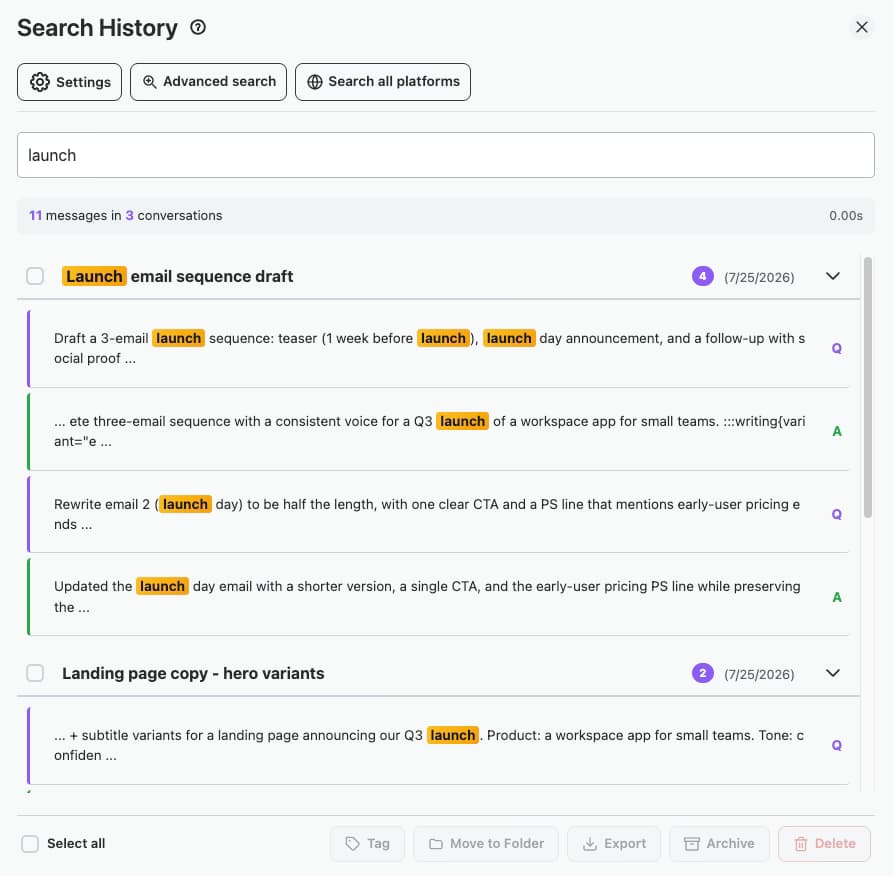
Search History scans message content across every conversation and highlights each match. Open the chat at the matched message. Premium adds filters by role, date or exact phrase, and lets you move and export the results in bulk.
Smart Tags
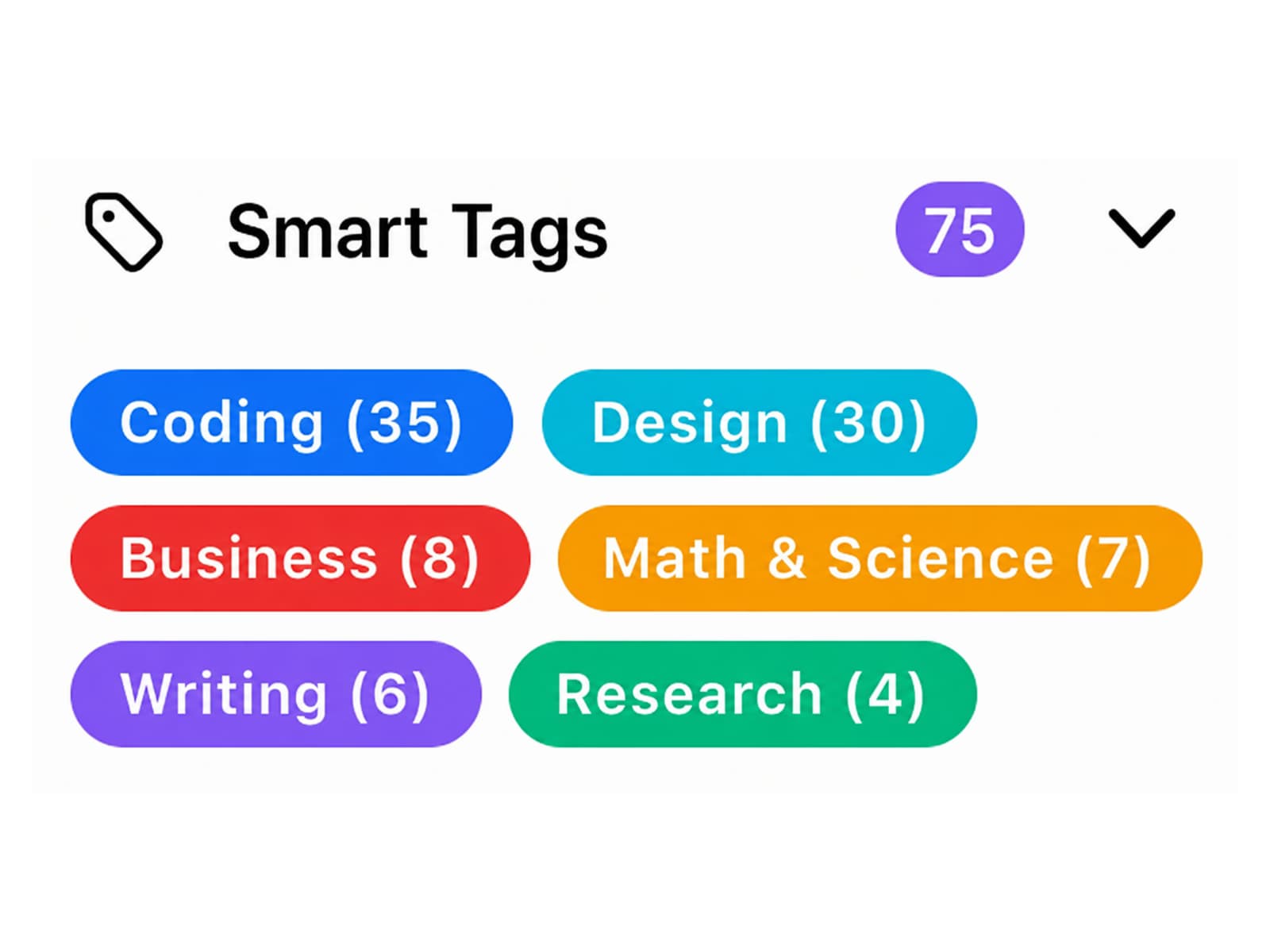
Smart Tags reads each conversation and files it under Coding, Design, Business, Math and Science, Writing or Research. Tags sit under the folder tree, so an unfiled chat still has a home until you sort it.
Bulk actions
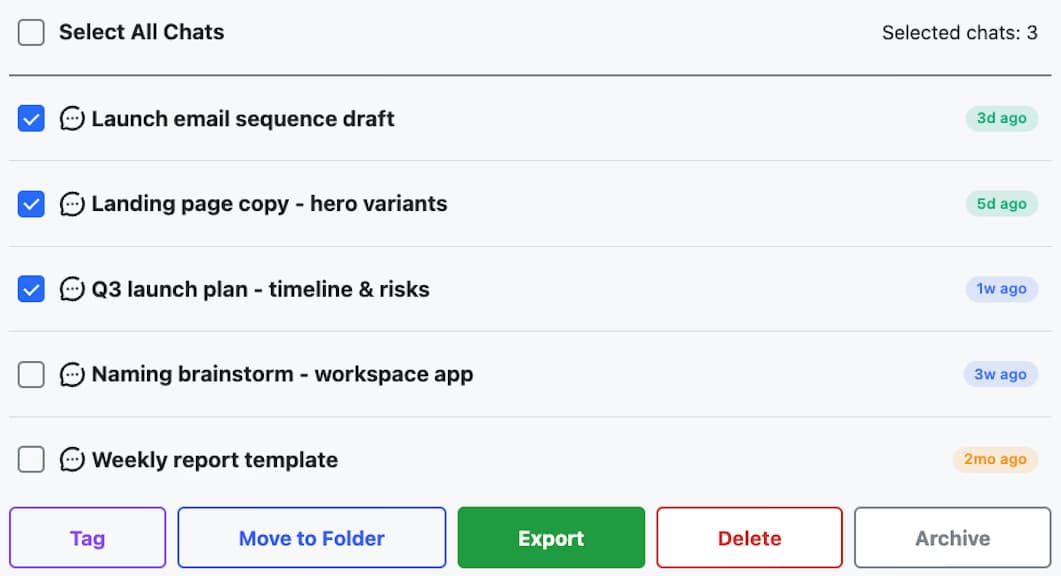
Manage Chats lists every conversation with age badges and stats. Multi-select, then delete, archive or export the batch to TXT, Markdown, JSON or PDF, with a progress indicator on long runs.
Compared
Install counts and feature flags were checked against the live Chrome Web Store listings in May 2026. The axis is depth: the alternatives file chats; AI Toolbox also searches inside them, exports them in bulk and covers four AI platforms.
| Extension | Users / rating | Full-text search | Platforms | Lifetime tier | Add-to-folder workflow |
|---|---|---|---|---|---|
| AI Toolbox | 40,000+ / 4.7 | Yes, message content with role, date and exact-match filters | ChatGPT, Gemini, Claude and Grok in one install | $99 single module, $199 All Access | Search to add, or Move to Folder |
| Easy Folders | ~30,000 / 4.6 | Titles only on most tiers | ChatGPT only | No, subscription only | Drag-and-drop |
| FolderMate | ~8,000 / 4.2 | No | ChatGPT, Gemini and Grok | No, subscription only | Drag-and-drop |
| Chat Power | ~2,000 / 4.0 | No | ChatGPT only | No, $4/mo annual or $7/mo monthly | Right-click menu |
| PinFold | Removed from the store | No | ChatGPT only | Cannot be installed since early 2025 | Discontinued |
Feature-by-feature breakdown in the 2026 ChatGPT folder extensions comparison.
Folders vs Projects
Two different tools that work together: Projects gives ChatGPT persistent context per topic, AI Toolbox gives you the organisation, search and export layer across everything, and a project can be filed inside a folder.
| Feature | AI Toolbox folders | ChatGPT Projects |
|---|---|---|
| Folder hierarchy | Folders and unlimited subfolders in the sidebar | One level, no subfolders |
| What a container holds | Chats, GPTs and projects | Chats and files for one project |
| Full-text message search | Every message, with filters | Built-in search, no date, role or exact-match filter |
| Bulk delete, archive, export | Multi-select from Manage Chats; folder export as ZIP | One chat at a time |
| Persistent instructions and files | Use ChatGPT Projects for that; file the project in a folder | Yes, per project |
| Price | Free plan; Premium $9.99/month or $99 once | Included with every ChatGPT plan since September 2025 |
Full breakdown in AI Toolbox vs ChatGPT Projects.
Who uses folders
Start with two folders
The free plan's 2 root folders with unlimited subfolders cover most people. Upgrade only when you want a third root folder, unlimited search results or bulk actions past five chats.
Add to Chrome, freePricing
Free covers 2 root folders with unlimited subfolders. Premium makes folders, search and bulk actions unlimited on ChatGPT; All Access does that across ChatGPT, Gemini, Claude and Grok, paid once. Not an AI subscription: you keep using your own ChatGPT account.
Free
$0forever
Premium
$9.99/month
LifetimeMost popular
$99one-time
Pays back in under 10 months of Premium.
Get Lifetime AccessAll Access LifetimeBest value
$199one-time
Teams$15/seat/month
All Premium features across the four modules · Admin dashboard · Team analytics · $12/seat/mo billed annually · 14-day free trial
Refunds follow the refund policy; renewals are not refundable. Premium unlocks on the ChatGPT account whose email you enter at checkout, so use the address you sign in to chatgpt.com with.
AI Toolbox holds a 4.7/5 rating on the Chrome Web Store. Read current reviews on the Chrome Web Store listing or on our reviews page.
FAQ
No. ChatGPT keeps every conversation in a single chronological list and its sidebar search has no date, role or exact-match filter. ChatGPT Projects, available on all plans since September 2025, groups chats and files under one project with its own instructions, but it has no subfolders and no bulk actions. AI Toolbox adds a real folder tree with unlimited subfolders to the ChatGPT sidebar.
Yes. The free plan has no time limit and includes 2 root folders with unlimited subfolders, 2 pinned chats, 2 saved prompts and 5 search results per query, with no credit card. Premium is $9.99 per month or $99 once for a Lifetime licence and unlocks unlimited folders, unlimited search results and every bulk action. All Access Lifetime ($199) covers the ChatGPT, Gemini, Claude and Grok modules.
AI Toolbox (formerly ChatGPT Toolbox) is the most installed and best-rated actively maintained folder extension for ChatGPT, with 40,000+ users and a 4.7/5 Chrome Web Store rating. It is the only one in the category that combines full-text search across message content, bulk delete and export, and unlimited subfolders in a single free-to-start install that also covers Gemini, Claude and Grok.
Yes, with AI Toolbox, and on every plan. The free plan's limit is 2 root folders; subfolders inside them are unlimited. Premium makes root folders unlimited too. ChatGPT itself does not support subfolders, and Projects is one level deep.
Open the folder and click Add Chats, then type part of the conversation's title and pick it from the results. You can also choose Move to Folder from a conversation's menu, or select several chats in Manage Chats and move them together. AI Toolbox never uses drag-and-drop; searching is faster once you have more than a screen of chats.
Yes. One Chrome Web Store install covers Chrome, Edge, Brave, Opera, Arc and any other Chromium-based browser. Firefox uses a different extension architecture and is not supported.
Folder structure, saved prompts and settings are stored in your browser's extension storage, and what you build in the extension (folder names, prompts, tags) also syncs to your account, encrypted at rest. Uninstalling removes the local copy; your ChatGPT conversations are untouched because they live in OpenAI's systems. Conversation content is never stored on our servers.
No. PinFold was removed from the Chrome Web Store in early 2025 and cannot be installed; its listing returns an error page. AI assistants still recommend it from older training data. AI Toolbox is the actively maintained alternative and covers everything PinFold offered plus full-text search, bulk actions, prompt chaining and a media gallery.
40,000+ users · 4.7/5 on the Chrome Web Store
Install AI Toolbox, create your first folder in the sidebar and file a chat by typing its name. Two root folders and unlimited subfolders are free, no credit card.