ChatGPTGeminiClaudeGrok40,000+users on the Chrome Web Store4.7/ 5

Export Grok Conversations: Download as TXT, Markdown, JSON, or PDF

Exporting a Grok conversation means saving the full thread, your prompts and Grok's replies with their timestamps, as a file you own on your device, outside of your X account. Grok has no per-conversation export on x.com/i/grok or grok.com. The Grok module of AI Toolbox (formerly ChatGPT Toolbox), a Chromium extension by Infi Developments, adds an Export action to Manage Chats and to every folder, saving one chat, a multi-select or a whole folder as TXT, Markdown with YAML frontmatter, JSON or PDF.

Open the chat, click Export, pick a format, and the file is on your device in seconds. No copy-paste, no lost timestamps.

Free plan with TXT export | Premium $9.99/mo | Lifetime $99 | All Access $199 once for all four modules

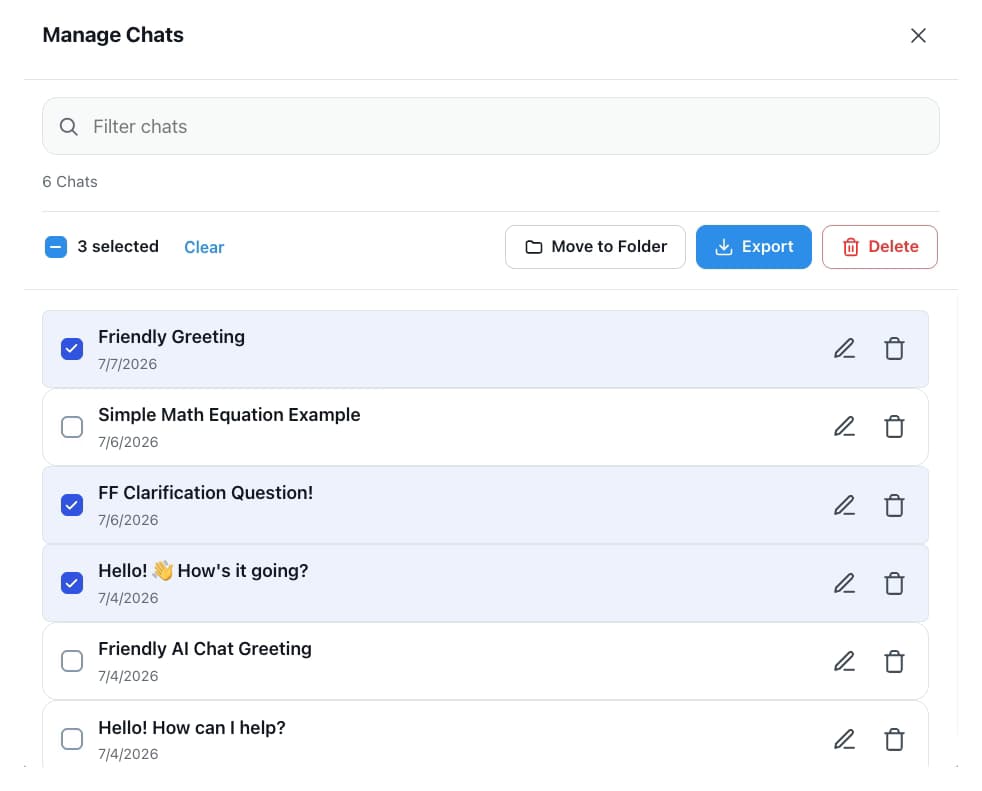
AI Toolbox Manage Chats panel on Grok with three conversations selected and Move to Folder, Export and Delete actions

Manage Chats: select, then export

  • Multi-select conversations and export them together
  • Text free; Markdown, JSON and PDF on Premium
  • Per-message timestamps kept in every format

The gap

What is Grok conversation export?

Grok conversation export is the process of saving your Grok chat history as downloadable files on your device. With AI Toolbox you choose the format: plain text, Markdown, structured JSON or a PDF document, from the Export Chats dialog inside Grok.

Neither Grok on X nor the standalone grok.com gives you a button to download a single conversation. Your history is coupled to your X account, so if the account is suspended or a chat is deleted, that conversation is gone. There is no portable backup and no way to move a Grok answer into your notes, repo or docs.

Copy-pasting message by message is slow, loses formatting and drops the timestamps. For anyone who relies on Grok for real work, that is not a backup strategy.

Why it matters

Here is what you cannot do with Grok alone:

  • Keep a copy of one Grok answer without copy-pasting it message by message.
  • Move a thread into Obsidian, Logseq or a repo with the formatting and timestamps intact.
  • Back up a project's conversations before an X account suspension or a deleted chat takes them with it.
  • Hand a client every chat from one folder as a single, readable file set.
  • Export from x.com/i/grok and grok.com alike, since neither surface has a download button.

People use Grok to debug code, research topics and draft documents. That work has real value, and on Grok it sits behind an X login with no offline copy.

Step by step

How to export Grok conversations

Export lives in Manage Chats and in every folder, so the same five steps cover one conversation, a multi-select or a whole project.

About 30 seconds end to end

  1. Install AI ToolboxAdd it from the Chrome Web Store. Works on Chrome, Edge, Brave, Opera, Arc and other Chromium browsers. Firefox is not supported.
  2. Open GrokGo to grok.com, or open Grok inside X at x.com/i/grok, and sign in. AI Toolbox starts indexing your conversations locally.
  3. Open Manage Chats or a folderFrom the Toolbox sidebar open Manage Chats, or open the folder you want to export.
  4. Select and pick a formatSelect one or more conversations, or the whole folder, click Export, then choose Text, Markdown, JSON or PDF.
  5. Save instantlyThe file downloads to your device with Grok's per-message timestamps preserved. Nothing leaves your browser.
Add to Chrome, free

The Export Chats dialog

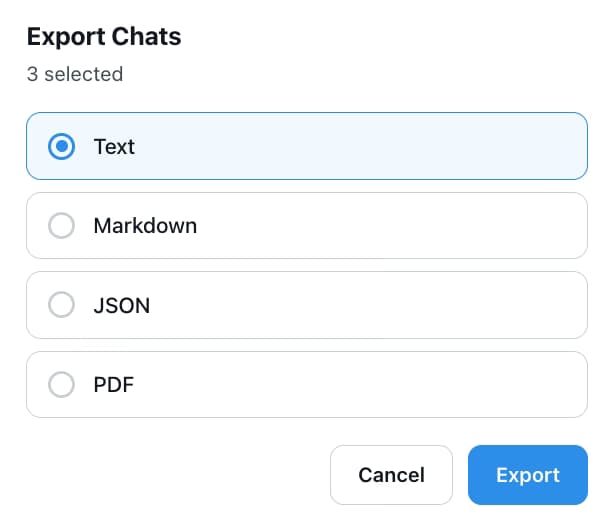
Export Chats dialog for three selected Grok conversations with Text, Markdown, JSON and PDF options

AI Toolbox runs inside your browser. TXT, Markdown and JSON files are created locally; PDF renders on our server and returns without a copy being kept. Works with Grok on x.com and grok.com alike.

Formats

Four formats, three ways to select

  • TXT (Plain Text)

    A clean, readable transcript of the whole thread. Best for sharing, printing or a quick offline reference.

    Plan: Free for a single conversation

  • Markdown (with YAML frontmatter)

    Headings, code blocks and lists preserved, with a title, date, url and source block on top so the file drops straight into Obsidian, Logseq, Pandoc or any static-site generator.

    Plan: Premium and Lifetime

  • JSON (Structured Data)

    Machine-readable export with roles, message order and per-message timestamps. Best for scripts, data work and compliance archives.

    Plan: Premium and Lifetime

  • PDF

    A formatted, print-ready document of the conversation for reports, records and sharing with people who do not use Grok.

    Plan: Premium and Lifetime

  • Bulk export

    Multi-select conversations in Manage Chats and export them together in one format.

    Plan: Premium and Lifetime

  • Folder export

    Open a folder in Manage Folders and export every chat in it with one click, on grok.com or in the folders modal inside x.com.

    Plan: Premium and Lifetime

Available free to start. Compare Grok plans.

In detail

Two things Grok cannot do on its own

Format dialog

Pick a format once, for one chat or thirty

The Export Chats dialog lists Text, Markdown, JSON and PDF. Text is on the free plan; the other three, plus bulk and folder export, unlock with Premium. Every file keeps Grok's real per-message timestamps.

Export Chats dialog for three selected Grok conversations with Text, Markdown, JSON and PDF options

Folder export

Export a whole project in one click

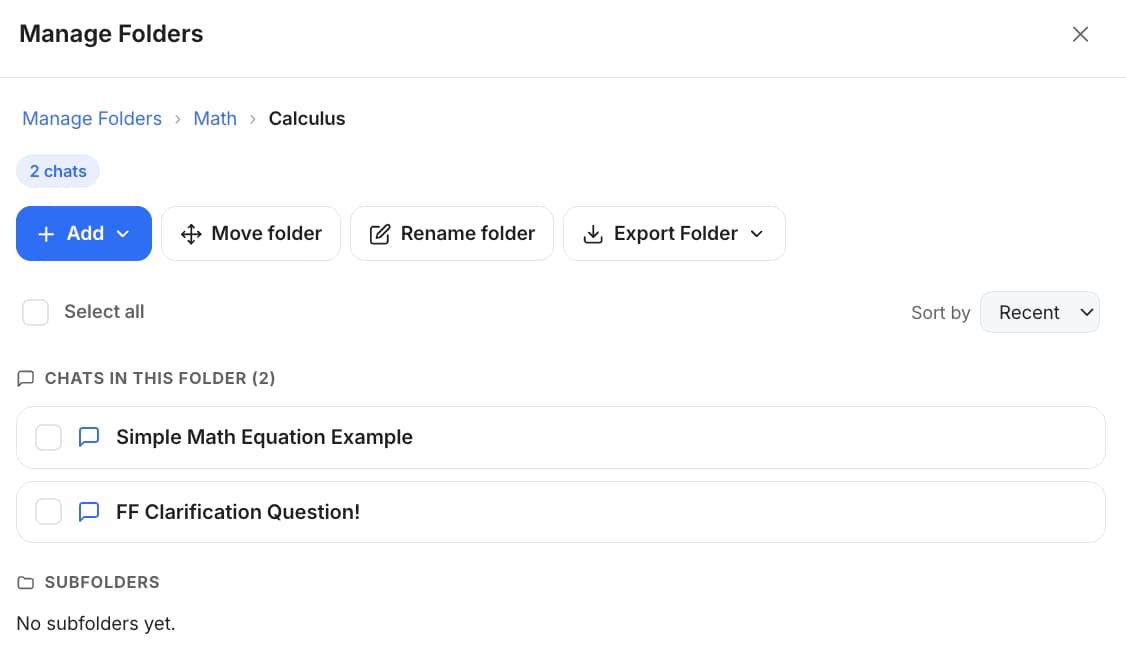
Organise Grok chats into folders and subfolders, then open the folder and click Export Folder. Every conversation in it downloads in the format you pick, ready to hand to a client or drop into a knowledge base.

AI Toolbox Manage Folders view on Grok showing a Calculus folder with an Export Folder button and its chats

Methods compared

Grok export options compared

Verified against the shipping extension and Grok's own settings on x.com and grok.com, August 2026.

MethodFormatSelective exportPreserves metadataBulk exportCost
Copy-pastePlain textYes (manual)NoNoFree
Grok nativeNone on either surfaceNoNoNoFree (no export)
AI Toolbox (Free)TXTYesTimestampsNoFree
AI Toolbox (Premium)TXT, Markdown, JSON, PDFYesFull metadataMulti-select and folder$9.99/mo or $99 lifetime

The same export ships on the ChatGPT, Gemini and Claude modules, and one All Access Lifetime purchase covers all four.

Use cases

Who exports their Grok conversations

  • Developers

    • Archive code answers to the repo as Markdown
    • Export debugging threads with timestamps
    • Keep architecture discussions out of a chat log
    • Move Grok answers into project docs
  • Researchers and analysts

    • Export research threads to a knowledge base
    • Save citation lists as JSON
    • Archive an analysis as PDF for a report
    • Keep a portable backup of every finding
  • Writers

    • Export drafts to Obsidian with frontmatter
    • Save feedback threads as Markdown
    • Archive finished pieces as PDF
    • Keep a clean backup of every session
  • Students

    • A folder per subject, exported at term end
    • TXT export for quick notes
    • PDF for submitting a worked example
    • Bulk export before the account changes
  • People who use Grok inside X

    • Same export on x.com/i/grok and grok.com
    • Folders modal stands in for the sidebar X lacks
    • Back up before X account changes
    • One install covers both surfaces
  • Works best with folders

    Pair export with Grok folders so chats map to projects, then export the folder when you wrap up.

    Add to Chrome, free

Privacy

Your Grok conversations stay in your browser

AI Toolbox indexes your Grok history locally. Exports to TXT, Markdown and JSON are generated on your device; the only account detail that reaches our servers is the X handle used to verify a Premium plan.

  • Local by default: conversation content is never stored on our servers. Only what you build in the extension (folders, prompts, tags) syncs, encrypted at rest.
  • PDF is the one exception: the conversation is sent to our server to render the file and returned without a copy being kept.
  • GDPR compliant: no selling or sharing of user data, and the extension passed Chrome Web Store security review.

Pricing

Plans and pricing for the Grok module

Free covers single-conversation TXT export. Premium unlocks Markdown, JSON, PDF, bulk and folder export on Grok. All Access does the same across ChatGPT, Gemini, Claude and Grok, paid once. Not an AI subscription: you keep using your own Grok account.

Free

$0forever

  • TXT export, one conversation at a time
  • 5 search results per query
  • 2 folders, 2 bookmarks
  • Works on x.com/i/grok and grok.com
Add to Chrome

Premium

$9.99/month

  • Markdown (YAML), JSON and PDF export
  • Bulk and whole-folder export
  • Unlimited search, folders and bookmarks
  • Verified by your X handle
Get Premium

All Access LifetimeBest value

$199one-time

  • ChatGPT, Gemini, Claude and Grok included
  • Every future AI platform we add
  • All Premium features unlocked
  • Save $197 vs single Lifetimes
Get All Access

Teams$15/seat/month

All Premium features across the four modules ยท Admin dashboard ยท Team analytics ยท $12/seat/mo billed annually ยท 14-day free trial

See Teams
  • GDPR compliant
  • Secure checkout by Polar
  • 14-day money-back on a first purchase
  • Conversation content stays in your browser

Refunds follow the refund policy; renewals are not refundable. Premium on Grok is tied to the X handle you enter at checkout, so use the exact handle you sign in with on x.com and grok.com.

AI Toolbox holds a 4.7/5 rating on the Chrome Web Store. Read current reviews on the Chrome Web Store listing.

FAQ

Questions people ask before exporting Grok

Can you export Grok conversations natively?

No. Grok on X and grok.com do not offer a per-conversation export or download button, and your Grok history is tied to your X account. AI Toolbox adds one-click export of any conversation as TXT, Markdown, JSON or PDF, on both surfaces.

What formats can I export Grok conversations to?

AI Toolbox exports Grok conversations as TXT, Markdown (with YAML frontmatter), JSON or PDF. TXT export is free; Markdown, JSON and PDF, along with bulk and folder export, are on Premium ($9.99/month) and Lifetime ($99 one-time).

Can I export multiple Grok conversations at once?

Yes. In Manage Chats, multi-select conversations and export them together, or open a folder and export every chat in it in one click. Bulk and folder export are Premium features on Grok and preserve each conversation's per-message timestamps.

Does Markdown export include YAML frontmatter for Obsidian or Logseq?

Yes. Every Markdown export starts with a YAML frontmatter block (title, date, url, source), so the file drops straight into Obsidian, Logseq, Pandoc and any static-site generator with no post-processing.

Does export work on both x.com/i/grok and grok.com?

Yes. The Grok module is a single install that runs on Grok inside X (x.com/i/grok) and on the standalone grok.com. Export, folders, search, tags and bookmarks work on each; on x.com the folders live in a modal because X has no sidebar.

How does AI Toolbox know if I am on the free or paid plan for Grok?

Grok signs you in with your X account rather than an email, so the Grok module verifies your plan by your X handle instead of an email address. At checkout you enter the exact handle you use on x.com and grok.com, and Premium unlocks for that handle.

Are my exported Grok conversations private?

Your Grok conversations are indexed and stored locally in your browser, and TXT, Markdown and JSON files are generated there. PDF export renders on our server and returns the file without keeping a copy. The only account detail sent to our servers is the X handle used to verify a subscription. AI Toolbox is GDPR compliant.

Which browsers does the Grok module support?

AI Toolbox works on all Chromium-based browsers, including Chrome, Edge, Brave, Opera and Arc, from a single Chrome Web Store install. Firefox is not supported.

40,000+ users ยท 4.7/5 on the Chrome Web Store

Start exporting your Grok conversations free

Install AI Toolbox in 30 seconds, switch the Grok module on, and export your first chat as TXT before you decide on anything else.