ChatGPTGeminiClaudeGrok40,000+users on the Chrome Web Store4.7/ 5

Search Claude Conversations: Every Message, Not Just Titles

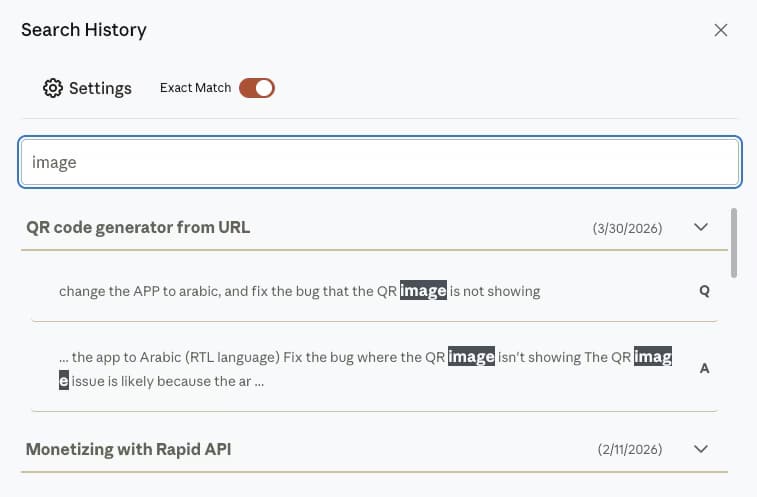
Claude's own sidebar search matches conversation titles. The Claude module of AI Toolbox (formerly ChatGPT Toolbox), a Chromium extension by Infi Developments, indexes every message of every conversation in your browser and searches the text itself: open Search History, type a phrase, and each result shows the sentence that matched, highlighted, with a Q or A label and a link into the chat.

Free with 5 results per query. Premium adds the Exact Match toggle, a date range, include and exclude chips, unlimited results and bulk actions on what you find.

Free plan, 5 results per query | Premium $9.99/mo | Lifetime $99 | All Access $199 once for all four modules

AI Toolbox Search History on claude.ai: the query image highlighted inside two messages of a QR code generator conversation, each line labelled Q or A with the conversation date

AI Toolbox Search History on claude.ai

  • โ€œimageโ€ found inside the messages of a build thread, not just its title
  • The matching sentence highlighted under each conversation, with a Q or A label and the date
  • Click any line to open the conversation; searching is free at 5 results per query, the Exact Match toggle shown is Premium

The gap

What Claude's own search does, and does not

Claude has a search box in its sidebar. It lists conversations whose title matches. It does not look inside messages, show the matching passage, or offer a single filter.

That works for a chat you named well. On paid Claude plans you can also ask Claude to recall past chats conversationally, which helps mid-conversation but is not a keyword box. It fails for the way most people use Claude: an error it fixed in March, the prompt that produced an artifact, a phrasing you liked in a draft. Those live inside replies, and the only native way to find them is to open chats one by one and use the browser's Ctrl+F.

AI Toolbox adds a full-text Search History panel to claude.ai. The index is built in your browser from your own history, so nothing is uploaded and results come back in a few hundredths of a second.

Why it matters

Here is what you cannot do with Claude alone:

  • Search inside messages with a keyword box: Claude's sidebar search matches conversation titles, so a function name or a figure buried in a reply stays hidden.
  • See the matching passage: native results show a title, never the sentence that matched or how many times it appears.
  • Pin down an exact phrase: there is no exact-match control, so a sentence you know Claude wrote cannot be isolated from near matches.
  • Act on results: you cannot select several matches and move, export or delete them together.
  • Search ChatGPT, Gemini and Grok at the same time: each AI's history is a separate silo.

The more you use Claude, the more of your work sits in old replies. Search is what turns that history from a scrollable list into something you can query.

Step by step

How to search your Claude conversations

Six steps from install to a filtered result. The first five are on the free plan; the sixth is where Premium starts.

About a minute, including the first index

  1. Install AI ToolboxAdd it from the Chrome Web Store, open the popup, switch the Claude module on and approve the one-time permission for claude.ai. Works on Chrome, Edge, Brave, Opera, Arc and other Chromium browsers; Firefox is not supported.
  2. Open ClaudeGo to claude.ai and sign in. AI Toolbox indexes your conversations into a local database in the background; the first pass on a large history takes a minute or two.
  3. Open Search HistoryClick the floating AI Toolbox button on claude.ai and choose Search History. There is no default keyboard shortcut on Claude; you can assign one to the extension's Open chat history search command at chrome://extensions/shortcuts.
  4. Type a word or phraseResults list every conversation that contains it, with the matching sentence highlighted, a Q or A label so you can tell your prompts from Claude's replies, and the conversation date.
  5. Open the matchClick a highlighted line to open that conversation. Expand a result to see every matching message in it.
  6. Switch on Advanced for filtersPremium adds the Exact Match toggle, Must include and Exclude chips with All or Any matching, a custom from-to date range, and Titles only.
Add to Chrome, free

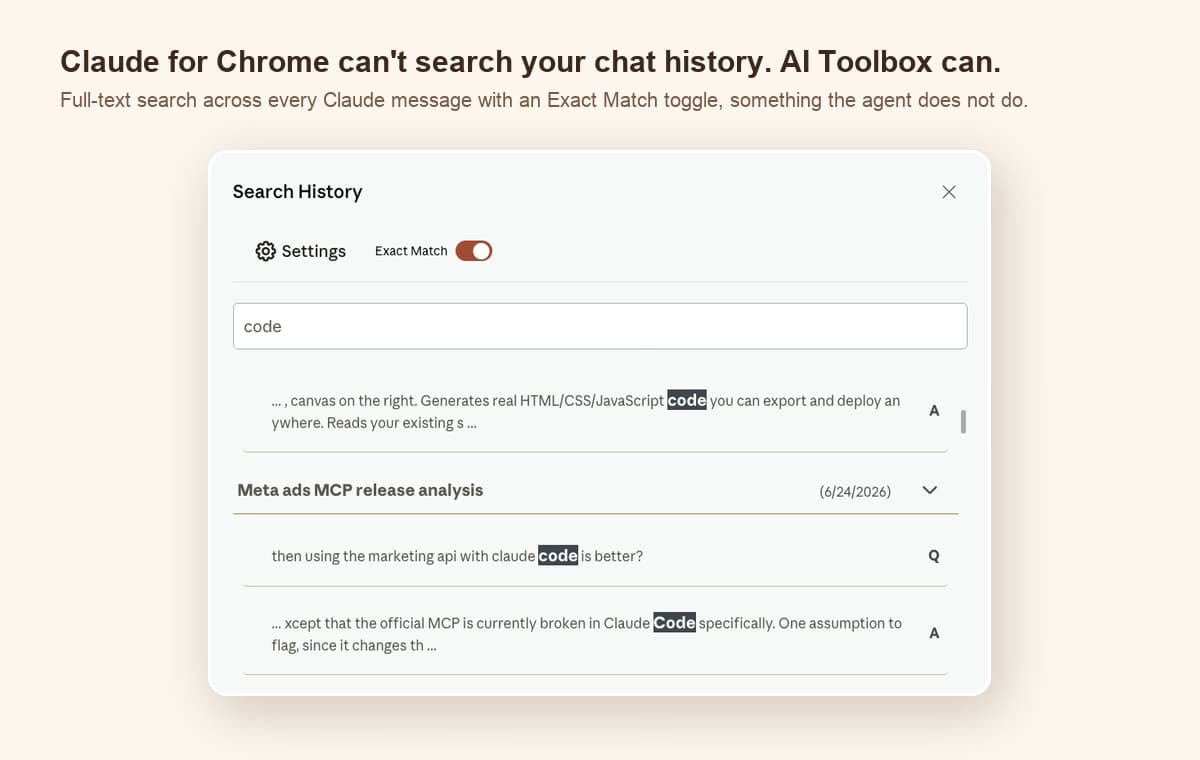
Exact Match on: the phrase, not every partial hit

AI Toolbox Search History on Claude with Exact Match on and the query code highlighted inside messages of a Meta ads MCP analysis conversation, each result labelled Q or A

Search History with Exact Match on: the query matched inside the messages of an analysis thread, each result labelled Q or A. Exact Match, the include and exclude chips and the date range are Premium; a plain query on the free plan searches everything with no filter applied.

What search can do

Nine things, with the plan stated on each

Every item below is in the shipping Claude module. Free covers the search itself; Premium covers filtering and acting on results.

  • Full-text search

    Every message in every synced conversation is indexed locally, so a query matches the body of a reply, not only the chat title.

    Plan: Free, 5 results per query

  • Highlighted snippets with Q and A labels

    Each result shows the matching sentence with the term highlighted, a Q or A label for who said it, and the conversation date.

    Plan: Free

  • One click from any Claude tab

    Search History opens from the floating AI Toolbox menu on claude.ai, and you can bind your own keyboard shortcut to it at chrome://extensions/shortcuts.

    Plan: Free

  • Exact match and date range

    Match the exact phrase instead of every partial hit, and limit results to a custom from-to date range covering the week you actually did the work.

    Plan: Premium and Lifetime

  • Must include, Exclude, Titles only

    Guided chips instead of query syntax: require every term or any of them, exclude words, or restrict matching to conversation titles.

    Plan: Premium and Lifetime

  • Bulk actions on results

    Select the conversations a search found and move them to a folder on any plan; exporting them as TXT, Markdown, JSON or PDF, or deleting them in one pass, is Premium.

    Plan: Folder moves free; export and delete Premium

  • Findings export

    Export only the passages that matched, as Markdown or TXT, so a research question becomes a clean set of quotes with links back to each chat.

    Plan: Premium and Lifetime

  • Search all platforms

    One query across ChatGPT, Claude, Gemini and Grok, results grouped by platform, opened with Cmd/Ctrl+Shift+. from any tab. Opt-in, on-device index.

    Plan: Premium and Lifetime

  • Unlimited results

    The free plan shows the first 5 results of every query. Premium removes the cap and loads results as you scroll.

    Plan: Premium and Lifetime

Search ships free on every module. Compare Claude plans.

In detail

What you do with a match, on Claude and across every AI

Bulk export

From a match to a file on your machine

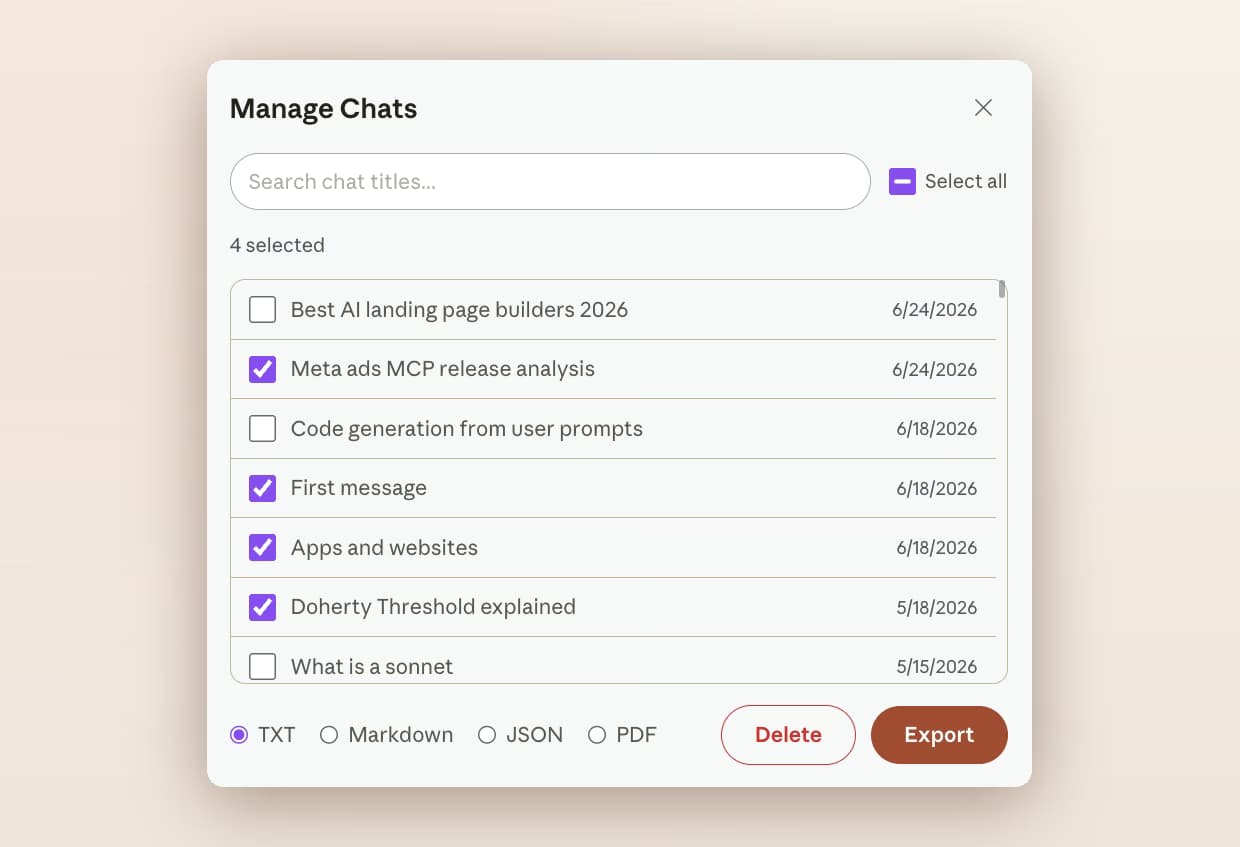
Once search has found the right conversations, Manage Chats exports them together as TXT, Markdown, JSON or PDF, or deletes them in one pass. Claude's only native export is an account-wide archive from Settings that is queued, emailed to you, and expires 24 hours after it lands.

AI Toolbox Manage Chats on Claude with four conversations selected and TXT, Markdown, JSON and PDF format options above the Delete and Export buttons

Search all platforms

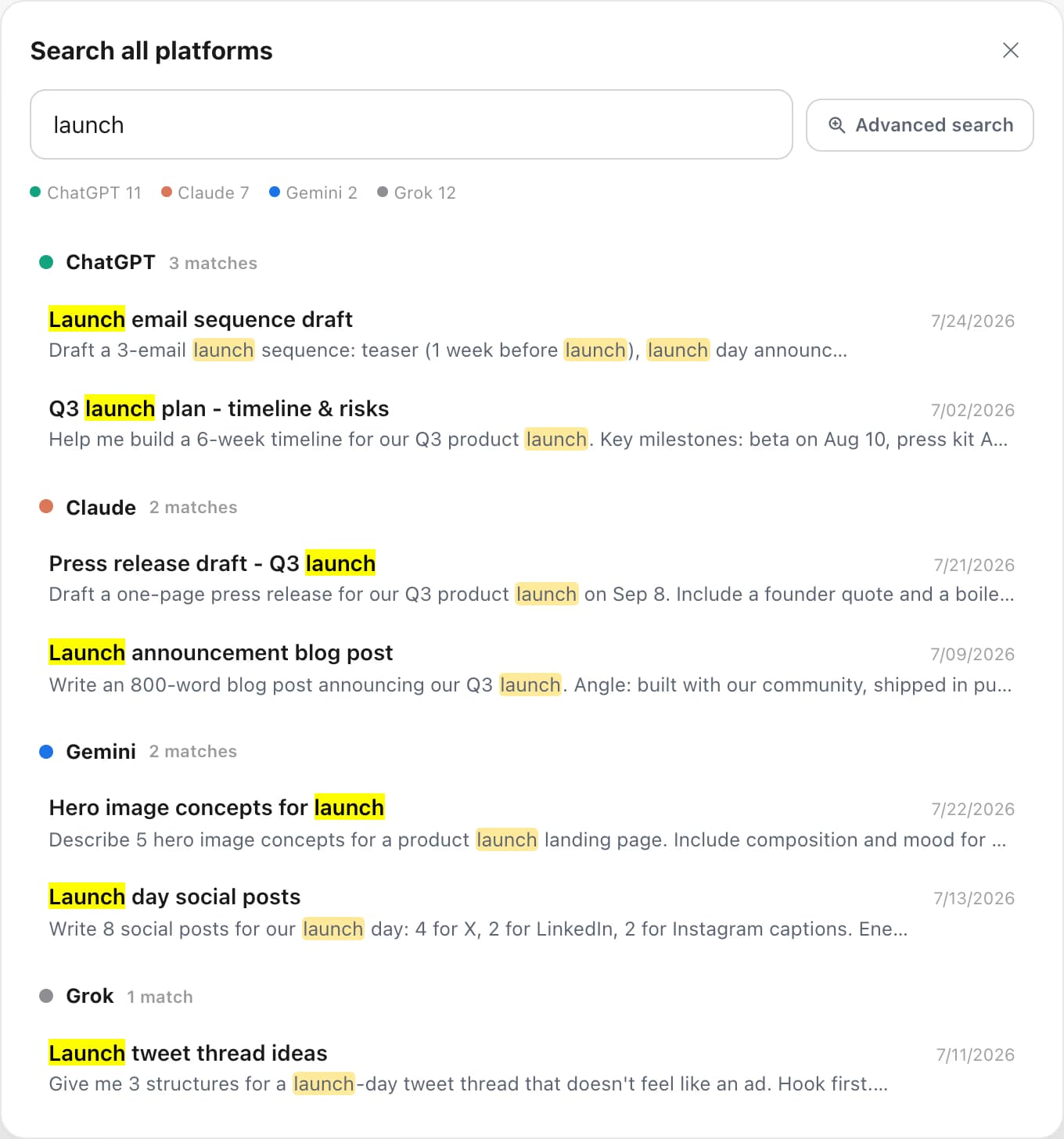
One query across Claude, ChatGPT, Gemini and Grok

With All Access, Search all platforms runs the same query over every AI you use and groups the results by platform with deep links. The unified index is built on your device, is off until you switch it on, and is purged when you switch it off.

Search all platforms results grouped by ChatGPT, Claude, Gemini and Grok

Findings export

Export the passages that matched, not whole chats

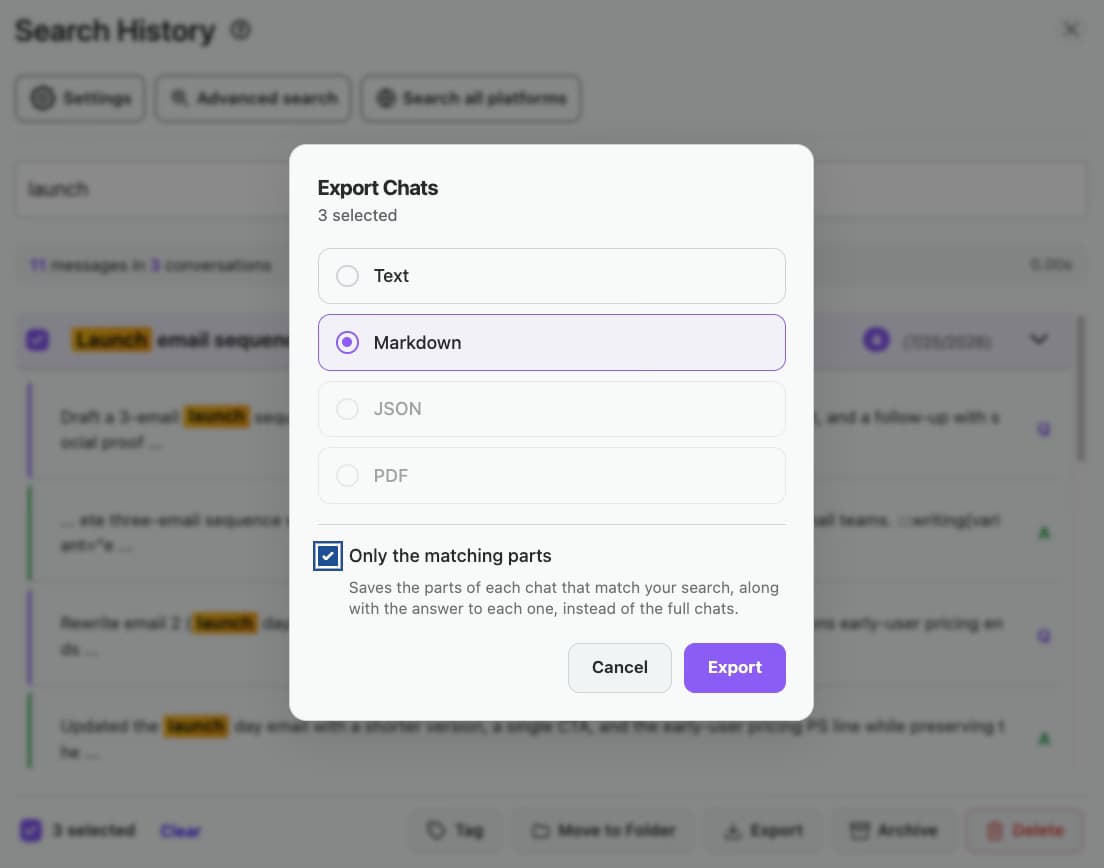
After a search, tick Only the matching parts and export as Markdown or TXT. You get the quotes that answered the question, each with a link back to its Claude conversation, ready for a note or a report.

Export Chats dialog over search results with the Only the matching parts option checked

Methods compared

Ways to find something in your Claude history

Verified against the shipping extension and claude.ai, August 2026.

MethodScopeFiltersWhat you getCost
Claude sidebar searchConversation titlesNoneTitles to click throughFree
Browser Ctrl+FThe one chat that is openNoneHighlights on the pageFree
Claude data export (Settings)Whole account, emailed as an archiveNoneData files to grep yourself; link expires in 24 hoursFree
AI Toolbox (Free)Every message in every conversationNoneHighlighted snippets with Q/A labels, 5 per queryFree
AI Toolbox (Premium)Every message, plus ChatGPT, Gemini and GrokExact match, date range, include/exclude, titles onlyUnlimited, with bulk actions and findings export$9.99/mo or $99 lifetime

The same search ships on the ChatGPT, Gemini and Grok modules, and one All Access Lifetime purchase unlocks Advanced search and Search all platforms on all four.

Use cases

Who searches their Claude history

  • Developers

    • Paste an error string and find the chat that fixed it
    • Exact match for a function name or flag
    • A labels take you straight to Claude's code, not your question
    • Bulk export a debugging thread as Markdown for the ticket
  • Researchers and analysts

    • Find the thread that cited a source
    • A from-to date range retraces one study phase
    • Findings export turns matches into a quote list
    • Search all platforms when a topic spans Claude and ChatGPT
  • Writers

    • Find the draft that used a specific phrase
    • Exact match to relocate the wording you liked
    • Q labels rebuild the brief you gave Claude
    • Export the matching passages for a style file
  • Builders and artifact users

    • Find the conversation that produced an artifact
    • Search the prompt that generated a component
    • Exclude chips drop the project you are not working on
    • Move every match into a project folder in one pass
  • Works best with folders

    Pair search with Claude folders and move every match into a project folder in one pass.

    Add to Chrome, free

Privacy

The index lives in your browser

AI Toolbox builds the search index in IndexedDB on your device and every query runs there. Conversation content never reaches our servers; the only account detail that does is the email used to verify a Premium plan.

  • Local by default: the index is rebuilt from claude.ai in the background, message content fetched in small batches so it never slows the page.
  • One account at a time: switching Claude accounts clears the previous account's local caches before anything is shown.
  • GDPR compliant: no selling or sharing of user data, and the extension passed Chrome Web Store security review.

Pricing

Plans and pricing for the Claude module

Free covers full-text search with 5 results per query. Premium removes the cap and adds the Advanced panel, bulk actions and findings export on Claude. All Access does the same across ChatGPT, Claude, Gemini and Grok, paid once. Not an AI subscription: you keep using your own Claude account.

Free

$0forever

  • Full-text search, 5 results per query
  • Highlighted snippets with Q and A labels
  • 2 root folders with unlimited subfolders
  • TXT export and an Artifacts vault for your last 5
Add to Chrome

Premium

$9.99/month

  • Unlimited search results
  • Exact Match, date range, include and exclude, Titles only
  • Bulk actions on results and findings export
  • Search all platforms, unlimited folders and exports
Get Premium

All Access LifetimeBest value

$199one-time

  • ChatGPT, Claude, Gemini and Grok included
  • Search all platforms across all four
  • Every future AI platform we add
  • Save $197 vs single Lifetimes
Get All Access

Teams$15/seat/month

All Premium features across the four modules ยท Admin dashboard ยท Team analytics ยท $12/seat/mo billed annually ยท 14-day free trial

See Teams
  • GDPR compliant
  • Secure checkout by Polar
  • 14-day money-back on a first purchase
  • Conversation content stays in your browser

Refunds follow the refund policy; renewals are not refundable. Premium unlocks on the account whose email you enter at checkout, so use the address you sign in to claude.ai with.

AI Toolbox holds a 4.7/5 rating on the Chrome Web Store. Read current reviews on the Chrome Web Store listing.

FAQ

Questions people ask about searching Claude

Does Claude have built-in conversation search?

A basic one. The search box in Claude's sidebar matches conversation titles and lists them, and on paid Claude plans you can also ask Claude to recall past chats conversationally. Neither gives you a keyword box over the full text of every message. AI Toolbox indexes every synced conversation in your browser and returns each message that contains your query, highlighted, with a Q or A label and a link into the chat.

Is Claude conversation search free in AI Toolbox?

Yes. Full-text search of every message, highlighted snippets and Q/A labels are on the free plan, with 5 results per query. Premium ($9.99 per month) or Lifetime ($99 one-time) removes the cap and adds the Advanced panel: the Exact Match toggle, Must include and Exclude chips, a custom date range and Titles only, plus bulk export, delete and findings export on results.

How does AI Toolbox search my Claude history?

When you open claude.ai, the extension syncs your conversations into an IndexedDB database in your browser, fetching message content in batches so long threads arrive in full. Searches query that local index, which is why results appear in a few hundredths of a second and why your conversation content never reaches our servers.

Is there a keyboard shortcut for Claude search?

Not out of the box. Search History opens from the floating AI Toolbox menu on claude.ai, and you can bind your own key to the extension's Open chat history search command at chrome://extensions/shortcuts. The one shortcut that ships bound is Cmd/Ctrl+Shift+Period, which opens Search all platforms from any tab.

How do I find an exact phrase Claude wrote?

Turn on Exact Match in the Advanced panel and paste the phrase. Without it a query matches as a substring, so a distinctive sentence gets lost among partial hits. Advanced also adds Must include and Exclude chips with All or Any matching, a custom from-to date range, and a Titles only switch. The Advanced panel is Premium; a plain full-text query is free.

Can I search my ChatGPT, Gemini and Grok history at the same time?

Yes, with Premium on the modules involved or All Access. Search all platforms runs one query across every AI you have switched it on for, groups results by platform and deep-links each match. The unified index is built on your device, is off by default, and is purged when you turn it off. Cmd/Ctrl+Shift+Period opens it from any tab.

What can I do with the conversations a search finds?

Select any of the results and move them to a folder on any plan. On Premium you can also export them together as TXT, Markdown, JSON or PDF, delete them in one pass, or use findings export to save only the passages that matched, as Markdown or TXT, with a link back to each conversation.

Does my Claude data leave my browser when I search?

No. The index lives in your browser and every query runs locally. If you sign in to a different Claude account, the extension clears the previous account's local caches so one account never sees another's history. Only what you build in the extension, such as folders, prompts and tags, syncs to your AI Toolbox account, encrypted at rest. AI Toolbox is GDPR compliant.

Which browsers does the Claude module support?

AI Toolbox works on Chrome, Edge, Brave, Opera, Arc and any other Chromium-based browser from a single Chrome Web Store install. Firefox is not supported.

40,000+ users ยท 4.7/5 on the Chrome Web Store

Find any Claude message in seconds, free

Install AI Toolbox, switch the Claude module on, open Search History and run your first full-text search before you decide on anything else.