ChatGPTGeminiClaudeGrok40,000+users on the Chrome Web Store4.7/ 5

Grok for Students: A Folder per Course, Every Explanation Findable

Students use Grok for homework help, exam prep, essay feedback and class notes, on the free tier at grok.com or inside X. By midterms the history holds a hundred chats titled by their first line and the explanation that finally made sense is somewhere in the middle. The Grok module of AI Toolbox (formerly ChatGPT Toolbox), a Chromium extension by Infi Developments, adds a folder per course, full-text search across every message, subject tags, color-labelled bookmarks on the answers to revise, saved study prompts and export to Markdown, PDF or TXT, on grok.com and x.com/i/grok alike.

Free with 2 root folders, 5 search results per query, Smart Tags on your 50 most recent chats, bookmarks in 2 conversations and TXT export. Premium removes the caps and adds the Exact Match, role and date filters, Markdown and PDF export and bulk actions.

Free plan, no account | Premium $9.99/mo | Lifetime $99 | All Access $199 once for all four modules

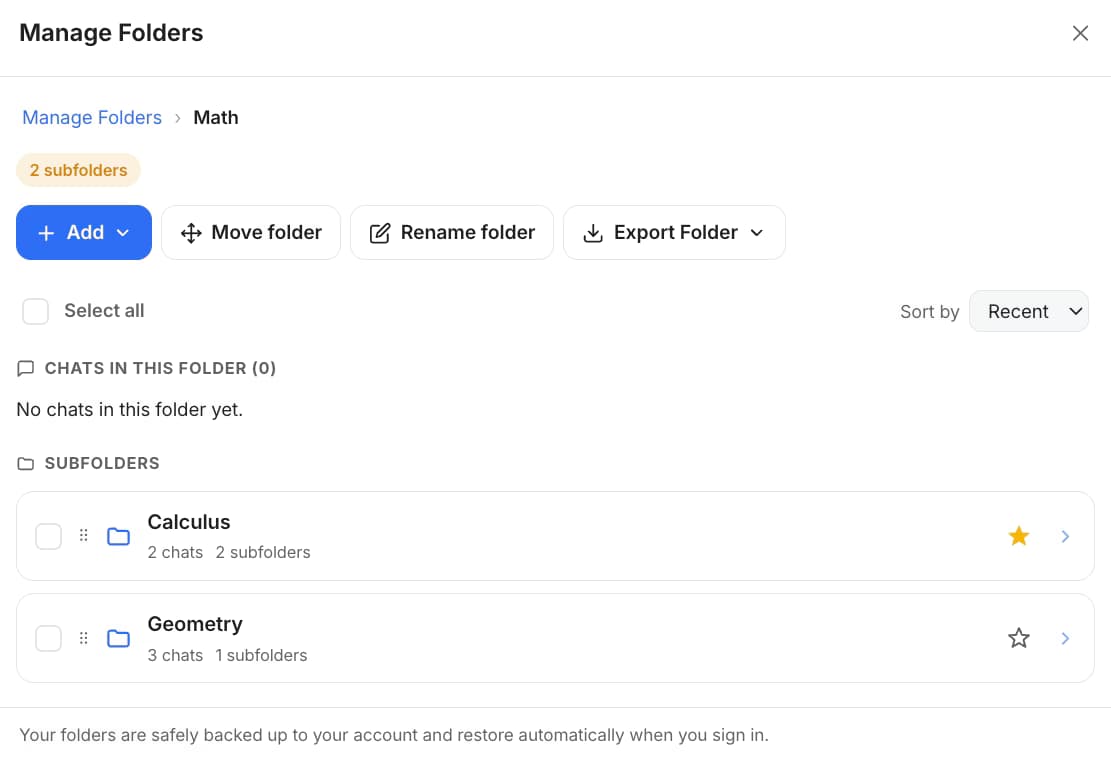
AI Toolbox Manage Folders on Grok showing a Math folder with Calculus and Geometry subfolders and chat counts, above the Add, Move folder and Rename folder buttons

Manage Folders on grok.com

  • A Math folder with Calculus and Geometry subfolders underneath, each with its chat count
  • Add a chat by searching its name; move or rename the folder from the toolbar, and the tree appears in the grok.com sidebar
  • The free plan includes 2 root folders with unlimited subfolders, one per course and one per semester

The gap

What Grok gives a student, and what it loses by finals

Grok has a generous free tier, a fast model and live X data. Its history is a title-only list on grok.com, there is no history list inside X at all, and there is no way to file a chat, flag a reply or turn a session into a page of notes.

A study session is worth keeping when Grok explains something in a way the textbook did not. On Grok that explanation sits inside a reply in a chat called "can you explain this", one of dozens per course, in a list you can only scroll. Inside X the same conversation has no list to scroll. Neither surface can search the text of a reply, keep one course apart from another, or hand you the session as a file.

AI Toolbox keeps the Grok interface and adds the missing layer in the browser: folders per course and topic, an index of every message you can search by keyword, automatic subject tags, color-labelled bookmarks on the answers to revise, saved prompts you insert with //, and per-conversation export as a file you can paste into your notes. Nothing is uploaded; the index lives in your browser.

Why it matters

Here is what you cannot do with Grok alone:

  • Search for the explanation, not the chat title. The grok.com list matches titles you scroll past; X has no history search at all.
  • Keep courses apart. Grok has no folders, tags or pins on either surface.
  • Mark the answer to revise. There is no way to flag a reply and come back to it before the exam.
  • Turn a session into notes. There is no per-conversation export; the only copy is what you select and paste.

The longer a course runs, the more of the good explanations sit in old replies. Folders, search and bookmarks are what make them revisable.

Step by step

A study workflow in five steps

From install to exported notes. Steps one to four are on the free plan; the Exact Match, role and date filters, Markdown and PDF export in step five are where Premium starts.

About three minutes

  1. Install AI Toolbox from the Chrome Web StoreWorks in Chrome, Edge, Brave, Opera and Arc, with the free Grok tier or a SuperGrok or X Premium account. Open the popup, switch the Grok module on and approve the one-time permission for grok.com and x.com.
  2. Create a folder per course, subfolders per topicManage Folders, then Add: Math with Calculus and Geometry underneath, Biology with a subfolder per unit. Existing chats are indexed in the background and Smart Tags sort them by subject. File a chat by typing part of its title; there is nothing to drag.
  3. Bookmark the answer that clicked, by examClick the bookmark control under the Grok reply that explained it and pick a color, one color per exam or assignment. The Bookmarks button in the navbar opens one viewer for grok.com and X, filtered by color, and Open jumps back to the exact reply.
  4. Search before you ask the same question againOpen Search History from the floating AI Toolbox menu and type the theorem, the formula or the essay topic. Every matching message shows its highlighted sentence with a YOU or GROK label and a link into the chat.
  5. Filter by week, then export the notesSwitch on Advanced to keep only Grok's answers from the past week or month, or the exact wording of a formula. Export the session as TXT on the free plan, or as Markdown or PDF on Premium, straight into Notion, Obsidian or a printed study pack.
Add to Chrome, free

Smart Tags: every chat labelled by subject

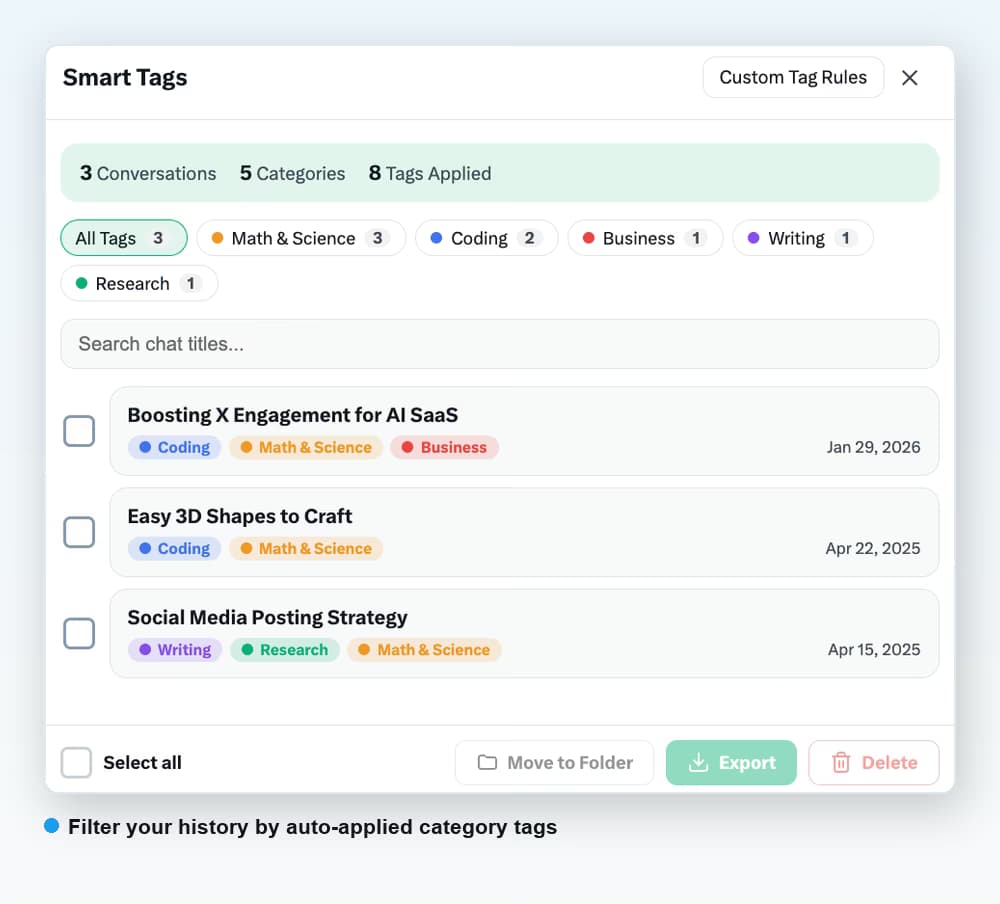
AI Toolbox Smart Tags on Grok with Math and Science, Coding, Business, Writing and Research filter chips and three tagged conversations with dates

Smart Tags reads each conversation locally and files it under Math and Science, Coding, Research, Writing or Business, with a filter chip per subject. Open a tag to see every chat in it, whether it happened on grok.com or inside X. Free covers your 50 most recent conversations; Premium tags the whole history.

The four features students use

Search, bookmarks, prompts and export, as they ship

Every capture below is the extension running inside grok.com. The plan each feature needs is stated in the text.

Search

Find the explanation by what it said

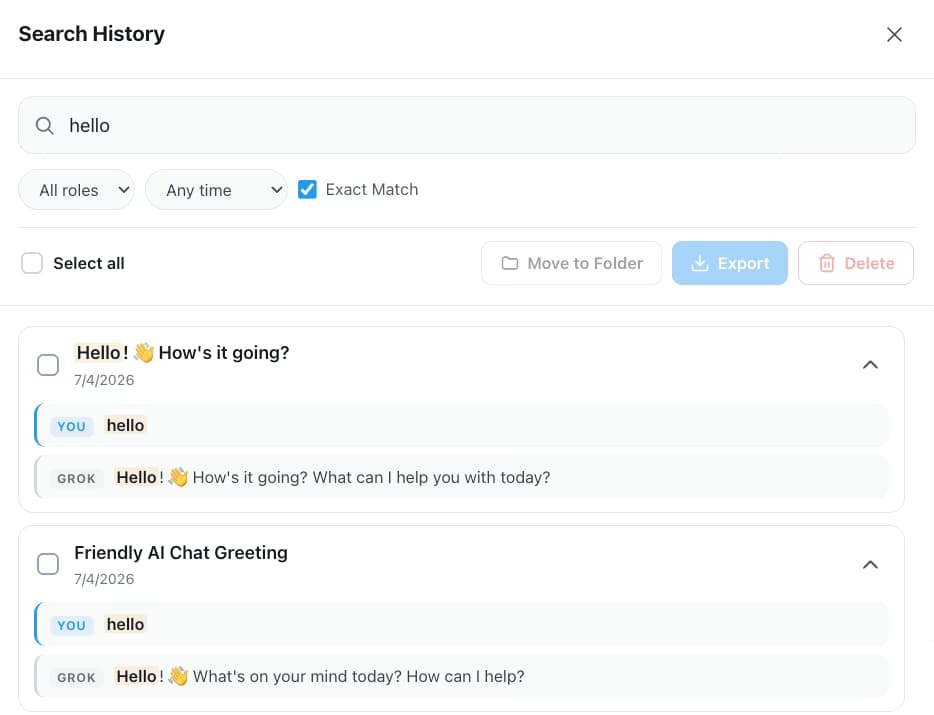
The index covers every message in your history on both surfaces, so a theorem name, a formula or an essay prompt finds the reply that contains it, highlighted, with a link into the chat. Open it from the floating AI Toolbox menu; there is no default keyboard shortcut on Grok, and you can assign one at chrome://extensions/shortcuts. Free returns five results per query; Premium adds unlimited results with the Exact Match, role and date filters.

AI Toolbox Search History on Grok with a query matched inside several conversations, each result showing the highlighted sentence and a YOU or GROK label, with role and date selects and Exact Match above

Bookmarks

Flag the answers to revise before the exam

Bookmark any Grok reply with one of six color labels, one color per exam or assignment. The navbar viewer lists every saved reply from grok.com and X together with its conversation title and a preview, filters by color, and opens the chat scrolled to the reply. Grok bookmarks are quick color saves without a note field. Free: bookmarks in two conversations. Premium: unlimited.

AI Toolbox Bookmarks viewer on Grok listing two saved replies, each with a color bar, a text preview, an Open button and a remove button, with six color filter chips at the top

Context Mentions

Type @@ to bring last week's problem into today's

The @@ picker lists recently used and recent conversations. Pull the chat where Grok walked through integration by parts into a new question and it gets that content as context without a paste, summarized when the thread is long. Free: 3 mentions a day; Premium is unlimited. Saved study prompts work the same way: save a step-by-step solver once and insert it anywhere by typing //.

Typing @@ in the Grok composer opens the AI Toolbox Context Mentions picker with recently used chips and recent conversations listed with dates

Export

A session becomes a page of notes

Any conversation exports from Manage Chats as TXT, Markdown, JSON or PDF. Markdown keeps headings, lists and code blocks and pastes into Notion or Obsidian; PDF prints as a study pack. Free exports one chat at a time as TXT; Premium unlocks the other formats and bulk export of many chats at once before the semester ends.

AI Toolbox Manage Chats on Grok with conversations selected and TXT, Markdown, JSON and PDF format options above the Delete and Export buttons

Scenarios

Where it pays off

Three study workflows and what to file, bookmark and export in each.

  • Exam prep

    • One folder per course, subfolder per unit
    • Bookmark the worked example with the exam's color
    • Grok's answers only, from the last month of the course
    • Export the unit's chats as PDF for a printed study pack
  • Homework help

    • Search the problem type before asking again
    • @@ the chat that walks through the method
    • Insert your step-by-step prompt with //
    • TXT export into your notes on the free plan
  • Essays and class notes

    • Folder per module, chat per essay
    • Smart Tags to find every Writing chat
    • Search for the source or quote you discussed
    • Markdown export into Notion or Obsidian
  • Free Grok tier included

    Works on the free Grok tier at grok.com and inside X, with one index and one bookmark viewer across both. See the full Grok module.

    Add to Chrome, free

From the Chrome Web Store

What reviewers say about folders and search

Public reviews from the listing, shown as captured. The full wall is on the reviews page.

  • Chrome Web Store review by Moses Promotion: The subfolders feature makes organizing chats a breeze.
    Moses Promotion
  • Chrome Web Store review by Asaf Ben-Yehuda: makes chatgpt search and usage much better. helps you find what you want to find. glad i joined when this add on was first introduced!
    Asaf Ben-Yehuda

Read all 46 captured reviews or the live Chrome Web Store listing.

Pricing

Plans and pricing for the Grok module

Free covers folders, search, tags, bookmarks, prompts and TXT export with usage caps. Premium removes the caps on Grok and adds the Exact Match, role and date filters, Markdown, JSON and PDF export and bulk actions. All Access does the same across ChatGPT, Gemini, Claude and Grok, paid once. Not an AI subscription: you keep using your own Grok account.

Free

$0forever

  • 2 root folders with unlimited subfolders
  • Full-text search, 5 results per query, YOU/GROK labels
  • Smart Tags on 50 chats, bookmarks in 2 conversations
  • Single-chat TXT export, 2 saved prompts with //
Add to Chrome

Premium

$9.99/month

  • Unlimited results with Exact Match, role and date filters
  • Unlimited folders, bookmarks, Smart Tags and prompts
  • Markdown, JSON and PDF export
  • Bulk export and delete, prompt chains, cross-platform search
Get Premium

All Access LifetimeBest value

$199one-time

  • ChatGPT, Gemini, Claude and Grok included
  • Search all platforms across all four
  • Every future AI platform we add
  • Save $197 vs single Lifetimes
Get All Access

Teams$15/seat/month

All Premium features across the four modules ยท Admin dashboard ยท Team analytics ยท $12/seat/mo billed annually ยท 14-day free trial

See Teams
  • GDPR compliant
  • Secure checkout by Polar
  • 14-day money-back on a first purchase
  • Conversation content stays in your browser

Refunds follow the refund policy; renewals are not refundable. Premium unlocks on the Grok account whose email you enter at checkout, so use the address you sign in with.

FAQ

Questions people ask before installing

Is AI Toolbox free for students?

Yes, with no time limit and no student verification. The free plan includes 5 search results per query, 2 root folders with unlimited subfolders, Smart Tags on your 50 most recent chats, bookmarks in 2 conversations, 3 Context Mentions a day, 2 saved prompts and single-chat TXT export. Premium ($9.99/month or $99 once) removes the caps and adds the search filters, Markdown, JSON and PDF export and bulk actions.

Does it work on Grok inside X as well as grok.com?

Yes. One install runs on grok.com and on Grok inside X at x.com/i/grok, with one search index, one Smart Tags cache and one bookmark viewer across both. The folder tree lives in the grok.com sidebar only, because X has no history sidebar. Premium is keyed to your X handle, so one purchase covers both surfaces.

Can I find a study session from earlier in the semester?

Yes. AI Toolbox indexes every message in your Grok history in the browser, so the theorem, formula or essay topic returns each reply that contains it, highlighted, with a link into the chat. Open Search History from the floating AI Toolbox menu; there is no default keyboard shortcut on Grok, and you can assign one at chrome://extensions/shortcuts. Free shows five results per query; Premium shows all of them and adds Exact Match, a Grok-only role filter and a date range, which is how you narrow a semester to one week.

How do I export a Grok conversation as notes?

Open Manage Chats, tick the conversation and choose a format. TXT is free and pastes anywhere. Markdown (Premium) keeps headings, lists and code blocks, so it drops into Notion or Obsidian; PDF (Premium) prints as a study pack. Premium can also export many chats at once before the semester ends.

Does it work on a school-managed Chromebook?

It works on any Chromium browser where the Chrome Web Store is allowed, including Chromebooks. Some school-managed devices block extension installs by policy; if the Web Store's Add to Chrome button is greyed out, that is the administrator's setting rather than the extension. Grok itself needs an X or grok.com account you are allowed to use.

Is my study data private?

Yes. The search index, Smart Tags and saved prompts are stored in your browser, and every search runs locally. Conversation content is never sent to our servers. Folders and bookmarks are backed up to your account so they follow you across devices, storing titles and short previews rather than whole conversations. PDF export is the one exception: the conversation is rendered on our server and returned without a copy being kept.

Does AI Toolbox do my homework?

No. It does not answer questions or write anything; Grok does that. AI Toolbox organises, searches and exports the conversations you already have, so what you learned stays findable. Follow your school's rules on AI use.

Which browsers work?

Any Chromium browser installed from the Chrome Web Store: Chrome, Edge, Brave, Opera and Arc. There is no Firefox version.

40,000+ users ยท 4.7/5 on the Chrome Web Store

Start the semester with a folder per course

Install AI Toolbox, switch the Grok module on, and bookmark the last explanation that made sense before you decide on anything else.