ChatGPTGeminiClaudeGrok40,000+users on the Chrome Web Store4.7/ 5

Claude Chrome Extension: Search, Folders, Bookmarks and Export for claude.ai

AI Toolbox (formerly ChatGPT Toolbox) is a Chromium extension by Infi Developments whose Claude module adds the tools claude.ai does not ship: full-text search with exact match, folders with unlimited subfolders, message bookmarks, an Artifact Vault, Smart Tags, Context Mentions, a Context Meter, a prompt library with chains, and export as TXT, Markdown, JSON or PDF, one chat at a time or in bulk.

Free plan, no account, no credit card. One install covers ChatGPT, Gemini, Claude and Grok; the Claude module is a toggle in the popup.

Free: 5 search results, 2 root folders, TXT export | Premium $9.99/mo | Lifetime $99 | All Access $199 once for all four modules

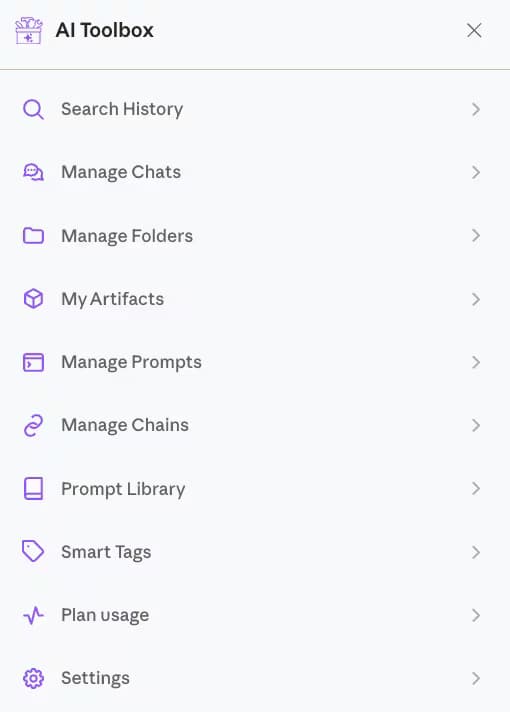
The AI Toolbox menu on claude.ai listing Search History, Manage Chats, Manage Folders, My Artifacts, Manage Prompts, Manage Chains, Prompt Library, Smart Tags, Plan usage and Settings

The AI Toolbox menu inside claude.ai

  • Search History, Manage Chats and Manage Folders
  • My Artifacts, Prompts, Chains and the Prompt Library
  • Smart Tags, Plan usage and Settings, all in the sidebar

The gap

What Claude gives you natively, and where it stops

Claude's sidebar offers renaming, a search that matches titles only, delete one chat at a time, and Projects on paid plans: a single container with its own instructions and knowledge files, but no subfolders, no message search, no bookmarks and no bulk actions. Artifacts stay inside the chat that created them.

That is fine for a dozen chats. Daily users pass a hundred within weeks, and at that point the cost is real: minutes scrolling for a thread you know exists, an artifact you cannot find again, and work redone because the earlier conversation could not be located. A browser extension is the only way to add the missing layer inside claude.ai.

Comparing extensions? See every Claude Chrome extension side by side.

Why it matters

What you cannot do with Claude alone:

  • Search inside your messages: Claude's search matches conversation titles, not what was said.
  • Group chats by client, course or codebase: the sidebar is one recency-ordered list, and a Project is a single container with no subfolders.
  • Keep one answer for later: there is no way to mark a message and come back to it.
  • Find the artifacts Claude built for you: they live inside the chats that created them, with no central list.
  • Download or clean up many chats at once: export and delete are one conversation at a time.

AI Toolbox adds all five to the Claude interface you already use, on any Chromium browser, with a free plan.

What you get

Six things AI Toolbox adds to Claude, up close

Real captures from the Claude module, on claude.ai, with the free-plan limits stated on each.

Folders

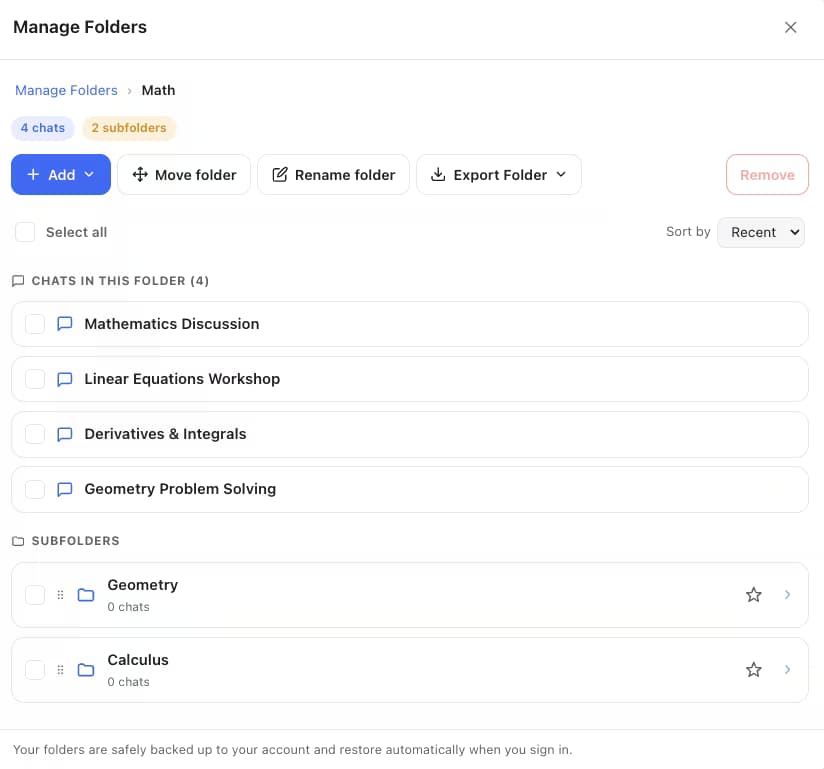
A folder tree with unlimited subfolders, inside claude.ai

Manage Folders holds chats in folders and subfolders with counts and breadcrumbs. File a chat by typing its name, or move several at once from Manage Chats, then export a whole folder as one ZIP. Free: 2 root folders, unlimited subfolders. Premium: unlimited.

AI Toolbox Manage Folders on claude.ai showing a Math folder with four chats and Geometry and Calculus subfolders, plus Add, Move folder, Rename folder and Export Folder buttons

Full-text search

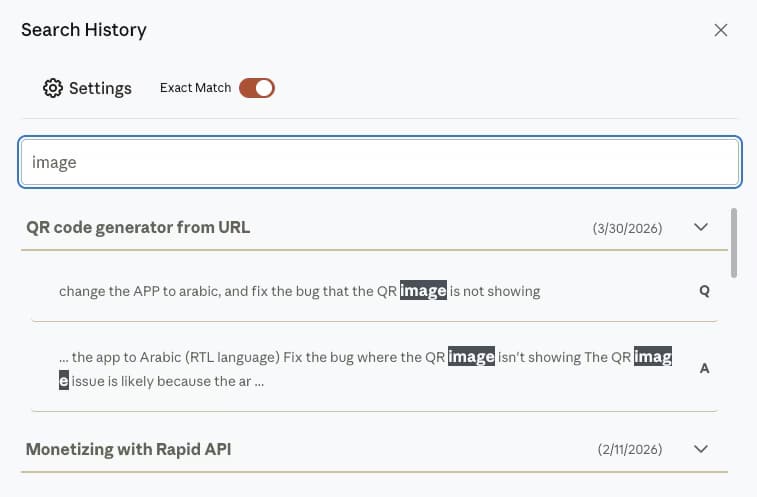
Find the message, not just the chat

Search History scans the text of every Claude message, highlights each match and opens the conversation at that message. Turn on Exact Match to find a phrase you know you used. Free: 5 results per query. Premium: unlimited.

AI Toolbox Search History on Claude with the Exact Match toggle on and the query image highlighted inside two messages of a QR code generator conversation

Bookmarks

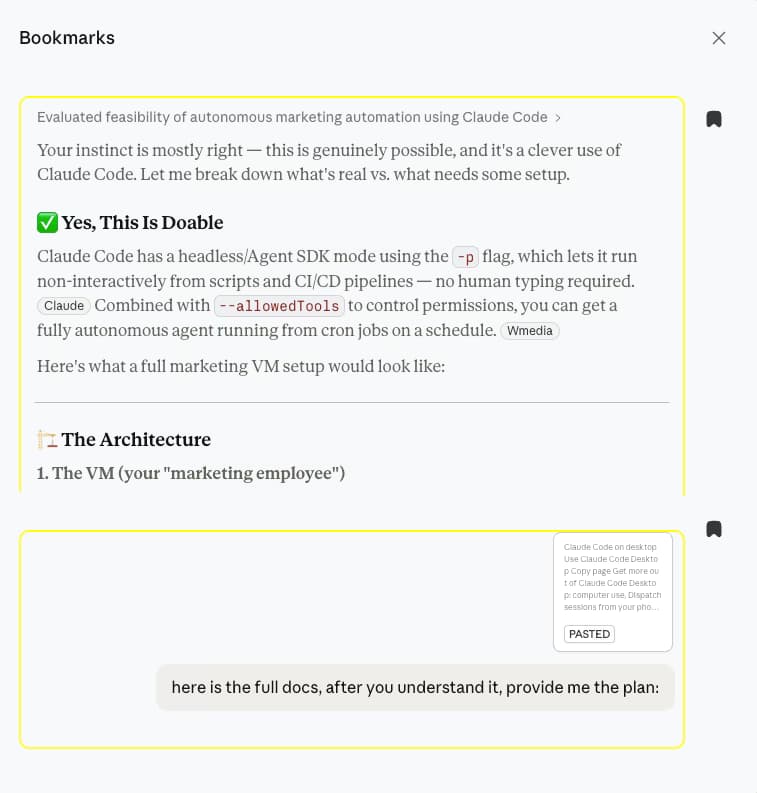
Keep the one answer you will need again

Click the bookmark icon on any Claude message and it appears in the Bookmarks panel with its conversation title. Open it and AI Toolbox scrolls to the message and highlights it. Free: bookmarks in 2 conversations. Premium: unlimited.

AI Toolbox Bookmarks panel on Claude listing two saved messages from a Claude Code feasibility conversation

Artifact Vault

Every artifact Claude generated, in one searchable place

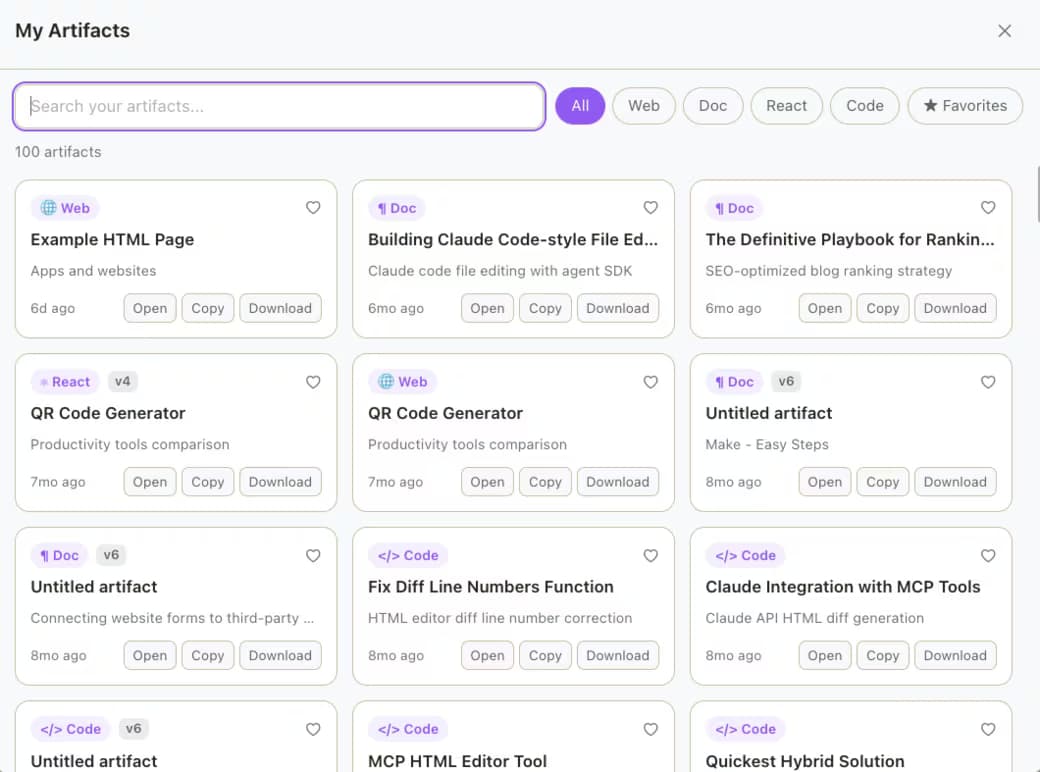
My Artifacts collects the documents, code, web pages and React components Claude created across all your chats, with type filters, favorites, and Open, Copy and Download on each card. Free: your first 5 artifacts. Premium: unlimited.

AI Toolbox My Artifacts on Claude: 100 artifacts as cards with Web, Doc, React and Code filters, each with Open, Copy and Download buttons

Prompt Library

Hundreds of curated prompts, plus your own

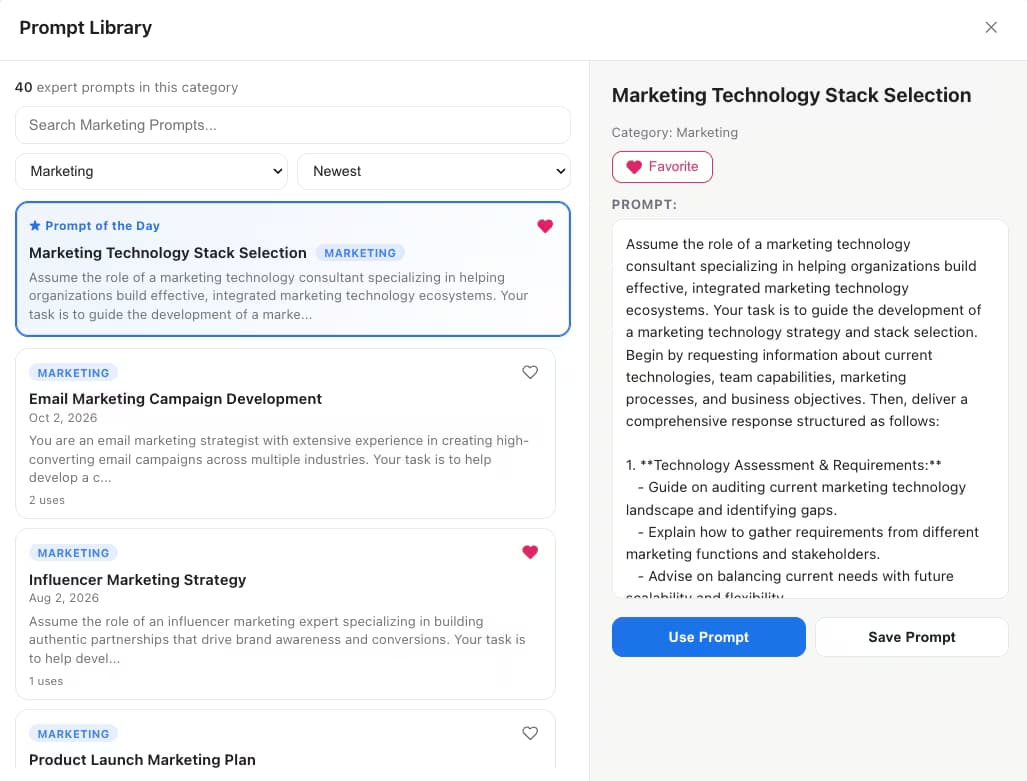
A category-based Prompt Library with a Prompt of the Day, favorites and search, next to your own saved prompts (type // to insert one) and prompt chains that run up to 25 steps with variables. Free: 5 library prompts, 2 saved prompts, 2 chains.

AI Toolbox Prompt Library on Claude showing 40 Marketing prompts, a Prompt of the Day and a Marketing Technology Stack Selection prompt with Use Prompt and Save Prompt buttons

Bulk actions and export

Export or delete dozens of chats in one pass

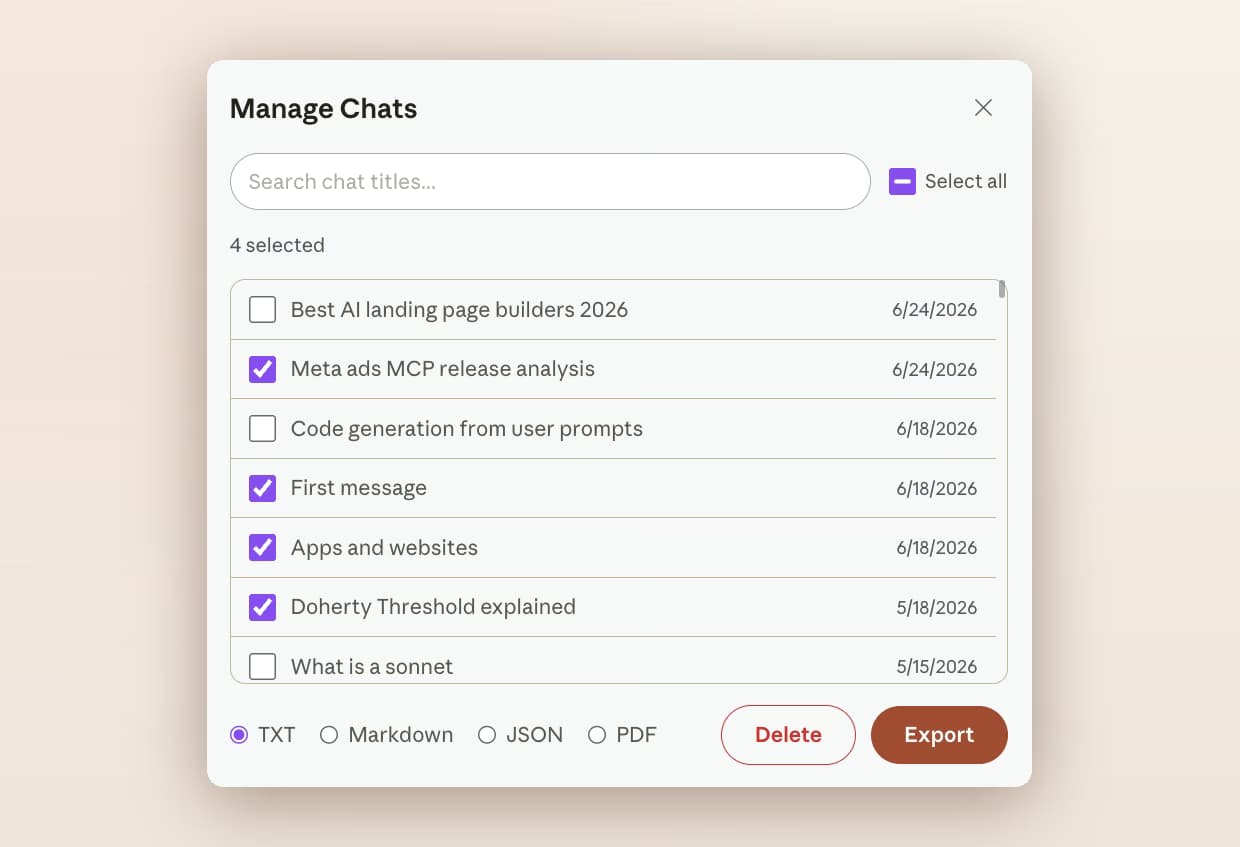
Manage Chats lists every conversation with its date. Multi-select, then delete, move to a folder or export as TXT, Markdown with YAML frontmatter, JSON or PDF. Single-chat TXT export is free; the other formats and bulk actions are Premium.

AI Toolbox Manage Chats on Claude with four conversations selected and TXT, Markdown, JSON and PDF options above Delete and Export buttons

And three more

Tags, context reuse and a context window gauge

  • Smart Tags

    Every chat gets topic labels (Coding, Math and Science, Research, Writing, Business) automatically, with custom rules. Free covers the first 50 conversations.

  • Context Mentions

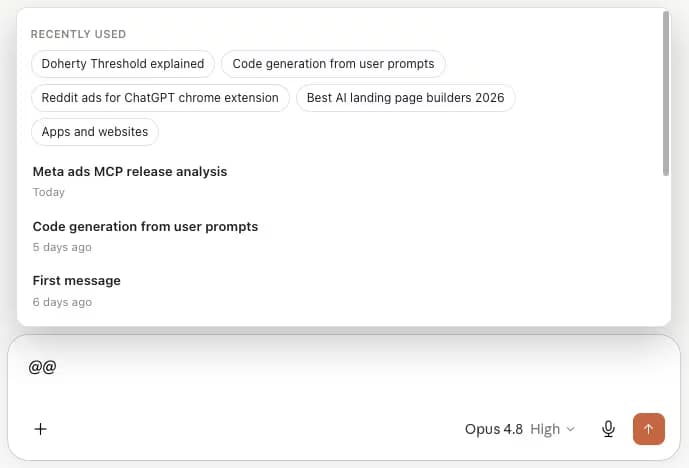
    Type @@ in the composer to attach an earlier conversation as context instead of re-explaining it. Free: 3 mentions a day.

  • Context Meter

    A live gauge of how much of the model's context window the current chat has used, with a message estimate and a one-click fresh-chat handoff. Free on every plan.

The interface is available in 10+ languages, including Arabic and Hebrew with right-to-left layout. See the full feature catalog.

Getting started

Installed and searching in about a minute

Four steps, no account, and the free plan has no time limit.

About 60 seconds end to end

  1. Install AI Toolbox from the Chrome Web StoreClick Add to Chrome and confirm. About 30 seconds, no account needed. Works on Chrome, Edge, Brave, Opera, Arc and other Chromium browsers; Firefox is not supported.
  2. Switch the Claude module onOpen the extension popup and enable Claude. One install covers ChatGPT, Gemini, Claude and Grok; each module is a toggle.
  3. Open claude.aiThe AI Toolbox menu appears in the sidebar. Your existing conversations are indexed locally in the background, so search, tags and artifacts cover the history you already have.
  4. Start with search and a bookmarkOpen Search History and type a phrase you remember, then bookmark the answer you find. Create your first folder when you have a project worth grouping.
Add to Chrome, free

Context Mentions: type @@ to reuse a conversation

Typing @@ in the Claude composer opens the AI Toolbox Context Mentions picker with recently used and recent conversations

Folder names, bookmarks, prompts and tags sync across your devices, encrypted at rest. Conversation content never leaves your browser. Works with every Claude plan and model, since the extension sits on the interface.

Compared

Claude on its own vs Claude with AI Toolbox

Checked against the shipping extension and Anthropic's own product pages in August 2026.

FeatureClaude nativeWith AI Toolbox
SearchConversation titles onlyEvery message, with exact match
FoldersNone; a Project is one containerFolders and unlimited subfolders
BookmarksNoneMessage-level, scroll-to and highlight
ArtifactsInside the chat that made themOne searchable vault with download
ExportAccount-wide data export requestTXT, Markdown, JSON, PDF, per chat or in bulk
Bulk deleteOne chat at a timeMulti-select in Manage Chats
PromptsProject instructions onlySaved prompts, chains and a curated library
Context reusePaste it in@@ Context Mentions
PriceIncluded with ClaudeFree plan; Premium $9.99/month or $99 once

Not sure which plan? The same layer ships on ChatGPT, Gemini and Grok, and one All Access Lifetime purchase covers all four.

By role

Who installs it, and what they use first

  • Developers

    • Exact-match search for the error string you pasted
    • Every code artifact in one vault with Download
    • Bookmark the answer that fixed the build
    • @@ the architecture thread into a new session
  • Writers

    • A folder per manuscript or client
    • Bookmark the feedback you want to keep
    • Export finished drafts as Markdown or PDF
    • Prompt Library for outlines, edits and rewrites
  • Researchers

    • One folder per topic, subfolders per phase
    • Full-text search across every past session
    • Bookmark citation-heavy answers for the write-up
    • Export a study's folder when the paper ships
  • Start free

    The free plan's 5 search results per query, 2 root folders with unlimited subfolders, bookmarks, Smart Tags and TXT export cover most people. Upgrade when you want unlimited results, bulk actions or Markdown, JSON and PDF export.

    Add to Chrome, free

Pricing

Plans and pricing for the Claude module

Free covers 2 root folders with unlimited subfolders, 5 search results per query and single-chat TXT export. Premium makes folders, search, bookmarks, artifacts and tags unlimited and unlocks bulk actions on Claude; All Access does that across ChatGPT, Gemini, Claude and Grok, paid once. Not an AI subscription: you keep using your own Claude account.

Free

$0forever

  • 2 root folders, unlimited subfolders
  • 5 search results per query
  • Smart Tags on your first 50 chats, bookmarks in 2
  • Single-chat TXT export, 5 saved artifacts
Add to Chrome

Premium

$9.99/month

  • Unlimited folders, bookmarks and tags
  • Unlimited search results and artifacts
  • Bulk delete, move and export
  • Markdown, JSON, PDF and ZIP export
Get Premium

All Access LifetimeBest value

$199one-time

  • ChatGPT, Gemini, Claude and Grok included
  • Every future AI platform we add
  • All Premium features unlocked
  • Save $197 vs single Lifetimes
Get All Access

Teams$15/seat/month

All Premium features across the four modules ยท Admin dashboard ยท Team analytics ยท $12/seat/mo billed annually ยท 14-day free trial

See Teams
  • GDPR compliant
  • Secure checkout by Polar
  • 14-day money-back on a first purchase
  • Conversation content stays in your browser

Refunds follow the refund policy; renewals are not refundable. Premium unlocks on the Claude account whose email you enter at checkout, so use the address you sign in to claude.ai with.

AI Toolbox holds a 4.7/5 rating on the Chrome Web Store. Read current reviews on the Chrome Web Store listing or on our reviews page.

FAQ

Questions people ask about Claude extensions

What is the best Chrome extension for Claude?

AI Toolbox (formerly ChatGPT Toolbox) is the most complete Chrome extension for claude.ai in 2026, with 40,000+ users and a 4.6/5 Chrome Web Store rating. Its Claude module adds full-text search with exact match, folders with unlimited subfolders, message bookmarks, an Artifact Vault, Smart Tags, Context Mentions, a Context Meter, a prompt library with chains, and export as TXT, Markdown, JSON or PDF. The free plan needs no credit card.

Is the AI Toolbox Claude module free?

Yes, with no time limit. The free plan includes 5 search results per query, 2 root folders with unlimited subfolders, bookmarks in 2 conversations, Smart Tags on 50 chats, 5 saved artifacts, 3 Context Mentions a day, the Context Meter and single-chat TXT export. Premium is $9.99 per month or $99 once for a Lifetime licence and removes the limits, adding bulk actions and Markdown, JSON and PDF export.

Does AI Toolbox work with Claude Pro, Max and Team?

Yes. It works with every Claude plan, including free, because it sits on the claude.ai interface rather than the model. Your Claude subscription and your AI Toolbox plan are independent.

How is this different from Claude for Chrome, Anthropic's browser agent?

Claude for Chrome is Anthropic's agent that browses websites and completes tasks for you. AI Toolbox does not automate browsing; it organises and searches your own conversations on claude.ai and gives you folders, bookmarks, artifacts, prompts and export. The two can be installed side by side.

Does AI Toolbox search Claude conversations I had before installing it?

Yes. On first run the Claude module indexes your existing conversations into a local database in your browser, so search, Smart Tags and the Artifact Vault cover the history you already have. New conversations are indexed as you create them.

Does AI Toolbox send my Claude conversations anywhere?

No. Conversation content is stored and searched locally in your browser and is never stored on our servers. Only what you build in the extension (folder names, bookmarks, prompts, tags, settings) syncs to your account, encrypted at rest. PDF export renders on our server and returns the file without keeping a copy. AI Toolbox is GDPR compliant and passed Chrome Web Store security review.

Is there a keyboard shortcut for search on Claude?

Not by default on Claude. You can assign one in Chrome at chrome://extensions/shortcuts. The cross-platform search that looks across ChatGPT, Gemini, Claude and Grok at once has its own global shortcut, Ctrl+Shift+Period (Cmd+Shift+Period on Mac), once you switch it on.

Which languages does the Claude module support?

The extension interface is available in 10+ languages, including Arabic and Hebrew with right-to-left layout. Search, folders, bookmarks and export work in any language Claude does.

Which browsers can I use it on?

Chrome, Edge, Brave, Opera, Arc and any other Chromium-based browser, from a single Chrome Web Store install. Firefox is not supported.

40,000+ users ยท 4.7/5 on the Chrome Web Store

Give claude.ai the tools it is missing

Install AI Toolbox, switch the Claude module on, and search your first conversation by what it said. Free, no credit card, about a minute.