ChatGPTGeminiClaudeGrok40,000+users on the Chrome Web Store4.7/ 5

AI Prompt Formatter: Structure a Prompt for Any AI Model

Paste a rough prompt and get it back tidied and placed inside a labeled scaffold: Role, Task, Format; Context, Task, Constraints, Format; or a step-by-step reasoning block. Your words are never rewritten, and nothing leaves your browser.

Formatter free forever | Prompt library with 2 saved prompts free inside ChatGPT, Gemini, Claude and Grok | Premium $9.99/mo or $99 once

Framework

Adds a Role heading and an Output format heading around your text. Best for most everyday prompts.

  • 0Words
  • 0Characters
  • ~0Tokens, estimated
  • 0Fields to fill in

Your words are kept exactly; the tool only normalizes whitespace and adds labeled sections with {{placeholders}}. Nothing you paste is uploaded. Token estimate assumes about 0.75 words per token; for an exact count use the token counter.

Why structure

Why a labeled prompt gets a better answer

A model treats each heading as a separate instruction. The same request written as one paragraph makes it guess which sentence is the task, which is the constraint and which is the format.

The scaffolds here are the ones that hold up across providers: a role, a task, a format, and for harder work a context block and a constraints list. None of them depend on a specific model, which is why a prompt formatted once can be pasted into ChatGPT, Claude, Gemini or Grok unchanged.

The tool deliberately does not write the role or the format for you. Those are the parts that carry your intent, and a guessed role is worse than an empty field you fill in. The counter on the right shows how many are still blank.

Four principles

What the scaffold is doing:

  • A role sets the register: "You are a senior copy editor" changes vocabulary, caution and depth more reliably than adjectives in the task itself.
  • Headings beat paragraphs: a model reads a labeled Task and a labeled Output format as two separate instructions; the same words in one paragraph blur together.
  • Constraints stop the common failure: word limits, banned phrases and required sections are the things a model drops first when they are implied rather than listed.
  • Placeholders make it reusable: a prompt with {{fields}} is a template. Fill them at use time and the wording stays identical from one run to the next.

Fill every field before you send: an unfilled {{role}} is read literally by the model.

Step by step

How to format a prompt

Four steps, no account, and nothing leaves your browser.

  • Paste the prompt

    Drop in the rough version, notes, half sentences and stray blank lines included. The text stays in your browser; nothing is sent anywhere.

  • Pick a framework

    Role, Task, Format covers most prompts. Choose Context, Task, Constraints, Format for high-stakes work, the reasoning scaffold for analysis, or Clean only to tidy without a scaffold.

  • Fill the placeholders

    Your words land under Task, untouched. Every {{field}} in the scaffold is a blank the tool cannot fill for you: the role, the format, the constraints. The counter shows how many are left.

  • Copy, then save it

    Copy the result into ChatGPT, Claude, Gemini or Grok. To reuse it, save it in the AI Toolbox prompt library, where the same {{fields}} become dynamic values you fill at insert time.

The frameworks

Which scaffold to pick

Four options, from a full context-and-constraints layout to a plain whitespace tidy. The chips in the tool switch between them.

FrameworkBest forStructureWhat the tool adds
Role, Task, Format SelectedMost everyday promptsWho the model is, what to do, how to answerAdds a Role heading and an Output format heading around your text
Context, Task, Constraints, FormatComplex or high-stakes tasksAdds background and explicit limits before the formatAdds Context, Constraints and Output format headings around your text
Task + step-by-stepAnalysis, math, debuggingAsks the model to show its work before the answerAdds an Instructions heading that asks for reasoning first
Clean onlyPrompts you have already structuredTrims whitespace, no scaffoldOnly normalizes whitespace and blank lines

Want a starting prompt rather than a scaffold? Browse the prompt templates.

In the chat itself

Format it once. Insert it everywhere.

This page formats one prompt. AI Toolbox keeps the result inside ChatGPT, Gemini, Claude and Grok, ready to insert.

Reuse

Save the formatted prompt once, insert it with two slashes

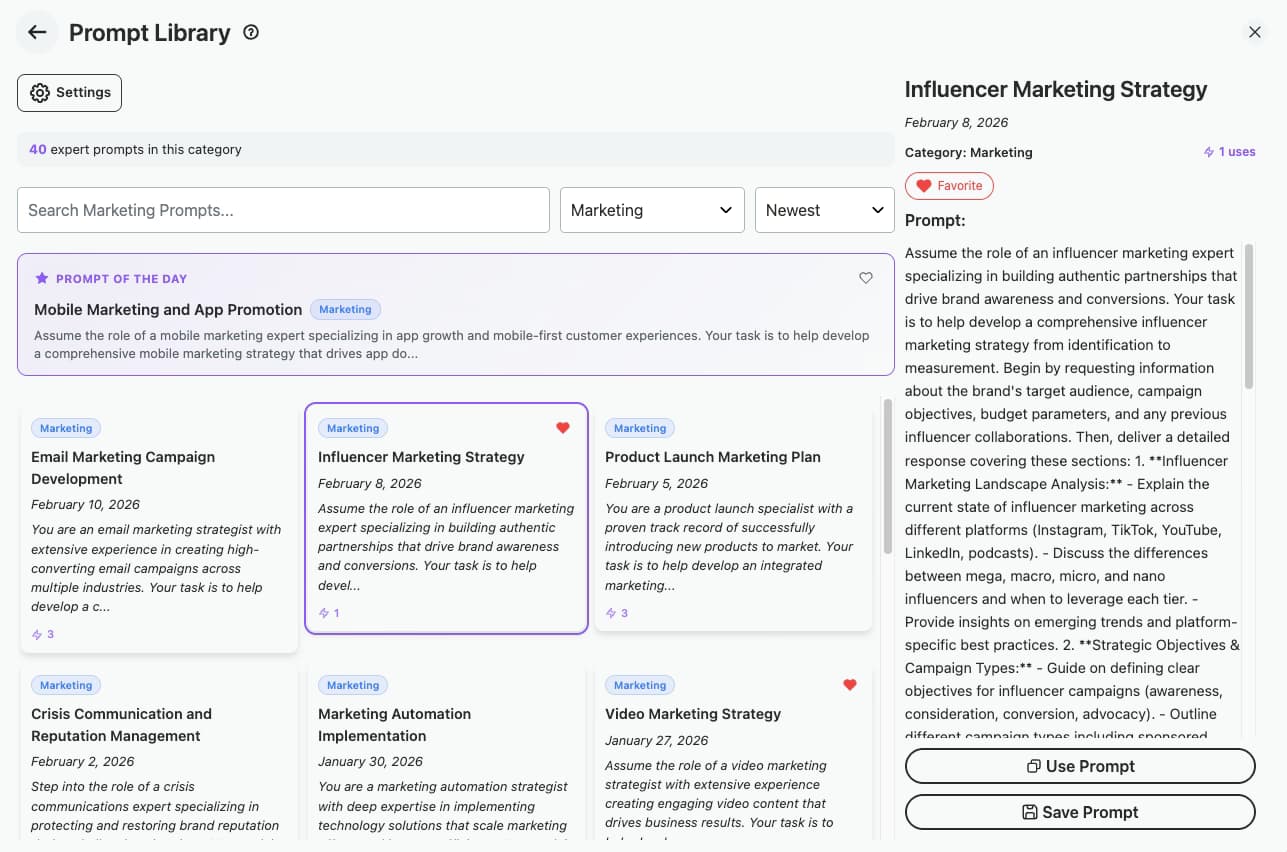
A formatted prompt is worth keeping. AI Toolbox holds one prompt library across ChatGPT, Gemini, Claude and Grok: save the result, type two slashes in any compose box to insert it, and keep the {{fields}} as dynamic values that a small form collects each time. The free plan holds two saved prompts and five from the catalog.

Plan: Free: 2 saved prompts, 5 catalog prompts. Premium: unlimited.

AI Toolbox prompt library inside ChatGPT with saved prompts inserted by typing two slashes and a catalog of ready-made prompts

Sequence

Turn several formatted prompts into a chain

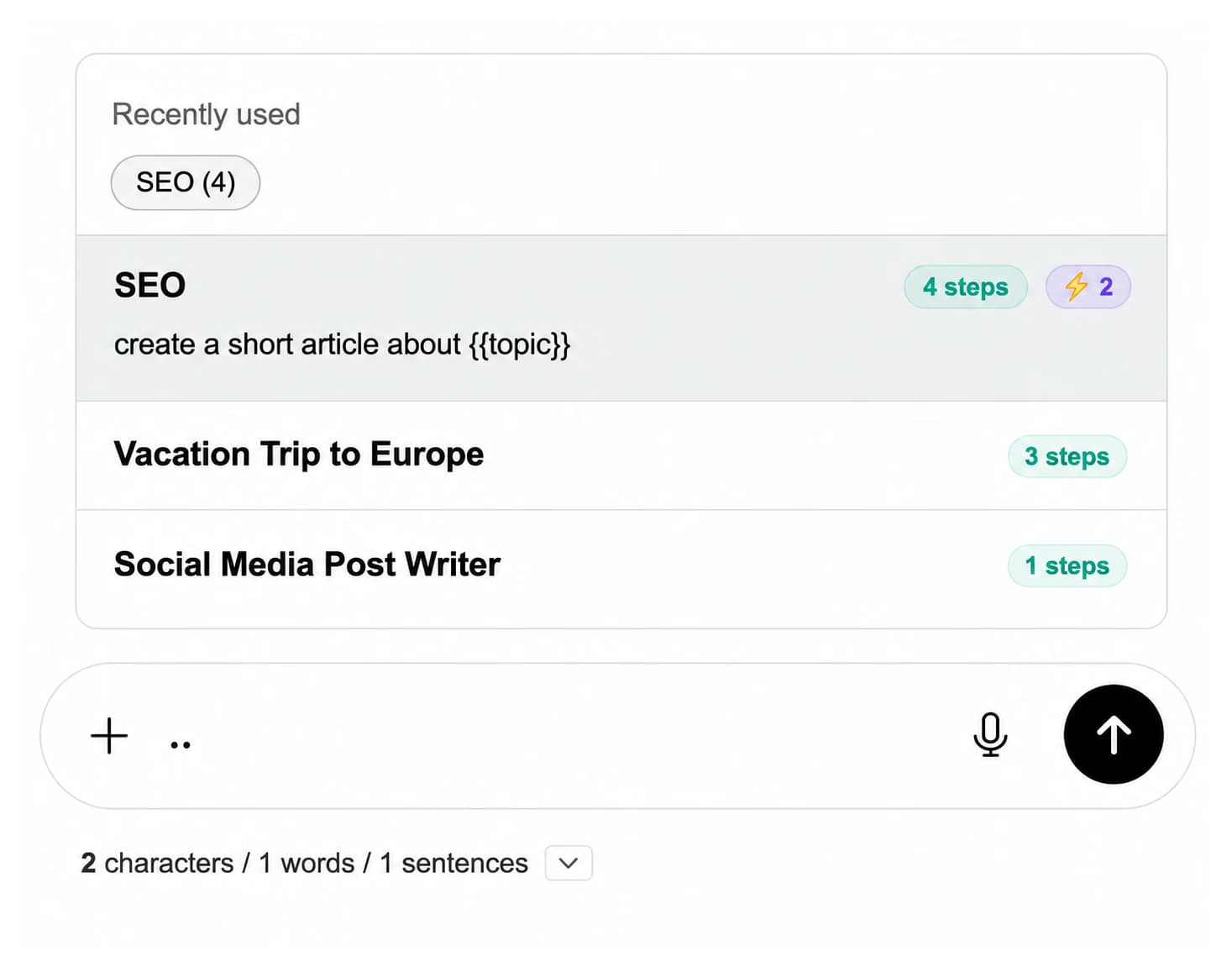
Long jobs are a sequence of prompts: outline, draft, edit, summarize. Premium chains run them in order from one trigger, two dots in the compose box, with a shared {{topic}} variable filled once at the start. Each step is a prompt you formatted here.

Plan: Premium: prompt chains with shared variables on all four platforms.

Prompt chain picker in the compose box listing chains with their step counts and a {{topic}} variable

Use cases

Who formats prompts before sending them

  • Writers and marketers

    • Turn a brief into a Role, Task, Format prompt
    • Lock tone and length in the format section
    • Keep one template per content type
    • Reuse it across ChatGPT and Claude
  • Developers

    • Scaffold a code review with explicit constraints
    • Ask for reasoning before the diff
    • Standardize the prompt a team shares
    • Keep {{language}} and {{framework}} as fields
  • Researchers and analysts

    • Add background under a Context heading
    • Force a step-by-step answer
    • State the citation format up front
    • Run the same prompt on every model
  • Support and operations

    • Template replies with a fixed role
    • List the rules the reply must follow
    • Fill customer details as fields
    • Chain triage, draft and summary
  • Students and educators

    • Structure a study prompt per subject
    • Ask for reasoning, not just answers
    • Set reading level in the format
    • Save one prompt per course
  • Keep what you format

    Install AI Toolbox for a prompt library you insert with two slashes on ChatGPT, Gemini, Claude and Grok, with dynamic fields filled at insert time.

    Add to Chrome, free

Pricing

This formatter is free. So is a lot of the extension.

Two saved prompts, five catalog prompts, folders and search are on the free plan. Premium adds unlimited prompts, prompt chains, full-text search and export. Not an AI subscription: you keep using your own accounts.

Free

$0forever

  • This formatter, no account
  • 2 saved prompts inserted with two slashes
  • 5 prompts from the catalog
  • 5 search results per query
Add to Chrome

Premium

$9.99/month

  • Unlimited prompts and prompt chains
  • Full prompt catalog
  • Unlimited folders and search
  • Bulk export in every format
Get Premium

All Access LifetimeBest value

$199one-time

  • ChatGPT, Gemini, Claude and Grok included
  • Every future AI platform we add
  • All Premium features unlocked
  • Save $197 vs single Lifetimes
Get All Access

Teams$15/seat/month

All Premium features across the four modules ยท Shared team prompts ยท Admin dashboard ยท $12/seat/mo billed annually ยท 14-day free trial

See Teams
  • GDPR compliant
  • Secure checkout by Polar
  • 14-day money-back on a first purchase
  • Your prompt never leaves the browser

Refunds follow the refund policy; renewals are not refundable. Premium unlocks for the email you enter at checkout, so use the same address you sign in to ChatGPT with.

FAQ

Prompt formatting questions people actually ask

What does the prompt formatter do?

It normalizes whitespace (trailing spaces, Windows line endings, runs of blank lines) and, if you choose a framework, places your text under a Task heading with labeled sections around it: Role and Output format, or Context, Constraints and Output format, or an Instructions block that asks for step-by-step reasoning. It runs entirely in your browser with no AI call, so nothing you paste leaves the page.

Will it change the meaning of my prompt?

No. It never rewrites, shortens or reorders your words. The only edits are whitespace normalization and, with Bullet each line on, a leading dash on each non-empty line. Everything else in the output is scaffold text and {{placeholders}} you fill in yourself.

What is the Role, Task, Format framework?

A three-part structure: who the model should be (Role), what it should do (Task) and how it should answer (Format, including length, tone and layout). An explicit role and an explicit output format are the two instructions models follow most consistently, which is why RTF is the default here.

When should I use Context, Task, Constraints, Format instead?

When the model needs background it cannot infer, or when there are rules it must not break: a word limit, a banned claim, a required section, a house style. Listing constraints as their own bullets is more reliable than folding them into the task sentence.

What does the step-by-step option add?

An Instructions block asking the model to think through the task before answering and to put the final answer under an Answer heading. It helps on analysis, math and debugging, where the model otherwise jumps to a conclusion; it adds length on simple factual prompts, so leave it off there.

Does a formatted prompt work on ChatGPT, Claude, Gemini and Grok?

Yes. The frameworks are plain text with Markdown headings, which all four read the same way. If you want the same prompt available in all four, AI Toolbox keeps one shared prompt library you insert by typing two slashes in the compose box on any of them.

How do I save and reuse a formatted prompt?

Copy it into the AI Toolbox prompt library. Saved prompts keep their {{fields}} as dynamic values that a small form collects at insert time, so the wording stays identical run to run. The free plan holds 2 saved prompts and 5 from the catalog; Premium ($9.99/month or $99 once per module) makes them unlimited and adds prompt chains.

Is this tool free, and is anything uploaded?

Free, with no account or sign-up, and nothing is uploaded: the formatting is a few string operations in your browser. The AI Toolbox extension is also free to install; the prompt library with two saved prompts, folders and search are on the free plan.

40,000+ users ยท 4.7/5 on the Chrome Web Store

Stop retyping the same prompt

Install AI Toolbox for a prompt library on ChatGPT, Gemini, Claude and Grok, inserted with two slashes, with fields you fill at insert time.