ChatGPTGeminiClaudeGrok40,000+users on the Chrome Web Store4.7/ 5

Claude for Writers: Keep the Draft That Worked

Writers use Claude for drafting, rewriting, feedback and tone work, iterating a paragraph across dozens of turns until one version lands. That version then sits inside a conversation titled by its first line, one of hundreds in a sidebar that only searches titles. The Claude module of AI Toolbox (formerly ChatGPT Toolbox), a Chromium extension by Infi Developments, adds message bookmarks on the draft that worked, full-text search across every message, folders per manuscript or client, automatic topic tags, a prompt library for your voice and export to Markdown, PDF or TXT, all inside claude.ai.

Free with bookmarks in 2 conversations, 5 search results per query, 2 root folders, 2 saved prompts and TXT export. Premium removes the caps and adds the Exact Match toggle and Markdown, JSON and PDF export.

Free plan, no account | Premium $9.99/mo | Lifetime $99 | All Access $199 once for all four modules

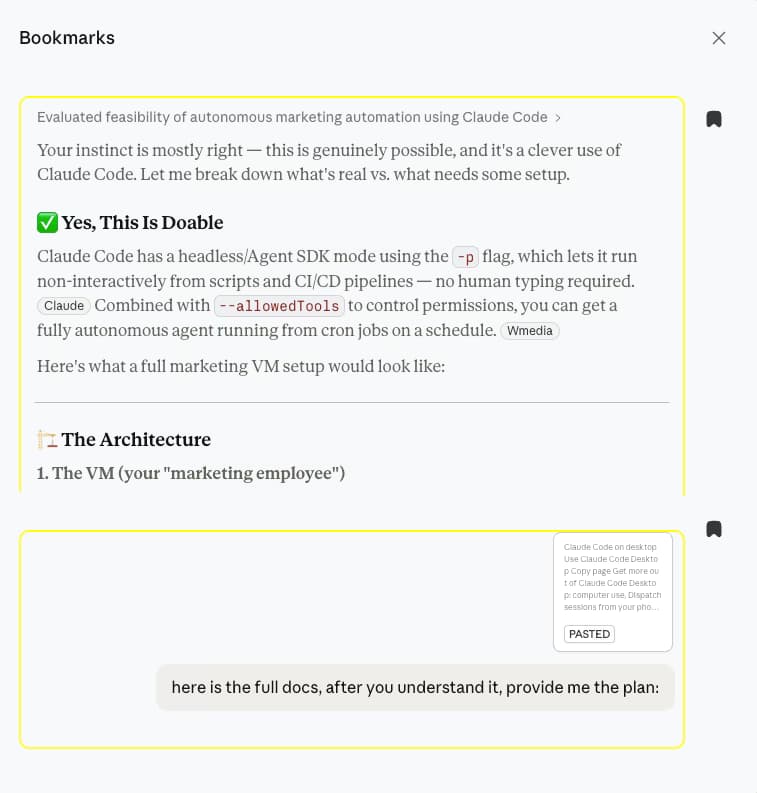
AI Toolbox Bookmarks panel on claude.ai listing two saved messages with rich previews, a Claude reply and the prompt that produced it, each with a bookmark icon

The Bookmarks panel on claude.ai

  • Bookmark the draft version worth keeping, not the whole conversation
  • Both sides saved: the passage Claude wrote and the instruction that produced it
  • Click a card and the chat scrolls to that exact message, even in a long session

The gap

What Claude gives writers, and what it loses

Claude drafts and rewrites brilliantly, and then keeps the results in a recency-ordered list. Starring marks a whole chat, Projects hold context, and the native export is an account-wide archive that arrives by email and expires in 24 hours.

Writing with Claude produces exactly the material you will need again: the version of the scene that finally worked, the instruction that got the tone right, the feedback thread on chapter three. All of it lands inside long conversations with no way to mark a passage, group work by manuscript, or search for a phrase you remember writing.

The workaround is a separate document of pasted drafts, which detaches every passage from its conversation and goes stale immediately. AI Toolbox removes the need for it: bookmarks live on the message itself, folders give the work a shape, the index covers every word, and export produces a file your editor can open. Everything is stored in your browser; nothing is uploaded.

Why it matters

Here is what you cannot do with Claude alone:

  • Mark the draft that worked. Starring flags a whole conversation; nothing native marks the one message.
  • Find a phrase you remember. The sidebar search matches titles, so a line inside a reply is unreachable.
  • Group chats by manuscript or client. The sidebar is one recency-ordered list, and a Project has no subfolders.
  • Hand an editor a clean file. The native export queues your whole account into an emailed link that dies after 24 hours.

A writing practice built on Claude accumulates drafts by the hundred. Bookmarks, search and export are what make them a body of work instead of scrollback.

Step by step

A writing workflow in five steps

From install to an exported draft. Steps one to four are on the free plan; the Exact Match toggle and Markdown and PDF export in step five are where Premium starts.

About three minutes

  1. Install AI Toolbox from the Chrome Web StoreWorks in Chrome, Edge, Brave, Opera and Arc. Open the popup, switch the Claude module on and approve the one-time permission for claude.ai.
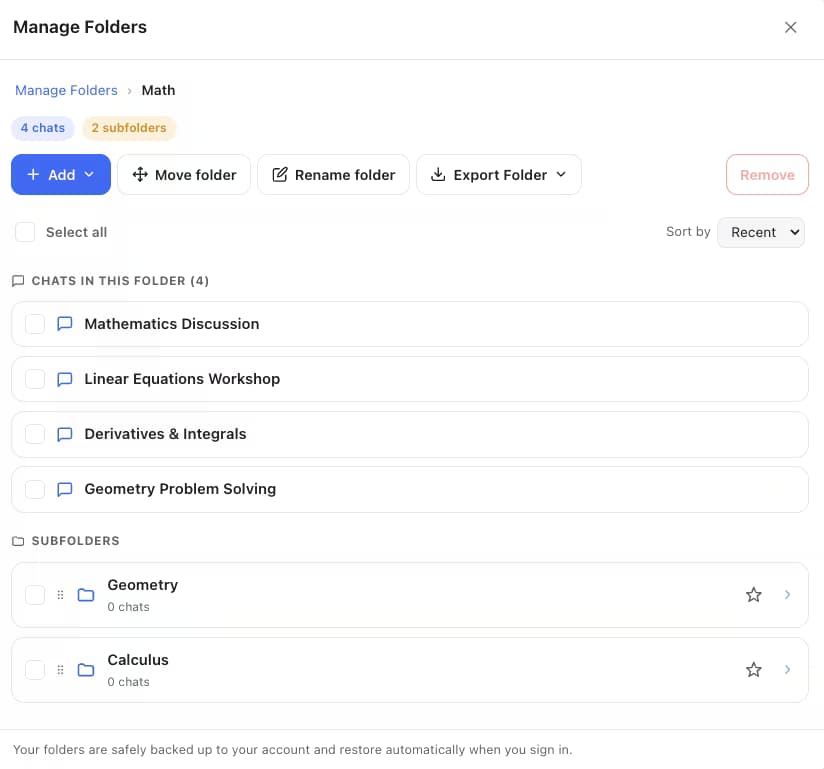
  2. Create a folder per manuscript or clientManage Folders, then Add: one root folder per project, subfolders per chapter, campaign or revision round. File a chat by typing part of its title; there is nothing to drag.
  3. Bookmark the version that landedWhen a rewrite finally works, click the bookmark icon on that message, or on your instruction so you can reuse it. The Bookmarks panel next to Share scrolls you straight back later.
  4. Search for the line, not the chatOpen Search History from the floating AI Toolbox menu and type a phrase from the draft. Every message that contains it comes back highlighted, labelled Q or A, with a link into the conversation.
  5. Export for the editorSwitch on Advanced for the Exact Match toggle when a common word needs pinning down, then export the conversation as Markdown for your notes app or a styled PDF for an editor. TXT is free; the other formats are Premium.
Add to Chrome, free

Smart Tags: your writing, grouped before you file anything

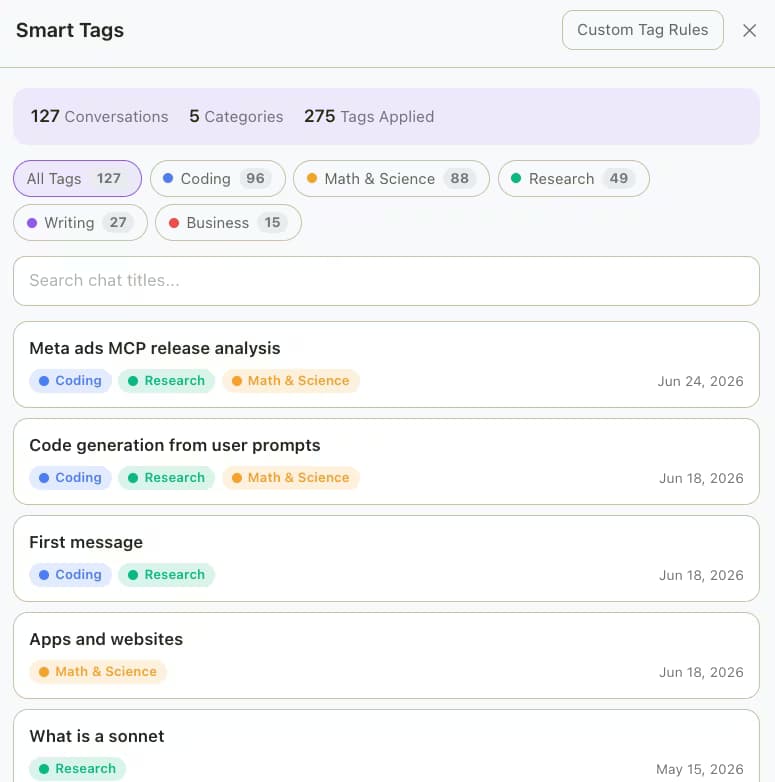
AI Toolbox Smart Tags on Claude grouping 127 conversations under Coding, Math and Science, Research, Writing and Business, each chat listed with its tags and date

Smart Tags reads each conversation and labels it by topic, Writing included, with counts per group and your own keyword rules. On a history you never organised it shows how much of your Claude use is actually the manuscript. Free covers your 50 most recent conversations and 2 custom rules.

The four features writers use

Search, folders, prompts and export, as they ship

Every capture below is the extension running inside claude.ai. The plan each feature needs is stated in the text.

Search

Find the draft by a line you remember writing

The index covers every message in your history, so a distinctive phrase, a character name or a working title finds the conversation that holds it, highlighted, with Q and A labels separating your instructions from Claude's prose. Free returns five results per query; Premium adds unlimited results and the Exact Match toggle that pins down an exact wording.
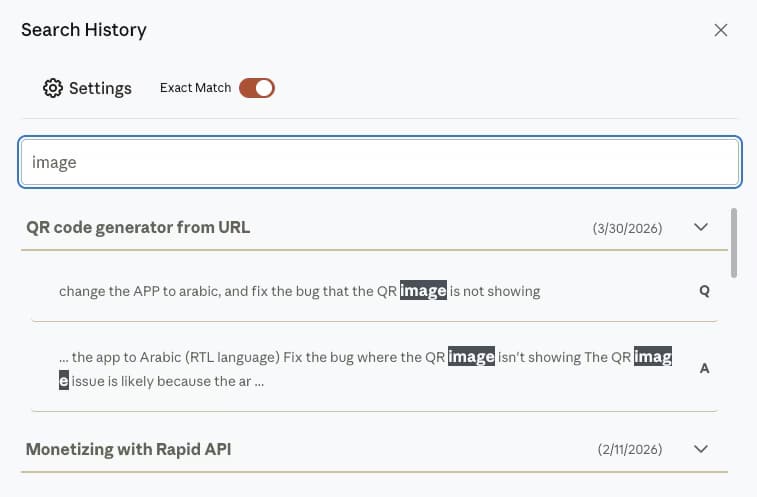
AI Toolbox Search History on claude.ai with Exact Match on and the query highlighted inside two messages of a conversation, each result labelled Q or A

Folders

A folder per manuscript, subfolders per chapter

Manage Folders holds conversations in a tree with counts and breadcrumbs, filed by searching a chat's name rather than dragging, and a whole folder exports as one archive when the project ships. Free covers two root folders with unlimited subfolders; Premium removes the cap and adds bulk move.

AI Toolbox Manage Folders on claude.ai showing a folder with four chats and two subfolders, plus Add, Move folder, Rename folder and Export Folder buttons

Prompt library

Your voice, saved as prompts and chains

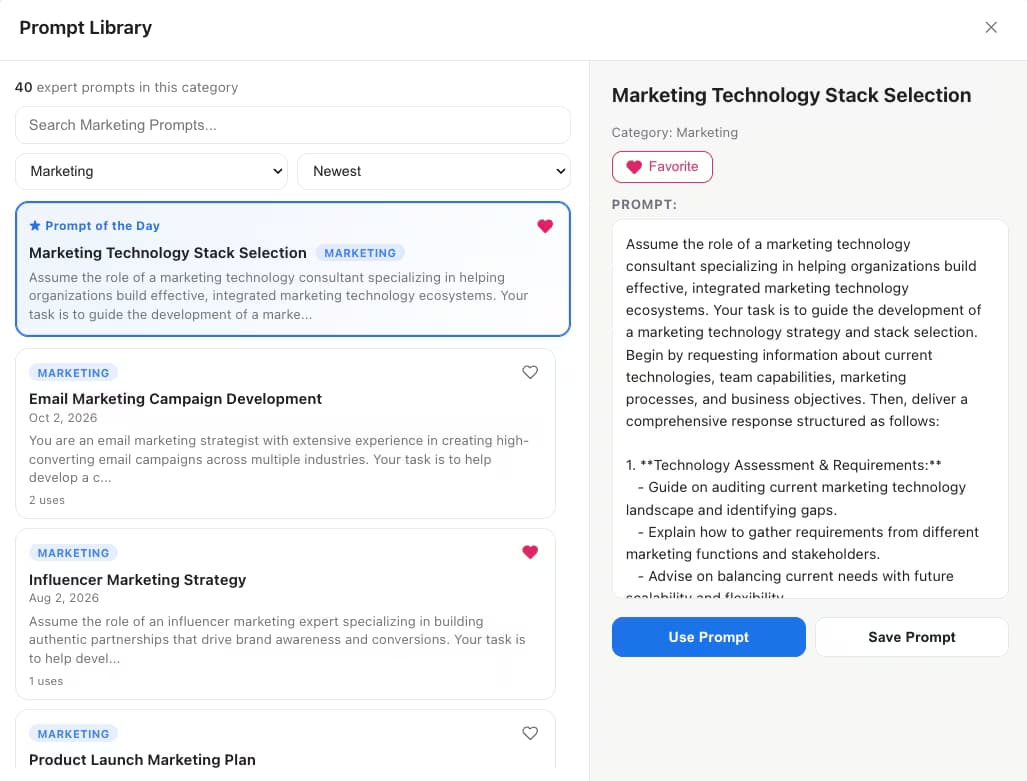
Save the instructions that produce your tone and reuse them in one click, or chain several with {{variables}} for a repeatable brief. The library also ships a curated catalog by category. Free: 2 saved prompts, 2 chains and a limited catalog; Premium removes the caps and unlocks every category.

AI Toolbox Prompt Library on Claude showing 40 Marketing prompts, a Prompt of the Day and a prompt with Use Prompt and Save Prompt buttons

Export

Markdown for your notes, a styled PDF for the editor

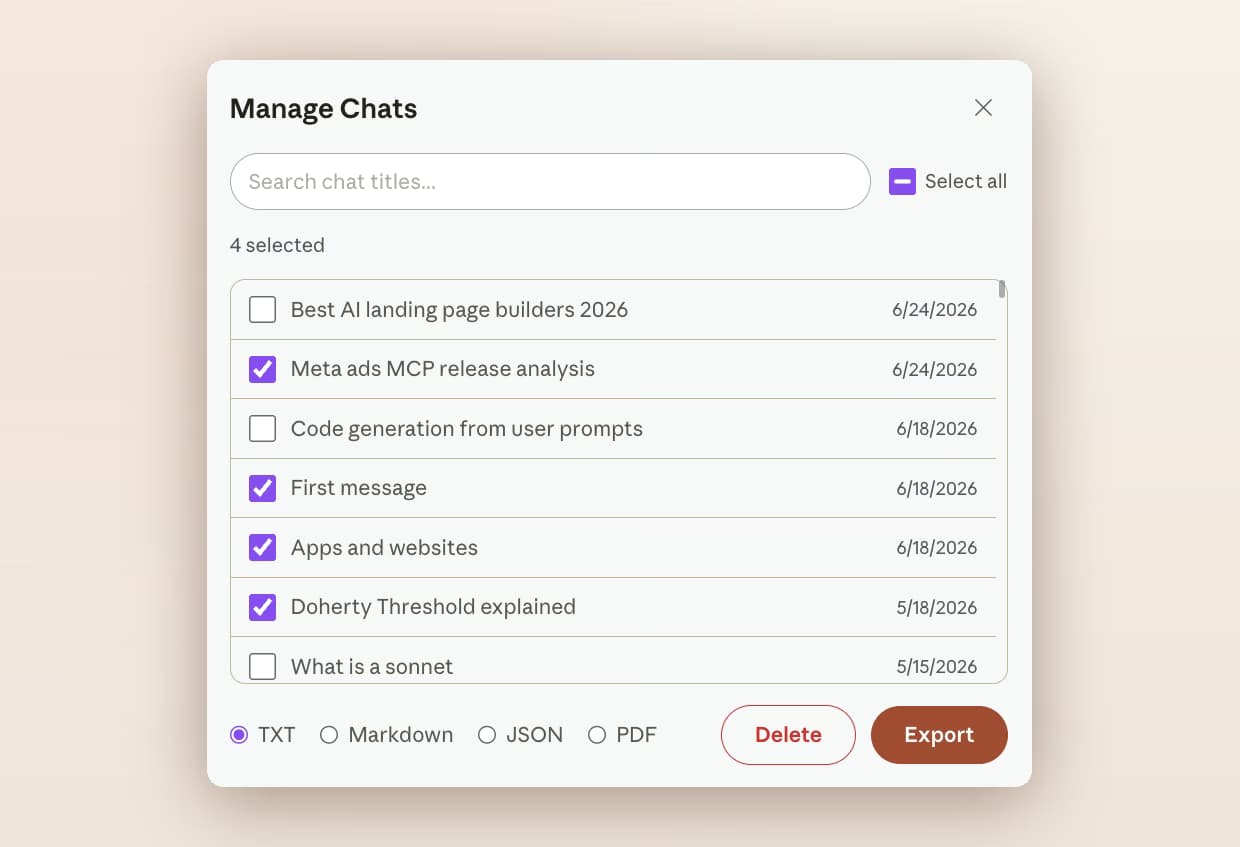
Any conversation exports from Manage Chats as Markdown, PDF, JSON or TXT. Markdown drops into Obsidian or Notion with the title, dates and source URL in its frontmatter; the PDF is styled and paginated with formatting kept, right-to-left text included. Free exports as TXT; Premium unlocks the other formats and bulk export.

AI Toolbox Manage Chats on Claude with four conversations selected and TXT, Markdown, JSON and PDF format options above the Delete and Export buttons

Scenarios

Where it pays off

Three writing workflows and what to file, bookmark and export in each.

  • Long-form and fiction

    • A folder per manuscript, subfolders per chapter
    • Bookmark the scene version that finally worked
    • Search a character name across every session
    • Export the chapter thread as Markdown for the draft file
  • Client copywriting

    • A folder per client, subfolders per campaign
    • Save the brief as a prompt chain with variables
    • Bookmark the approved copy and the instruction behind it
    • Styled PDF export for the client record
  • Editing and revision

    • Search the phrase the editor flagged
    • Exact match pins down one exact wording
    • @@ an earlier feedback thread into the new session
    • Bookmark each revision decision as you go
  • Works with your editor stack

    Scrivener, Obsidian or Docs holds the manuscript; AI Toolbox keeps the claude.ai side searchable. See the full Claude module.

    Add to Chrome, free

From the Chrome Web Store

What reviewers say about organizing and exporting their work

Public reviews from the listing, shown as captured. The full wall is on the reviews page.

  • Chrome Web Store review by Moses Promotion: The subfolders feature makes organizing chats a breeze.
    Moses Promotion
  • Chrome Web Store review by Dave G: Great extension! Love the export feature.. The support is good, very responsive and helpful!
    Dave G

Read all 46 captured reviews or the live Chrome Web Store listing.

Pricing

Plans and pricing for the Claude module

Free covers bookmarks, search, folders, Smart Tags, the prompt library and TXT export with usage caps. Premium removes the caps on Claude and adds the Exact Match toggle, Markdown, JSON and PDF export and bulk actions. All Access does the same across ChatGPT, Claude, Gemini and Grok, paid once. Not an AI subscription: you keep using your own Claude account.

Free

$0forever

  • Bookmarks in 2 conversations, scroll-back included
  • Full-text search, 5 results per query, Q/A labels
  • 2 root folders with unlimited subfolders
  • 2 saved prompts, 2 chains and single-chat TXT export
Add to Chrome

Premium

$9.99/month

  • Unlimited results with the Exact Match toggle and date range
  • Unlimited folders, bookmark conversations, tags and prompts
  • Markdown, JSON, PDF and whole-folder export
  • Bulk export and delete, full prompt catalog, cross-platform search
Get Premium

All Access LifetimeBest value

$199one-time

  • ChatGPT, Gemini, Claude and Grok included
  • Search all platforms across all four
  • Every future AI platform we add
  • Save $197 vs single Lifetimes
Get All Access

Teams$15/seat/month

All Premium features across the four modules ยท Admin dashboard ยท Team analytics ยท $12/seat/mo billed annually ยท 14-day free trial

See Teams
  • GDPR compliant
  • Secure checkout by Polar
  • 14-day money-back on a first purchase
  • Conversation content stays in your browser

Refunds follow the refund policy; renewals are not refundable. Premium unlocks on the Claude account whose email you enter at checkout, so use the address you sign in with.

FAQ

Questions people ask before installing

Can I save a specific draft version in Claude?

Yes, at message level. Click the bookmark icon in the action bar of the message that holds the draft, or of your own instruction, and the Bookmarks panel next to Share lists it with a rich preview and scrolls you straight back later. Claude bookmarks are plain one-click saves stored on your device; the free plan holds bookmarks in 2 conversations and Premium removes that cap.

How do I find a phrase I remember writing with Claude?

Open Search History from the floating AI Toolbox menu and type the phrase. AI Toolbox indexes every message in your history in the browser, so the line comes back highlighted with a link into its conversation. There is no default keyboard shortcut on Claude; you can assign one at chrome://extensions/shortcuts. Free shows 5 results per query; Premium shows all of them and adds the Exact Match toggle for a wording you need pinned down.

How should I organize Claude conversations by manuscript or client?

Create a root folder per project and subfolders per chapter, campaign or revision round, then add conversations by searching their name inside the folder. Claude Projects hold context on paid Claude plans but have no subfolders; AI Toolbox folders work on any plan. The free plan includes 2 root folders with unlimited subfolders, and Smart Tags labels your 50 most recent chats by topic automatically.

Which export format is best for a manuscript or client work?

Markdown for your own notes system: the file imports cleanly into Obsidian, Notion or Logseq with the title, dates and source URL in its frontmatter. A styled, paginated PDF for an editor or a client record, with formatting and right-to-left text preserved. The free plan exports single chats as TXT; Markdown, JSON, PDF and bulk export are Premium.

Can I reuse the prompts that produce my voice?

Yes. Save any instruction to the prompt library and insert it in one click, or chain several prompts with {{variables}} into a repeatable brief that runs in order inside claude.ai. The free plan includes 2 saved prompts, 2 chains and a limited catalog; Premium removes the caps and unlocks every category.

Is my writing sent anywhere?

No. The search index, folders, tags, bookmarks and saved prompts live in your browser, and every search runs locally, so conversation content is never stored on our servers. PDF export is the one exception: the conversation is rendered on our server and the file returned without a copy being kept. AI Toolbox is GDPR compliant.

Which browsers work?

Any Chromium browser installed from the Chrome Web Store: Chrome, Edge, Brave, Opera and Arc. There is no Firefox version.

40,000+ users ยท 4.7/5 on the Chrome Web Store

Stop losing the draft that worked

Install AI Toolbox, switch the Claude module on, and bookmark the next passage worth keeping the moment Claude writes it. Free, no account, about three minutes.