ChatGPTGeminiClaudeGrok40,000+users on the Chrome Web Store4.7/ 5

Bookmark Claude Messages and Jump Straight Back

claude.ai can star a conversation, but nothing native marks the one message inside it that mattered. The Claude module of AI Toolbox (formerly ChatGPT Toolbox), a Chromium extension by Infi Developments, adds a Bookmark toggle to every message's action bar and a Bookmarks panel next to Share: save a reply or one of your own prompts in one click, then jump straight back to it, scrolled into view, even in a conversation hundreds of turns long.

Free with bookmarks in 2 conversations. Premium removes the conversation cap; room for 200 bookmarked messages per chat either way.

Free plan, 2 bookmark conversations | Premium $9.99/mo | Lifetime $99 | All Access $199 once for all four modules

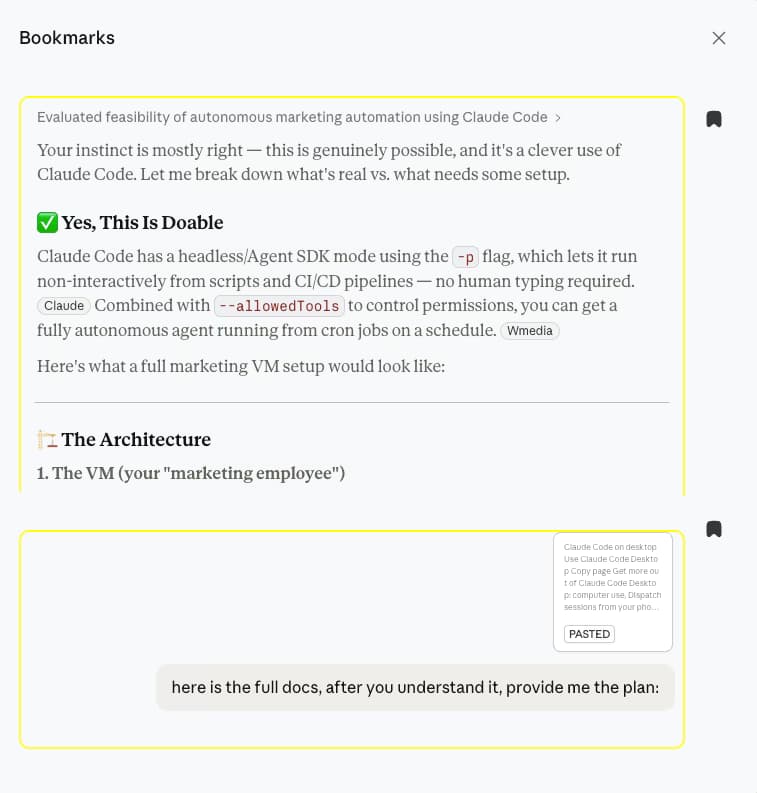
AI Toolbox Bookmarks panel on claude.ai listing two saved messages from a Claude Code feasibility conversation, a Claude reply and a user prompt, each with a bookmark icon and a rich preview

The Bookmarks panel on claude.ai

  • Both sides saved: a Claude reply and the prompt that produced it
  • Rich previews, code and formatting included, pulled from the local database
  • Click a card and the conversation scrolls to that exact message

The gap

What claude.ai gives you, and what it doesn't

A Claude conversation that solves something real runs long. Somewhere in it is the reply you will need again: the fix, the plan, the paragraph. Claude keeps the conversation; it has no way to keep the moment.

The native options all operate at the wrong level. Starring marks a whole chat. Copying an answer into a notes app saves the words but detaches them from the conversation and the link back. And rereading is worse than it sounds, because Claude renders long chats in pieces as you scroll, so even Ctrl+F only sees the part currently on screen.

AI Toolbox works at message level. The bookmark lives on the message itself, inside the conversation, and the panel takes you back to it in one click. Everything is stored in your browser; nothing about your conversations is uploaded.

Why it matters

Here is what you cannot do with Claude alone:

  • Mark a single message: nothing in claude.ai saves one reply inside a conversation; the closest native act is starring the whole chat in the sidebar.
  • Jump back to a passage: refinding one answer in a 100-turn thread means scrolling and rereading, and long chats load in pieces as you scroll.
  • Keep the context: copying an answer into a notes app preserves the words but loses the conversation around them and the link back.
  • See what you saved: there is no native list of the moments that mattered, so every conversation looks the same from the sidebar.

A bookmark is the cheapest note you can take: one click at the moment you already know something matters.

Step by step

How to bookmark a Claude message

Five steps from install to jumping back. Everything here is on the free plan.

About a minute

  1. Install AI ToolboxAdd it from the Chrome Web Store, open the popup, switch the Claude module on and approve the one-time permission for claude.ai. Works on Chrome, Edge, Brave, Opera, Arc and other Chromium browsers; Firefox is not supported.
  2. Open a conversation on claude.aiSign in and open any chat, old or new. AI Toolbox adds its controls into Claude's own interface; there is no separate app to learn.
  3. Click the bookmark icon on a messageEvery message's action bar, next to copy and thumbs up, gets a Bookmark toggle. It works on Claude's replies and on your own prompts, so you can save the instruction that worked as well as the answer.
  4. Open Bookmarks next to ShareA Bookmarks button appears in the conversation header. It lists that conversation's saved messages with rich previews, including code and math, pulled from the local database.
  5. Click a bookmark to jump backAI Toolbox scrolls the conversation to the exact message. That works even in long chats where Claude only renders the part you are looking at.
Add to Chrome, free

The toggle, where Claude's own buttons live

The Bookmark toggle AI Toolbox adds to a Claude message's action bar, next to the copy, thumbs up, thumbs down and retry buttons

The Bookmark toggle sits in the action bar of every message, next to copy, thumbs up and retry, styled like Claude's own controls. It appears on your prompts as well as Claude's replies, and clicking it on an already-bookmarked message removes the bookmark.

What bookmarks can do

Eight things, with the plan stated on each

Every item below is in the shipping Claude module. The core workflow is free; the only paid difference is how many conversations can hold bookmarks.

  • Bookmark any message

    The toggle sits in every message's action bar: Claude's replies, your own prompts, the message with the file attached. One click saves it, one click removes it.

    Plan: Free

  • Scroll-to, even in huge chats

    Claude renders long conversations in pieces. AI Toolbox resolves each bookmark from its local copy of the chat and scrolls you to the exact message anyway.

    Plan: Free

  • Rich previews in the panel

    The Bookmarks panel shows each saved message as it looked, code blocks and math included, so you can tell your bookmarks apart before you jump.

    Plan: Free

  • One button in the header

    Bookmarks sits next to Claude's own Share button in every conversation, listing what you saved in the chat you are looking at.

    Plan: Free

  • Stored on your device

    Claude bookmarks live in your browser's extension storage, keyed to the Claude account you are signed in to. They are not uploaded anywhere.

    Plan: Free

  • Room to actually use it

    Up to 200 bookmarked messages in a single conversation and 1,000 across your history, on any plan.

    Plan: Free

  • Free covers two conversations

    The free plan holds bookmarks in 2 conversations at a time. Premium removes that gate so every project thread can carry its own saved moments.

    Plan: Free: 2 conversations. Premium: unlimited

  • Richer on the other modules

    On ChatGPT, Gemini and Grok, bookmarks add a note, one of six colour labels and a global viewer across every conversation. Claude bookmarks are plain for now.

    Plan: Per module

Bookmarks ship on every module. Compare Claude plans.

In detail

The toggle, the panel, and what the other modules add

One click

A Bookmark toggle in every message's action bar

AI Toolbox adds the toggle beside Claude's own copy and feedback buttons, styled to match, so saving a message costs one click mid-conversation. Click it again on a bookmarked message to remove it. If the free plan's two-conversation allowance is used up, the toggle offers the upgrade instead of failing silently.
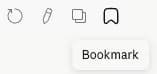
The Bookmark toggle AI Toolbox adds to a Claude message's action bar, next to the copy, thumbs up, thumbs down and retry buttons

Refinding things

Bookmarks are for chats you know; search is for the rest

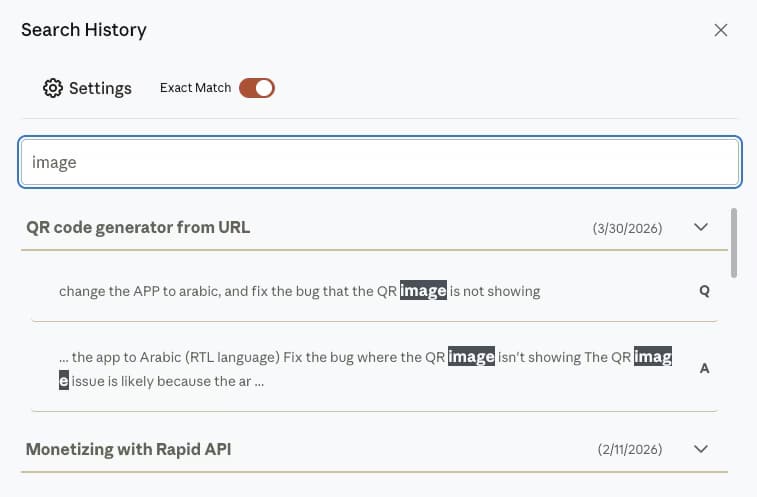
A bookmark takes you back to a moment you knew was important when it happened. For everything you did not think to save, the same extension ships full-text Search History across every synced conversation, with the matching sentence highlighted. The two together are how a long Claude history stays usable.

AI Toolbox Search History on Claude with the query image highlighted inside two messages of a QR code generator conversation, each line labelled Q or A

Other modules

On ChatGPT, Gemini and Grok: notes, labels and a global viewer

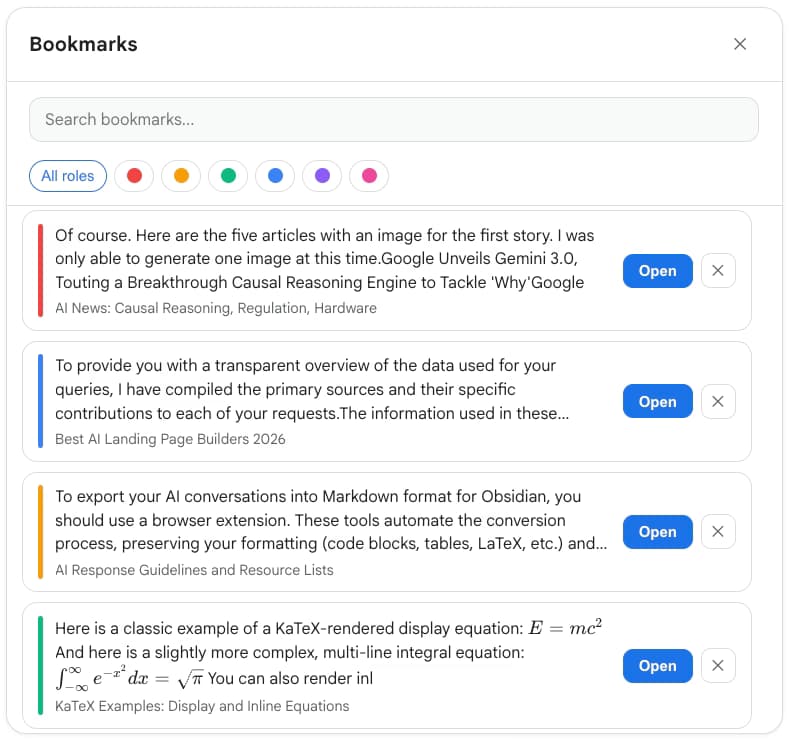
The same bookmark workflow ships on the other three modules with more attached: a freeform note, one of six colour labels, a viewer that lists saved messages across every conversation, and sync to your AI Toolbox account. Claude bookmarks are plain single-click saves for now; the capture shows the Gemini panel.

AI Toolbox Bookmarks panel on Gemini with a search box, six colour label filters and four saved answers listed with their conversation titles

Methods compared

Ways to keep a Claude answer you will need again

Verified against the shipping extension and claude.ai, August 2026.

MethodScopePrecisionGetting back to itCost
Star the chat (native)Whole conversationNone: the star marks the chat, not a messageStarred section in the sidebarFree
Copy into a notes appOne passageExact, but detachedSearch your notes; the Claude context and link are goneFree
Browser Ctrl+FThe part of the chat currently renderedText on screen onlyRe-scroll and re-search every timeFree
AI Toolbox bookmarks (Free)Any message, in 2 conversationsThe exact message, with a rich previewOne click scrolls to it, in-placeFree
AI Toolbox bookmarks (Premium)Any message, in unlimited conversationsThe exact message, with a rich previewOne click scrolls to it, in-place$9.99/mo or $99 lifetime

The same bookmarks ship on the ChatGPT, Gemini and Grok modules, and one All Access Lifetime purchase unlocks Premium on all four.

Use cases

Who bookmarks their Claude messages

  • Developers

    • Bookmark the reply that actually fixed the build
    • Save your own prompt that produced the right architecture
    • Jump back to the code block without rescrolling 80 turns
    • Pair with exact-match search for everything unsaved
  • Writers

    • Mark the draft paragraph worth keeping
    • Save the instruction that got the tone right
    • Return to feedback without rereading the whole session
    • Keep the passage inside its conversation, not a notes file
  • Researchers

    • Bookmark the synthesis you will cite
    • Save the methodology suggestion mid-thread
    • Rich previews make sources easy to tell apart
    • Export the conversation when the paper ships
  • Claude Code and artifact users

    • Save the plan Claude wrote before you started building
    • Bookmark the prompt that generated the component
    • Mark the message with the attached spec
    • Long agentic threads stay navigable
  • Works best with search

    Bookmarks keep the moments you saw coming. Pair them with full-text Claude search for everything you didn't.

    Add to Chrome, free

Privacy

Bookmarks stay on your device

Claude bookmarks are written to your browser's extension storage and the previews render from a local copy of the conversation. Nothing about what you save is uploaded to our servers.

  • Local by default: the bookmark list and the conversation copy it reads from both live in your browser.
  • One account at a time: bookmarks are keyed to the Claude account and organisation you are signed in to, so histories never mix.
  • GDPR compliant: no selling or sharing of user data, and the extension passed Chrome Web Store security review.

Pricing

Plans and pricing for the Claude module

Free covers the whole bookmark workflow in 2 conversations, alongside full-text search, folders and TXT export. Premium removes the caps on Claude. All Access does the same across ChatGPT, Claude, Gemini and Grok, paid once. Not an AI subscription: you keep using your own Claude account.

Free

$0forever

  • Bookmarks in 2 conversations, scroll-to included
  • Full-text search, 5 results per query
  • 2 root folders with unlimited subfolders
  • TXT export and an Artifacts vault for your last 5
Add to Chrome

Premium

$9.99/month

  • Bookmarks in unlimited conversations
  • Unlimited search results with the Advanced panel
  • Markdown, JSON and PDF export, plus bulk actions
  • Unlimited folders, tags, prompts and artifacts
Get Premium

All Access LifetimeBest value

$199one-time

  • ChatGPT, Claude, Gemini and Grok included
  • Bookmarks with notes and labels on the other three
  • Every future AI platform we add
  • Save $197 vs single Lifetimes
Get All Access

Teams$15/seat/month

All Premium features across the four modules ยท Admin dashboard ยท Team analytics ยท $12/seat/mo billed annually ยท 14-day free trial

See Teams
  • GDPR compliant
  • Secure checkout by Polar
  • 14-day money-back on a first purchase
  • Bookmarks stay in your browser

Refunds follow the refund policy; renewals are not refundable. Premium unlocks on the account whose email you enter at checkout, so use the address you sign in to claude.ai with.

AI Toolbox holds a 4.7/5 rating on the Chrome Web Store. Read current reviews on the Chrome Web Store listing.

FAQ

Questions people ask about bookmarking Claude

Can you bookmark messages in Claude natively?

No. claude.ai lets you star a whole conversation in the sidebar, but there is no native way to mark a single message inside one. AI Toolbox adds a Bookmark toggle to every message's action bar and a Bookmarks panel in the conversation header, next to Share.

How many bookmarks do I get?

The free plan holds bookmarks in 2 conversations at a time; Premium ($9.99 per month) or Lifetime ($99 one-time) removes that gate. Within a conversation there is room for 200 bookmarked messages, and 1,000 across your history, on any plan.

What happens when I click a bookmark?

The conversation scrolls to that exact message. Claude renders long chats in pieces as you scroll, so AI Toolbox resolves the bookmark from its local copy of the conversation and navigates there even when the message is not currently on the page.

Can I bookmark my own prompts, or only Claude's replies?

Both. The toggle appears in the action bar of every message, so you can save the instruction that produced a great answer, the message where you attached the spec, or the reply itself.

Can I see bookmarks from all conversations in one list?

On Claude, the Bookmarks panel shows the saved messages of the conversation you have open. A global viewer across every conversation, plus notes and six colour labels per bookmark, ships on the ChatGPT, Gemini and Grok modules; Claude bookmarks are plain single-click saves for now.

Do Claude bookmarks sync between my devices?

No. Claude bookmarks are stored in your browser's extension storage on the device where you made them, keyed to the Claude account you are signed in to. They never leave your machine. If you need a portable copy of a conversation, export it as Markdown or PDF instead.

What if I did not bookmark the message I need?

The same extension includes full-text Search History: type a word or phrase and every synced conversation that contains it comes back with the matching sentence highlighted, 5 results per query on the free plan. Bookmarks are for the moments you knew mattered; search covers everything else.

Which browsers does the Claude module support?

AI Toolbox works on Chrome, Edge, Brave, Opera, Arc and any other Chromium-based browser from a single Chrome Web Store install. Firefox is not supported.

40,000+ users ยท 4.7/5 on the Chrome Web Store

Stop losing the reply that mattered

Install AI Toolbox, switch the Claude module on, and bookmark the next answer worth keeping the moment Claude writes it. Free, no account needed.