
Stop losing important ChatGPT responses.
You spent thirty minutes refining a response with ChatGPT. The final email, the working code block, the approved draft. Now it is buried under fifty messages of follow-up. ChatGPT has no way to mark one specific reply as important. Every message lives in the same flat thread. AI Toolbox (formerly ChatGPT Toolbox) Message Bookmarks add color labels, notes, a centralized sidebar list, and jump-to-message auto-scroll. Click any bookmark in the sidebar and the conversation scrolls to the exact message and highlights it, a workflow Savelore and similar save-and-organize extensions do not offer. The important reply is now one click away, forever.
 Add to Chrome
 Add to Edge
Free plan covers bookmarks in 2 conversations | Premium $9.99/mo | Lifetime $99
Why important responses disappear in ChatGPT
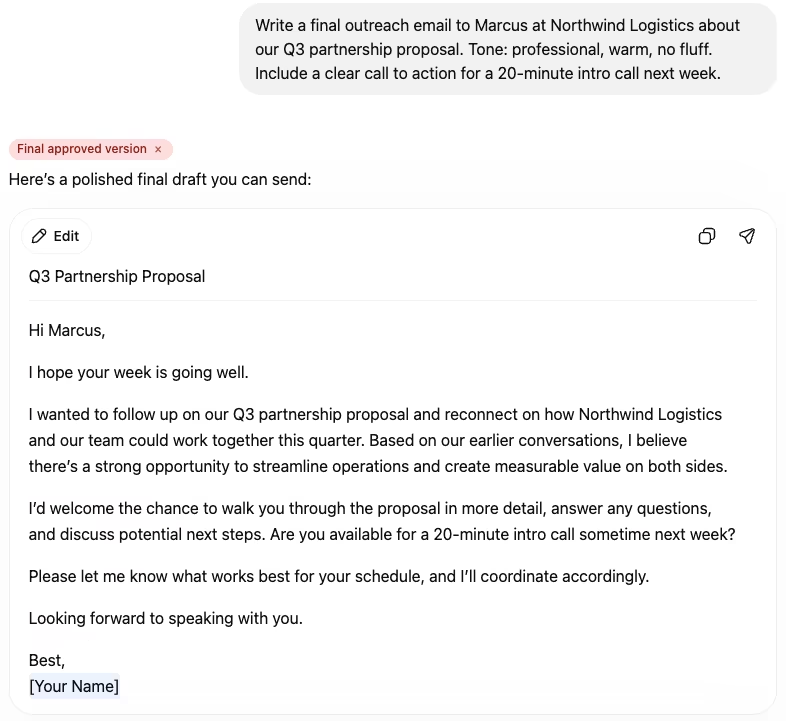
ChatGPT's interface treats every message identically. A first-draft brainstorm and a finalized client deliverable look the same in the message list. The only way to surface an important reply is to remember which conversation it's in, which paragraph it's in, and scroll until you find it.
The pattern repeats across every workflow:
- An iterative writing session ends with a polished final paragraph buried under twelve revisions.
- A long debugging conversation produces a single working code fix inside hundreds of follow-up messages.
- A research thread surfaces a citation in turn 47 that you cannot find when you need it three weeks later.
- A client back-and-forth ends with an “approved” reply that is indistinguishable from the dozen pre-approval drafts above it.
OpenAI does not solve this. ChatGPT has no concept of an “important” message, no way to tag a specific response, and no scroll-to-message navigation. You have to remember.
How message bookmarks work
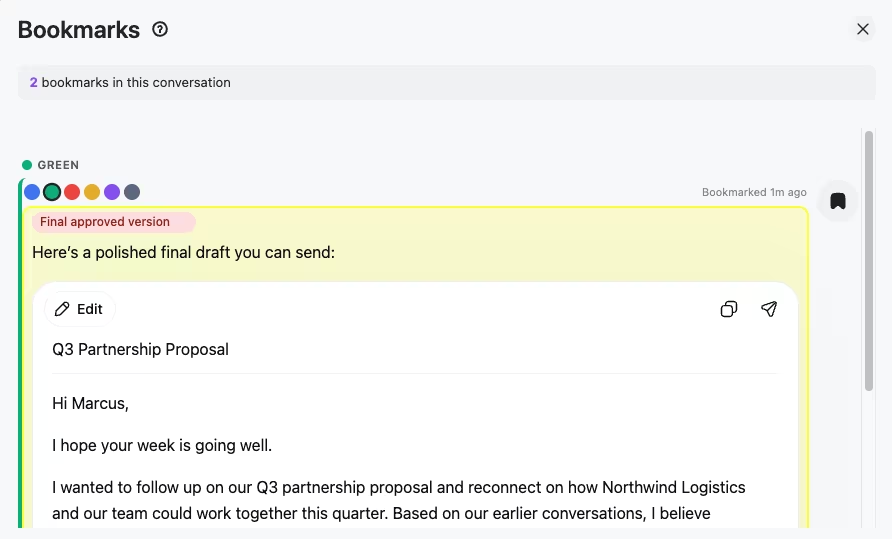
AI Toolbox adds a bookmark icon to every ChatGPT response's action toolbar. One click bookmarks the message. The bookmark supports eight color labels (so you can build a personal system: green for approved, red for critical, blue for follow-up) and an optional text note.
Once a message is bookmarked, three things happen:
- The message gets a colored left border matching your chosen color, so you can spot it while scrolling.
- The note appears as a tag above the response, visible inline without expanding anything.
- The bookmark shows up in the per-conversation Bookmarks panel, where you can see all bookmarks in the conversation at once and click any one to scroll directly to it.
How to save a ChatGPT response: step by step
- Install AI Toolbox from the Chrome Web Store. Free, takes 30 seconds. Works on Chrome, Edge, Brave, Opera, and Arc.
- Open ChatGPT and navigate to any conversation with a response you want to save.
- Hover the response and click the bookmark icon AI Toolbox adds to the message action toolbar.
- Pick a color and add a note (optional). Build your own system over time: a color per project, a color per priority, a color per status.
- Jump back any time by opening the conversation's Bookmarks panel and clicking the bookmark you want. The chat scrolls to that exact message.
Bookmark patterns that actually work
A few systems users have built with the color labels and notes:
- Approval workflow. Green = approved by stakeholder, yellow = waiting for review, red = revision requested. The note carries the reviewer's name and date.
- Project status. One color per active project. Quickly scan a conversation to find every bookmark related to a specific deliverable.
- Research citation tracking. Blue = direct quote, green = paraphrase, purple = needs verification. The note carries the source.
- Code snippets that work. Green for the version that compiled and passed tests. Note carries the test scenario it passed.
Frequently Asked Questions
ChatGPT has no native concept of an 'important' message. Every response sits in the same flat list, regardless of whether it is a final draft you spent 30 minutes refining or a one-line throwaway. The interface treats all messages equally, so the important ones get buried as the conversation continues.
Pinning works at the conversation level (the entire chat stays at the top of the sidebar). Bookmarks work at the message level. You can bookmark one specific response inside a long conversation and jump straight back to it later, even if the conversation has 200 more messages afterwards.
Yes. Every bookmark supports a color label (one of eight colors) and an optional text note. The color shows as a left border on the message and as a tag near the response. The note is freeform: write what makes the message important, who approved it, what version it represents, anything that helps your future self find it.
Free includes 2 bookmarked messages. Premium ($9.99/month or $99 one-time Lifetime) unlocks unlimited bookmarks across unlimited conversations, plus color labels and notes.
Bookmarks are stored on our servers, encrypted at rest, so they sync across your devices and come back when you reinstall and sign in again, on the free plan too. Your conversations themselves stay in your browser and on OpenAI's servers, never on ours.
Bookmark Folders for ChatGPT (804 Chrome Web Store users, 4.3 stars from 24 ratings, last updated August 2025) is a smaller specialist that adds conversation-level folders and a Favorites folder for ChatGPT. The free tier limits you to 3 folders and 5 favorites; Pro unlocks unlimited. It is ChatGPT-only with no Claude or Gemini module. AI Toolbox is the workspace generalist: 40,000+ users, 4.7/5 rating, Chrome Featured badge, message-level bookmarks (with color labels and notes) rather than conversation-level folders, plus folders, full-text search, bulk export, prompt library, and a single install covering ChatGPT, Claude, and Gemini. Pick Bookmark Folders if you only want conversation-level folder organization for ChatGPT and never need Claude or Gemini coverage. Pick AI Toolbox if you want message-level bookmarking and a workspace that covers all three host sites.
ChatGPT Organizer (also marketed as MarkBook) is a 38-user Chrome extension (4.5 stars from 4 ratings, last updated March 4 2026, 100% free with no paid tier, no Featured badge) that adds smart auto-folders to ChatGPT and Gemini only. The auto-classification mechanism is not publicly documented (rules-based vs AI-classified is not stated on the listing), and there is no full-text message search, no prompt library, no message-level bookmarks, no RTL layout, no bulk export, and no Claude support. AI Toolbox is the depth pick for the same buyer: 40,000+ users, 4.7/5 rating, Chrome Featured badge, manual folder hierarchy with search-to-add (no black-box classification), full-text search across every message body, message bookmarks with color labels and notes, prompt library with {{variable}} placeholders and the // and .. shortcuts, RTL layout, bulk export to TXT/Markdown/JSON/PDF/ZIP, and a single install covering ChatGPT, Claude, and Gemini. Pick MarkBook if you only use ChatGPT or ChatGPT + Gemini, you want 100% free, and you hate manual folder management. Pick AI Toolbox if you use Claude, need full-text search across messages, rely on a prompt library, want message-level bookmarks, work in Arabic or Hebrew, or just want a Chrome Featured extension with 500x the installed base. The two can also run together (MarkBook auto-sorts intake, AI Toolbox handles the project-level workspace on top). Full comparison: <a href="/chatgpt-toolbox-competitors/chatgpt-toolbox-vs-chatgpt-organizer-markbook-2026">ChatGPT Toolbox vs ChatGPT Organizer (MarkBook)</a>.
Yes. The Bookmarks panel shows every bookmarked message across the current conversation, each with its color label, the note you added, and a timestamp. Clicking a bookmark scrolls the conversation directly to that message and highlights it briefly so you can spot it.
Install AI Toolbox and never lose a response again
40,000+ users. 4.7/5 on the Chrome Web Store. Free forever for 2 bookmarked messages. Premium starts at $9.99/month or $99 one-time Lifetime, with a 14-day money-back guarantee.
Also using Claude for writing? Claude module bookmarks bring the same scroll-to-bookmark workflow to claude.ai. The Gemini module has message bookmarks too, each marked in one of 6 colors, and Gemini search across all conversations finds any Gemini message by its content, not just titles. For all four modules in one purchase, see All Access Lifetime ($199).
Considering Savelore for the same use case? See the head-to-head: AI Toolbox vs Savelore: which is better for saving important AI responses. Savelore lifts saved responses out into a separate Notion-synced library; AI Toolbox bookmarks stay inside the conversation with color labels, freeform notes, and click-to-scroll back to the exact message.