ChatGPTGeminiClaudeGrok40,000+users on the Chrome Web Store4.7/ 5

Folders, tags and an artifact vault for Claude

The Claude module of AI Toolbox (formerly ChatGPT Toolbox) adds folders and subfolders, smart tags, full-text search with an exact-match toggle, TXT, Markdown, JSON and PDF export, message bookmarks, a prompt library and a vault that keeps every artifact Claude generates, inside claude.ai. One install also covers ChatGPT, Gemini and Grok.

Free plan, no account. Premium $9.99/month or $99 once. Works on Chrome, Edge, Brave, Opera and Arc.

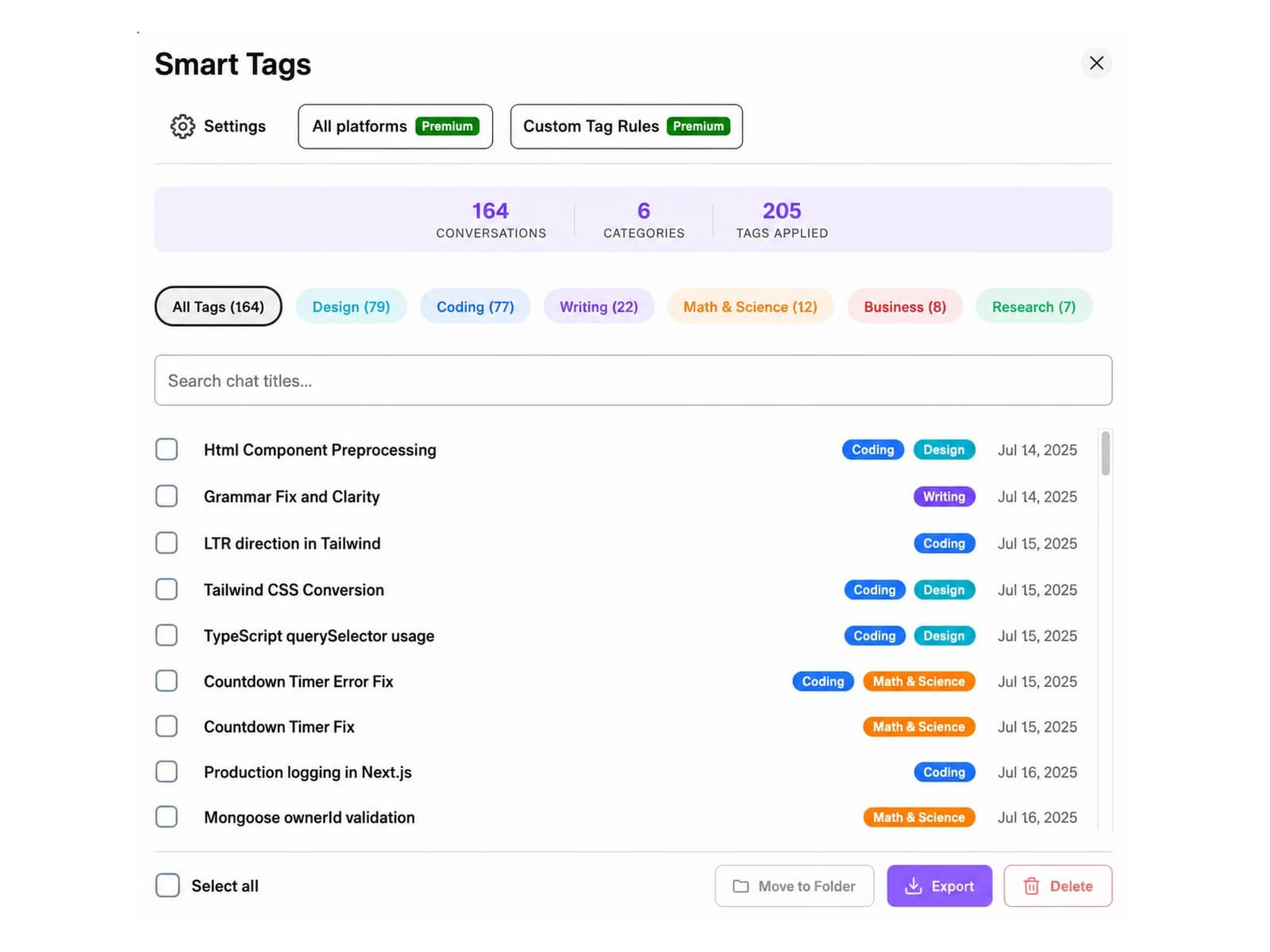
Smart Tags manager listing 164 conversations across 6 categories with filter chips, search, and bulk Move, Export, and Delete

Your Claude history, filed by the extension

  • Chats tagged Coding, Writing, Research, Math or Business
  • Filter by tag, then move, export or delete in bulk
  • Free: last 50 conversations and 2 custom rules

Claude with and without it

What Claude does not include, and what the module adds

Claude has Projects, title search, and one-at-a-time artifact downloads. AI Toolbox adds the rest in one install, with 40,000+ users and a 4.7/5 Chrome Web Store rating behind it.

FeatureClaude aloneWith AI Toolbox
Conversation organisationProjects, no foldersFolders and subfolders for any past chat, added by search
SearchTitle search; conversational search on paid plansFull-text search across every message with an exact-match toggle
ExportCopy a reply, or the account-wide data exportTXT, Markdown with YAML frontmatter, JSON or PDF per conversation
ArtifactsDownload one at a time from the artifact panelArtifact Vault: every artifact captured, filtered by type, downloaded in one click
Message bookmarksNoneBookmark any reply and jump back to it from one panel
Prompt reuseProject instructions onlySaved prompts with // insert, a curated library, prompt chaining with ..
Context limitNo indicatorLive context window meter with a handoff to a fresh chat
Bulk delete and exportOne conversation at a timeManage Chats: multi-select export and delete with search and filters

What the module adds

Six things you will use every day on claude.ai

Every feature works on the free plan with a usage cap. Premium removes the caps. Captures below are the real extension, not mockups.

Full-text search

Find the message, not just the conversation title

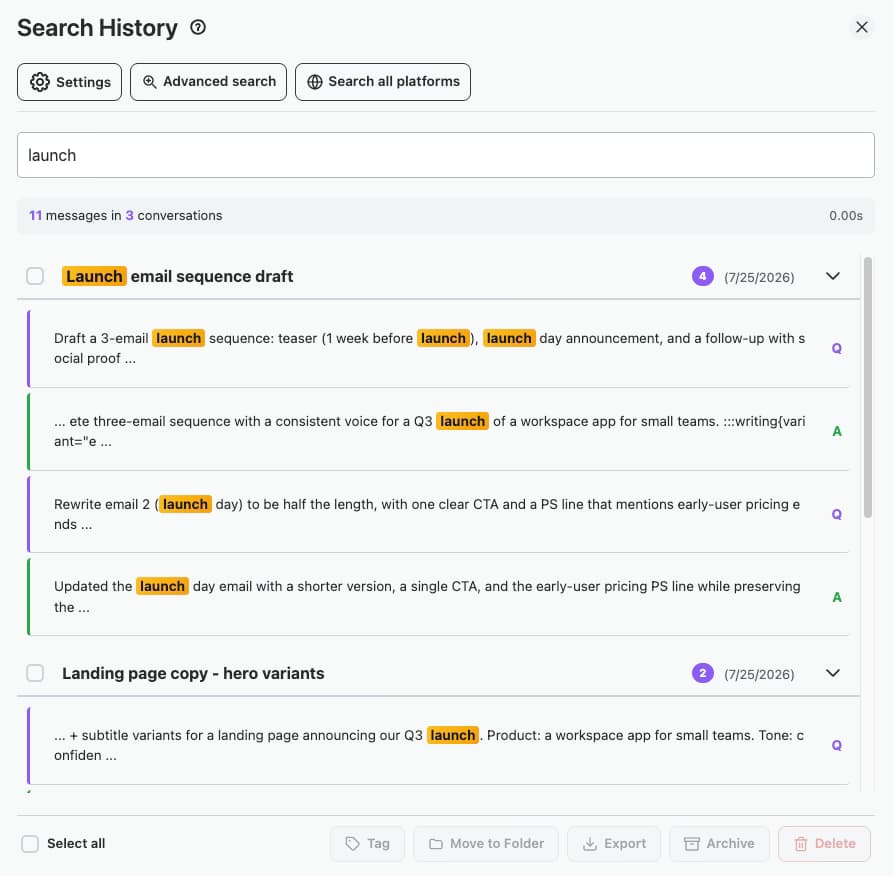
Claude's search matches titles, and its conversational search on paid plans answers questions about a project. AI Toolbox searches every message in every conversation you have opened, with an exact-match toggle for precise phrases. Results highlight the match and jump straight to the message. The index lives in your browser.

  • Free: 5 results per query
  • Premium: unlimited results with infinite scroll
  • Search all four platforms at once with Ctrl+Shift+. (Premium)
Search History panel showing 'launch' matched in 11 messages across 3 conversations, with per-message highlights and bulk actions

Artifact Vault

Stop losing the code and documents Claude writes

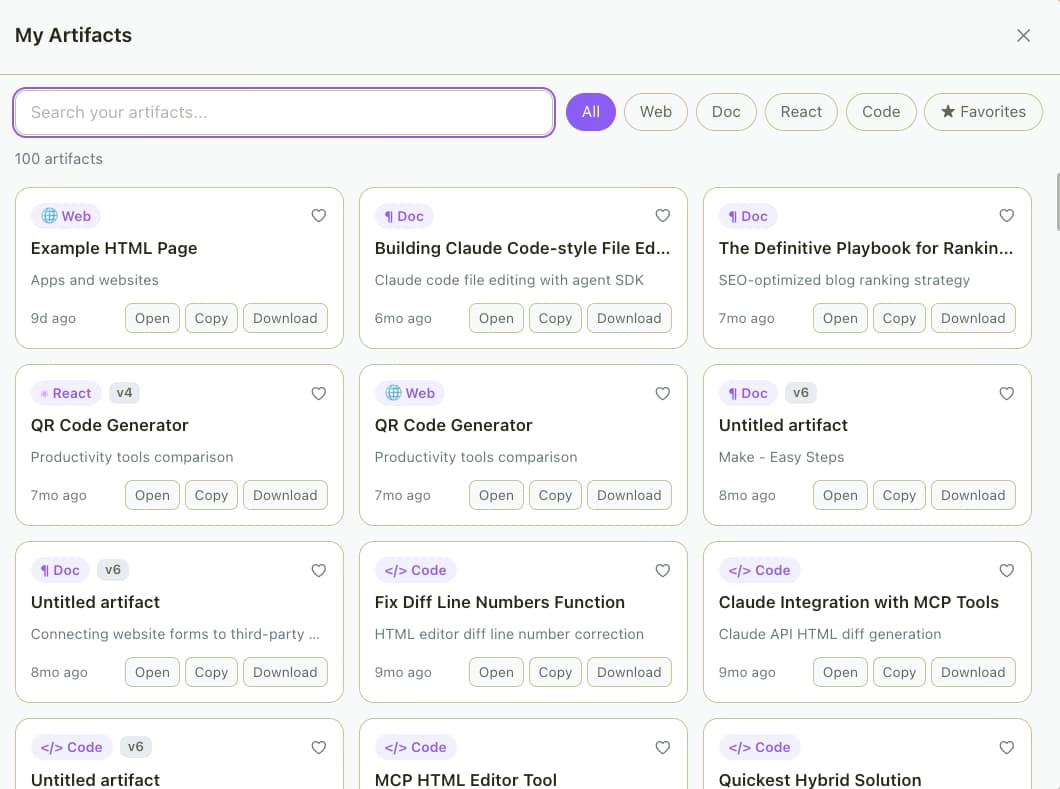
Every artifact Claude generates is captured into a searchable vault: filter by type, mark favorites, jump back to the conversation it came from, and download it in the correct file type with one click instead of hunting through old chats.

  • Free: your 5 most recent artifacts
  • Premium: the full vault
  • Exclusive to the Claude module
Artifact Vault listing 100 Claude artifacts filtered by Web, Doc, React, and Code with Open, Copy, and Download actions

Export

Your Claude conversations, in files you own

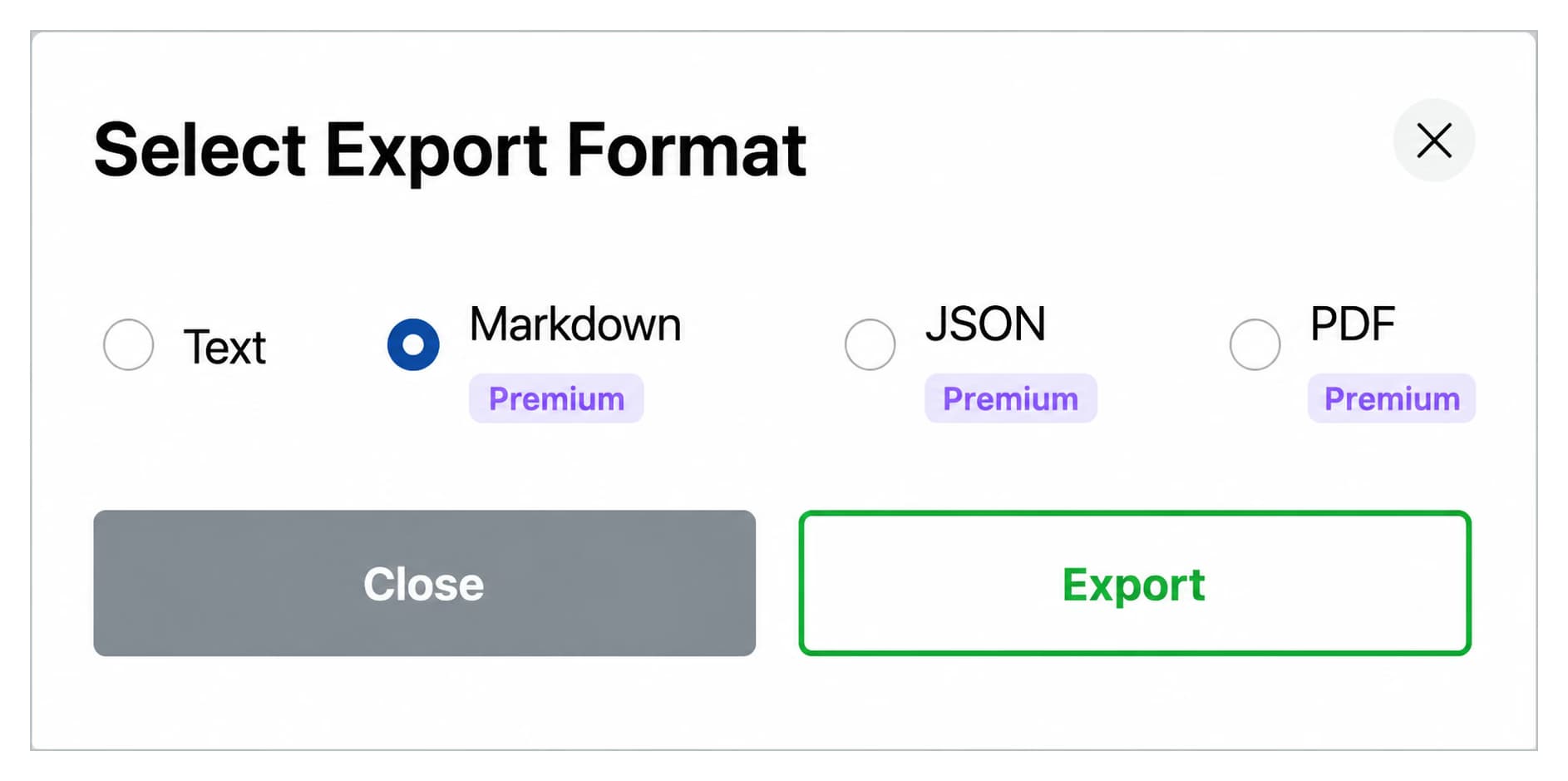
Export any conversation as TXT, Markdown, JSON or PDF. Markdown ships with YAML frontmatter (title, date, url, source) so files drop into Obsidian, Logseq or Pandoc without cleanup. Manage Chats lets Premium users select many conversations and export or delete them together.

  • Free: TXT export, 3 per day
  • Premium: Markdown, JSON and PDF, plus multi-select export in Manage Chats
  • Claude's own option is the account-wide data export
Select Export Format dialog with Text, Markdown, JSON, and PDF options

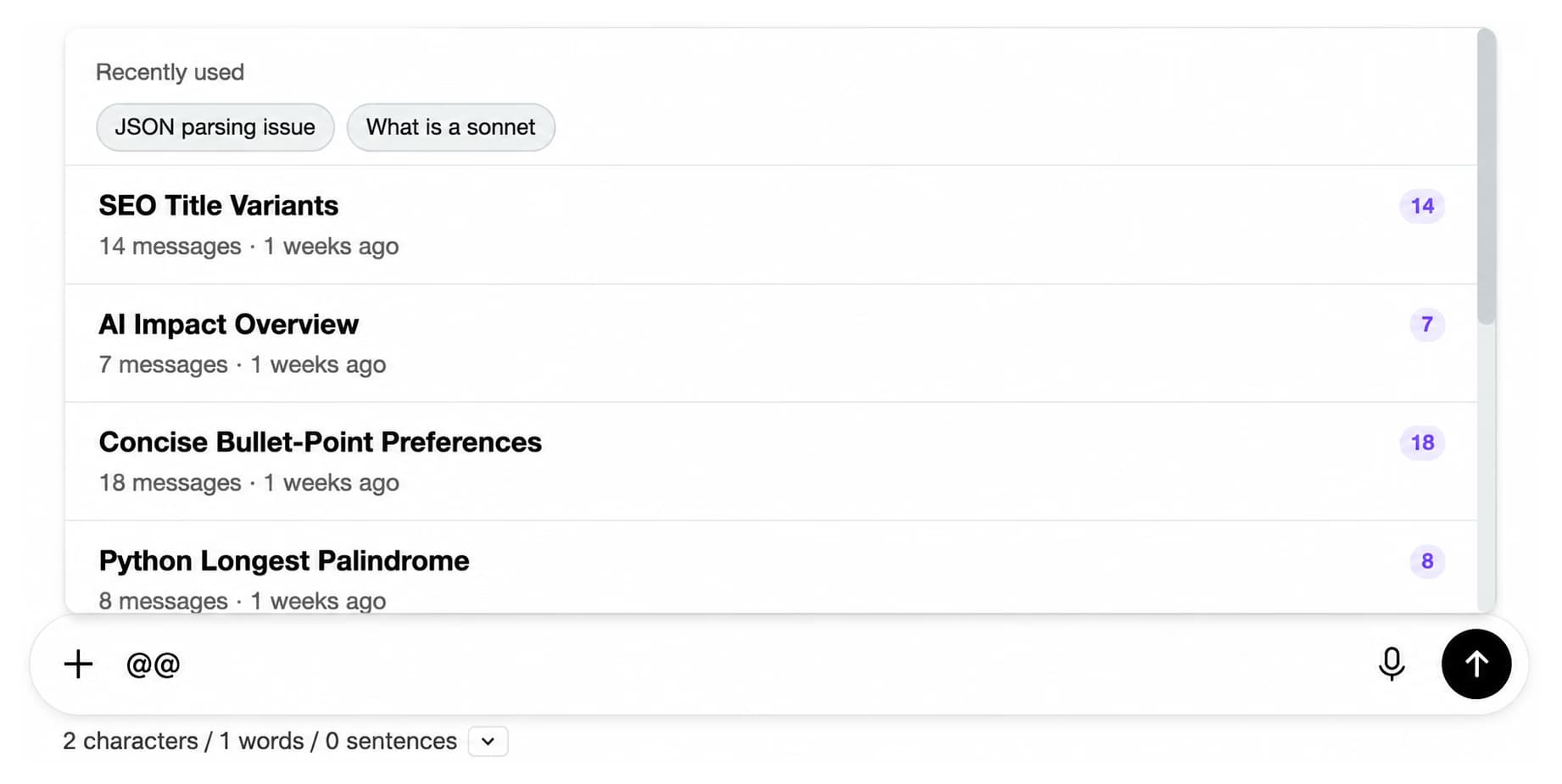
Context mentions (@@)

Bring an old conversation into the new one

Type @@ in the prompt box and pick any past Claude conversation to inject as context. Long conversations are summarised first so they fit, which beats pasting half a chat by hand or re-explaining the project every time.

  • Free: 3 mentions per day
  • Premium: unlimited
  • Works alongside Claude Projects, not instead of them
Context Mentions picker opened by typing @@ listing recent conversations with message counts

Prompt library and chaining

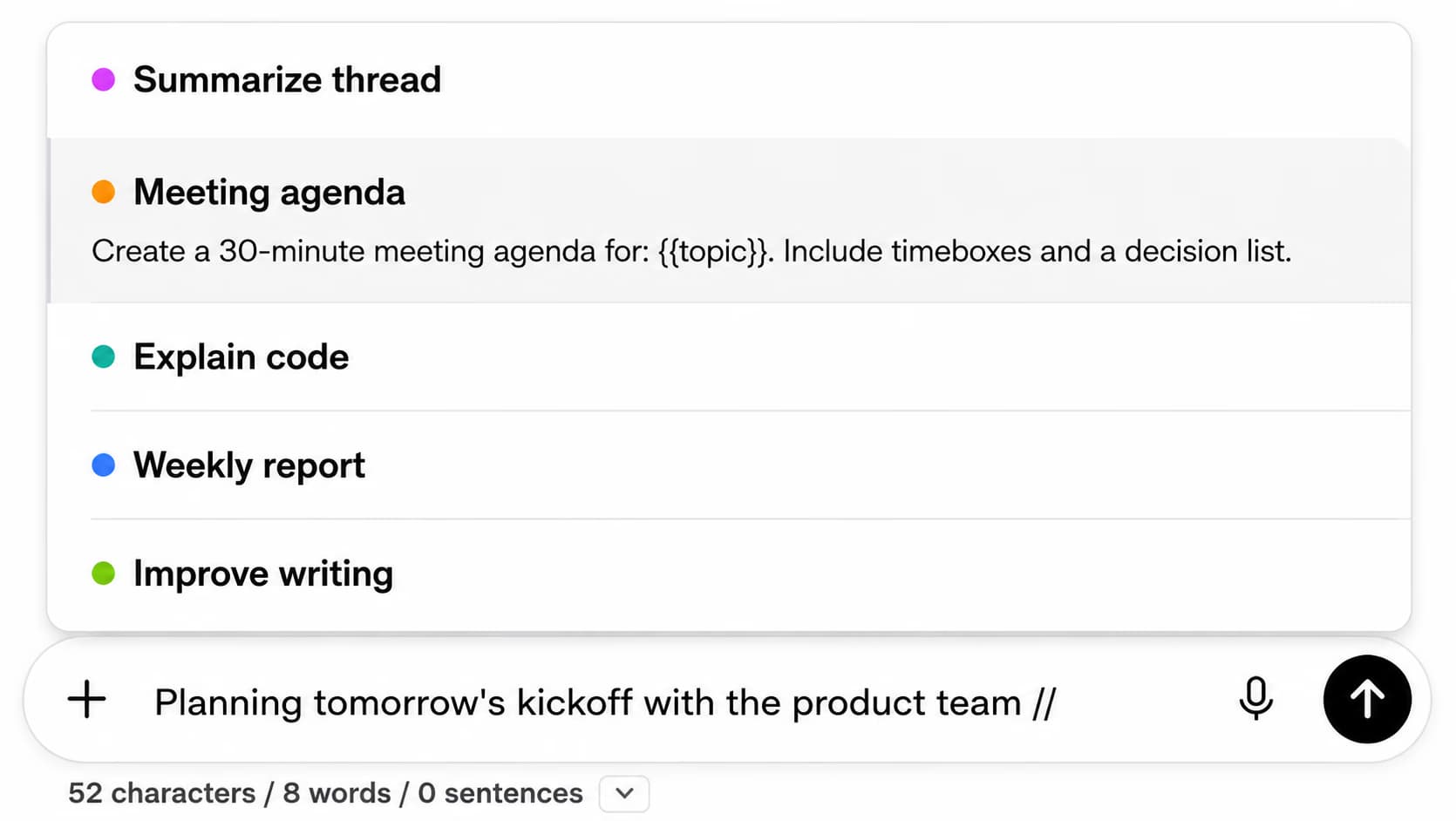
Type // and your best prompt is in the box

Save prompts with {{placeholder}} variables and insert them with the // shortcut. Browse a curated library by category with favorites. Prompt chaining, triggered with .., queues prompts and waits for each Claude reply before sending the next.

  • Free: 2 saved prompts, 2 chains, 5 library prompts per category
  • Premium: unlimited prompts, chains and favorites, every category
  • Same prompts on ChatGPT, Gemini and Grok
Inserting a saved prompt by typing // in the compose box

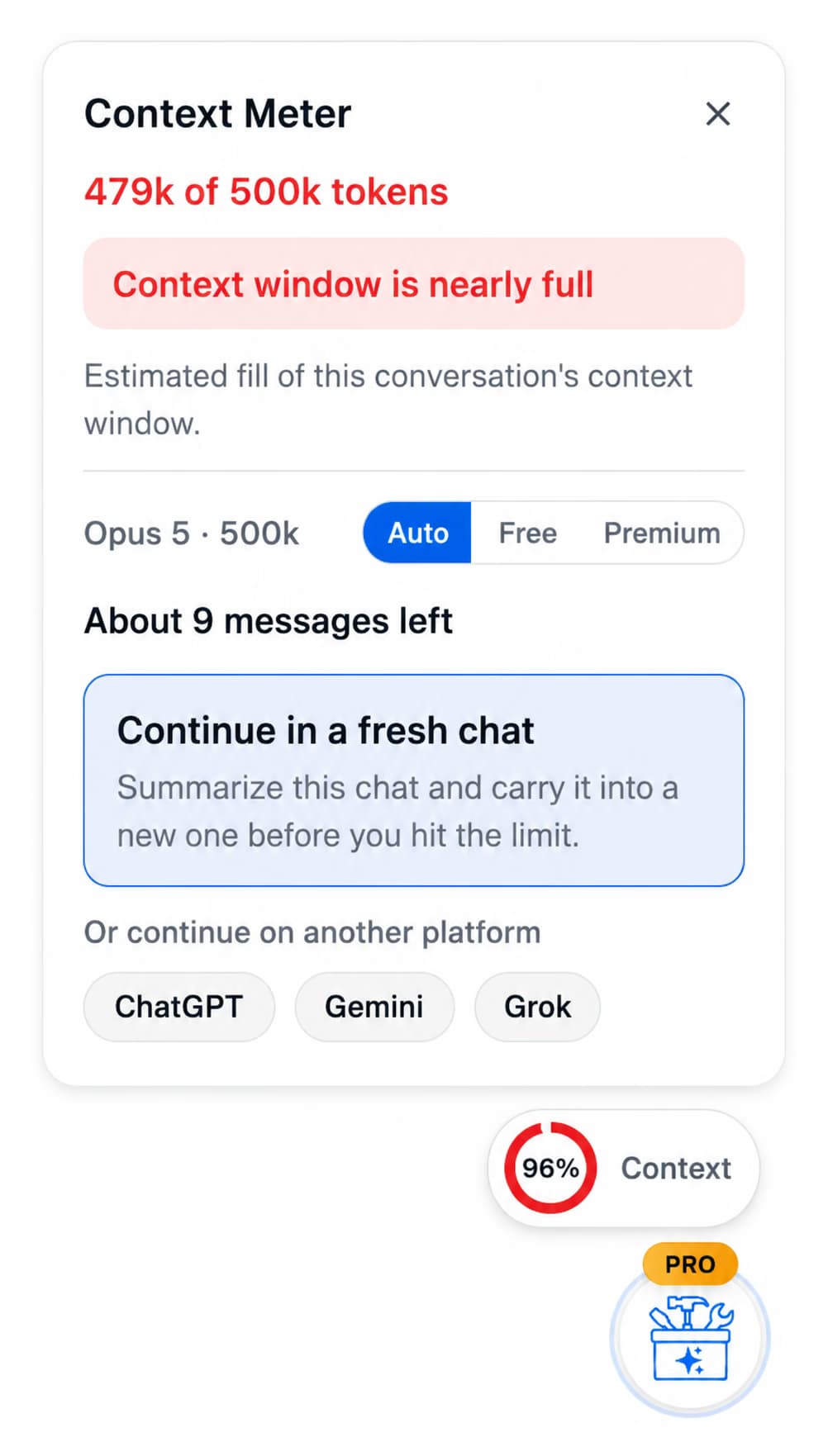
Context window meter

Know when a long thread is about to lose detail

A live meter shows how much of Claude's context window the current conversation is using, with an estimate of how many messages are left. When it fills up, hand the conversation off to a fresh chat with a summary instead of watching answers degrade.

  • Free: the meter, always on
  • Premium: the one-click handoff to a fresh chat
  • Sized for Claude's context limits
Context Meter panel at 479k of 500k tokens with 'About 9 messages left' and a Continue in a fresh chat handoff

Also in the Claude module

Six more, from folders to Manage Chats

  • Folders and subfolders

    Claude has Projects, not folders. File any past chat by client, topic or month: open a folder, search a chat by name, and add it (search-to-add, not drag-and-drop). Free: 2 folders. Premium: unlimited.

  • Smart tags

    Auto-categorise conversations by keyword into color-coded tags, with custom rules you control. Runs on the local cache, no AI cost. Free: last 50 conversations, 2 rules. Premium: full history, up to 50 rules.

  • Message bookmarks

    Bookmark a reply inside any Claude conversation and jump back to it from one panel, with scroll-to and highlight. Free: bookmarks in 2 conversations. Premium: unlimited.

  • Prompt chaining

    Queue a sequence of prompts with {{variables}} and run them one after another with the .. trigger; each step waits for Claude's reply. Free: 2 chains. Premium: unlimited.

  • Manage Chats

    A modal that lists every conversation with search and filters, select all, and multi-select export or delete, for clearing out months of chats in one pass. Premium.

  • Ten languages, RTL included

    The module UI runs in 10+ languages, with a mirrored right-to-left layout for Arabic and Hebrew. Free.

Who uses it

Built for people who live in Claude

  • DevelopersKeep every artifact Claude writes in the vault, filter by Code or React, download in the right file type, and export the conversation as Markdown with frontmatter for the repo docs.
  • Writers and editorsFile drafts into folders by client or piece, bookmark the reply that landed, and reuse the brief as a saved prompt instead of pasting it again.
  • Researchers and analystsFind the exact phrase across months of conversations with the exact-match toggle, tag history by topic, and export sessions for citation.
  • TeamsShare a prompt library across ChatGPT, Claude, Gemini and Grok with seats, roles and one invoice on the Teams plan.

Install in under a minute

No account, no card, nothing to configure

  1. Add to a Chromium browserInstall AI Toolbox from the Chrome Web Store. Works on Chrome, Edge, Brave, Opera, Arc and any other Chromium browser. No account needed to start.
  2. Turn on the Claude moduleOpen the extension popup and switch Claude on. Go to claude.ai and AI Toolbox appears in the sidebar and starts indexing your conversations locally.
  3. Search, file and bookmarkOpen Search History, toggle exact match, and find any message. Add chats to folders by search, bookmark the replies that matter.
  4. Upgrade when you need moreFree includes 5 search results per query, 2 folders, bookmarks in 2 conversations, 5 artifacts and TXT export. Premium ($9.99/month or $99 once) removes the caps.
Add to Chrome, free

Pricing

Free to start, $9.99 a month or $99 once for everything

Single-module plans cover Claude. All Access Lifetime covers Claude, ChatGPT, Gemini, Grok and every module we add later. Not an AI subscription: you keep using your own Claude account.

Free

$0forever

  • 5 search results per query
  • 2 folders, 2 bookmarks
  • 2 saved prompts
  • 3 exports per day
Install free

Premium

$9.99/ month

  • Unlimited search results, folders and bookmarks
  • Markdown, JSON and PDF export, Manage Chats
  • The full artifact vault, smart tags, chains
  • Cancel anytime
Start Premium

Or $59/year, 51% less, on the pricing page

All AccessBest value

$199lifetime, one-time

  • ChatGPT, Gemini, Claude and Grok modules
  • Save $197 vs four single Lifetimes
  • Every future platform included
  • Pay once, own forever
Get All Access
  • GDPR compliant
  • Secure checkout by Polar
  • 14-day money-back on a first purchase
  • Conversation content stays in your browser

Refunds follow the refund policy; renewals are not refundable. Existing Claude Toolbox subscriptions and lifetime licenses keep working with no migration.

Privacy

Your Claude conversations stay in your browser

AI Toolbox indexes your Claude conversations into IndexedDB in your browser and searches that local index, so searches are fast and private and conversation content is never uploaded. Only what you build in the extension (folder names, prompts and tags) syncs, encrypted at rest. GDPR compliant, and it passes Chrome Web Store security review.

  • The extension only needs access to claude.ai
  • The search index and artifact vault live on this device
  • Uninstall removes all local data immediately; synced data is deleted on request within 30 days

FAQ

Questions Claude users ask before installing

Does Anthropic Claude have built-in search?

Claude has basic search on all plans (including free) that finds conversations by title. On paid plans (Pro, Max, Team, Enterprise), Claude also offers conversational RAG search via natural-language queries like 'what did we discuss about X?', scoped per-project. AI Toolbox adds full-text search across all message content with an exact-match toggle, something Claude's native search does not offer on any plan.

How does AI Toolbox search work for Claude?

AI Toolbox indexes your Claude conversations locally in your browser. When you search, it queries this local index for instant results. Your conversations never leave your browser. The only data sent to our servers is your account email for subscription verification.

How do bookmarks work in the AI Toolbox Claude module?

You can bookmark individual messages within any Claude conversation to save important responses. Free users can bookmark messages in up to 2 conversations. Paid users can bookmark unlimited messages total. Click a bookmarked message to scroll directly to it and highlight it.

Is the AI Toolbox Claude module free?

The Claude module of AI Toolbox has a free plan that includes 5 search results per query and bookmarks on up to 2 conversations. Monthly ($9.99/month) and Lifetime ($99 one-time) plans unlock unlimited search results, unlimited bookmarks, export to TXT, Markdown (with YAML frontmatter), and JSON, and all features. All Access Lifetime ($199) covers Claude, ChatGPT, and Gemini in one purchase.

Does Markdown export include YAML frontmatter for Obsidian or Logseq?

Yes. Every Markdown export (.md) ships with a YAML frontmatter block at the top of the file containing title, date (ISO format), url (the original claude.ai link), and source. The file drops straight into Obsidian, Logseq, Pandoc, Quartz, Astro, Hugo, and any other tool that reads YAML frontmatter, with no post-processing required.

Is my data safe with AI Toolbox?

Yes. Your Claude conversations are stored locally in your browser. The only data sent to our servers is your account email to verify your subscription status. We follow GDPR-compliant data handling practices and use encryption at rest.

Does AI Toolbox support RTL languages on Claude?

Yes. AI Toolbox supports 10+ languages including Arabic and Hebrew with right-to-left (RTL) layout support across the Claude module. The interface mirrors panels, controls, and labels based on your selected language.

Get started

Bring folders, search and the vault to Claude today

AI Toolbox (formerly ChatGPT Toolbox). Install free, switch Claude on in the popup, open claude.ai, and every artifact and message is already searchable. Upgrade only if the free limits get in your way.