
Back up your Claude history before you lose it with AI Toolbox.
Anthropic's native Settings → Privacy → Export data is a slow, account-wide archive, not a per-conversation backup. AI Toolbox (formerly ChatGPT Toolbox) bulk export starts instantly, lets you pick conversations by checkbox or a whole folder, and chooses your format (TXT, Markdown, JSON, or PDF) at export time. Export a single chat, a hand-picked set, or an entire folder as one ZIP that keeps your structure. Free for single-chat TXT. Premium for everything else.
 Add to Chrome
 Add to Edge
Free TXT export | Premium $9.99/mo unlocks Markdown, JSON, PDF, bulk ZIP | Lifetime $99
Why Claude's native export does not work as a backup
Anthropic gives you one backup mechanism: Settings → Privacy → Export data. Request it and, eventually, you get an email with a data archive of your entire Claude account. That satisfies a compliance checkbox but fails everywhere else:
- No format choice. Everything comes out as a bulk archive, not the format your workflow needs.
- No selectivity. You cannot back up just one conversation, just one folder, or just the last month.
- No speed. The account archive can take hours or days to arrive.
- No structure. The output is not built for Obsidian, Notion, Git, or any modern note-taking system.
If you treat Claude as a workspace, not just a chatbot, you need a backup mechanism that runs in real time and lets you choose what to back up and how.
The four backup formats, when to use each
Text (.txt), free
A clean, readable transcript that preserves the full message flow. Best for printing, quick offline reference, or sharing a single conversation with someone who does not need formatting. Included on the free plan for single conversations.
Markdown (.md), Premium
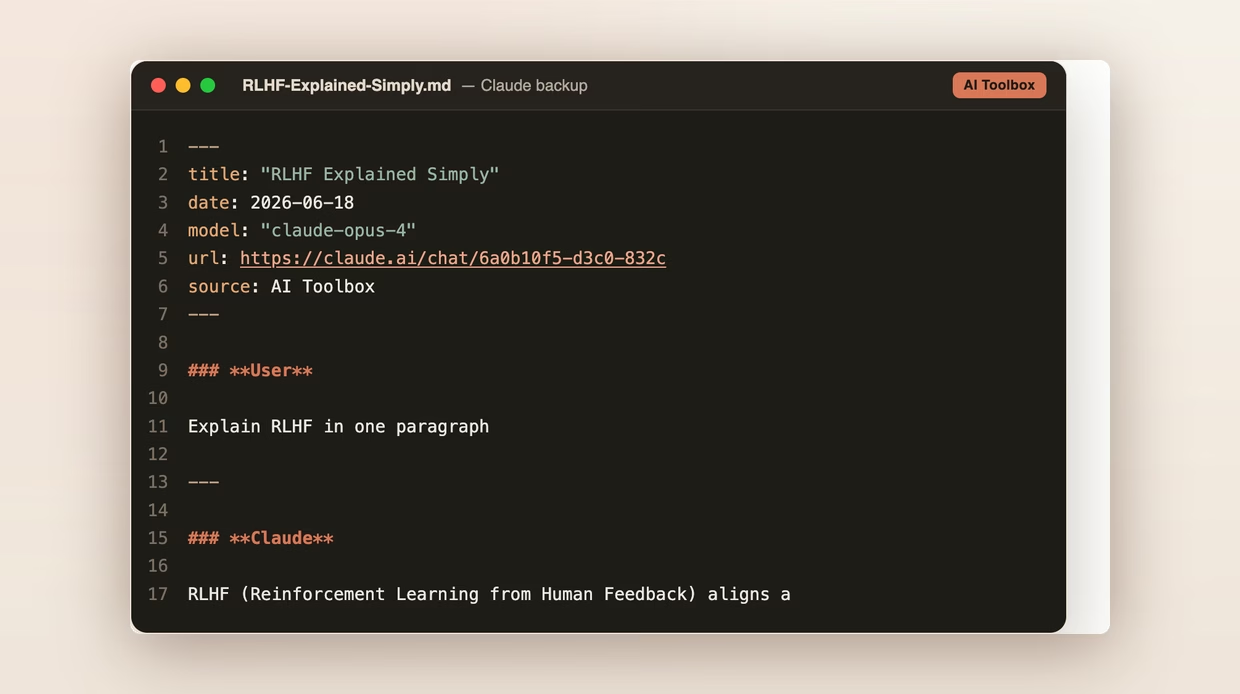
Formatted text that preserves headings, code blocks, lists, and inline emphasis. Every .md export ships with a YAML frontmatter block at the top (title, date, model, url linking back to the original claude.ai conversation, and source: AI Toolbox) so the file drops directly into Obsidian, Logseq, Pandoc, Quartz, Astro, Hugo, Notion, Bear, and VS Code with zero manual metadata entry. Markdown is the universal portable format and almost always the right answer for personal knowledge bases.
JSON (.json), Premium
Machine-readable export with full metadata: timestamps, message IDs, role labels, and complete conversation structure. The right choice for developer workflows, compliance archives, data analysis pipelines, and anything that needs to be parsed programmatically rather than read by a human.
PDF (.pdf), Premium
Formatted, print-ready document with page numbers and clear role labels. Best for formal documentation, stakeholder reviews, compliance records, and long-term archives where you want a fixed-format document rather than editable text.
How to back up your Claude conversations
- Install AI Toolbox from the Chrome Web Store. Free, takes 30 seconds. Works on Chrome, Edge, Brave, Opera, and Arc.
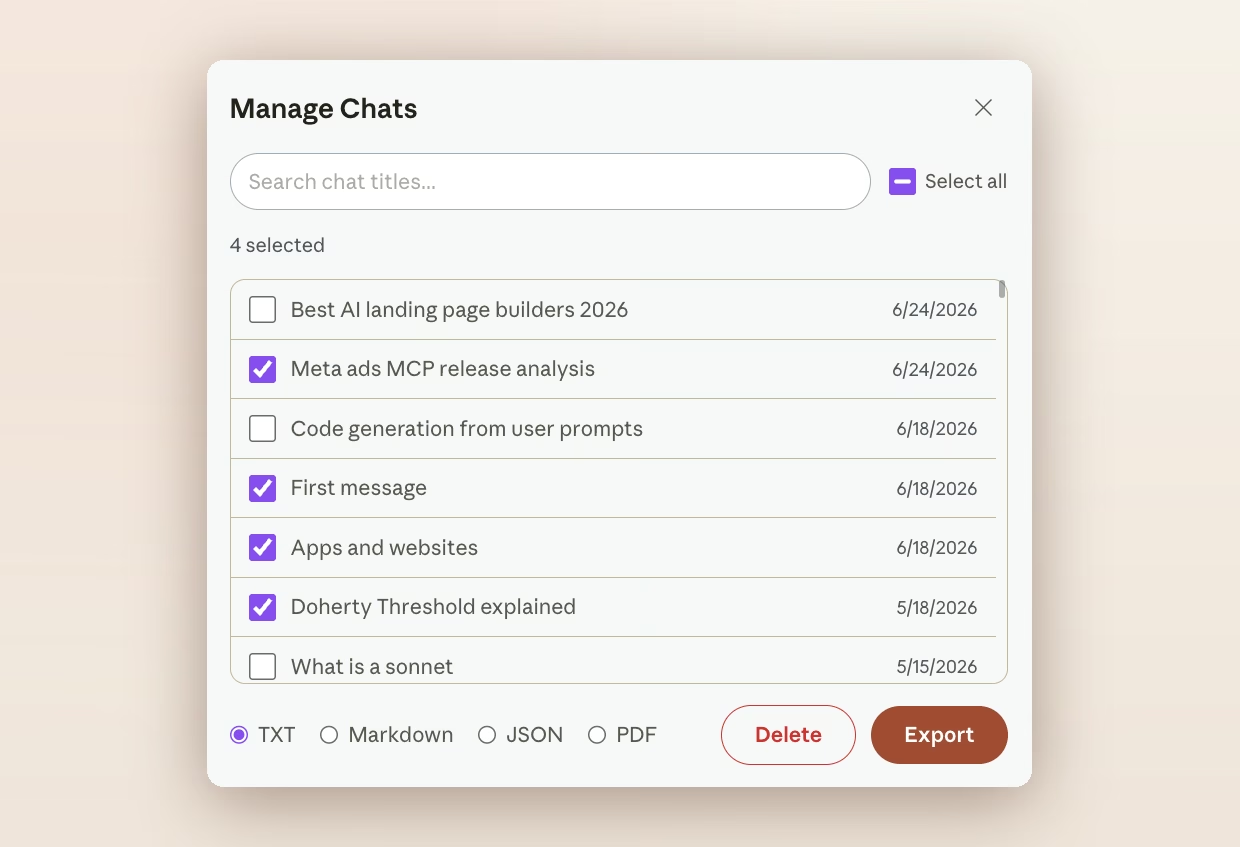
- Open Manage Chats from the AI Toolbox popup on claude.ai. Every conversation appears in one searchable list.
- Select the conversations you want to back up by checkbox, or click Select all to grab everything. You can also open a folder and use Export Folder to back up a whole folder at once.
- Pick a format. Markdown is the default for most knowledge-base workflows. JSON for developer pipelines. PDF for compliance. Text is free when you export a single chat; bulk export in any format is Premium.
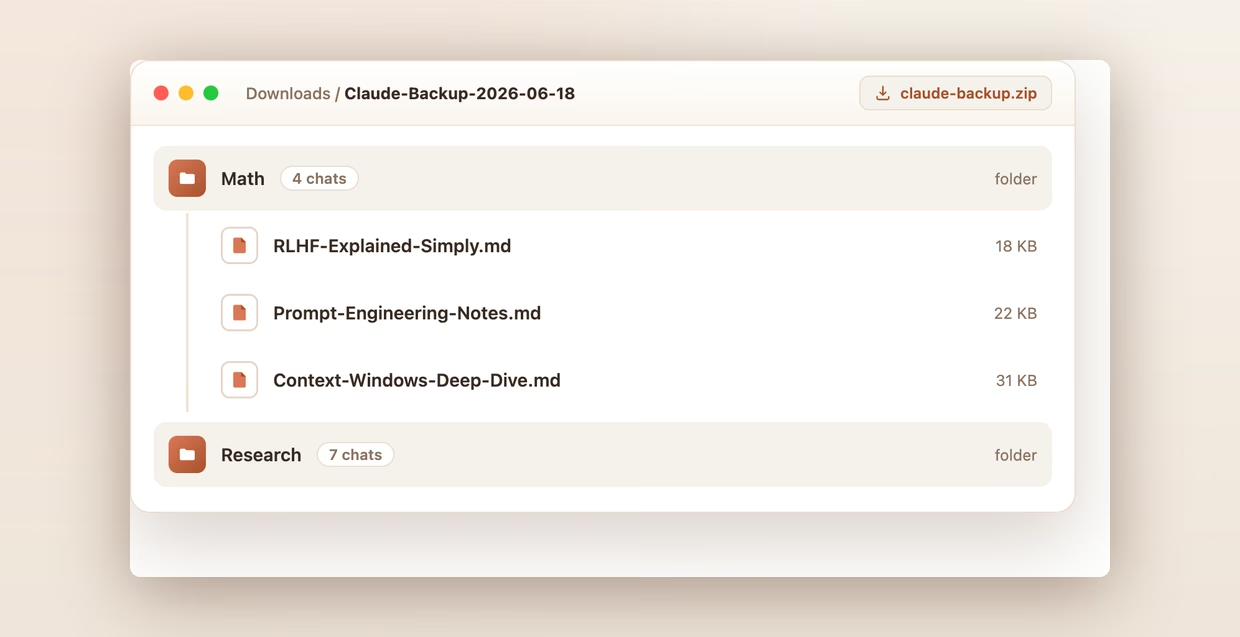
- Click Export. The ZIP downloads instantly. Unzip it and you have one file per conversation, organized exactly the way it was in Claude.
Backup patterns for different workflows
- Personal knowledge base. Monthly Markdown export of your entire Claude history into Obsidian. Full-text search across years of conversations, even offline.
- Compliance archive. Quarterly JSON export of any folder containing client-facing or regulated work. Timestamps and message IDs satisfy audit trails.
- Code-history archive. Per-project JSON export. Commit the export file alongside the project so future engineers can see the AI-assisted reasoning behind decisions.
- Course-by-course archive for students. A folder per subject, exported once per semester as Markdown. Searchable study material, forever.
Frequently Asked Questions
Anthropic offers one option: Settings > Privacy > Export data, which emails you a data archive of your whole Claude account. You cannot export a single conversation, choose a readable format, or back up just one project. It is an account dump, not a usable per-conversation backup. For anyone who uses Claude seriously, that workflow is unusable as a day-to-day backup.
Four formats from the Select Export Format selector: Text (.txt, free), Markdown (.md, Premium), JSON (.json, Premium with full metadata), and PDF (.pdf, Premium, formatted with page numbers). Bulk export across selected conversations or a whole folder downloads as a single ZIP with one file per conversation.
Yes. Open Manage Chats from the AI Toolbox popup on claude.ai, tick the conversations you want (or click Select all), pick your format, and click Export. Every selected conversation is packaged into a single ZIP. You can also open any folder and use Export Folder to back up an entire folder at once, structure preserved.
Only for PDF. TXT, Markdown and JSON exports run entirely in your browser. The files are built locally from the conversation content already loaded in Claude and downloaded directly to your device. PDF is the one exception: the text of that chat is sent to our servers to render the file, and nothing is kept afterwards.
Markdown preserves headings, code blocks, lists, and inline emphasis in a portable plain-text format, with a YAML frontmatter block at the top (title, date, model, url, source) so the file drops straight into Obsidian, Logseq, Pandoc, Quartz, Astro, and Hugo without manual metadata entry. It also pastes cleanly into Notion, Bear, VS Code, and GitHub gists. PDF is best for compliance and stakeholder review. JSON is best when you need timestamps, message IDs, and structured metadata for code or analysis.
Free includes Text (.txt) export for single conversations. Premium ($9.99/month or $99 one-time Lifetime) unlocks Markdown, JSON, PDF, and bulk export as a single ZIP. 14-day money-back guarantee on Premium and Lifetime, subject to refund policy.
Install AI Toolbox and stop losing Claude chats to silent account changes
40,000+ users. 4.7/5 on the Chrome Web Store. Free for single-chat Text export. Premium starts at $9.99/month or $99 one-time Lifetime for Markdown, JSON, PDF, and bulk ZIP. 14-day money-back guarantee, subject to refund policy.
Need per-conversation export options too? See Claude export, or set up backups for Gemini and ChatGPT, or get every module with All Access Lifetime ($199).