
Back up your ChatGPT history before you lose it with AI Toolbox.
OpenAI's native Settings > Data controls > Export Data sends a slow email link that can take 24 to 48 hours and arrives as a generic ZIP. AI Toolbox (formerly ChatGPT Toolbox) bulk export starts instantly, lets you pick conversations by checkbox or folder, and chooses your format (TXT, Markdown, JSON, PDF, or ZIP) at export time. Pick a per-conversation format, or export an entire folder as a single ZIP that preserves your structure. Free for single-chat TXT. Premium for everything else.
 Add to Chrome
 Add to Edge
Free TXT export | Premium $9.99/mo unlocks Markdown, JSON, PDF, bulk ZIP | Lifetime $99
Why ChatGPT's native export does not work
OpenAI provides one backup mechanism: Settings → Data Controls → Export Data. Click it and you get an email, eventually, containing a ZIP of your entire account history in HTML. That works for compliance but fails everywhere else:
- No format choice. Everything comes out as HTML wrapped in an account-export package.
- No selectivity. You cannot back up just one conversation, just one folder, or just the last month.
- No speed. The export email can take hours or days to arrive.
- No structure. The HTML output is not built for Obsidian, Notion, Git, or any modern note-taking system.
If you treat ChatGPT as a workspace, not just a chatbot, you need a backup mechanism that runs in real time and lets you choose what to back up and how.
The four backup formats, when to use each
Text (.txt), free
A clean, readable transcript that preserves the full message flow. Best for printing, quick offline reference, or sharing a single conversation with someone who does not need formatting. Included on the free plan for single conversations.
Markdown (.md), Premium
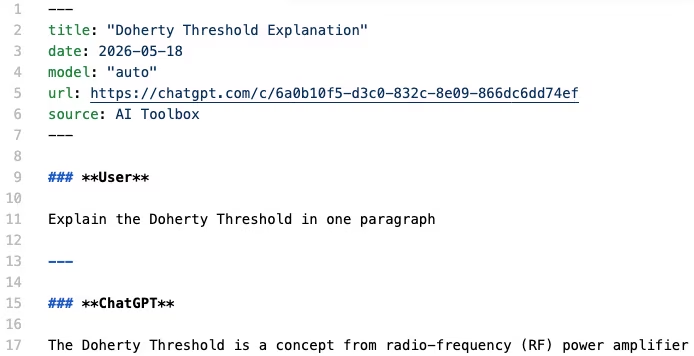
Formatted text that preserves headings, code blocks, lists, and inline emphasis. Every .md export ships with a YAML frontmatter block at the top (title, date, model, url linking back to the original ChatGPT conversation, and source: AI Toolbox) so the file drops directly into Obsidian, Logseq, Pandoc, Quartz, Astro, Hugo, Notion, Bear, and VS Code with zero manual metadata entry. Markdown is the universal portable format and almost always the right answer for personal knowledge bases.
JSON (.json), Premium
Machine-readable export with full metadata: timestamps, message IDs, role labels, and complete conversation structure. The right choice for developer workflows, compliance archives, data analysis pipelines, and anything that needs to be parsed programmatically rather than read by a human.
PDF (.pdf), Premium
Formatted, print-ready document with page numbers and clear role labels. Best for formal documentation, stakeholder reviews, compliance records, and long-term archives where you want a fixed-format document rather than editable text.
How to back up a folder of ChatGPT conversations
- Install AI Toolbox from the Chrome Web Store. Free, takes 30 seconds. Works on Chrome, Edge, Brave, Opera, and Arc.
- Group your conversations into a folder. Open the folder you want to back up; if it does not exist yet, create it and use the in-folder search box to add the conversations you want.
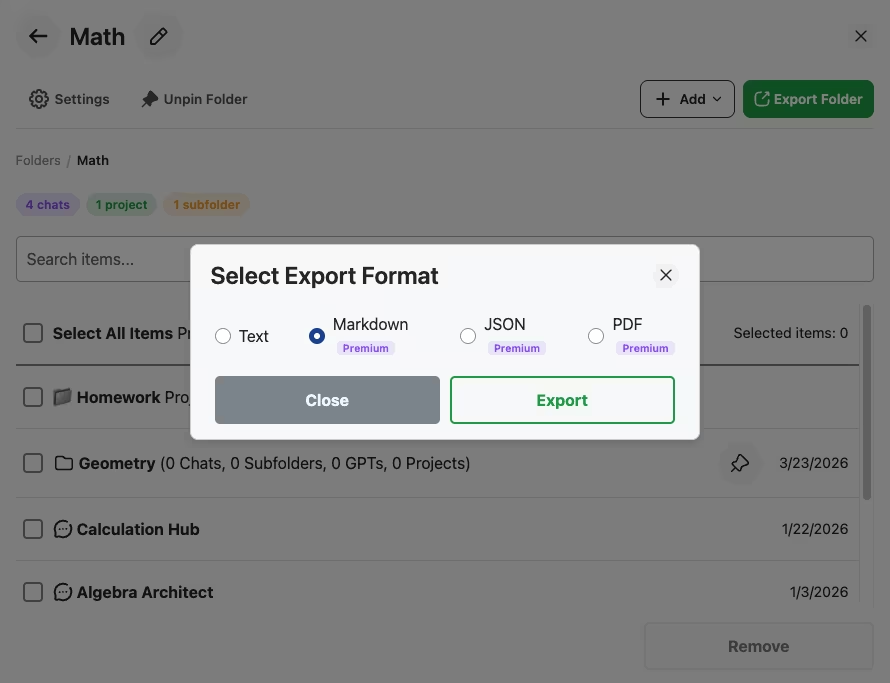
- Click Export Folder (the green button in the folder's top action bar). The Select Export Format modal opens.
- Pick a format. Markdown is the default for most knowledge-base workflows. JSON for developer pipelines. PDF for compliance.
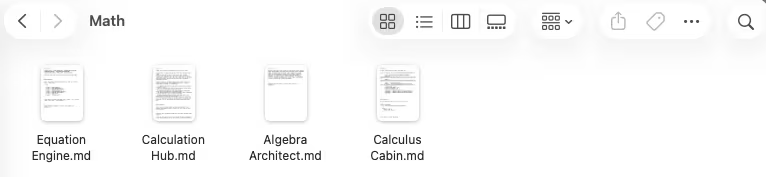
- Click Export. The ZIP downloads instantly. Unzip it and you have one file per conversation, organized exactly the way the folder was in ChatGPT.
Backup patterns for different workflows
- Personal knowledge base. Monthly Markdown export of the entire ChatGPT history into Obsidian. Lets full-text search across years of conversations even when not online.
- Compliance archive. Quarterly JSON export of any folder containing client-facing or regulated work. Timestamps and message IDs satisfy audit trails.
- Code-history archive. Per-project JSON export. Commit the export file alongside the project so future engineers can see the AI-assisted reasoning behind decisions.
- Course-by-course archive for students. A folder per subject, exported once per semester as Markdown. Searchable study material, forever.
Frequently Asked Questions
It has one feature: Settings > Data Controls > Export Data. It emails you a ZIP of your entire account history in HTML, and the email can take hours or days to arrive. You cannot export a single conversation, choose a format, or back up just one folder. For anyone who uses ChatGPT seriously, that workflow is unusable.
Four formats from the Select Export Format modal: Text (.txt, free), Markdown (.md, Premium), JSON (.json, Premium with full metadata), and PDF (.pdf, Premium, formatted with page numbers). Bulk export across an entire folder downloads as a single ZIP that preserves the folder's structure on disk.
Yes. Open any folder in AI Toolbox, click 'Export Folder', and pick your format from the Select Export Format modal. Every conversation in the folder is packaged into a single ZIP with each chat as its own file. Folder structure is preserved so you can drop the ZIP into Obsidian, Notion, your file system, or a Git repository and have everything organized the way it was in ChatGPT.
Only for PDF. TXT, Markdown and JSON exports run entirely in your browser. The files are built locally from the conversation content already loaded in ChatGPT and downloaded directly to your device. PDF is the one exception: the text of that chat is sent to our servers to render the file, and nothing is kept afterwards.
Markdown preserves headings, code blocks, lists, and inline emphasis in a portable plain-text format, with a YAML frontmatter block at the top (title, date, model, url, source) so the file drops straight into Obsidian, Logseq, Pandoc, Quartz, Astro, and Hugo without manual metadata entry. It also pastes cleanly into Notion, Bear, VS Code, GitHub gists, and almost every documentation system. PDF is best for compliance and stakeholder review. JSON is best when you need timestamps, message IDs, and structured metadata for code or analysis. Use the format that matches where the export is going.
Free includes Text (.txt) export from the Select Export Format modal for single conversations. Premium ($9.99/month or $99 one-time Lifetime) unlocks Markdown, JSON, PDF, bulk folder export as ZIP, and Voice Download with 9 voices. 14-day money-back guarantee on Premium and Lifetime, subject to refund policy.
Install AI Toolbox and stop losing chats to silent account changes
40,000+ users. 4.7/5 on the Chrome Web Store. Free for single-chat Text export. Premium starts at $9.99/month or $99 one-time Lifetime for Markdown, JSON, PDF, and bulk ZIP. 14-day money-back guarantee, subject to refund policy.
Want a deeper methods comparison covering manual copy-paste and the native ChatGPT export too? See How to Save ChatGPT Conversations: 3 Methods That Work. This page is the focused one-click bulk-backup workflow; that page is the broader methods comparison.
Need backups for Gemini or Claude too? See Gemini export and Claude export, or save with All Access Lifetime ($199).