ChatGPTGeminiClaudeGrok40,000+users on the Chrome Web Store4.7/ 5

ChatGPT for Marketers: Organize Campaigns, Prompts, and Copy

Marketing work with ChatGPT is repetitive by design: the same briefs, the same variants, the same four-step content routine per campaign. AI Toolbox, a Chromium extension by Infi Developments, adds folders per client and channel, saved prompts you insert by typing two slashes, reusable prompt chains, full-text search across every chat, and export for handing copy to a client.

Free to install, no account and no credit card. It organises your own ChatGPT account rather than replacing it.

Free: 2 root folders, 2 prompts, TXT export | Premium $9.99/mo | Lifetime $99

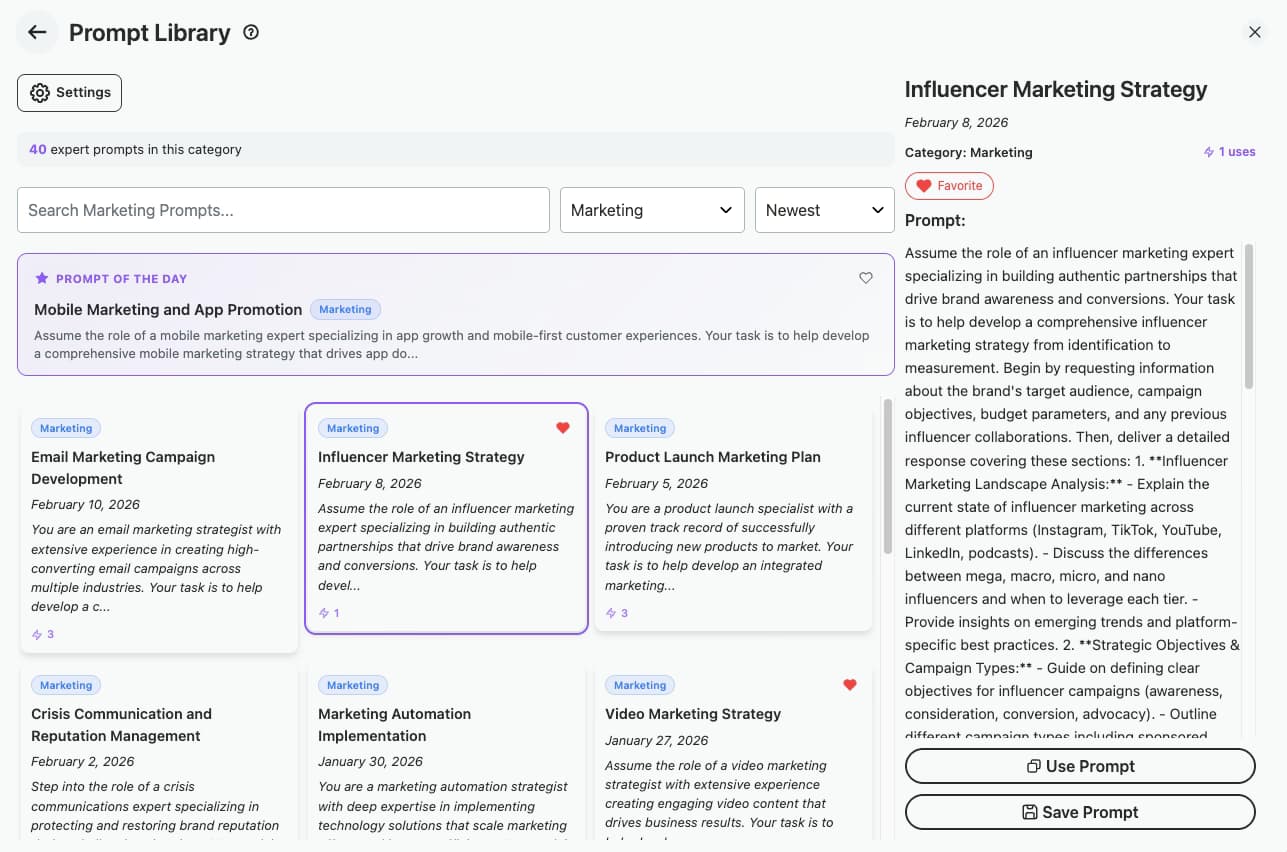
AI Toolbox Prompt Library filtered to the Marketing category, showing 40 expert prompts including Influencer Marketing Strategy, Email Marketing Campaign Development and Product Launch Marketing Plan, with a Prompt of the Day panel and a Use Prompt button

A Marketing category, already written

  • Influencer, email, launch and automation prompts
  • Favourite the ones that work for your accounts
  • Free covers 5 per category

The gap

ChatGPT gives you one long list, whatever you are working on

The sidebar is a single reverse-chronological list with title-only search. For a marketer running several accounts and several channels inside each, that is the wrong shape: everything is in one pile and the good work sinks.

The cost is not the generating, it is the re-finding and the re-typing. A brief that produced good copy gets rewritten because nobody saved it. A headline framework from last quarter gets rebuilt because title search cannot see inside messages.

None of that needs a different model. It needs the chat history to have structure. Organizing ChatGPT conversations covers the general version of the same problem.

Why it matters

What you cannot do with ChatGPT alone:

  • Find the headline framework that worked last quarter, without scrolling a year of chats to reach it.
  • Keep one client's work away from another's, instead of every account sharing one flat conversation list.
  • Reuse a brief that produced good copy without pasting it from a scratch document every time.
  • Hand finished copy to a client or a CMS as a file, rather than copying it out of the chat window.
  • See what you already tested, so the same subject lines are not generated twice in a quarter.

Marketing output has a shelf life and a reuse value. By default ChatGPT keeps it in a pile with no index.

Step by step

Setting it up for a marketing workflow

Five steps, and the first four are one-off. After that it is the setup working for you.

About 5 minutes to set up

  1. Install AI ToolboxAdd it from the Chrome Web Store. Works on Chrome, Edge, Brave, Opera and Arc. Firefox is not supported.
  2. Make a folder per client or campaignAdd a folder in the ChatGPT sidebar, then nest subfolders for social, email, blog and ads. Chats are filed by searching for them and picking Move to Folder.
  3. Save the prompts that workedStore a brief once, then insert it in any chat by typing two slashes. The curated library also ships a Marketing category you can start from.
  4. Chain the repeatable workFor a task that always runs the same way, outline then draft then meta description, build a chain once with variables and run it by typing two dots.
  5. Export the approved copyExport a finished conversation to hand off, or multi-select a campaign's chats and export the set together.
Add to Chrome, free

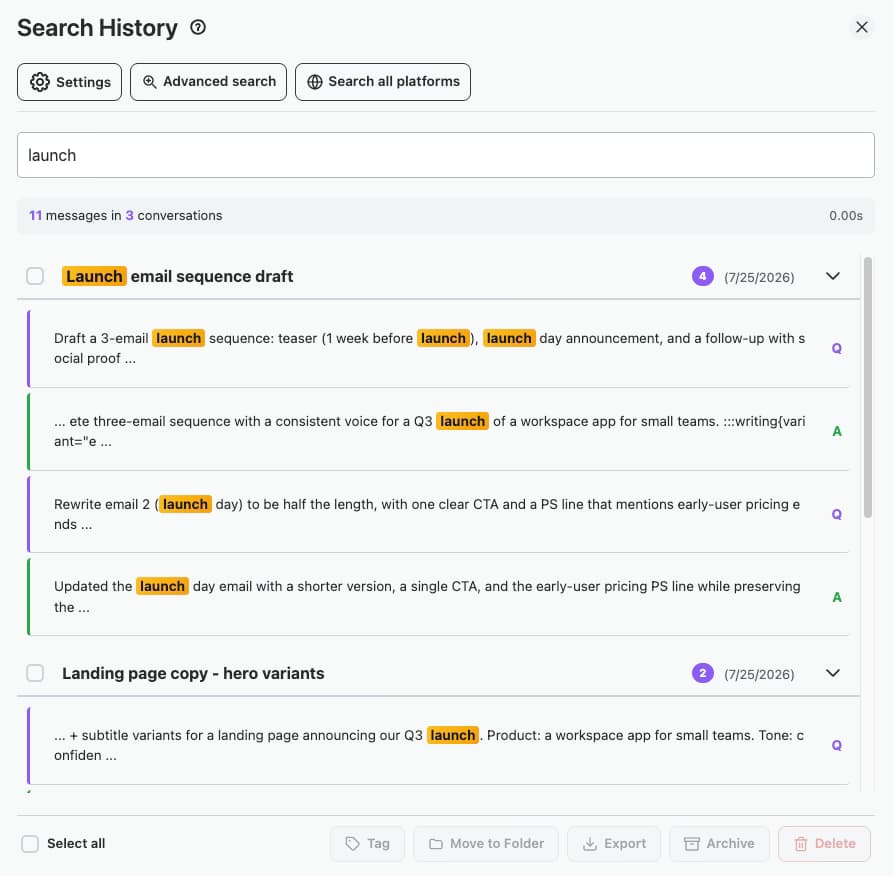
Search inside messages, not just titles

Search History panel showing the word launch matched in 11 messages across 3 conversations, with role and date filters

Full-text search reads the words inside every message, with role and date filters. Free returns 5 results per query, which is usually enough until a history gets deep.

What you get

Six things that change the marketing workflow

  • Folders per client and campaign

    Nested folders in the ChatGPT sidebar so Q1 is not mixed with Q3 and Client A is not mixed with Client B. Chats are added by search or Move to Folder.

    Plan: Free: 2 root folders with unlimited subfolders. Premium: unlimited.

  • Your own saved prompts

    Save a working brief once and insert it into any conversation by typing two slashes, with {{variables}} for the parts that change per client.

    Plan: Free: 2 saved prompts. Premium: unlimited.

  • A curated Marketing prompt category

    Expert-written prompts grouped by category, including Marketing, with favourites, search and a prompt of the day.

    Plan: Free: 5 prompts per category. Premium: the full catalogue.

  • Prompt chains for repeatable work

    Run a fixed sequence, brief then outline then draft then meta description, as one action instead of pasting four prompts in order.

    Plan: Free: 2 chains, up to 25 steps each. Premium: unlimited.

  • Full-text search across every chat

    Search the words inside messages, not just chat titles, and filter by role or date to find the variant you shipped.

    Plan: Free: 5 results per query. Premium: unlimited.

  • Export for handoff and approval

    Take a finished conversation out as a file for a client, a CMS or a content calendar, one chat at a time or a whole campaign at once.

    Plan: Free: TXT, one chat at a time. Premium: Markdown, JSON, PDF, DOCX, HTML and bulk.

Free to start. See every feature in the extension.

In detail

What it looks like on a real account

Client separation

One folder per client, subfolders per channel

The default ChatGPT sidebar is a single reverse-chronological list, so every account bleeds into every other. Folders and subfolders give each client a space and each channel a shelf inside it. Conversations are filed by searching for them and choosing Move to Folder, so nothing has to be dragged.

Plan: Free: 2 root folders, unlimited subfolders on every plan.
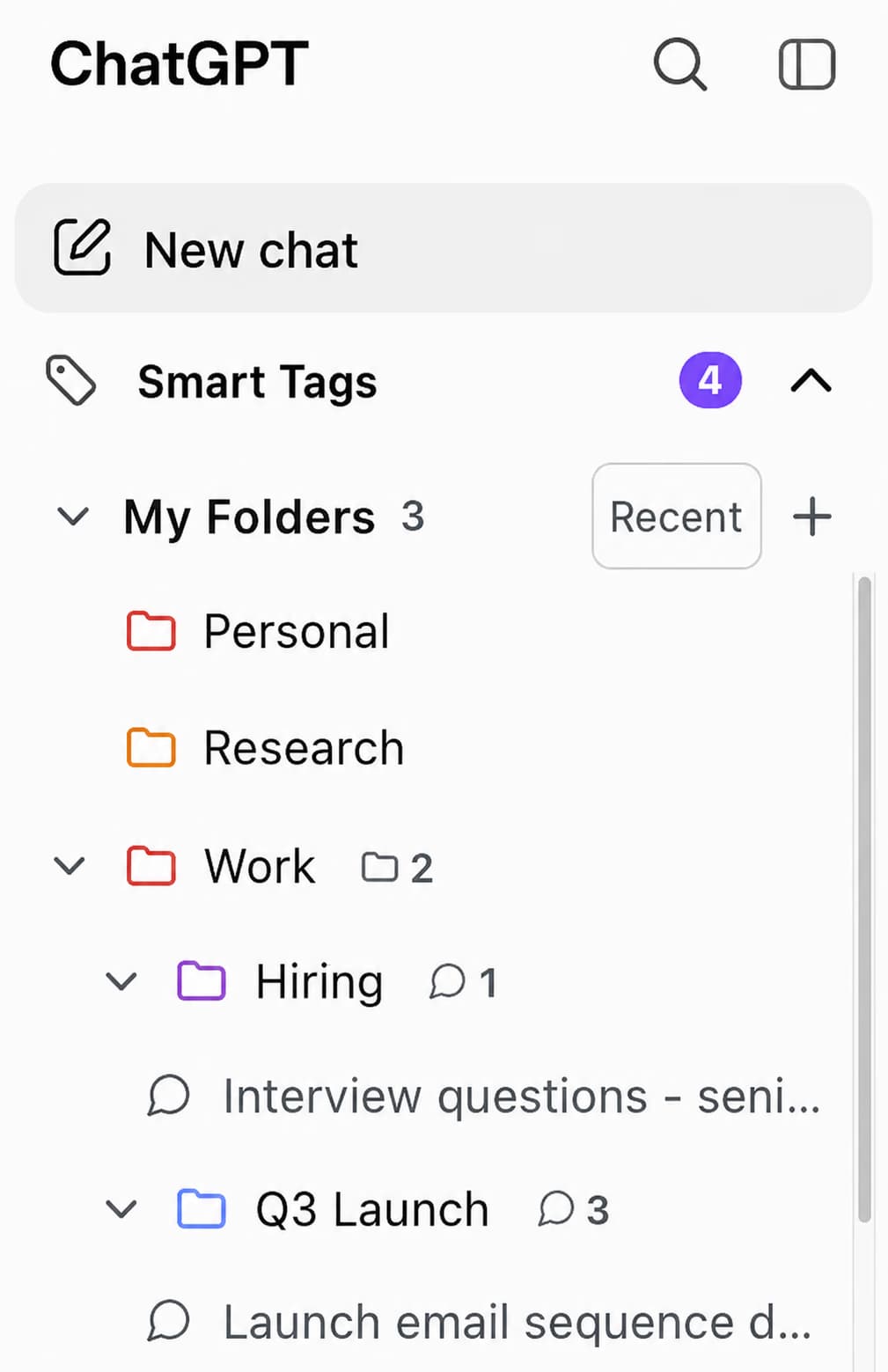
AI Toolbox folder tree in the ChatGPT sidebar with a Work folder containing Hiring and Q3 Launch subfolders, and a Launch email sequence conversation filed inside Q3 Launch

Prompt library

A Marketing category you do not have to write first

The curated library ships expert prompts grouped by category. The Marketing set covers influencer strategy, email campaigns, product launch plans, marketing automation and crisis communication, each one a starting point you can edit and save as your own.

Plan: Free: 5 prompts per category. Premium: the whole catalogue.

AI Toolbox Prompt Library filtered to the Marketing category, showing 40 expert prompts including Influencer Marketing Strategy, Email Marketing Campaign Development and Product Launch Marketing Plan, with a Prompt of the Day panel and a Use Prompt button

Chains

The four-step content routine, run as one action

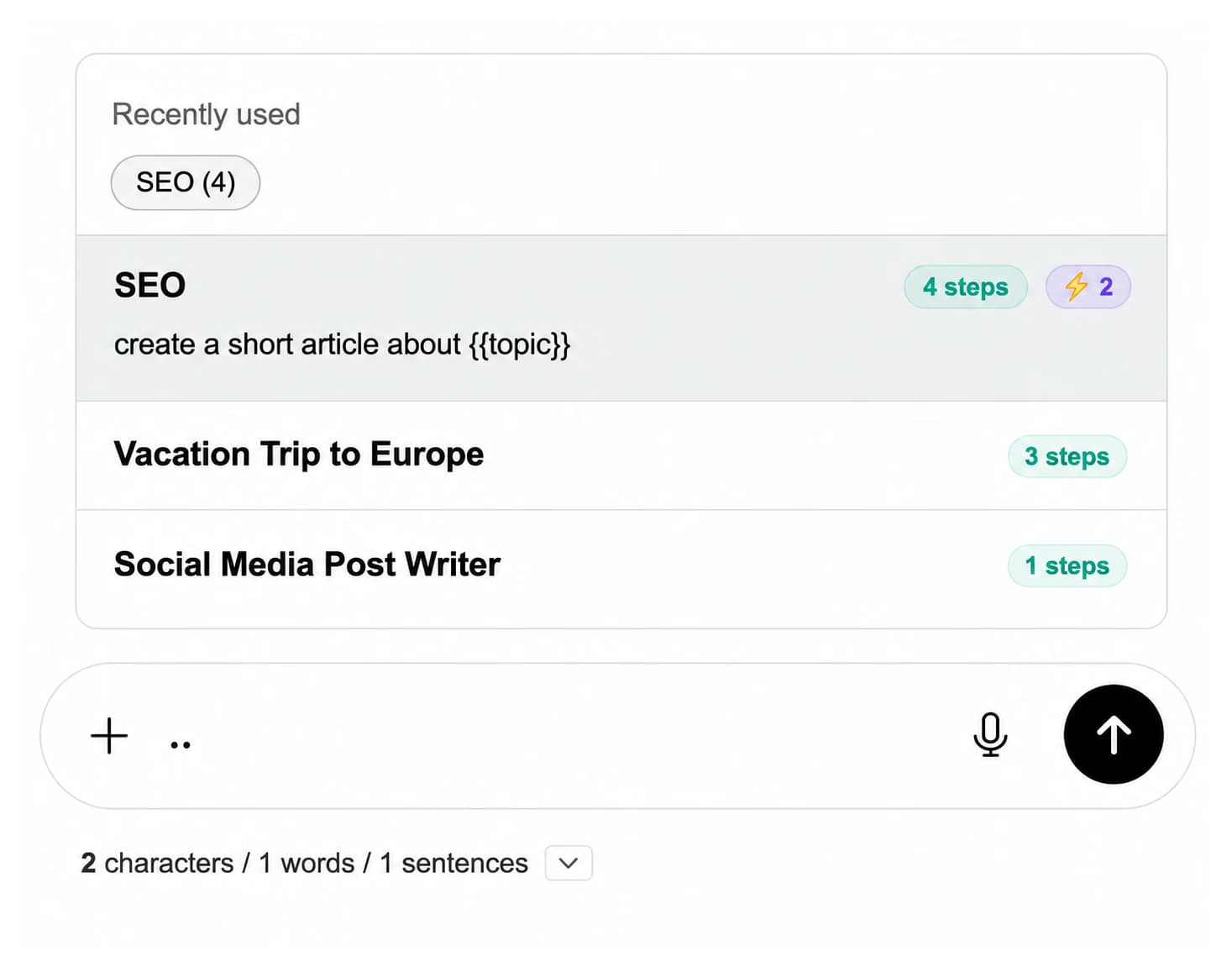
Most content work is the same sequence every time. A chain stores that sequence with {{variables}} for the topic, so an SEO run of four steps executes in order from one trigger. Type two dots in the compose box to pick a chain.

Plan: Free: 2 chains, up to 25 steps each. Premium: unlimited.

Prompt chain picker above the ChatGPT compose box listing an SEO chain of 4 steps using a topic variable, plus Social Media Post Writer, opened by typing two dots

Handoff

Send a campaign's copy out as files, not screenshots

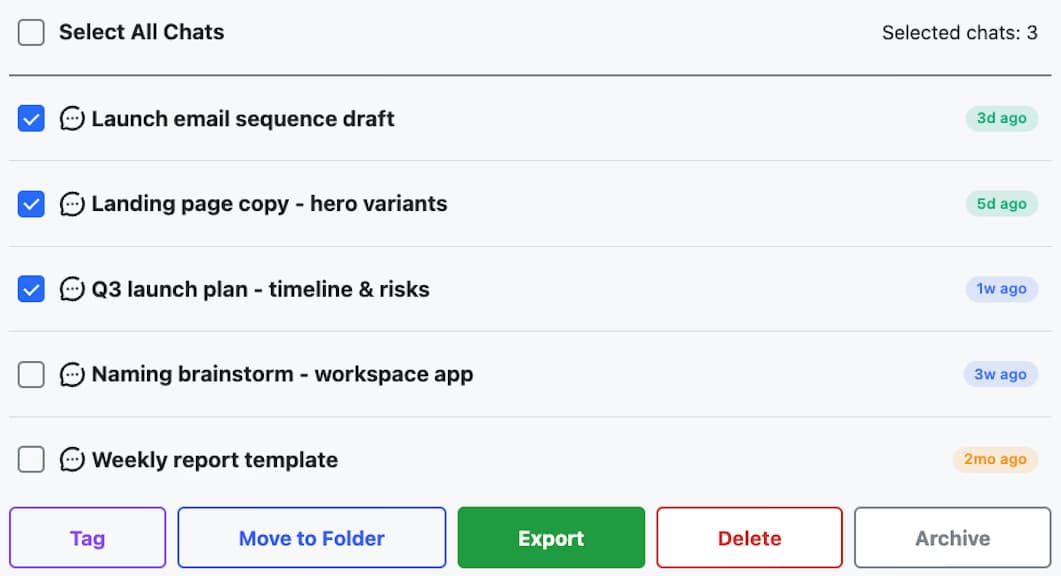
Select the conversations that make up a campaign, the launch email sequence, the landing page variants, the plan, and export them together. Free covers a single chat as TXT; Premium adds Markdown, JSON, PDF, DOCX and HTML plus multi-select export.

Plan: Free: single-chat TXT. Premium: every format and bulk export.

Bulk actions panel with three marketing conversations selected, Launch email sequence draft, Landing page copy and Q3 launch plan, above Tag, Move to Folder, Export, Delete and Archive buttons

Scenarios

Where marketers put it to work

  • Agency work across accounts

    • A folder per client, subfolders per channel
    • Saved briefs that carry each brand's voice
    • Search to prove what was already delivered
    • Export approved copy for client sign-off
  • In-house content and SEO

    • A chain for outline, draft and meta description
    • Keyword clusters filed by project
    • Find the framework that ranked last quarter
    • Tag conversations by campaign automatically
  • Paid and lifecycle

    • Ad variants kept per campaign, not per day
    • Reusable prompts for subject lines and hooks
    • Compare tested angles before writing new ones
    • Hand creative to the team as files
  • Solo marketers and freelancers

    • Two folders is enough to separate two clients
    • TXT export is free for client handoff
    • Free search covers a small history
    • Upgrade only when the history gets deep
  • Start with two folders

    Two clients, two folders, one saved brief. That is the whole free plan and it is enough to feel the difference. Writers get a similar setup.

    Add to Chrome, free

Pricing

Plans for marketing work

Free covers a couple of clients. Premium removes the caps on folders, prompts, chains, search and export. All Access covers ChatGPT, Gemini, Claude and Grok, paid once. Not an AI subscription: you keep using your own ChatGPT account.

Free

$0forever

  • 2 root folders, unlimited subfolders
  • 2 saved prompts, 2 chains
  • 5 search results per query
  • Single-chat TXT export
Add to Chrome

Premium

$9.99/month

  • Unlimited folders, prompts and chains
  • Unlimited full-text search
  • Markdown, JSON, PDF, DOCX and HTML export
  • Bulk export and the full prompt library
Get Premium

All Access LifetimeBest value

$199one-time

  • ChatGPT, Gemini, Claude and Grok included
  • Every future AI platform we add
  • All Premium features unlocked
  • Save $197 vs single Lifetimes
Get All Access

Teams$15/seat/month

All Premium features across the four modules ยท Admin dashboard ยท Team analytics ยท $12/seat/mo billed annually ยท 14-day free trial

See Teams
  • GDPR compliant
  • Secure checkout by Polar
  • 14-day money-back on a first purchase
  • Client work stays in your browser

Refunds follow the refund policy; renewals are not refundable. Premium unlocks for the email you enter at checkout, so use the same address you sign in to ChatGPT with.

Reviews

What people say on the Chrome Web Store

Transcribed word for word from the public listing, including the typos.

  • I didn't realize how much more I could do with ChatGPT until I got the Toolbox extension. It has taken everything I loved about ChatGPT and made it 100 times more effective. The tagging system and the easy-to-use organization tools are key highlights.
    Sugaa Baddie ยท 13 Feb 2025
  • A really thoughtful extension that makes ChatGPT way more user-friendly. Everything is super organized and accessible.
    Isaac John ยท 8 Mar 2025
  • I no longer get frustrated trying to find a specific GPT in my long list. The ability to organize GPTs in folders and search a list of GPTs to find one should have been part of ChatGPT, but wasn't. This extension now eliminates that issue for me completely. The developer is very responsive and very fast to update with needed features to make it even more useful. I highly, highly, highly recommend this for anyone using ChatGPT for more than casual purposes.
    R.M. Nedd ยท 4 Feb 2025
  • Great extension! Love the export feature.. The support is good, very responsive and helpful!
    Dave G ยท 9 May 2026

FAQ

Questions marketers ask first

How do marketers actually use ChatGPT day to day?

Mostly for first drafts and variants: subject lines, ad copy, landing page sections, outlines, meta descriptions and campaign briefs. The work is repetitive by nature, which is why the useful part is not generating once but keeping the prompts that worked and being able to find what was already produced.

How do I organize ChatGPT by client or campaign?

Create a folder for each client or campaign in the ChatGPT sidebar and nest subfolders for social, email, blog and ads. Conversations are filed by searching for them and choosing Move to Folder, not by dragging. The free plan includes 2 root folders with unlimited subfolders inside them; Premium removes the root cap.

Can I save my best marketing prompts and reuse them?

Yes. Save a prompt once and insert it into any conversation by typing two slashes, using {{variables}} for the parts that change between clients. The free plan stores 2 of your own prompts and Premium is unlimited. There is also a curated library with a Marketing category, free up to 5 prompts per category.

What is a prompt chain and when is it worth it?

A chain runs a fixed sequence of prompts as one action, for example outline, then draft, then meta description. It is worth it when a task always runs the same way and only the topic changes. Chains support variables and up to 25 steps; the free plan keeps 2, Premium is unlimited. Type two dots in the compose box to run one.

Can I export ChatGPT copy for client approval?

Yes. Exporting a single conversation as TXT is free. Premium adds Markdown, JSON, PDF, DOCX and HTML, and lets you multi-select a campaign's conversations and export them together. That is usually what you want for a handoff, since a client needs a file rather than a link into your chat history.

Does it help with SEO work specifically?

It organises it rather than performing it. File keyword clusters and content projects in folders, keep the outline-to-meta-description chain as a reusable sequence, and use full-text search to find the approach that worked before. AI Toolbox does not fetch rankings or crawl a site; it manages the ChatGPT side of the work.

Is the free plan enough for a solo marketer?

Often, at first. Free gives you 2 root folders with unlimited subfolders, 5 search results per query, 2 saved prompts, 2 chains and single-chat TXT export. It stops being enough when you are juggling more than a couple of clients or your history is deep enough that 5 search results no longer surfaces the right chat.

Does this replace my ChatGPT subscription?

No. It is a browser extension that sits on top of chatgpt.com and organises what is already there. It is not an AI subscription and gives no model access of its own: you keep using your own ChatGPT account and whatever plan you have with OpenAI.

Is client work kept private?

Conversation content stays in your browser and is never stored on our servers. Only what you build inside the extension, folders, prompts and tags, syncs, and that syncs encrypted at rest. AI Toolbox is GDPR compliant and passed Chrome Web Store security review.

40,000+ users ยท 4.7/5 on the Chrome Web Store

Give this quarter's campaigns a shelf

Install AI Toolbox, make a folder for your busiest client, and save the brief you keep retyping.