
ChatGPT for Students: Study Smarter, Not Harder
Turn ChatGPT into your personal study assistant. Organize sessions by subject, save important explanations, and never lose a helpful conversation again.
Best for: Students managing 100+ ChatGPT study sessions across courses, exams, and group projects.
 Add to Edge
Start free | Used by 40,000+ students & professionals
The Student's ChatGPT Problem
You're using ChatGPT for everything-homework help, research, exam prep, writing feedback. But after a few weeks, you have hundreds of conversations with no way to find that perfect explanation your professor praised.
Scrolling through an endless list of "Help me understand..." chats isn't studying-it's wasting time you don't have.
Organize Your AI Study Sessions
AI Toolbox (formerly ChatGPT Toolbox) transforms your ChatGPT into an organized study hub. Create folders for each class, pin important conversations, search across everything, and export notes for offline studying.
Organize by Subject
Create folders for each class or subject. Keep Math separate from History, Biology from Literature. Never mix up study sessions again.
Pin Active Assignments
Working on a research paper? Pin that conversation to the top. Finals week? Pin all your study guides for quick access.
Export Study Notes
Export ChatGPT explanations as TXT files. Print them out, add them to your notes app, or share with study groups.
Search Past Sessions
Remember that perfect explanation from weeks ago? Search across all your conversations to find it instantly.
How Students Use AI Toolbox
- Create Subject Folders - Set up a folder for each class or subject area.
- Organize as You Go - After each study session, add the conversation to the right folder.
- Pin Active Work - Working on a paper? Pin it. Studying for finals? Pin your study guides.
- Search When Needed - Use full-text search to find any explanation or concept instantly.
- Export for Review - Download conversations as study notes to review offline or print.
Study Scenarios
Homework Help
- Organize help sessions by subject
- Save step-by-step explanations
- Export solutions for review
- Track progress on assignments
Research Papers
- Organize sources and summaries
- Save citation formatting help
- Export research notes
- Keep drafts organized
Exam Prep
- Create folders per exam
- Pin study guides and practice Q&A
- Search for concept explanations
- Export flashcard content
Simple, Transparent Pricing
Start free, upgrade when you need more
Free
$0 /forever
- 2 Top-Level Folders (unlimited subfolders)
- Up to 5 Pinned Chats
- Search (up to 25 results)
- Media Gallery
- Sync across all devices
 Add to Chrome
Premium
$9.99 /month
- Everything in Free
- Unlimited folders and pinned chats
- Unlimited saved prompts and prompt chains
- Bulk export and unlimited bulk actions
Lifetime
$123$99 /one-time
- Everything in Premium
- Pay once - yours forever
- Study on laptop + library PC
- Priority 24/7 support
- All future updates
How Students Use AI Toolbox: Step-by-Step
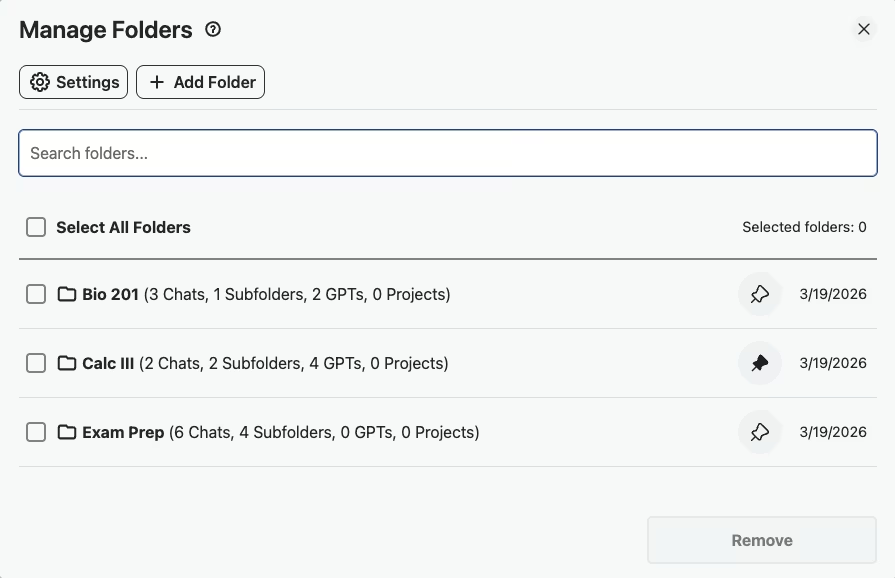
- Step 1: Create Folders by Course
Set up folders like “Bio 201,” “Calc III,” and “English Comp” so every study session is organized from day one.
- Step 2: Pin Active Assignment Conversations
Working on a research paper or problem set? Pin that conversation to the top of your sidebar for instant access whenever you sit down to study.
- Step 3: Ask ChatGPT to Explain a Concept and Organize It
Get ChatGPT to break down a tough topic, then open the matching course folder and use the in-folder search to add the conversation by name. Search-to-add scales as conversations pile up across courses.
- Step 4: Search Past Study Conversations Before an Exam
Before a midterm or final, search your conversation history by concept or keyword to pull up every explanation ChatGPT gave you on that topic.
- Step 5: Export Study Notes as TXT for Offline Review
Export your best explanations and study conversations as TXT files so you can print them or review them on your phone without internet.
Success Story
A pre-med student at UCLA - organized 200+ ChatGPT study sessions across 6 courses using subject folders. She exported all her MCAT prep conversations as TXT files to review offline before the exam.
The folder system let her separate organic chemistry from anatomy from physics without mixing anything up.
What Students Say About AI Toolbox
“I'm doing my master's in public health and I have folders for each course,Epidemiology, Biostatistics, Health Policy. Before midterms, I export all the concept explanations ChatGPT gave me and print them as a study packet. My grades genuinely improved this semester.”
- Priya Narayanan, MPH Candidate at University of Michigan
“I used to waste so much time scrolling through old ChatGPT chats trying to find a specific explanation. Now I just search ‘thermodynamics’ or ‘organic chem mechanisms’ and it's right there. The pinning feature is great for whatever assignment I'm actively working on.”
- Daniel Kowalski, Chemistry Undergrad at Penn State
Frequently Asked Questions
Is using ChatGPT for homework cheating?
Using ChatGPT as a learning tool is not cheating-it's like having a 24/7 tutor. The key is using it to understand concepts, not just copy answers. AI Toolbox helps you organize these learning sessions so you can review and truly learn the material.
How can students use ChatGPT effectively for studying?
Use ChatGPT to explain complex concepts, generate practice questions, summarize readings, and check your understanding. With AI Toolbox, organize these sessions by subject, pin important explanations, and export study notes for offline review.
Can I organize my ChatGPT conversations by class or subject?
Yes! AI Toolbox lets you create folders and subfolders. Create a folder for each class (Math 101, Chemistry, English Literature), then add subfolders for specific topics or assignments.
How do I export ChatGPT study notes?
With AI Toolbox, click the export button on any conversation to download it as a TXT or JSON file. You can also bulk export multiple conversations at once-perfect for creating comprehensive study guides.
Does AI Toolbox work with ChatGPT Free and Plus?
Yes! AI Toolbox works with all ChatGPT plans-Free, Plus, Team, and Enterprise. It enhances the ChatGPT interface regardless of your subscription.
Start Studying Smarter Today
Join thousands of students who've organized their ChatGPT study sessions.