ChatGPTGeminiClaudeGrok40,000+users on the Chrome Web Store4.7/ 5

51 Prompt Templates for ChatGPT, Claude, Gemini and Grok

Ready-to-paste prompts across 8 categories, each one naming its deliverable and its constraints, with [placeholders] for your specifics. Search or filter, copy in one click, and paste into any of the four assistants.

Templates free forever | Prompt library with 2 saved prompts free inside ChatGPT, Gemini, Claude and Grok | Premium $9.99/mo or $99 once

Category

All 51 templates

Templates

  • Blog Post Outline

    Marketing

    Create a detailed blog post outline about [topic] targeting [audience]. Include an attention-grabbing title, 6-8 H2 sections with key points under each, a FAQ section with 5 questions, and a conclusion with a call-to-action.

  • Social Media Calendar

    Marketing

    Create a 2-week social media content calendar for [brand/product] across Instagram, LinkedIn, and Twitter. Include post topics, suggested captions, hashtags, and best posting times for each platform.

  • Email Subject Lines

    Marketing

    Generate 10 email subject lines for [campaign type] targeting [audience]. Include 3 curiosity-based, 3 benefit-driven, 2 urgency-based, and 2 personalized options. Keep all under 50 characters.

  • SEO Meta Description

    Marketing

    Write 5 unique meta descriptions for a page about [topic]. Each should be under 155 characters, include the keyword [keyword], and end with a call-to-action. Make them compelling enough to increase click-through rate.

  • Product Description

    Marketing

    Write a compelling product description for [product name]. Include: a hook headline, 3 key benefits, technical specs formatted as bullet points, a social proof element, and a clear CTA. Tone: [professional/casual/luxury].

  • Ad Copy Variations

    Marketing

    Write 5 variations of ad copy for [product/service] targeting [audience] on [platform]. Each should have a headline (max 30 chars), description (max 90 chars), and CTA. Test different angles: pain point, benefit, social proof, urgency, curiosity.

  • Competitor Analysis

    Marketing

    Analyze the top 5 competitors for [business/product] in [market]. For each competitor, identify: pricing strategy, unique selling proposition, main marketing channels, strengths, weaknesses, and opportunities we can exploit.

  • Landing Page Copy

    Marketing

    Write conversion-focused copy for a landing page selling [product/service]. Include: headline + subheadline, 3 benefit sections with icons, social proof section, FAQ (5 questions), and a strong CTA section. Target audience: [audience].

  • Code Review

    Coding

    Review this code for bugs, performance issues, security vulnerabilities, and best practice violations. Suggest specific improvements with code examples: [paste code here]

  • Explain Code

    Coding

    Explain this code line by line as if teaching a junior developer. Include: what each section does, why it's written this way, potential edge cases, and suggestions for improvement: [paste code here]

  • Write Unit Tests

    Coding

    Write comprehensive unit tests for the following function using [testing framework]. Include tests for: happy path, edge cases, error handling, boundary values, and null/undefined inputs: [paste function here]

  • Debug Error

    Coding

    I'm getting this error: [paste error message]. Here's the relevant code: [paste code]. Explain what's causing the error, provide the fix, and explain how to prevent similar issues in the future.

  • API Documentation

    Coding

    Generate API documentation for the following endpoint. Include: endpoint URL, HTTP method, request headers, request body (with example), response format (with example), error codes, and usage example with curl: [paste endpoint details]

  • Refactor Code

    Coding

    Refactor this code to improve readability, performance, and maintainability. Follow [language] best practices, add meaningful variable names, extract reusable functions, and add brief comments for complex logic: [paste code here]

  • SQL Query Builder

    Coding

    Write a SQL query that [describe what you need]. Use the following table structure: [describe tables and columns]. Include: the query, explanation of each clause, performance considerations, and an index recommendation if applicable.

  • Git Commit Message

    Coding

    Based on the following code changes, write a conventional commit message. Follow the format: type(scope): description. Include a body explaining WHY the change was made (not just what changed): [paste diff or describe changes]

  • Article Rewriter

    Writing

    Rewrite the following text to be [more engaging/more professional/simpler/more persuasive] while keeping the core message. Maintain the same length and structure but improve clarity and impact: [paste text]

  • Proofread & Edit

    Writing

    Proofread and edit this text for grammar, spelling, punctuation, clarity, and flow. Mark each change with [CHANGE: reason]. Then provide the clean corrected version: [paste text]

  • Executive Summary

    Writing

    Write a 200-word executive summary of the following document. Focus on: key findings, main recommendations, expected impact, and next steps. Use bullet points for scannability: [paste document or key points]

  • Creative Brief

    Writing

    Create a creative brief for [project type] for [brand/client]. Include: project overview, target audience (demographics + psychographics), key message, tone of voice, deliverables, timeline, and success metrics.

  • Newsletter Draft

    Writing

    Write a weekly newsletter edition about [topic/industry]. Include: a compelling subject line, personal opening hook (2 sentences), 3 key stories/insights with brief commentary, one actionable tip, and a sign-off with CTA.

  • Case Study

    Writing

    Write a case study about [client/project]. Structure: Challenge (what problem they faced), Solution (how [product/service] helped), Results (specific metrics and outcomes), Quote (a realistic testimonial), and Key Takeaway.

  • LinkedIn Post

    Writing

    Write a LinkedIn post about [topic] that will drive engagement. Use the hook-story-lesson format: start with a bold first line, share a brief personal/professional story, end with a key insight and question to spark comments. 150-200 words max.

  • Meeting Agenda

    Business

    Create a structured meeting agenda for a [type] meeting with [participants]. Duration: [X minutes]. Include: objectives, agenda items with time allocations, discussion points for each item, action items section, and next steps.

  • SWOT Analysis

    Business

    Conduct a SWOT analysis for [company/product/project]. For each quadrant (Strengths, Weaknesses, Opportunities, Threats), provide 4-5 specific, actionable points with brief explanations. End with 3 strategic recommendations.

  • Project Proposal

    Business

    Write a project proposal for [project description]. Include: executive summary, problem statement, proposed solution, scope and deliverables, timeline with milestones, budget estimate, team requirements, risks and mitigation, and success criteria.

  • KPI Dashboard

    Business

    Define 8-10 KPIs for [department/project]. For each KPI, specify: metric name, formula/calculation, target value, measurement frequency, data source, and who is responsible. Format as a table.

  • SOPs Template

    Business

    Create a Standard Operating Procedure for [process]. Include: purpose, scope, roles and responsibilities, step-by-step instructions (numbered), decision points with if/then logic, quality checkpoints, and troubleshooting common issues.

  • Quarterly Review

    Business

    Create a quarterly business review template covering: revenue performance vs targets, key wins and losses, customer metrics (acquisition, retention, NPS), team performance highlights, challenges faced, lessons learned, and priorities for next quarter.

  • Investor Update

    Business

    Draft a monthly investor update email. Include: key metrics dashboard (MRR, growth rate, burn rate, runway), product milestones, customer highlights, hiring updates, challenges and how we're addressing them, and a forward-looking section.

  • Lesson Plan

    Education

    Create a 45-minute lesson plan for [subject] for [grade level] students. Include: learning objectives (3), warm-up activity (5 min), main instruction (20 min), guided practice (10 min), independent practice (5 min), and assessment/exit ticket (5 min).

  • Quiz Generator

    Education

    Create a 15-question quiz on [topic] for [grade level]. Include: 8 multiple choice (4 options each), 4 short answer, 2 true/false, and 1 essay question. Provide an answer key with explanations for each answer.

  • Rubric Creator

    Education

    Create a detailed grading rubric for [assignment type] with 4 performance levels (Excellent/Proficient/Developing/Beginning). Include 5 criteria with specific descriptions for each level and point values totaling 100.

  • Differentiated Worksheet

    Education

    Create a worksheet on [topic] with 3 difficulty tiers: foundational (struggling learners), standard (grade level), and advanced (gifted). Each tier should have 5 questions that assess the same concept at different complexity levels.

  • Parent Email

    Education

    Write a professional email to parents about [situation: late assignments/behavior concern/academic progress/upcoming event]. Tone should be warm but factual. Include: context, specific observations, what you're doing to help, and how parents can support at home.

  • IEP Accommodation

    Education

    Suggest 10 classroom accommodations for a student with [learning difference]. For each, include: the accommodation, how to implement it, which learning objectives it supports, and how to assess effectiveness.

  • Literature Review

    Research

    Write a structured literature review section about [topic]. Include: introduction to the research area, key themes and debates, summary of 5-7 major studies (authors, year, methodology, findings), identified gaps in current research, and how my research addresses these gaps.

  • Research Methodology

    Research

    Design a research methodology section for a study investigating [research question]. Include: research design (qualitative/quantitative/mixed), sampling strategy, data collection methods, data analysis approach, validity and reliability measures, ethical considerations, and limitations.

  • Abstract Writer

    Research

    Write a 250-word academic abstract for a paper titled [title]. Follow the structured format: Background (2 sentences), Objective (1 sentence), Methods (2-3 sentences), Results (2-3 sentences), and Conclusion (1-2 sentences). Use past tense for methods and results.

  • Data Analysis Plan

    Research

    Create a data analysis plan for [dataset/research]. Include: descriptive statistics to run first, appropriate statistical tests for each hypothesis, assumptions to check, software/tools to use, how to handle missing data, and how to present results (tables/figures).

  • Grant Proposal

    Research

    Write a 500-word research grant proposal for [topic]. Include: significance of the research, specific aims (3), innovation, approach overview, expected outcomes, and broader impacts. Tone: compelling but scientifically rigorous.

  • Response Template

    Customer Service

    Write a professional customer service response for: [scenario, e.g., refund request / product complaint / shipping delay / feature request / billing question]. Include: acknowledgment of issue, empathy statement, explanation/solution, next steps, and professional closing.

  • Escalation Email

    Customer Service

    Draft an internal escalation email for a customer issue: [describe issue]. Include: customer name and account, issue summary, steps already taken, why it needs escalation, recommended resolution, urgency level, and deadline for response.

  • FAQ Generator

    Customer Service

    Generate 15 FAQs for [product/service]. Group into categories: Getting Started (5), Billing & Account (5), and Troubleshooting (5). Each answer should be 2-3 sentences, direct, and include a link suggestion where users can find more info.

  • Customer Survey

    Customer Service

    Create a 10-question customer satisfaction survey for [product/service]. Include: 3 NPS-style (1-10 scale), 4 multiple choice, 2 open-ended, and 1 yes/no. Each question should measure a specific aspect of the customer experience.

  • Knowledge Base Article

    Customer Service

    Write a knowledge base article for: [topic]. Structure: title, 1-sentence summary, step-by-step instructions with screenshots placeholders, tips/best practices callout box, related articles section, and 'Still need help?' CTA.

  • Resume Bullet Points

    Personal

    Rewrite these job responsibilities as achievement-focused resume bullet points using the STAR method. Start each with a strong action verb, include quantifiable results where possible, and keep each under 2 lines: [paste responsibilities]

  • Cover Letter

    Personal

    Write a tailored cover letter for [job title] at [company]. My key qualifications: [list 3-4]. Tone: professional but personable. Structure: hook opening, why this company, what I bring, specific example of relevant achievement, and confident closing.

  • Salary Negotiation

    Personal

    Help me prepare for a salary negotiation for [role] at [company/level]. Current offer: [amount]. Market rate: [range]. Prepare: 3 talking points highlighting my value, responses to 3 common objections, a counter-offer strategy, and non-salary benefits to negotiate.

  • Weekly Planner

    Personal

    Create a productivity plan for my week based on these priorities: [list 3-5 priorities]. For each day (Mon-Fri), suggest: a morning focus task (deep work), afternoon tasks, and one habit to maintain. Include time blocks and buffer time for unexpected items.

  • Learning Plan

    Personal

    Create a 30-day learning plan for [skill/topic]. Include: daily study schedule (1 hour/day), resource recommendations (free and paid), weekly milestones, 3 mini-projects to build, and a final project to demonstrate competency. Assume I'm a complete beginner.

Replace every [bracketed placeholder] before you send. Copying puts the text on your clipboard in your browser; nothing is tracked about what you paste. Want to structure your own prompt instead? Use the prompt formatter.

Why templates

What a good prompt template already contains

The difference between "write a blog post about X" and a template is not length. It is that the template has already decided the deliverable, the audience and the constraints, and leaves only the specifics to you.

Every template on this page follows that pattern: a named output (an outline with six to eight sections, ten subject lines under fifty characters, a test plan), the audience or context it is for, and the limits that keep the answer usable. The [placeholders] are the only parts that change from one use to the next.

They are written as plain text with no vendor syntax. The same template pastes into ChatGPT, Claude, Gemini or Grok, and the ones that ask for long, multi-section answers work best on a model with a large output limit.

Four principles

What to keep when you edit one:

  • Every template names the deliverable: an outline, a calendar, ten subject lines, a test plan. A model that knows the shape of the answer stops guessing at it.
  • Placeholders carry the specifics: [topic], [audience], [language]. Fill them and the rest of the wording stays proven; leave them and the model reads the brackets literally.
  • Constraints are inside the prompt: character limits, section counts, reading level. They are the parts a vague prompt loses first.
  • They are model-agnostic: plain text with no vendor syntax, so the same template pastes into ChatGPT, Claude, Gemini or Grok unchanged.

If you cut a constraint to shorten a prompt, expect the model to drop it too.

Step by step

How to use a prompt template

Four steps, no account, and nothing you copy is tracked.

  • Pick a category or search

    Eight categories, from marketing to personal. The search box matches titles and prompt text, so "outline" or "SQL" finds the template without browsing.

  • Copy the template

    One click puts the full prompt on the clipboard. The card confirms it, and the text stays visible so you can read it before pasting.

  • Fill the placeholders

    Replace every [bracketed] value with your own detail before sending. The more specific the placeholder, the more specific the answer.

  • Save the ones you reuse

    Paste the template into the AI Toolbox prompt library once and insert it with two slashes in ChatGPT, Claude, Gemini or Grok, with the placeholders turned into fields you fill at insert time.

In the chat itself

Copy it once. Then stop copying.

This page is a list you copy from. AI Toolbox keeps the templates you actually use inside ChatGPT, Gemini, Claude and Grok, ready to insert.

Reuse

Save a template once, insert it with two slashes

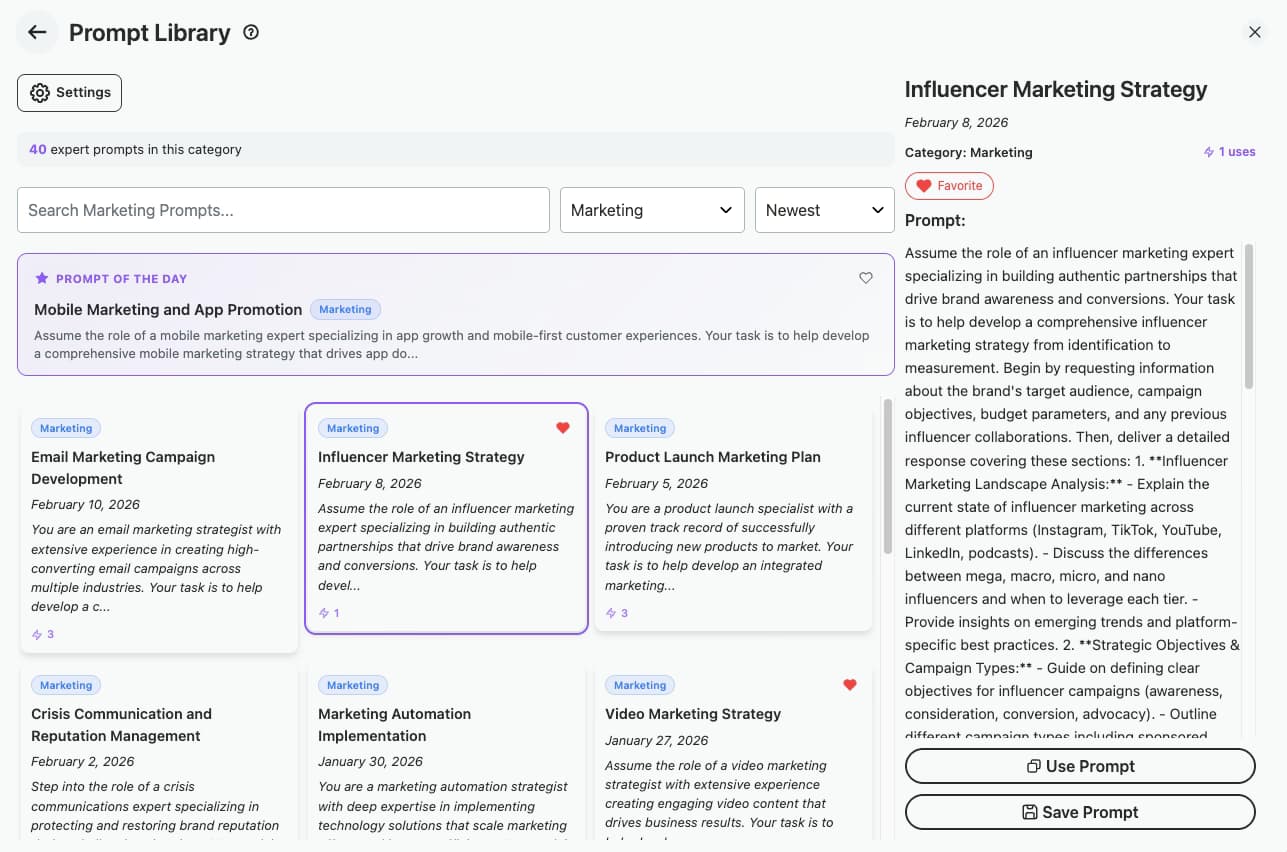
Copying from a web page works for a prompt you use once. For the ones you use weekly, AI Toolbox keeps a prompt library inside ChatGPT, Gemini, Claude and Grok: save the template, type two slashes in any compose box to insert it, and turn each [placeholder] into a {{field}} that a small form collects every time. The free plan holds two saved prompts and five from the catalog.

Plan: Free: 2 saved prompts, 5 catalog prompts. Premium: unlimited.

AI Toolbox prompt library inside ChatGPT with saved prompts inserted by typing two slashes and a catalog of ready-made prompts

Sequence

Chain several templates into one workflow

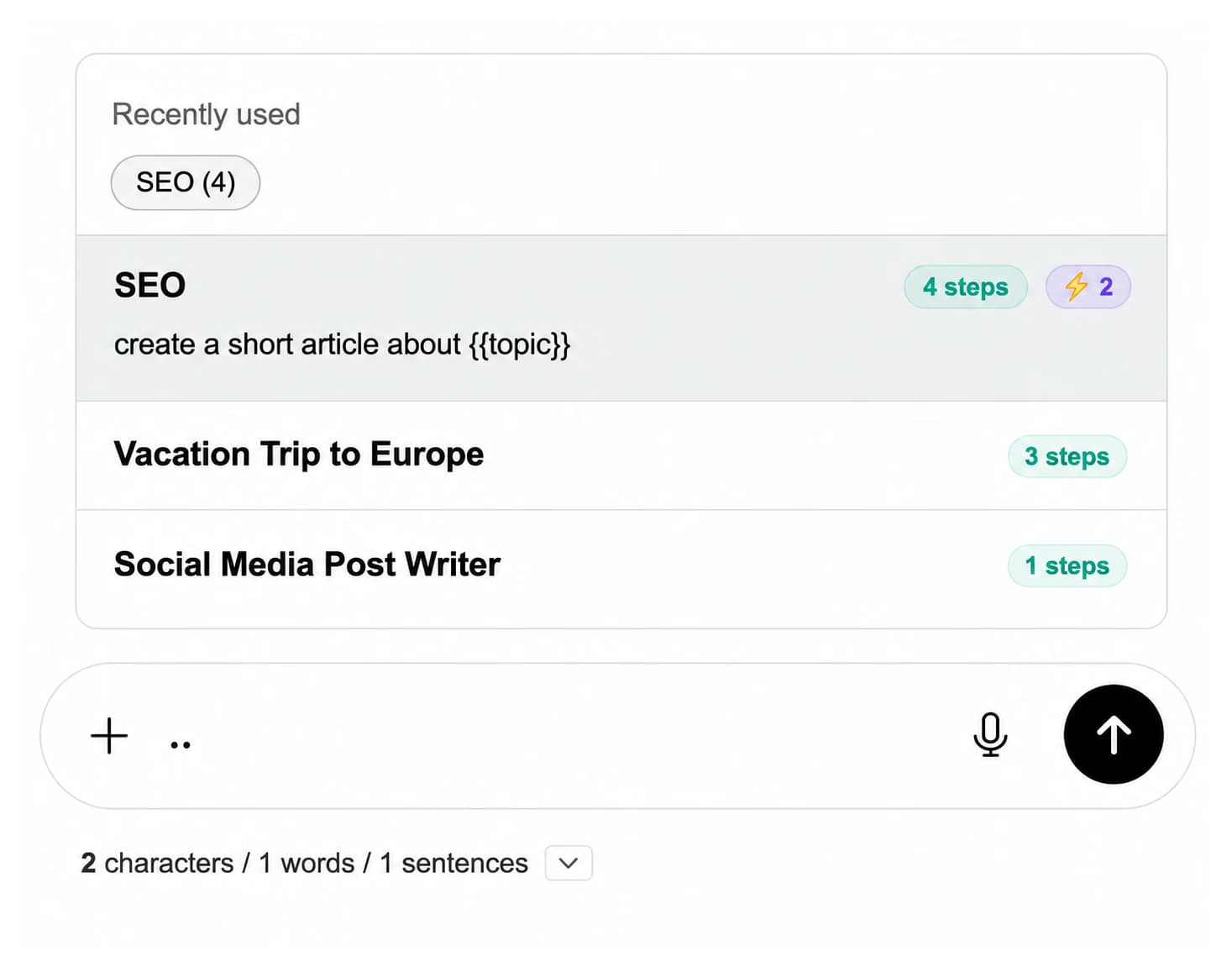
An outline template, then a draft template, then an edit template is a workflow. Premium chains run them in order from one trigger, two dots in the compose box, with a shared {{topic}} variable filled once at the start.

Plan: Premium: prompt chains with shared variables on all four platforms.

Prompt chain picker in the compose box listing chains with their step counts and a {{topic}} variable

Pricing

The templates are free. So is a lot of the extension.

Two saved prompts, five catalog prompts, folders and search are on the free plan. Premium adds unlimited prompts, the full catalog, prompt chains, full-text search and export. Not an AI subscription: you keep using your own accounts.

Free

$0forever

  • Every template on this page, no account
  • 2 saved prompts inserted with two slashes
  • 5 prompts from the in-chat catalog
  • 5 search results per query
Add to Chrome

Premium

$9.99/month

  • Unlimited prompts and prompt chains
  • Full in-chat prompt catalog
  • Unlimited folders and search
  • Bulk export in every format
Get Premium

All Access LifetimeBest value

$199one-time

  • ChatGPT, Gemini, Claude and Grok included
  • Every future AI platform we add
  • All Premium features unlocked
  • Save $197 vs single Lifetimes
Get All Access

Teams$15/seat/month

All Premium features across the four modules ยท Shared team prompts ยท Admin dashboard ยท $12/seat/mo billed annually ยท 14-day free trial

See Teams
  • GDPR compliant
  • Secure checkout by Polar
  • 14-day money-back on a first purchase
  • Nothing you copy is tracked

Refunds follow the refund policy; renewals are not refundable. Premium unlocks for the email you enter at checkout, so use the same address you sign in to ChatGPT with.

FAQ

Prompt template questions people actually ask

How do I use these prompt templates?

Copy a template, paste it into ChatGPT, Claude, Gemini or Grok, and replace every [bracketed placeholder] with your own detail: the topic, the audience, the language, the constraint. The rest of the wording is already specific about the deliverable, so the more precisely you fill the placeholders, the better the answer.

Do these prompts work on Claude, Gemini and Grok as well as ChatGPT?

Yes. They are plain text with no vendor-specific syntax, so they paste into any of the four unchanged. Longer templates that ask for many sections benefit from a model with a large output limit; the model comparison tool lists those.

Can I edit or combine the templates?

They are starting points. Add context under the task, tighten the constraints, or combine two: an outline template followed by a draft template is the usual pairing. The prompt formatter on this site wraps any edited version in a Role, Task, Format scaffold.

How do I save a template so I do not have to copy it every time?

Paste it into the AI Toolbox prompt library. Saved prompts are inserted by typing two slashes in the compose box on ChatGPT, Gemini, Claude or Grok, and each [placeholder] can become a {{field}} that a small form collects at insert time. The free plan holds 2 saved prompts and 5 from the catalog; Premium ($9.99/month or $99 once per module) makes them unlimited.

What is the difference between this page and the extension's prompt catalog?

This page is a free, no-install list you copy from. The extension's catalog lives inside the chat and inserts with two slashes, keeps your own saved prompts alongside it, supports dynamic fields and, on Premium, chains several prompts into one run. Five catalog prompts are free; the full catalog is Premium.

Why do the templates use [square brackets] rather than {{curly braces}}?

Square brackets are the convention for a value you replace by hand before sending. Double curly braces are what the AI Toolbox prompt library uses for a dynamic field it asks you to fill at insert time; when you save a template there, swap the brackets for braces and the form appears automatically.

Are these templates free, and is anything tracked when I copy one?

Free, with no account or sign-up. Copying puts the text on your clipboard in your browser; nothing you paste elsewhere is seen by this site. The AI Toolbox extension is also free to install, with the prompt library, folders and search on the free plan.

Do these prompts work with the latest models?

Yes. They are compatible with every current ChatGPT model (GPT-6 Astra, GPT-5.6 Sol, GPT-5.6 Terra, GPT-5.6 Luna, GPT-5.5, GPT-5.5 Pro, GPT-5.4, GPT-5.4 Pro, GPT-5.4 mini, GPT-5.4 nano) and with the current Claude, Gemini and Grok lineups. Newer models follow explicit structure at least as well as older ones, so a template that names its deliverable and constraints keeps working across releases.

40,000+ users ยท 4.7/5 on the Chrome Web Store

Keep the templates where you type

Install AI Toolbox for a prompt library on ChatGPT, Gemini, Claude and Grok, inserted with two slashes, with fields you fill at insert time.