
ChatGPTGeminiClaudeGrok40,000+users on the Chrome Web Store4.7/ 5

The AI Prompt Pack: 26 Prompts for Real Work

26 copy-and-paste prompts for ChatGPT, Gemini, Claude and Grok, built around working habits rather than party tricks: planning, editing, deciding, debugging and learning. Each one asks for a specific shape of answer and tells the model when to ask you first. Free, no sign-up, and the whole pack saves as a PDF.

Pack free forever | Prompt library with 2 saved prompts free inside ChatGPT, Gemini, Claude and Grok | Premium $9.99/mo or $99 once

Replace every [bracketed placeholder] before you send. Copying puts the text on your clipboard in your browser; nothing you paste elsewhere is seen by this site.

The pack

26 prompts in five groups

Scan the titles, copy the one that matches the job, fill the bracket, paste.

Work and productivity

6 prompts
  • Turn a messy brain-dump into a plan

    Here is an unstructured brain-dump of what I need to get done. Group the items into themes, order them by impact and urgency, flag anything that is blocking something else, and give me a realistic plan for today and this week. Ask me for anything that is unclear before you start. [paste your notes]
  • Summarize a long thread into decisions

    Read the conversation below and extract only what matters: the decisions made, the open questions, and who owns each next step with a due date if one is mentioned. Keep it under 200 words and use bullet points. [paste the thread]

  • Draft a clear status update

    Write a short status update for my team based on these notes. Structure it as: what shipped, what is in progress, what is blocked, and what I need from others. Keep the tone plain and confident, no filler. [paste notes]

  • Prep for a hard conversation

    I need to have a difficult conversation about the situation below. Help me prepare: what is the core message, what outcome do I want, what are the likely objections, and how do I stay calm and specific. Give me two or three opening lines I could actually say. [describe the situation]

  • Make a decision with a scorecard

    I am deciding between these options. Build a simple weighted scorecard: propose 4 to 6 criteria that matter for this decision, weight them, score each option, and show the totals. Then tell me where the result is close enough that my own judgment should break the tie. [list the options]

  • Weekly review coach

    Act as my weekly review coach. Ask me one question at a time about what went well, what slipped, and what I am carrying into next week. After my answers, summarize three lessons and one focus for the coming week.

Writing and communication

5 prompts
  • Tighten any draft

    Edit the text below for clarity and concision without changing my meaning or voice. Cut redundancy, replace vague words with specific ones, and fix any awkward phrasing. Show the edited version first, then a short list of the biggest changes and why. [paste your draft]

  • Rewrite for a specific reader

    Rewrite this message for the following reader so it lands well with them: [describe the reader, their priorities, and how much detail they want]. Keep it honest and specific, and match their level of formality. [paste the message]

  • Three subject lines and a reason

    Write three subject-line options for the email below, each with a different angle (clarity, curiosity, urgency). For each, add one line explaining who it works best for. Then recommend one. [paste the email]

  • Explain it simply

    Explain the concept below to a smart person who is new to the topic. Use a concrete analogy, avoid jargon, and end with the one thing they should remember. Keep it under 150 words. [concept]

  • Turn notes into an outline

    Turn these rough notes into a clear outline for a [article, talk, doc]. Propose a logical structure with a strong opening, three to five main sections, and a closing takeaway. Mark anywhere the argument is thin so I can fill it in. [paste notes]

Marketing and growth

5 prompts
  • Positioning in one page

    Help me sharpen the positioning for the product below. Give me: the one-sentence value proposition, the specific audience it is for, the top three benefits framed as outcomes, and the single reason to choose it over the obvious alternative. Be concrete, no buzzwords. [describe the product]

  • Landing page section critique

    Critique the landing-page copy below like a skeptical first-time visitor. Where would I get confused, where do I not believe the claim, and where is the call to action unclear. Then rewrite the weakest section. [paste the copy]

  • Content ideas from one insight

    Here is one insight my audience cares about. Generate 10 content angles from it (posts, threads, short videos), each with a specific hook. Rank them by how likely they are to resonate and say why. [the insight]

  • Customer-voice research

    Below are raw customer quotes or reviews. Cluster them into the recurring themes, quote the most vivid line for each theme, and tell me which theme I should lead with in my messaging and why. [paste quotes]

  • Cold outreach that is not spam

    Write a short, specific outreach message to the person below. Reference something real about them, make one clear ask, and keep it under 90 words. No flattery, no fake urgency. [describe the recipient and the ask]

Coding and technical

5 prompts
  • Explain this code

    Explain what the code below does, step by step, in plain language. Call out anything surprising, any edge cases it does not handle, and one thing you would improve. Do not rewrite it yet. [paste code]

  • Debug with a hypothesis

    Here is the code, the expected behavior, and the actual behavior. Give me your top three hypotheses for the bug, ordered by likelihood, and the fastest way to test each one. Only then propose a fix. [paste code, expected, actual]

  • Review like a senior engineer

    Review the change below the way a thoughtful senior engineer would. Focus on correctness, edge cases, and readability, not style nitpicks. For each issue, give a concrete failure scenario and a suggested fix. [paste the diff or code]

  • Write tests for this function

    Write a focused set of tests for the function below. Cover the happy path, the boundary cases, and the failure modes. List the cases first as a short table, then the test code. [paste function]

  • Turn a task into a plan

    I need to implement the feature below. Before any code, give me a short implementation plan: the files likely involved, the approach, the trickiest part, and how I would verify it works. Ask me anything you need first. [describe the feature]

Learning and research

5 prompts
  • Teach me with a roadmap

    I want to learn the topic below to a working level. Give me a roadmap: the core concepts in the order I should learn them, one concrete exercise per concept, and a way to test that I actually understand each one. Assume I have limited time. [topic]

  • Steel-man both sides

    Give me the strongest honest case for and against the claim below. For each side, state the best evidence and the weakest point. End by telling me what a careful person would still be uncertain about. [the claim]

  • Quiz me until I get it

    Quiz me on the topic below to find the gaps in my understanding. Ask one question at a time, adapt the difficulty to my answers, and after five questions tell me exactly what to review. [topic]

  • Compare options objectively

    Compare the options below on the dimensions that actually matter for someone in my situation: [describe your situation]. Use a table, be specific about tradeoffs, and note where the honest answer is that it depends. [list options]

  • Extract the useful parts

    Read the material below and pull out only what is useful to me: the key claims, the numbers worth remembering, and anything I could act on. Skip the background I likely already know. [paste material]

Why these work

What the pack does that a one-line prompt does not

"Summarize this" gets a summary. "Extract the decisions, the open questions and who owns each next step, under 200 words, in bullets" gets something you can forward. The difference is the shape.

Every prompt here was written for a recurring job rather than a demo: the Monday brain-dump, the draft that needs cutting, the bug with three plausible causes, the topic you need to learn by Friday. The wording is deliberately plain so it works the same on ChatGPT, Claude, Gemini and Grok.

The [placeholder] is the only part that changes between uses. Keep the rest, and the model's behaviour stays predictable, which is the whole point of a saved prompt.

Four habits

What every prompt in the pack does:

  • Each one asks for a shape, not a vibe: a scorecard, a status update in four parts, three hypotheses ordered by likelihood. The model fills a shape far more reliably than it guesses one.
  • They tell the model when to ask: several end with "ask me anything unclear first", which turns a bad guess into a clarifying question.
  • They separate the thinking from the fix: explain before rewriting, hypothesize before patching, outline before drafting. The intermediate step is where you catch the wrong turn.
  • The placeholder is the only part that changes: [paste your notes], [describe the situation]. Keep the wording and swap the bracket, and the prompt behaves the same every time.

Keep these four when you edit a prompt and it will still behave.

Step by step

How to use the pack

Four steps, no account, and nothing you copy is tracked.

  • Pick the job

    Five groups: work, writing, marketing, coding and learning. Each prompt names the job in its title, so scan the titles rather than reading every card.

  • Copy the prompt

    One click puts the full text on your clipboard and the card confirms it. The text stays visible, so you can read it before you paste.

  • Fill the bracket and paste

    Replace the [bracketed placeholder] with your notes, code or situation, then paste into ChatGPT, Claude, Gemini or Grok. The prompts are plain text and work the same on all four.

  • Keep the ones you reuse

    Save this page as a PDF with the print button, or save a prompt in the AI Toolbox prompt library and insert it with two slashes, with the bracket turned into a field you fill at insert time.

In the chat itself

Keep the pack one keystroke away

This page is the pack. AI Toolbox keeps the prompts you actually use inside ChatGPT, Gemini, Claude and Grok, ready to insert.

Reuse

Save a prompt once, insert it with two slashes

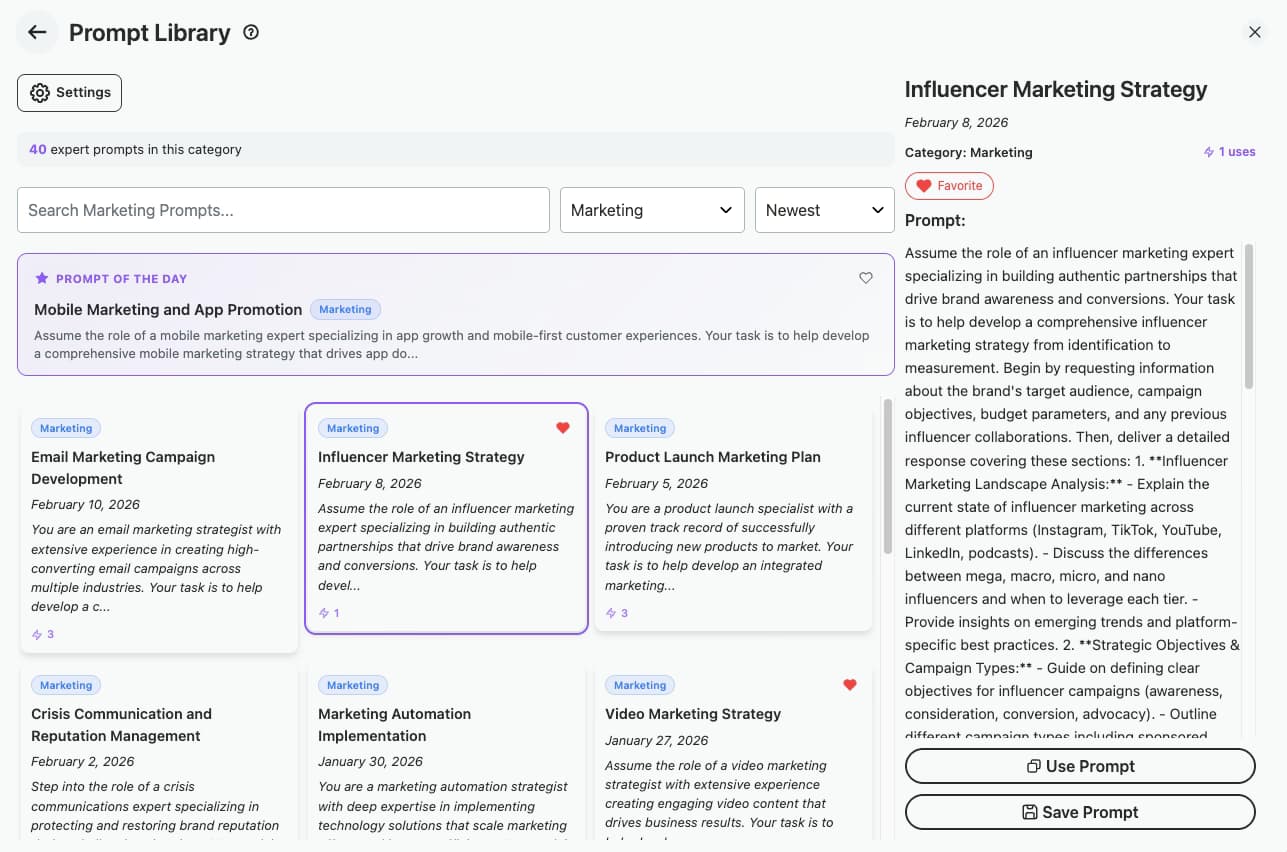
A PDF is a fine backup; it is a poor way to use a prompt daily. AI Toolbox keeps a prompt library inside ChatGPT, Gemini, Claude and Grok: save any prompt from this pack, type two slashes in the compose box to insert it, and turn each [placeholder] into a {{field}} that a small form collects every time. The free plan holds two saved prompts and five from the catalog.

Plan: Free: 2 saved prompts, 5 catalog prompts. Premium: unlimited.

AI Toolbox prompt library inside ChatGPT with saved prompts inserted by typing two slashes and a catalog of ready-made prompts

Sequence

Chain the pack into a workflow

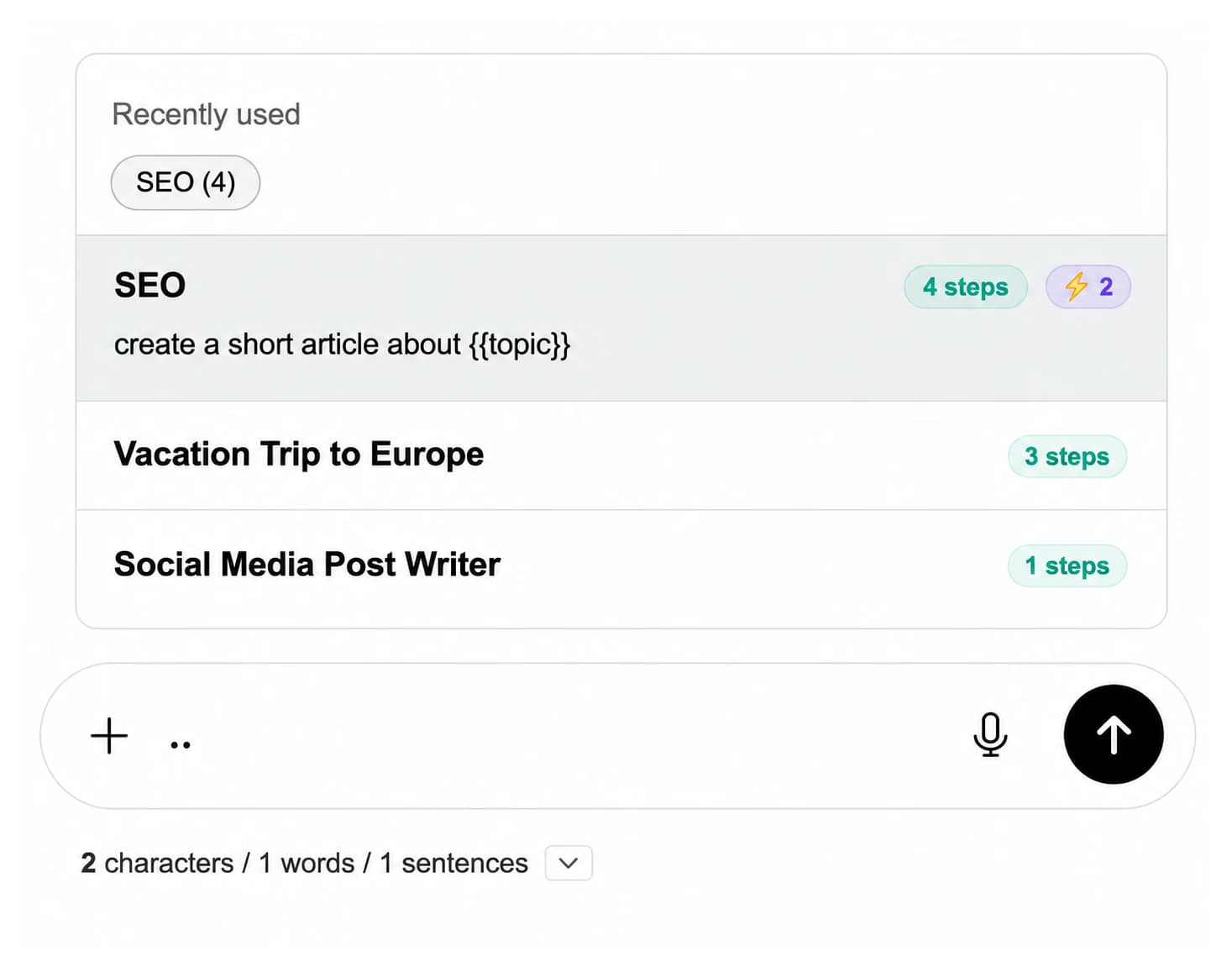
Several of these prompts belong in sequence: brain-dump to plan, plan to status update; explain the code, then debug, then write the tests. Premium chains run them in order from one trigger, two dots in the compose box, with a shared {{topic}} variable filled once at the start.

Plan: Premium: prompt chains with shared variables on all four platforms.

Prompt chain picker in the compose box listing chains with their step counts and a {{topic}} variable

Pricing

The pack is free. So is a lot of the extension.

Two saved prompts, five catalog prompts, folders and search are on the free plan. Premium adds unlimited prompts, the full catalog, prompt chains, full-text search and export. Not an AI subscription: you keep using your own accounts.

Free

$0forever

  • Every prompt in this pack, no account
  • 2 saved prompts inserted with two slashes
  • 5 prompts from the in-chat catalog
  • 5 search results per query
Add to Chrome

Premium

$9.99/month

  • Unlimited prompts and prompt chains
  • Full in-chat prompt catalog
  • Unlimited folders and search
  • Bulk export in every format
Get Premium

All Access LifetimeBest value

$199one-time

  • ChatGPT, Gemini, Claude and Grok included
  • Every future AI platform we add
  • All Premium features unlocked
  • Save $197 vs single Lifetimes
Get All Access

Teams$15/seat/month

All Premium features across the four modules ยท Shared team prompts ยท Admin dashboard ยท $12/seat/mo billed annually ยท 14-day free trial

See Teams
  • GDPR compliant
  • Secure checkout by Polar
  • 14-day money-back on a first purchase
  • Nothing you copy is tracked

Refunds follow the refund policy; renewals are not refundable. Premium unlocks for the email you enter at checkout, so use the same address you sign in to ChatGPT with.

FAQ

Prompt pack questions people actually ask

How do I use the prompt pack?

Copy a prompt, replace the [bracketed placeholder] with your own notes, code or situation, and paste it into ChatGPT, Claude, Gemini or Grok. Every prompt is plain text with no vendor syntax, so it behaves the same on all four. The print button saves the whole pack as a PDF.

Is the pack free, and do I need to sign up?

Free, no account and no email required: the prompts are on this page. Copying puts the text on your clipboard in your browser and nothing you paste elsewhere is seen by this site. The AI Toolbox extension is also free to install.

What makes these different from a list of generic prompts?

Each prompt asks for a specific shape of answer (a weighted scorecard, a four-part status update, three ranked hypotheses), tells the model when to ask a clarifying question, and separates the thinking step from the fix. Those three habits are what make a prompt reusable rather than a one-off.

Can I edit the prompts?

Yes, they are starting points. Keep the shape of the answer and the instruction to ask when unclear, and change the constraints to fit your work: word limits, tone, the number of options. The prompt formatter on this site wraps any edited version in a Role, Task, Format scaffold.

How do I keep a prompt one keystroke away?

Save it in the AI Toolbox prompt library and insert it by typing two slashes in the compose box on ChatGPT, Gemini, Claude or Grok. Each [placeholder] can become a {{field}} that a small form collects at insert time. The free plan holds 2 saved prompts and 5 from the catalog; Premium ($9.99/month or $99 once per module) makes them unlimited and adds prompt chains.

Do the prompts work with the latest models?

Yes. They rely on explicit structure and clarifying questions, which every current model follows: GPT-6 Astra, GPT-5.6 Sol, GPT-5.6 Terra, GPT-5.6 Luna, GPT-5.5, GPT-5.5 Pro, GPT-5.4, GPT-5.4 Pro, GPT-5.4 mini, GPT-5.4 nano on ChatGPT, and the current Claude, Gemini and Grok lineups.

Can I share the pack with my team?

Yes, link to this page or share the PDF. Teams on AI Toolbox can also publish shared prompts to every member's library from the admin dashboard, so the same prompt inserts identically for everyone across the four platforms.

Where do the prompt templates on the tools page fit in?

The templates page is a larger catalog of task-specific prompts (marketing calendars, SQL queries, cover letters) organized by category. This pack is shorter and built around working habits: planning, editing, deciding, debugging, learning. Use the templates when you need a specific deliverable and the pack when you need a better way of working with the model.

40,000+ users ยท 4.7/5 on the Chrome Web Store

Stop pasting from a PDF

Install AI Toolbox for a prompt library on ChatGPT, Gemini, Claude and Grok, inserted with two slashes, with fields you fill at insert time.