Search Study Sessions by Date
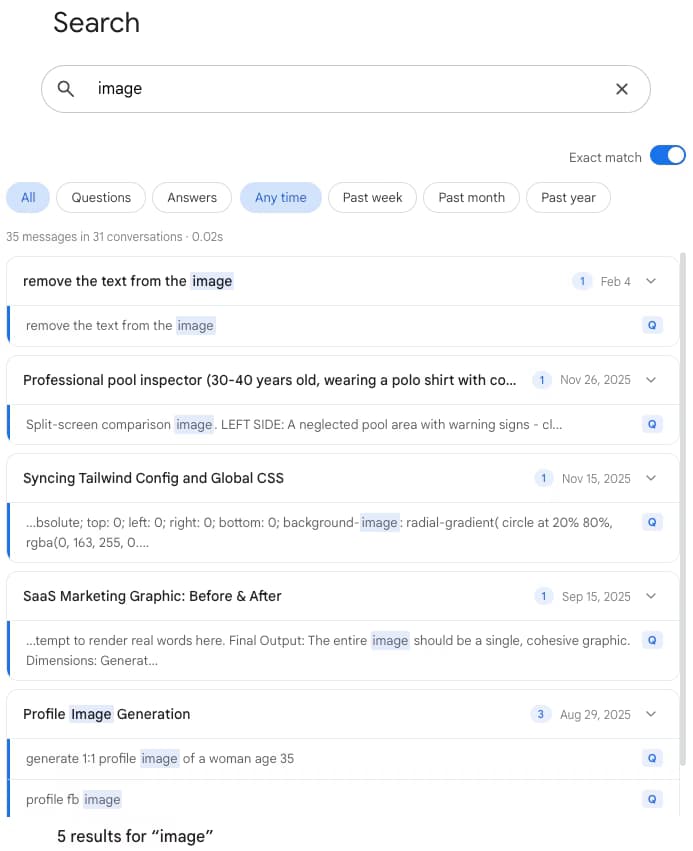
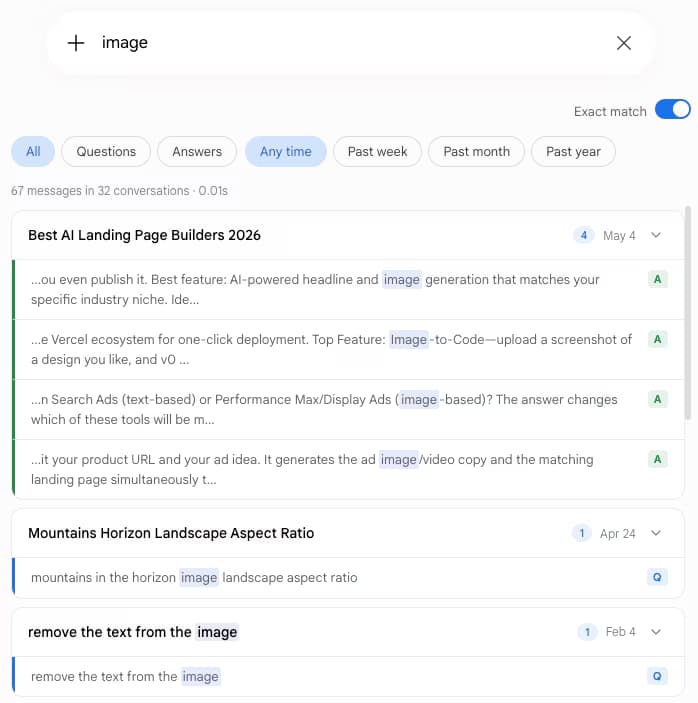
Narrow search results to the week of a midterm, the month before finals, or the semester you took calculus. Date filters turn your conversation list into a study timeline.
Loading...
Google Gemini is free, powerful, and often bundled with student plans. The catch: every study session you have with it disappears into a sidebar that only searches chat titles. Gemini Toolbox adds full-text search with date filters and TXT or Markdown export so your notes actually work as notes.
From the makers of ChatGPT Toolbox (18,000+ users · 4.5 on Chrome Web Store).
Free plan (5 results) | Premium $5/mo | Lifetime $49
You ask Gemini to explain a derivative, a period of history, a chemistry reaction, a Python loop. Two weeks later you need that explanation for a quiz and it is buried in a sidebar that only matches chat titles - and half your chats are still called “new chat.”
Google does let you share a single response to Docs or Gmail, and you can request a full Google Takeout dump of your account. Neither is what you want at 11pm the night before a midterm.
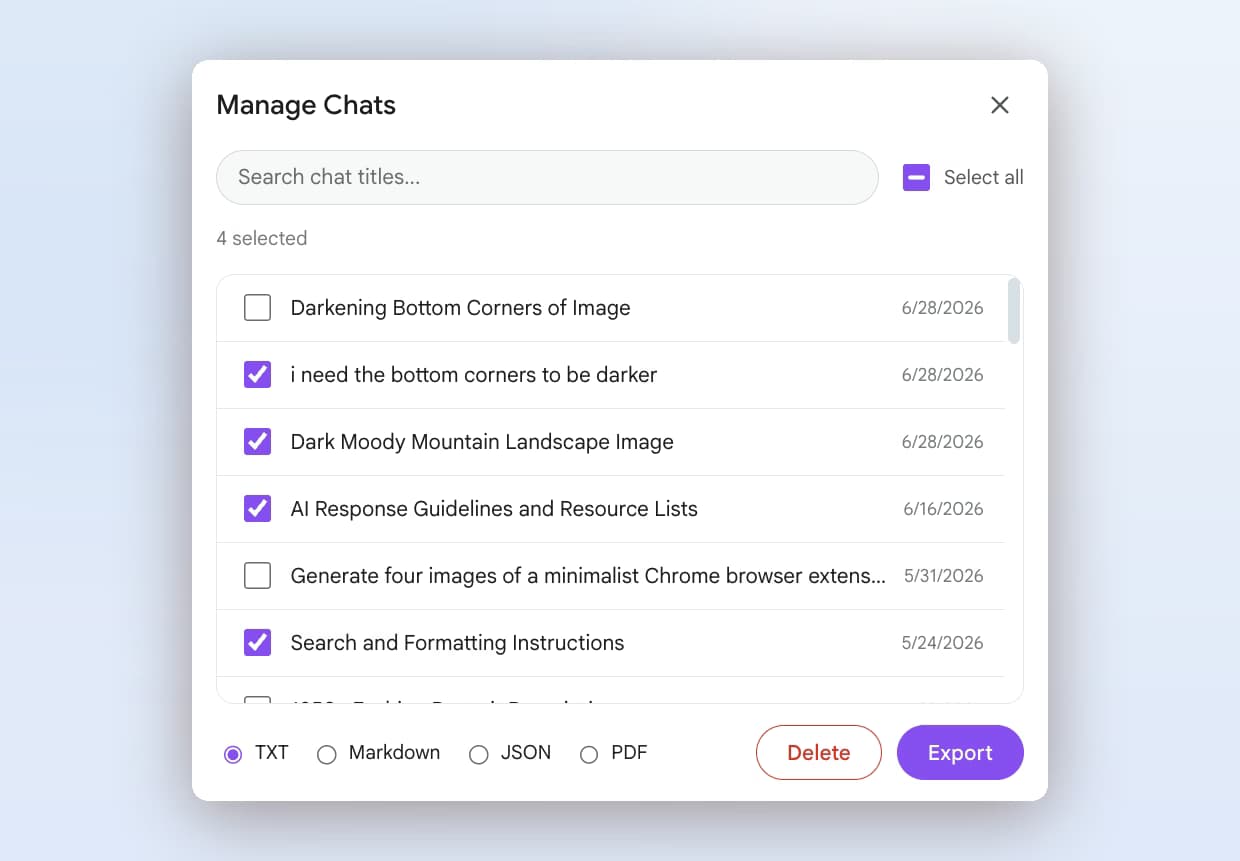
Gemini Toolbox indexes every synced conversation locally and lets you search by any keyword or topic. Date filters narrow to the week or month you need. Role filters show only Gemini's explanations. Export pulls any conversation out as TXT or Markdown notes.
Narrow search results to the week of a midterm, the month before finals, or the semester you took calculus. Date filters turn your conversation list into a study timeline.
Use the role filter to show only Gemini responses. When you are revising, you usually want the explanation, not your own half-formed question. One toggle and the noise is gone.
TXT is perfect for a plain-text note app or printing. Markdown keeps code blocks and headings intact for Obsidian, Notion, or a class wiki. Both export types are instant.
Gemini Toolbox keeps the last five searches you ran, stored locally. Re-run them with one click when you revisit a topic.

$0
$5 /month
$49 one-time
| Capability | Gemini Native | Gemini Toolbox |
|---|---|---|
| Search study session content | No (titles only) | Yes - full-text |
| Filter by week or month | No | Yes |
| Show Gemini explanations only | No | Yes - role filter |
| Export as notes (TXT or Markdown) | No (per-response to Docs only) | Yes - one click |
| Price | Free | Free plan available |
“I used Gemini for most of organic chemistry and could never find the reaction mechanisms I had worked through. Toolbox just indexes everything. Week before the final I searched for Diels-Alder, filtered to the month before the exam, and exported the best conversation as Markdown into my Obsidian vault. Legitimately changed how I study.”
- Mira Patel, Undergraduate Chemistry Student
Yes. Google Gemini is free at the base tier and the paid Google AI Pro tier is often bundled with student plans. Gemini can explain concepts, walk through worked examples, and handle long documents (2.5 Pro has a 1M token context window). The productivity problem for students is not Gemini - it is finding the explanation you got two weeks ago. Gemini Toolbox fixes that with full-text search, date filters, and TXT/Markdown export.
Yes. Install Gemini Toolbox, press Cmd+Shift+F on Mac or Ctrl+Shift+F on Windows, type a keyword from the topic, and apply the date range filter for the relevant week or month. Results come from a local index of every synced conversation, so even a study session you had on day one of the semester is searchable.
Gemini Toolbox Premium ($5/month or $49 lifetime) lets you export any conversation as TXT, Markdown, JSON, or PDF. For notes, Markdown is the best option because it preserves headings, code blocks, and formatting for Notion, Obsidian, or your class wiki. TXT is the simplest for printing or pasting into a plain note app.
The free plan is free forever and includes full-text search with up to 5 results per query, date range and role filters, exact match, background sync, and the Cmd+Shift+F keyboard shortcut. Most student workflows fit inside the free plan. Exporting as TXT, Markdown, JSON, or PDF is part of Premium ($5/month) or Lifetime ($49 one-time).
It works wherever you can install a standard Chrome Web Store extension. Some school-managed Chromebooks restrict extension installs via policy - check with your IT admin. The extension itself only reads Gemini conversation data from gemini.google.com and stores it in your local browser IndexedDB, so there is no network dependency.
Yes. Gemini Toolbox syncs conversations into IndexedDB, a local database inside your browser. Search queries run locally. No conversation content is uploaded to a server by the extension. If you share a device, sign out of the browser profile like you would for any browser-stored data.
Install Gemini Toolbox free. Search your past sessions, filter by date, export notes in seconds.
We build productivity extensions for every major AI assistant.