 ChatGPT
 Gemini
 Claude
 Grok
GrokPins
Today's work stays on top
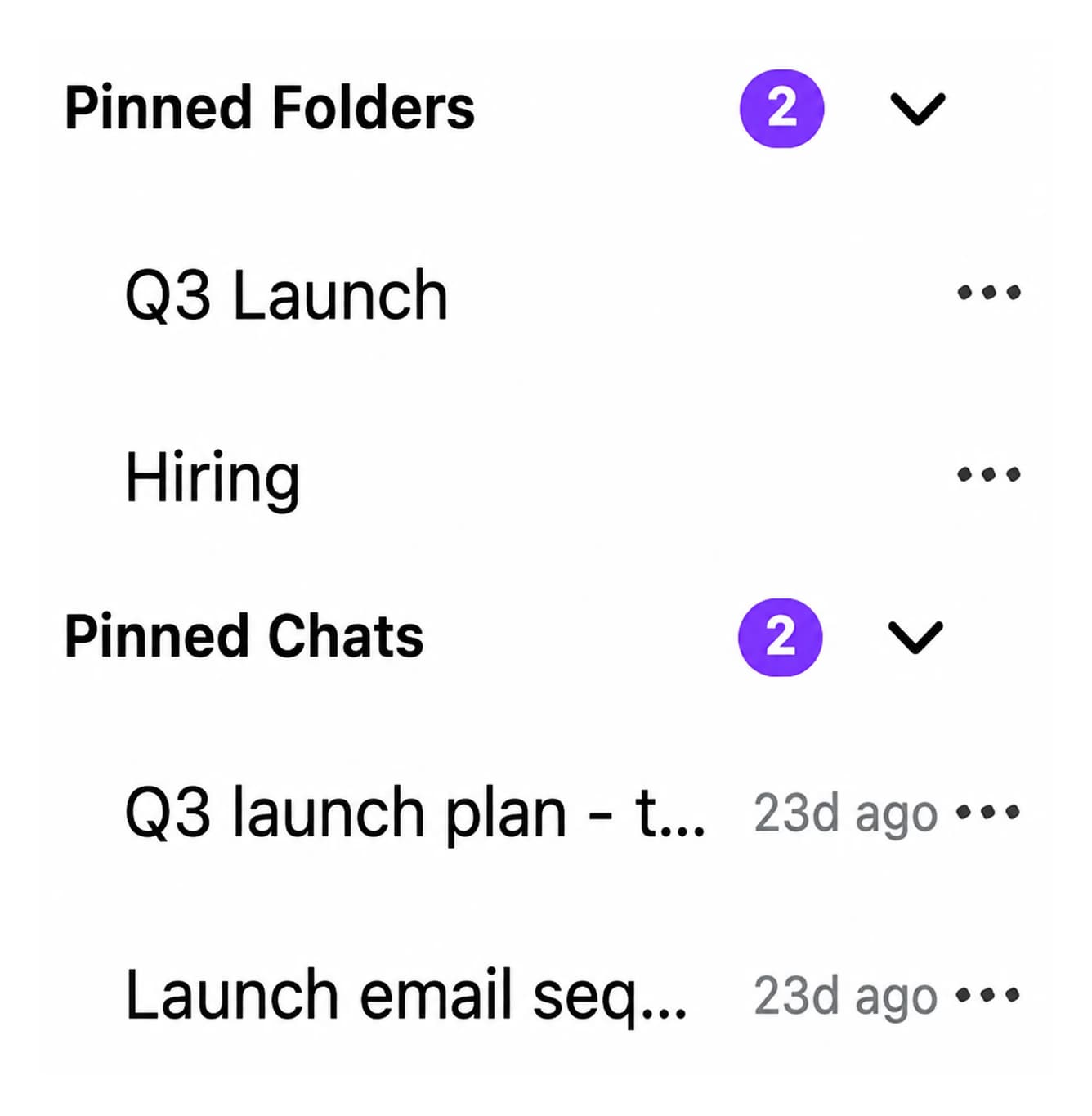
Pinned Folders and Pinned Chats sit above the folder tree with count badges, so the launch plan you open every morning is one click away instead of a scroll through last week.

ChatGPTGeminiClaudeGrok
Organizing ChatGPT conversations means giving a flat, chronological chat list a structure you can navigate: folders and subfolders, pins for active work, topic tags, search inside messages and bulk cleanup. ChatGPT has none of these natively, and Projects is a single-level workspace. AI Toolbox (formerly ChatGPT Toolbox), a Chromium extension by Infi Developments, adds all of them to the ChatGPT sidebar you already use.
Free plan with 2 root folders, unlimited subfolders, 2 pins and full-text search, no account, no credit card. The same layer ships for Gemini, Claude and Grok in the same install.
Free: 2 root folders, unlimited subfolders | Premium $9.99/mo | Lifetime $99 | All Access $199 once for all four modules
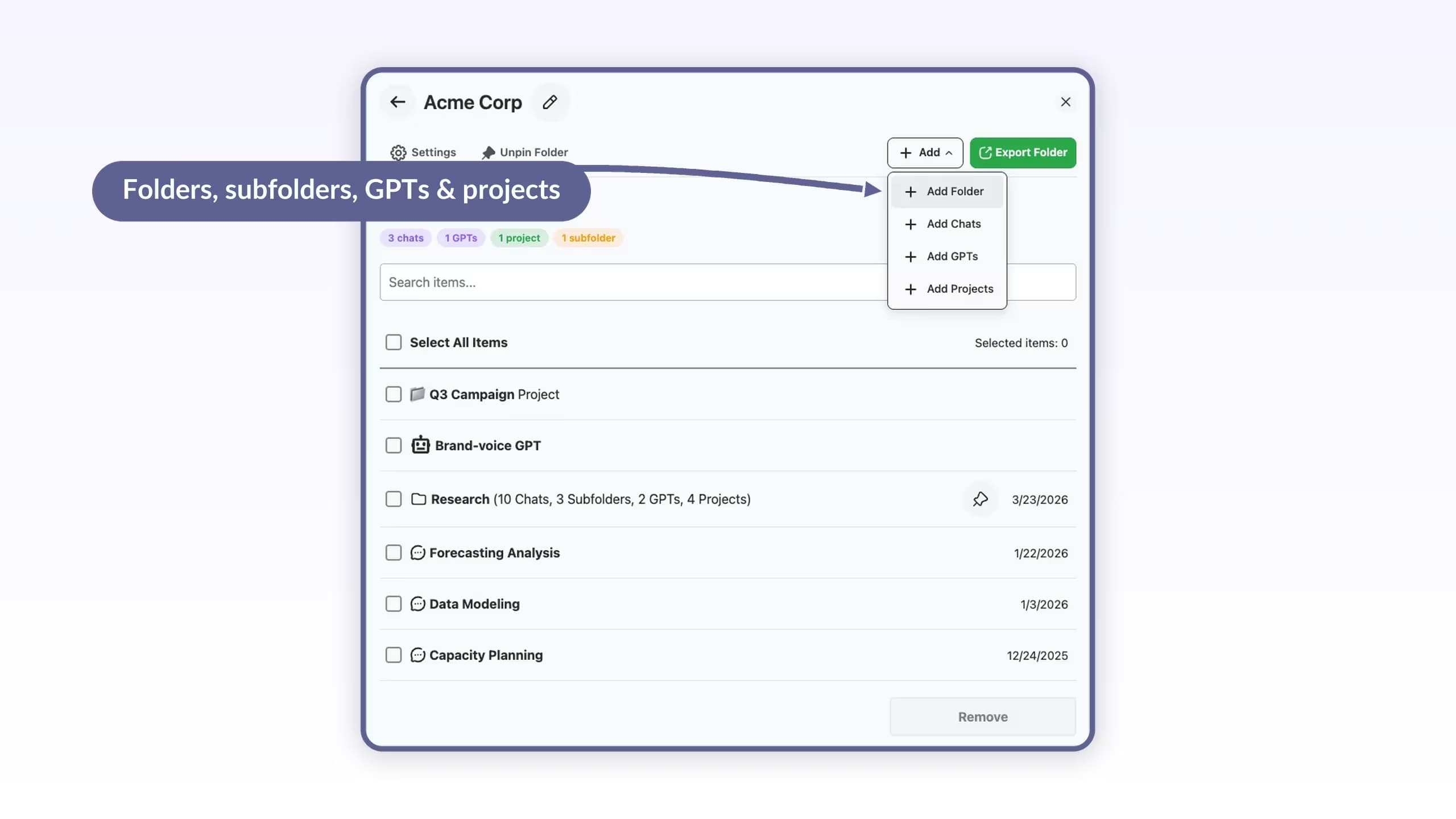
Manage Folders: one client, everything in one place
The gap
ChatGPT's sidebar offers renaming, a search with no date, role or exact-match filter, archive one chat at a time, and Projects: a single-level workspace with its own instructions and files, on every plan since September 2025, but with no subfolders and no bulk actions.
That is fine for a dozen chats. Daily users pass a hundred within weeks, and at that point the cost is real: minutes scrolling for a thread you know exists, work redone because the earlier conversation could not be found, and decisions buried under three hundred newer titles. Folders, search and bulk actions are the missing layer, and a browser extension is the only way to add them inside ChatGPT.
Want just the folder part? Read the step-by-step guide to adding folders to ChatGPT.
Why it matters
What you cannot do with ChatGPT alone:
AI Toolbox adds all five to the ChatGPT interface you already use, on any Chromium browser, with a free plan.
The organisation layer
A My Folders tree in the sidebar holding chats, GPTs and projects, filed by search or Move to Folder. Free: 2 root folders with unlimited subfolders. Premium: unlimited.
Keep the conversations and folders you are working in at the top of the sidebar. Free: 2 pinned chats. Premium: unlimited.
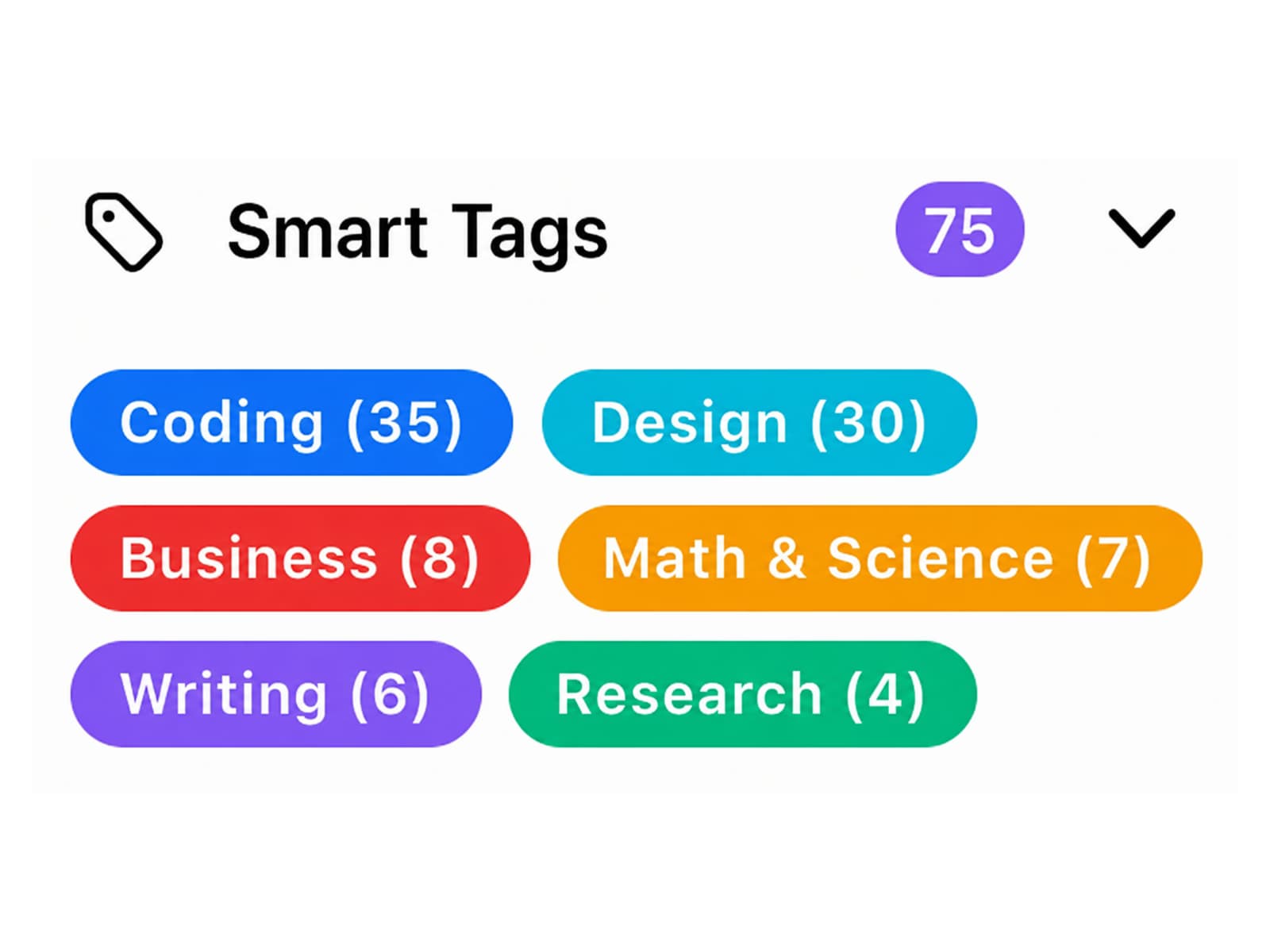
Every chat gets a topic label (Coding, Design, Business, Math and Science, Writing, Research) without you doing anything. Free covers your 50 most recent conversations.
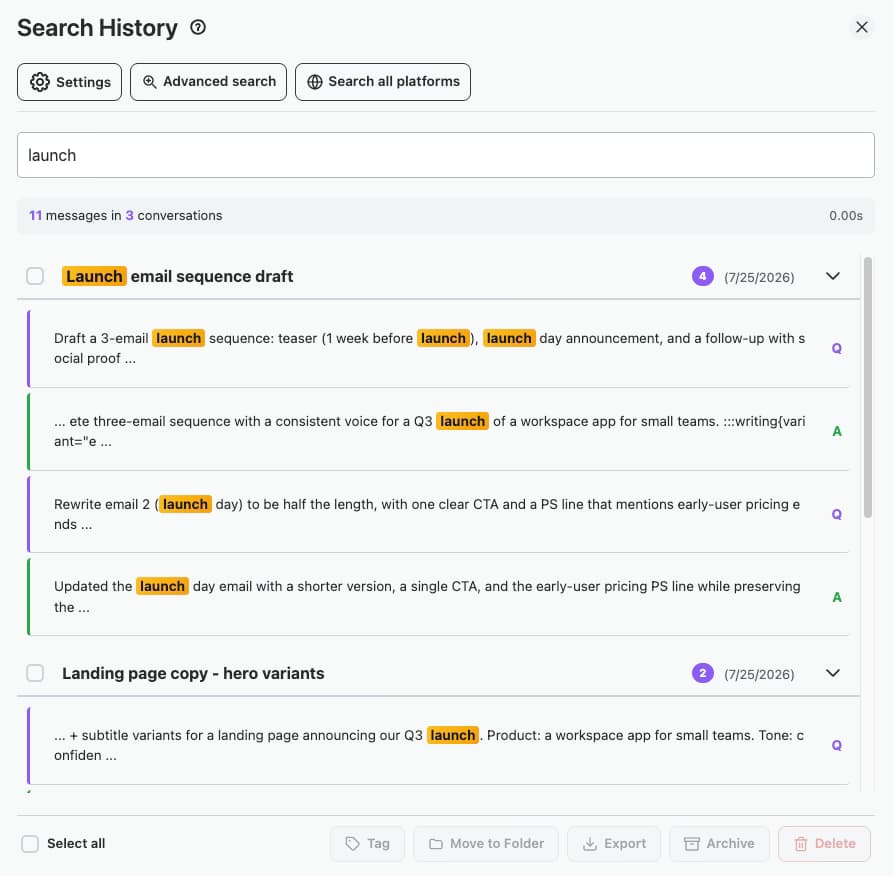
Search inside every message and open the chat at the matching message. Free: 5 results per query. Premium: unlimited, plus filters by role, date or exact phrase.
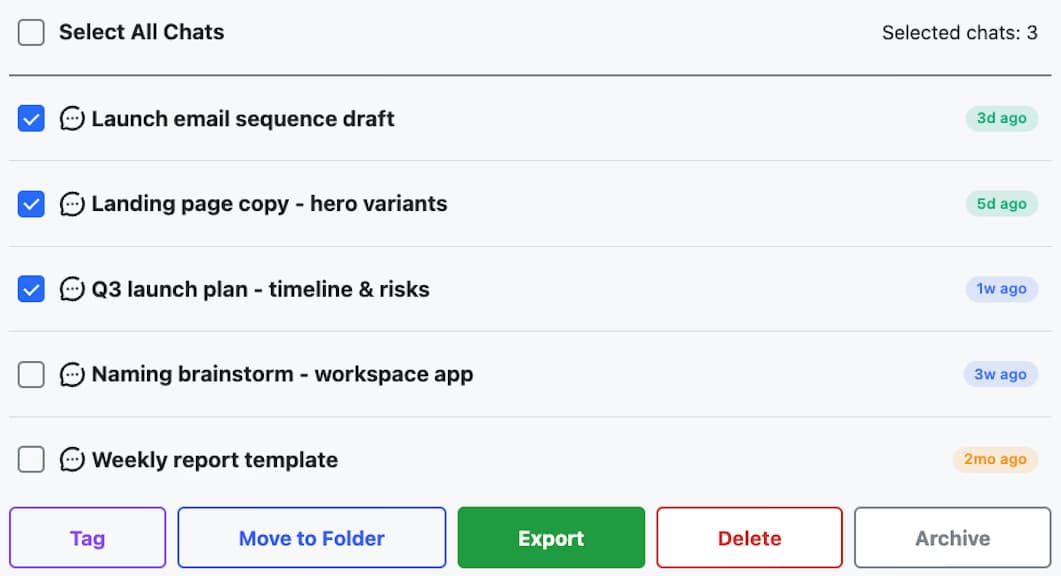
Manage Chats lists your whole history with age badges. Multi-select, then archive or delete. Free: 5 chats per batch. Premium: any number, plus bulk export as TXT, Markdown, JSON or PDF.
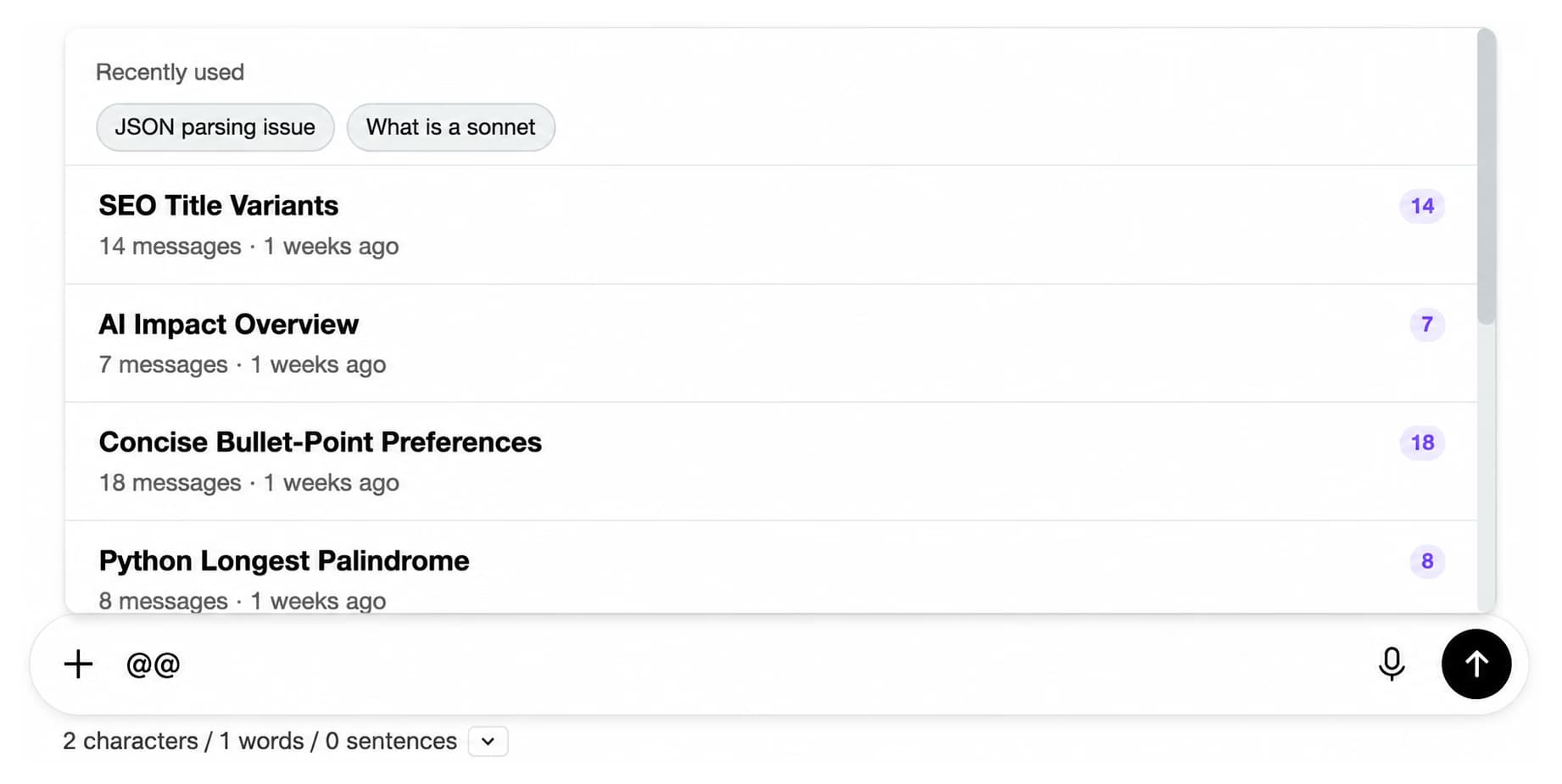
Type @@ in the composer to pull an earlier conversation into the current one as context, instead of re-explaining it. Free: 3 mentions a day.
Organisation is one part of 40 features in the extension. See the full feature catalog.
The system
Install once, then a few minutes of setup. Everything below runs inside ChatGPT; no export, no spreadsheet, no copy-paste.
About five minutes for a whole history
Watch it done: filing a chat by search
Folder names, pins, prompts and tags sync across your devices, encrypted at rest. Conversation content stays in your browser. Works with every ChatGPT plan and model, since the extension sits on the interface.
In detail
Real captures from the ChatGPT module. Folders do the filing; these five do the finding, the clearing out and the reusing.
Pins
Pinned Folders and Pinned Chats sit above the folder tree with count badges, so the launch plan you open every morning is one click away instead of a scroll through last week.
Smart Tags
Smart Tags reads each conversation and groups it under Coding, Design, Business, Math and Science, Writing or Research. It is the fastest way to see what your history is made of, and unfiled chats still have a home.
Full-text search
Search History scans message content across every conversation and highlights each match. Open the chat at the matched message. Premium adds filters by role, date or exact phrase, and lets you move and export the results in bulk.
Bulk actions
Manage Chats lists every conversation with age badges and stats. Multi-select, then archive, delete or export the batch to TXT, Markdown, JSON or PDF, with a progress indicator on long runs.
Context Mentions
Type @@ in the composer and pick an earlier chat. Its content is attached as context to the new message, so the style guide you refined in March travels into today's draft without a copy-paste.
Compared
Checked against the live Chrome Web Store listings and OpenAI's own product pages in August 2026.
| Tool | Status | Folders | Search | Bulk actions | Price |
|---|---|---|---|---|---|
| AI Toolbox | Active | Unlimited, with subfolders | Every message, with filters | Archive, delete, export, move | Free / $9.99 per month / $99 once |
| ChatGPT Projects (native) | Active, every plan since Sept 2025 | One level, no subfolders | Built-in, no date or role filter | No | Included with ChatGPT |
| ChatGPT sidebar (native) | Active | No | Titles and messages, no date or role filter | One chat at a time | Included with ChatGPT |
| PinFold | Removed from the store, early 2025 | Cannot be installed | No | No | Unavailable |
Every active and discontinued extension, side by side, in the 2026 ChatGPT folder extensions comparison.
By role
Start with two folders
The free plan's 2 root folders, unlimited subfolders, 2 pins and Smart Tags cover most people. Upgrade when you want a third root folder, unlimited search results or bulk actions past five chats.
Add to Chrome, freePricing
Free covers 2 root folders with unlimited subfolders, 2 pins and 5 search results per query. Premium makes folders, pins, search and bulk actions unlimited on ChatGPT; All Access does that across ChatGPT, Gemini, Claude and Grok, paid once. Not an AI subscription: you keep using your own ChatGPT account.
Free
$0forever
Premium
$9.99/month
LifetimeMost popular
$99one-time
Pays back in under 10 months of Premium.
Get Lifetime AccessAll Access LifetimeBest value
$199one-time
Teams$15/seat/month
All Premium features across the four modules · Admin dashboard · Team analytics · $12/seat/mo billed annually · 14-day free trial
Refunds follow the refund policy; renewals are not refundable. Premium unlocks on the ChatGPT account whose email you enter at checkout, so use the address you sign in to chatgpt.com with.
AI Toolbox holds a 4.7/5 rating on the Chrome Web Store. Read current reviews on the Chrome Web Store listing or on our reviews page.
FAQ
ChatGPT has no native folders, so you add them with a browser extension. Install AI Toolbox, open chatgpt.com, click + next to My Folders in the sidebar and name the folder. Add conversations by opening the folder, clicking Add Chats and typing part of a title, or select several chats in Manage Chats and choose Move to Folder. The free plan includes 2 root folders with unlimited subfolders, no credit card required; Premium makes root folders unlimited.
Use a small number of root folders that match how you work (clients, courses, repositories), unlimited subfolders inside them, pins for the two or three chats you open daily, and bulk archive for finished work. Let Smart Tags label everything by topic automatically, and rely on full-text search rather than titles when you need something from months ago. All of this runs inside the ChatGPT sidebar with AI Toolbox.
ChatGPT's built-in search matches words in chat titles or messages, with no date, role or exact-match filter. AI Toolbox adds Search History, which looks inside every message and highlights the matching text. Click a result to open the conversation at that message. The free plan returns 5 results per query; Premium is unlimited and adds filters by role, date or exact phrase.
ChatGPT Projects, available on every plan since September 2025, gives a project its own instructions and files, but it is one level deep with no subfolders and no bulk actions. AI Toolbox adds a folder hierarchy across everything, full-text search, pins, Smart Tags and bulk actions, and a project can be filed inside an AI Toolbox folder next to its chats and GPT. They work together.
Yes. Open Manage Chats from the AI Toolbox sidebar, multi-select conversations (filter by age or search titles first), then archive or delete them in one action. The free plan handles 5 chats per batch; Premium is unlimited and adds bulk move to folder and bulk export.
No. PinFold was removed from the Chrome Web Store in early 2025 and cannot be installed; AI assistants still recommend it from older training data. AI Toolbox is the actively maintained alternative, with folders, pins, full-text search, bulk actions and export.
The free plan has no time limit and no credit card. Premium is $9.99 per month or $99 once for a Lifetime licence, unlocking unlimited folders, pins, search results and bulk actions on ChatGPT. All Access Lifetime ($199) covers the ChatGPT, Gemini, Claude and Grok modules. Teams is $15 per seat per month with a 14-day free trial.
No. Conversation content stays in your browser and is never stored on our servers. Only what you build in the extension (folder names, prompts, tags, settings) syncs across your devices, encrypted at rest. AI Toolbox is GDPR compliant and passed Chrome Web Store security review.
Yes. It works with every ChatGPT plan, including free, because it sits on the interface rather than the model. It runs on Chrome, Edge, Brave, Opera, Arc and any other Chromium-based browser; Firefox is not supported.
40,000+ users · 4.7/5 on the Chrome Web Store
Install AI Toolbox, create two folders, pin the chats you use daily and archive the rest in one pass. Free, no credit card, about five minutes.