
ChatGPT for Customer Service: Faster, Better Responses
Build a library of proven support responses. Organize by ticket type, find solutions instantly, and deliver consistent quality at scale.
Best for: Support teams organizing ChatGPT response templates and resolution workflows by ticket category.
 Add to Edge
Start free | Trusted by 40,000+ users
The Customer Service Challenge
Your team uses ChatGPT to draft responses, but every great template gets lost in a sea of conversations. When a similar ticket comes in, you start from scratch instead of reusing what worked.
Without organization, ChatGPT is helpful but inefficient. With organization, it becomes your team's secret weapon for consistent, high-quality support.
Build Your Support Response Library
AI Toolbox (formerly ChatGPT Toolbox) helps you organize every useful response into a searchable library. Create folders for each ticket type, pin your best templates, and find the right response in seconds.
Organize by Ticket Type
Create folders for refunds, technical issues, billing, shipping, and more. Find the right response template instantly.
Build a Response Library
Save ChatGPT-crafted responses that worked well. Pin your best templates for quick access during high-volume periods.
Search Solutions Fast
When a tricky ticket comes in, search across all your ChatGPT conversations to find how you solved similar issues before.
Export for Team Training
Export your best response templates as TXT files. Share with new team members or add to your knowledge base.
How Support Teams Use AI Toolbox
- Create Category Folders - Set up folders for Refunds, Technical, Billing, Shipping, etc.
- Save Great Responses - When ChatGPT creates a response that works, add it to the right folder.
- Pin Top Templates - Pin your most-used responses for instant access during busy periods.
- Search for Solutions - When a tricky ticket arrives, search to find how you solved similar issues.
- Export for Training - Download your best templates to share with new team members.
Customer Service Scenarios
Support Response
- Draft professional responses
- Craft empathetic refund replies
- Create technical explanations
- Generate follow-up templates
Knowledge Base
- Organize solutions by category
- Build searchable FAQ responses
- Save troubleshooting guides
- Export for documentation
Team Training
- Save example conversations
- Document best practices
- Export training materials
- Share templates with team
Simple, Transparent Pricing
Start free, upgrade when you need more
Free
$0 /forever
- Up to 2 Total Folders
- Up to 2 Pinned Chats
- Search (up to 5 results)
- Media Gallery
 Add to Chrome
Premium
$9.99 /month
- Everything in Free
- Sync across all devices
- Prompt library
- Bulk actions
Lifetime
$123$99 /one-time
- Everything in Premium
- Pay once - yours forever
- Use on home + work PC
- Priority 24/7 support
- All future updates
How Customer Service Teams Use AI Toolbox: Step-by-Step
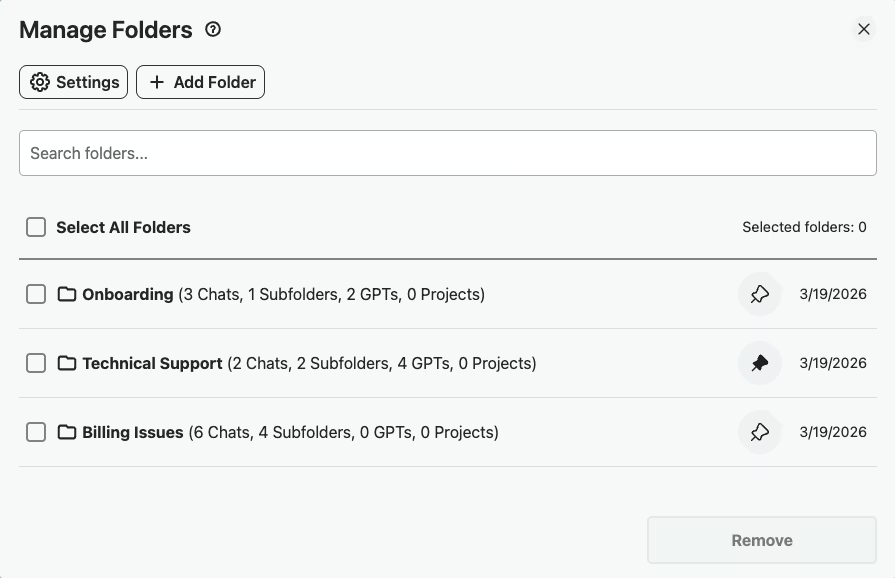
- Step 1: Create Template Folders by Category
Set up folders like “Billing,” “Technical,” “Onboarding,” and “Escalation” so every response template and resolved ticket has a clear home.
- Step 2: Save Response Templates as Prompts
Build and save prompt templates for common scenarios like “Refund request” and “Password reset” to your Prompt Library so any agent can use them instantly.
- Step 3: Load the Matching Template with //
When a new ticket comes in, type // to open the Prompt Library and load the matching response template,no rewriting, no guessing the right tone.
- Step 4: Resolve and Organize
After resolving a ticket, open the right category folder and use the in-folder search to add the conversation by name. Search-to-add keeps your response library growing without slowing down as ticket volume scales.
- Step 5: Export Monthly Conversations for QA Review
At the end of each month, export conversations by category for quality assurance review, training sessions, or compliance documentation.
Success Story
A SaaS support team - built a library of 50+ response templates organized by issue type: billing, technical, onboarding, cancellation. New reps ramp up 3x faster using the searchable template library.
Searching by error code or feature name finds the exact response template in seconds.
What Support Teams Say About AI Toolbox
“I built a complete response template library organized by ticket type,Refunds, Billing Disputes, Technical Troubleshooting, Shipping Issues. My agents pin the folders they use most and pull up the right template in seconds. Our average response time dropped by 40% in the first month.”
- Michelle Tran, Customer Support Manager at CloudCart Commerce
“Training new support reps used to take weeks. Now I export our best ChatGPT response templates and hand them a ready-made playbook on day one. The search feature means even junior agents can find how we handled tricky edge cases before. It's completely changed our onboarding process.”
- Brian Caldwell, Head of Customer Experience at ParkView SaaS
Frequently Asked Questions
How can customer service teams use ChatGPT effectively?
Use ChatGPT to draft professional responses, create empathetic refund templates, simplify technical explanations, and generate FAQ content. With AI Toolbox, organize these by ticket type so your team can find the right template instantly.
Can I organize ChatGPT responses by ticket category?
Yes! Create folders for each ticket type-Refunds, Technical Issues, Billing, Shipping, Account Problems. Use subfolders for specific scenarios within each category. Your entire team can benefit from this organized library.
How do I share ChatGPT templates with my support team?
Use the bulk export feature to download your best response templates as TXT, Markdown (with YAML frontmatter for Obsidian, Notion, and any knowledge-base tool), JSON, or PDF files. Share these with your team via your internal knowledge base, Slack, or training documentation.
Will AI Toolbox slow down my workflow during high-volume periods?
No. AI Toolbox is lightweight and optimized for speed. Pin your most-used templates for instant access, and use search to find any response in seconds-even during your busiest support hours.
Is my customer conversation data safe?
AI Toolbox only stores folder names and conversation IDs locally in your browser. Your actual conversation content stays with OpenAI. We never access, store, or transmit your support conversations.
Transform Your Support Workflow
Stop recreating responses from scratch. Build a library of proven templates.