ChatGPTGeminiClaudeGrok40,000+users on the Chrome Web Store4.7/ 5

Claude for Researchers: Make a Literature Review Searchable

Researchers use Claude for literature review, qualitative coding, long PDF analysis and careful synthesis, feeding papers and transcripts into the 1 million token window of Claude Opus 5 and Sonnet 5. Six months in, the synthesis you need is a sentence inside one of four hundred chats, and Claude's sidebar search only matches titles. The Claude module of AI Toolbox (formerly ChatGPT Toolbox), a Chromium extension by Infi Developments, adds full-text search across every message, folders per study, automatic topic tags, message bookmarks on the passages you will cite and export to Markdown, JSON, PDF or TXT, all inside claude.ai.

Free with 5 search results per query, 2 root folders and unlimited subfolders, Smart Tags on your 50 most recent chats, bookmarks in 2 conversations and TXT export. Premium removes the caps and adds the Exact Match toggle and Markdown, JSON and PDF export.

Free plan, no account | Premium $9.99/mo | Lifetime $99 | All Access $199 once for all four modules

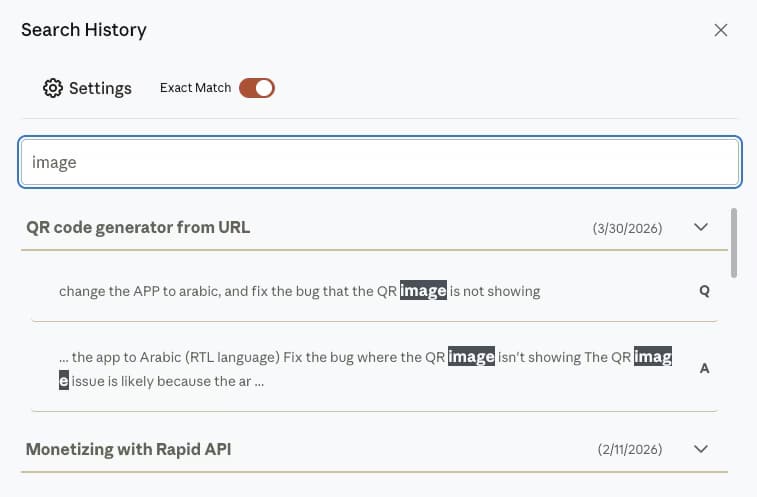
AI Toolbox Search History on claude.ai with Exact Match on and the query highlighted inside two messages of a conversation, each result labelled Q or A with its date

Search History on claude.ai

  • One query matches inside messages, not just chat titles, with the sentence highlighted
  • Q and A labels split your questions from Claude's analysis, which an audit trail needs
  • Free search covers your whole history at 5 results per query; the Exact Match toggle shown is Premium

The gap

What Claude gives researchers, and where the trail goes cold

Claude has a title-matching sidebar search, starred chats, Projects on paid plans and an account-wide export that arrives by email and expires in 24 hours. None of them answer the question a researcher actually asks six months in: where did I write about this?

Research in Claude accumulates as prose. A literature review is fifty chats of summarising and challenging papers; interview analysis is a chat per transcript; a synthesis session produces the paragraph you will want to quote later. All of it lands in one recency-ordered list, titled by whatever you typed first, with no folders, no tags and no way to search what was said.

The workaround most people reach for is copying answers into a separate document so they can find them again, which duplicates the corpus and goes stale immediately. AI Toolbox removes the need for it: the index covers every message, folders and automatic tags give the corpus a shape, bookmarks keep the passages you will cite inside their conversations, and export produces a citable file. The index is built in your browser and nothing is uploaded.

Why it matters

Here is what you cannot do with Claude alone:

  • Find a concept across the corpus. Native search matches conversation titles, so a construct discussed inside a reply is unreachable.
  • Quote a source exactly. There is no exact-match control, so a phrase you know you wrote cannot be pinned down.
  • Group chats by study or paper. The sidebar is a flat list, and a Project is a context container without subfolders.
  • Hand a supervisor a clean record. The native export queues your whole account into an emailed link that dies after 24 hours.

Every one of these is retrieval, not generation. Claude writes well; the missing layer is finding what it already wrote for you.

Step by step

A research workflow in five steps

From install to a citable export. Steps one to four run on the free plan; the Exact Match toggle and Markdown, JSON and PDF export in step five are where Premium starts.

About four minutes

  1. Install AI Toolbox from the Chrome Web StoreWorks in Chrome, Edge, Brave, Opera and Arc. Open the popup, switch the Claude module on and approve the one-time permission for claude.ai.
  2. Let the index build, then read your corpus with Smart TagsExisting conversations are indexed locally in the background. Open Smart Tags and your history is already grouped under Research, Writing and the rest, with counts, which tells you what you have before you file anything.
  3. Create a folder per study, subfolders per phaseManage Folders, then Add: one root folder for the project, subfolders for Literature, Methods, Interviews and Drafts. File a chat by typing part of its title; there is nothing to drag.
  4. Bookmark the passages you will citeClick the bookmark icon on the message, the synthesis itself or the prompt that produced it. The Bookmarks panel next to Share reopens the conversation at the exact message, which is the part a copy-paste document always loses.
  5. Search, then export what you foundOpen Search History from the floating AI Toolbox menu and query a construct or an author. Switch on Advanced for the Exact Match toggle and a date range covering your fieldwork weeks, then export as PDF for a supervisor or Markdown for Obsidian and Zotero notes.
Add to Chrome, free

Smart Tags: the corpus, grouped before you file anything

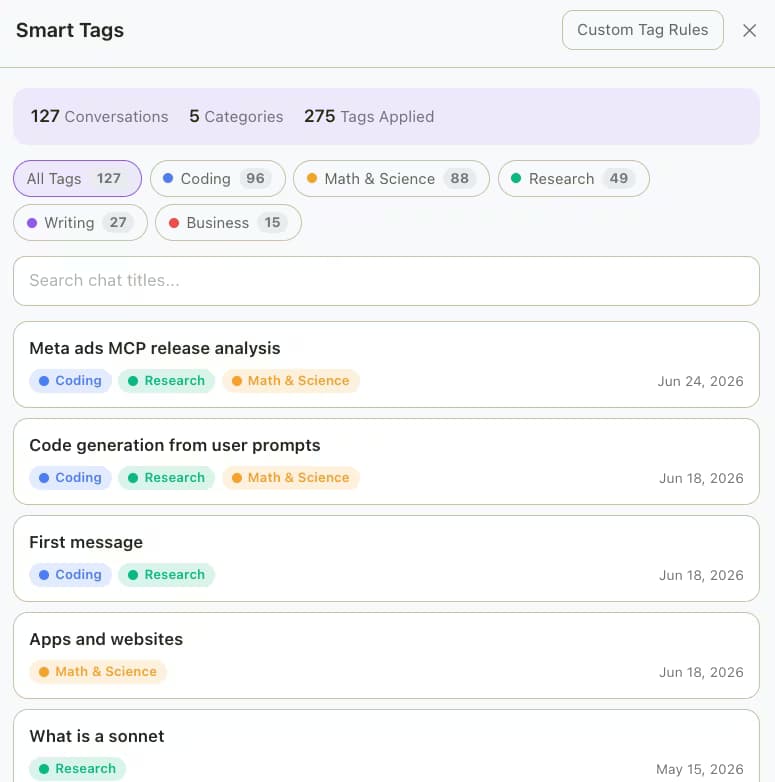
AI Toolbox Smart Tags on Claude grouping 127 conversations under Coding, Math and Science, Research, Writing and Business, each chat listed with its tags and date

Smart Tags reads each conversation and labels it by topic, Research included, with a count per category plus your own keyword rules. On a history you never organised it is the fastest way to see how much of your Claude use is actually research. Free covers your 50 most recent conversations and 2 custom rules.

The four features researchers use

Folders, bookmarks, mentions and export, as they ship

Every capture below is the extension running inside claude.ai. The plan each feature needs is stated in the text.

Folders

A folder per study, subfolders per phase

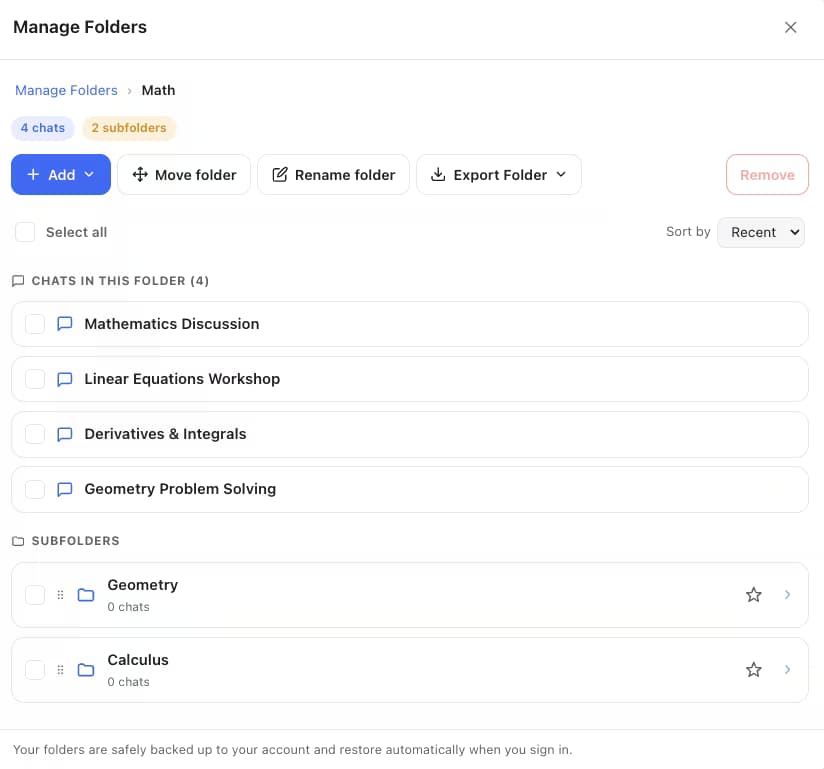
Manage Folders holds conversations in a tree with counts and breadcrumbs, filed by searching a chat's name rather than dragging, and a whole folder exports as one archive when the paper ships. Free covers two root folders with unlimited subfolders, which is enough for a project and its phases; Premium removes the cap and adds bulk move from Manage Chats.

AI Toolbox Manage Folders on claude.ai showing a folder with four chats and two subfolders, plus Add, Move folder, Rename folder and Export Folder buttons

Bookmarks

Keep the passage, not a copy of it

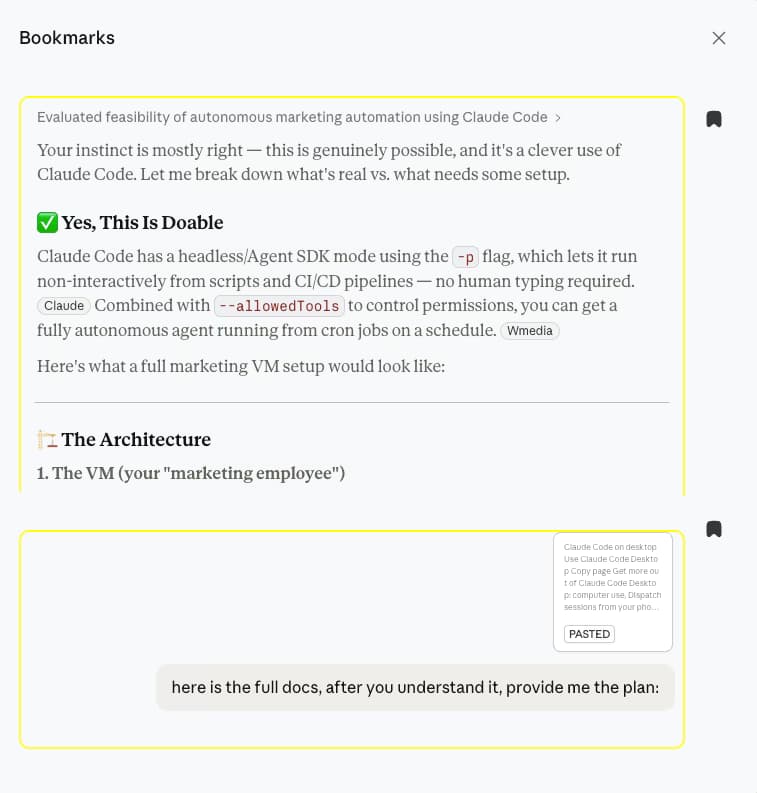
Bookmark any Claude message, the synthesis you will cite or the question that produced it, and the panel next to Share reopens the chat scrolled to that message, so a citation keeps its context instead of becoming an orphaned paragraph in a notes document. Bookmarks are plain one-click saves on Claude. Free: bookmarks in two conversations. Premium: unlimited.

AI Toolbox Bookmarks panel on claude.ai listing two saved messages with rich previews, a Claude reply and the prompt that produced it

Context Mentions

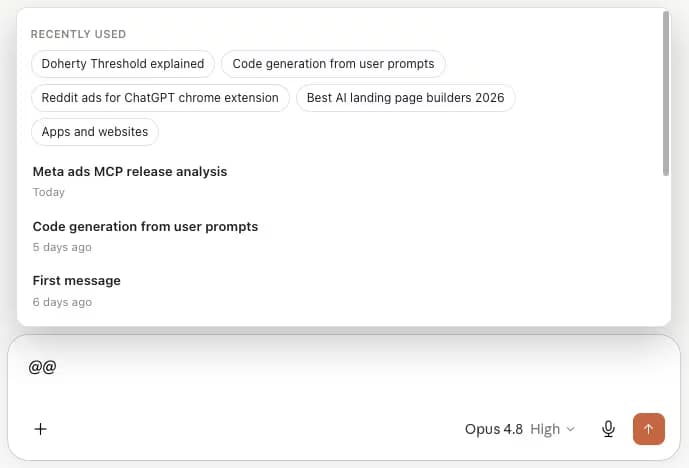
Type @@ to bring an earlier thread into the write-up

The @@ picker lists recently used and recent conversations. Pull the methods discussion from March into the drafting session and Claude gets its content as context without a paste, summarized server-side when the thread is long. Free: 3 mentions a day; Premium is unlimited with several mentions per message.

Typing @@ in the Claude composer opens the AI Toolbox Context Mentions picker with recently used and recent conversations

Export

PDF for a supervisor, Markdown for your notes

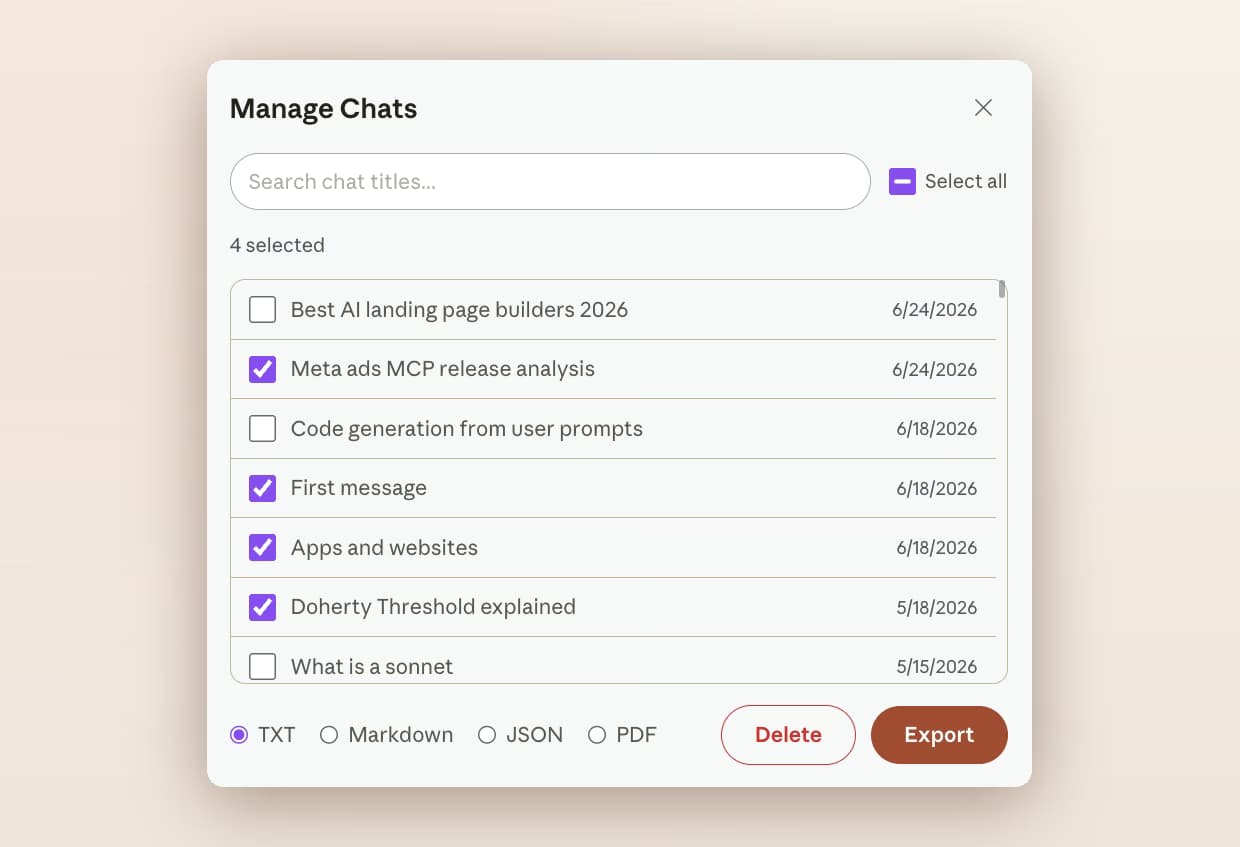
Any conversation exports from Manage Chats as PDF, Markdown, JSON or TXT. The PDF is styled and paginated with formatting kept; Markdown drops cleanly into Obsidian or a Zotero note with the title, dates and source URL in its frontmatter; JSON gives a coding tool the raw messages. Free exports as TXT; the other formats and bulk export are Premium.

AI Toolbox Manage Chats on Claude with four conversations selected and TXT, Markdown, JSON and PDF format options above the Delete and Export buttons

Scenarios

Where it pays off

Three research workflows and what to file, bookmark and export in each.

  • Literature review

    • A folder per theme, subfolders per reading round
    • Search an author or construct across every summary
    • Bookmark the synthesis you will cite
    • Export the theme folder as Markdown for your notes
  • Interview and qualitative coding

    • A folder per study, one chat per transcript
    • Exact match relocates a participant's words
    • Q and A labels keep your questions auditable
    • JSON export into your coding tool
  • Long documents and write-up

    • Feed a paper into the 1 million token window, then find it again by phrase
    • @@ the methods thread into the drafting session
    • Bookmark each analytic decision as you go
    • PDF export for a supervisor or an appendix
  • Works with Projects

    Claude Projects hold your sources and instructions; AI Toolbox is what makes the resulting conversations findable a term later. See the full Claude module.

    Add to Chrome, free

From the Chrome Web Store

What reviewers say about finding and keeping their work

Public reviews from the listing, shown as captured. The full wall is on the reviews page.

  • Chrome Web Store review by Asaf Ben-Yehuda: makes chatgpt search and usage much better. helps you find what you want to find. glad i joined when this add on was first introduced!
    Asaf Ben-Yehuda
  • Chrome Web Store review by Moses Promotion: The subfolders feature makes organizing chats a breeze.
    Moses Promotion

Read all 46 captured reviews or the live Chrome Web Store listing.

Pricing

Plans and pricing for the Claude module

Free covers full-text search, folders, Smart Tags, bookmarks and TXT export with usage caps. Premium removes the caps on Claude and adds the Exact Match toggle, Markdown, JSON and PDF export and bulk actions. All Access does the same across ChatGPT, Claude, Gemini and Grok, paid once. Not an AI subscription: you keep using your own Claude account.

Free

$0forever

  • Full-text search, 5 results per query, Q/A labels
  • 2 root folders with unlimited subfolders
  • Smart Tags on your 50 most recent chats, bookmarks in 2 conversations
  • Single-chat TXT export, 3 Context Mentions a day
Add to Chrome

Premium

$9.99/month

  • Unlimited results with the Exact Match toggle and date range
  • Unlimited folders, tags, bookmark conversations and Context Mentions
  • Markdown, JSON, PDF and whole-folder export
  • Bulk export and delete, full artifacts history, cross-platform search
Get Premium

All Access LifetimeBest value

$199one-time

  • ChatGPT, Gemini, Claude and Grok included
  • Search all platforms across all four
  • Every future AI platform we add
  • Save $197 vs single Lifetimes
Get All Access

Teams$15/seat/month

All Premium features across the four modules ยท Admin dashboard ยท Team analytics ยท $12/seat/mo billed annually ยท 14-day free trial

See Teams
  • GDPR compliant
  • Secure checkout by Polar
  • 14-day money-back on a first purchase
  • Conversation content stays in your browser

Refunds follow the refund policy; renewals are not refundable. Premium unlocks on the Claude account whose email you enter at checkout, so use the address you sign in with.

FAQ

Questions people ask before installing

Can I search inside my Claude research conversations?

Yes. Claude's own search matches conversation titles. AI Toolbox indexes every message in your history in the browser, so a construct, an author name or a methodology returns each reply that mentions it, highlighted, labelled Q or A, with a link into the chat. Open Search History from the floating AI Toolbox menu on claude.ai; there is no default keyboard shortcut on Claude, and you can assign one at chrome://extensions/shortcuts. The free plan returns 5 results per query; Premium returns all of them.

How do I find an exact quote I know Claude gave me?

Turn on Exact Match in the Advanced panel and paste the phrase. Without it a query matches as a substring, so a distinctive sentence gets lost among partial hits, which is the usual reason a quotation feels unfindable. Advanced also adds Must include and Exclude chips, a custom from-to date range and a Titles only switch. The Advanced panel is Premium; a plain full-text query is free.

How should I organise a literature review in Claude?

Create a root folder for the project and subfolders per phase: Literature, Methods, Interviews, Drafts. File a conversation by opening the folder, clicking Add and typing part of its title. Smart Tags runs alongside and labels conversations by topic automatically, so you can see the shape of the corpus before you file anything. The free plan includes 2 root folders with unlimited subfolders and tags your 50 most recent chats; Premium removes both caps.

Can I keep the passages I will cite without copying them out?

Yes. Bookmark the message that holds the synthesis, or the question that produced it, and the Bookmarks panel next to Share reopens the conversation scrolled to that exact message with a rich preview, code and math included. Claude bookmarks are plain one-click saves stored on your device; the free plan holds bookmarks in 2 conversations and Premium removes that cap.

Which export format is best for academic work?

PDF for anything you hand to a supervisor, a co-author or an ethics file: it is styled, paginated and fixed. Markdown for your own notes, since the file imports cleanly into Obsidian, Logseq or a Zotero note with the title, dates and source URL in its frontmatter. JSON when a qualitative coding tool needs the raw messages. The free plan exports as TXT; Markdown, JSON, PDF and bulk export are Premium.

Is my research data sent anywhere?

No. The search index, folders, tags, bookmarks and saved prompts live in your browser and every query runs locally, so conversation content is never stored on our servers. PDF export is the one exception: the conversation is rendered on our server and the file returned without a copy being kept. AI Toolbox is GDPR compliant.

Which browsers does it support?

Any Chromium browser installed from the Chrome Web Store: Chrome, Edge, Brave, Opera and Arc. There is no Firefox version.

40,000+ users ยท 4.7/5 on the Chrome Web Store

Stop rebuilding a corpus you already wrote

Install AI Toolbox, switch the Claude module on, and search your history for the construct you have been meaning to write up. Free, no account, about four minutes.