ChatGPTGeminiClaudeGrok40,000+users on the Chrome Web Store4.7/ 5

AI Toolbox for your whole team

Folders, full-text search, exports and a shared prompt library for every teammate across ChatGPT, Claude, Gemini and Grok. Invite people by email, manage seats and roles from one admin dashboard, and pay one invoice. From $12/seat/month billed annually, 2-seat minimum.

14-day free trial at checkout. Not an AI subscription: your team keeps using its own ChatGPT, Claude, Gemini and Grok accounts.

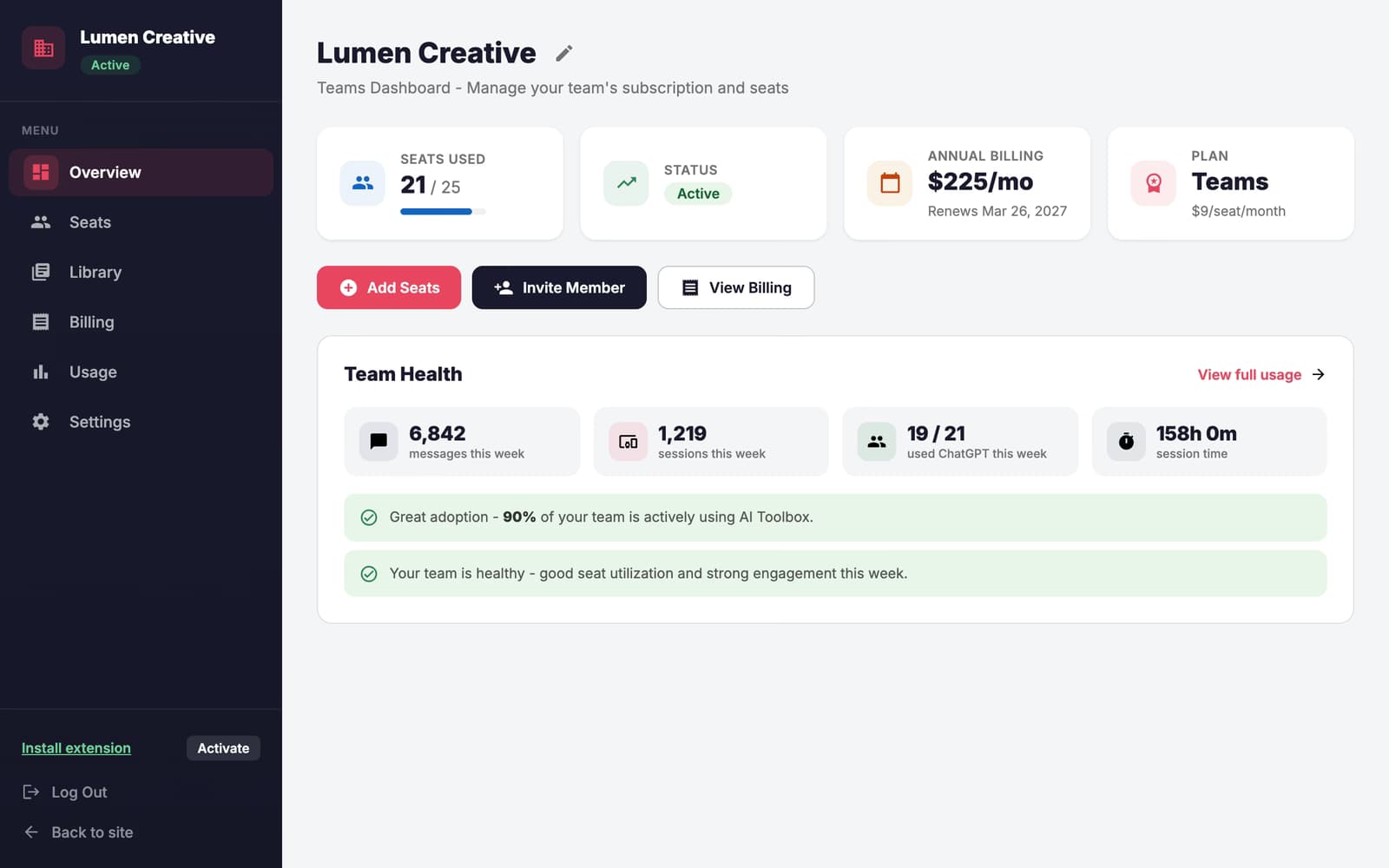
AI Toolbox Teams admin dashboard overview: seats used, subscription status, billing, plan, and this week's team health

The admin dashboard, as it ships

  • Seats used, status, billing and plan on one screen
  • Team health for the week: messages, sessions, adoption
  • Add seats, invite a member or open billing in one click

What Teams adds

Everything an admin needs, nothing the team has to learn

Members use the same extension they would use alone. The Teams layer adds a shared library, seat management and aggregate usage on top, managed from a dashboard built for the person who owns the invoice.

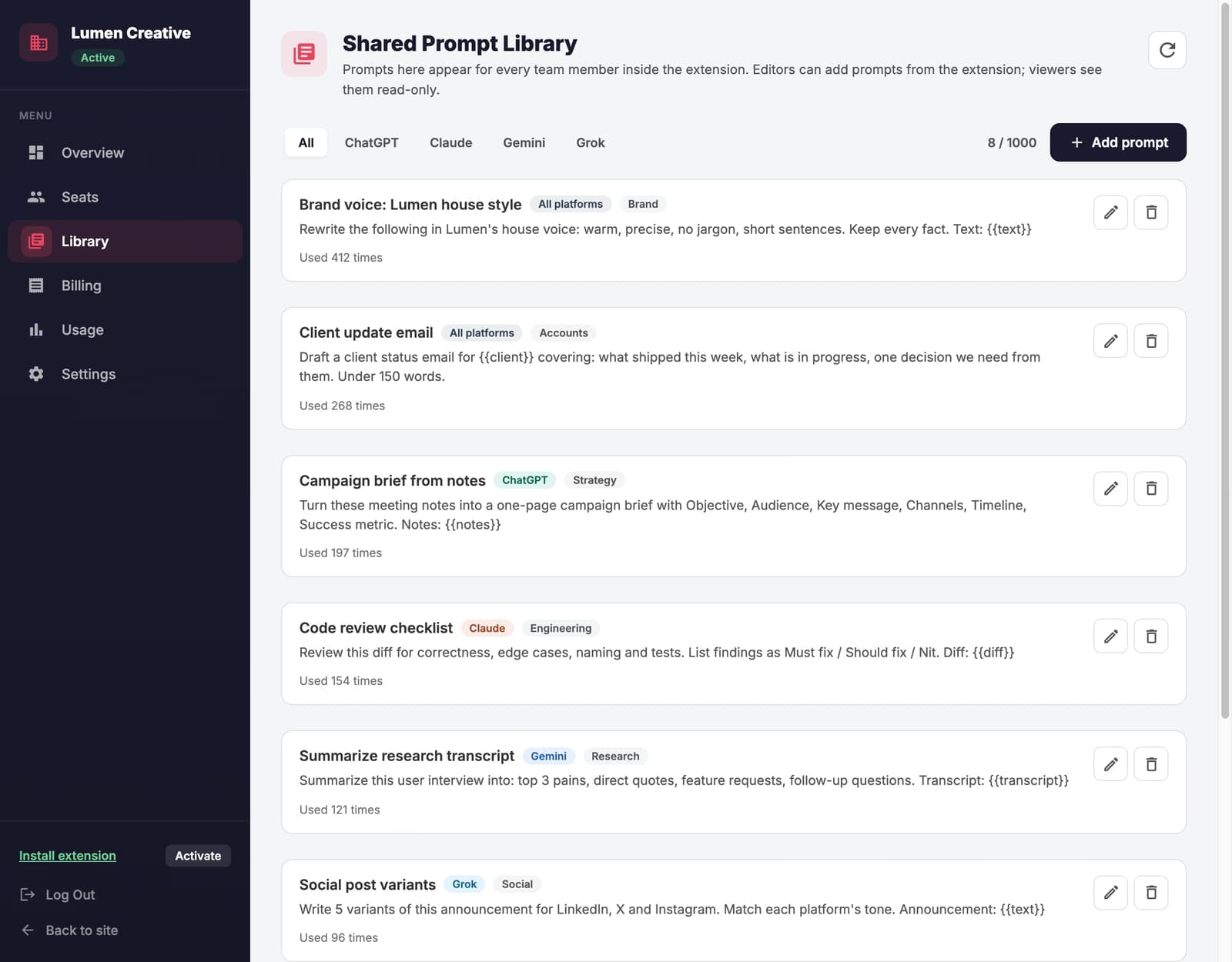
Shared prompt library

Write a prompt once. Every teammate has it.

Admins and editors add prompts in the dashboard, with {{value}} placeholders and a category. Members get them in a read-only Team tab inside the extension on ChatGPT, Claude, Gemini and Grok, and insert them with one click.

  • Up to 1,000 team prompts
  • Filter by platform or category
  • Use counts show which prompts earn their place
Shared prompt library in the AI Toolbox Teams dashboard: team prompts with platform and category tags, use counts, and platform filters

Seats and roles

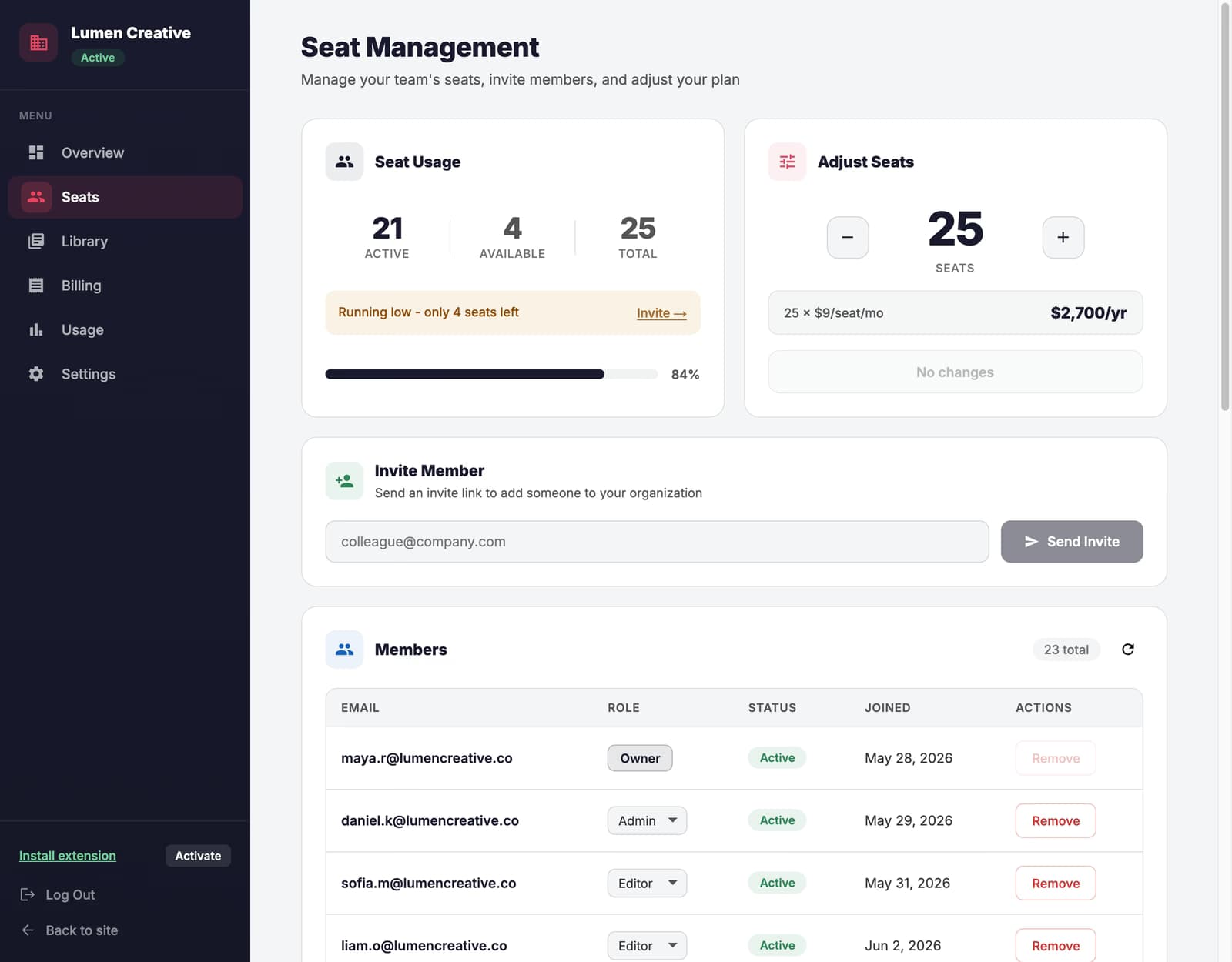
Invite by email. A seat is used only when someone accepts.

Owner, admin, editor and viewer roles. Add seats from the dashboard, prorated for the rest of the period, and remove them at the next renewal. Removed members drop back to the free plan and keep their own data.

  • Send more invites than you have seats
  • Change roles from the members table
  • Editors can add team prompts from the extension
Seat management in the AI Toolbox Teams dashboard: seat usage, adjust seats, invite by email, and the members table with roles

Usage and billing

Aggregate usage. One invoice.

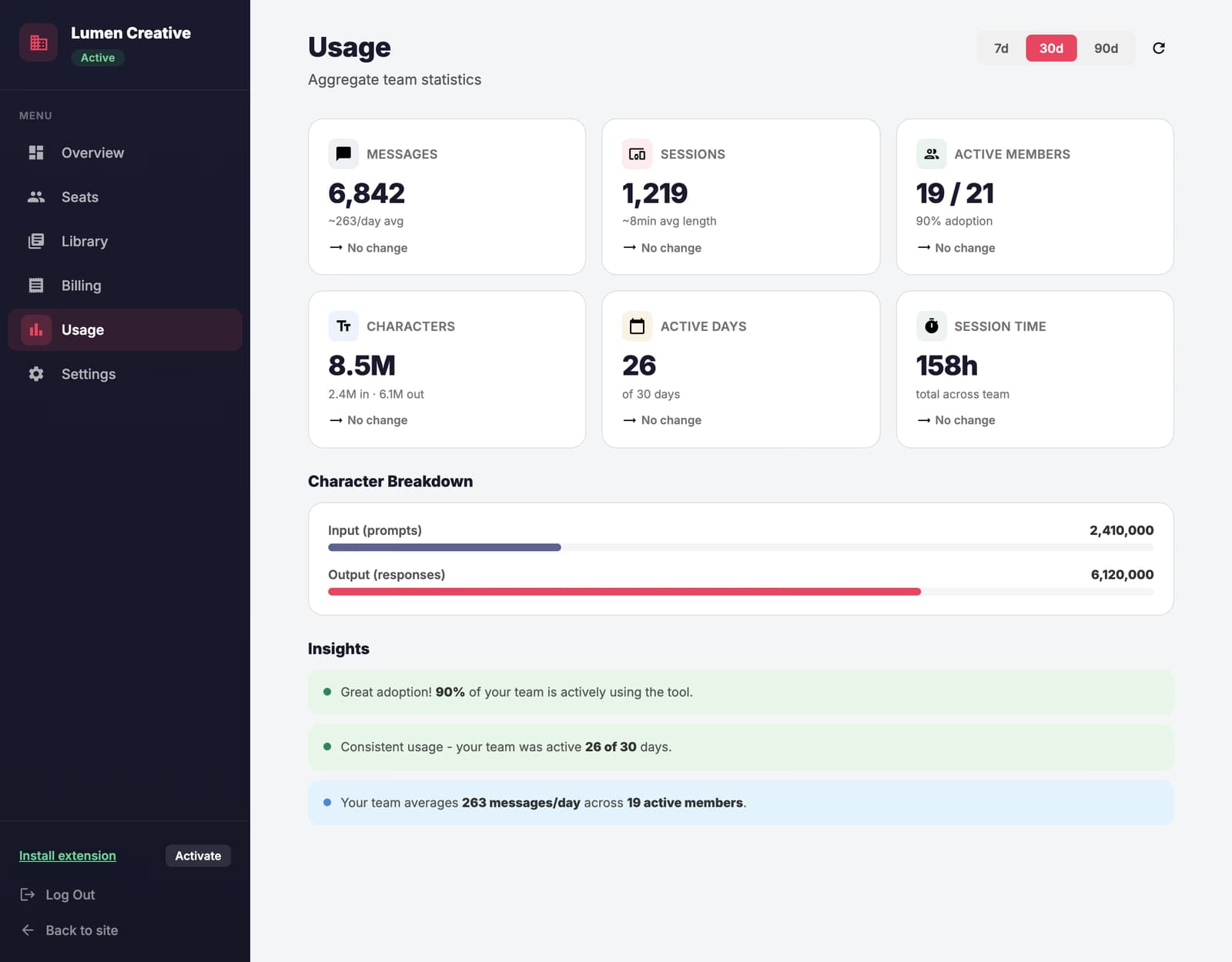
Messages, sessions, active members and session time for the last 7, 30 or 90 days, with the trend against the previous period. Counts only, never message text. Billing is one subscription and one invoice, monthly or annual, managed in the billing portal.

  • Adoption and engagement insights
  • Switch between monthly and annual any time, prorated
  • The volume rate applies to every seat
Usage analytics in the AI Toolbox Teams dashboard: messages, sessions, active members, characters, active days, and insights

Included in every seat

The full Premium feature set, on all four modules

A Teams seat is a Premium seat plus the team layer. Each member turns on ChatGPT, Claude, Gemini or Grok in the extension popup and gets the same features everywhere.

  • Unlimited folders and subfolders
  • Full-text search across every message
  • Bulk export: PDF, Markdown, JSON, zip
  • Prompt chains and a personal prompt library
  • Pinned chats and message bookmarks
  • Sync across devices
  • Message labels and smart tags
  • Usage tracker and writing analytics

Pricing

Per-seat pricing that drops as the team grows

Pick a seat count, pay once for the organization, invite by email. The rate for your tier applies to every seat, and you can change the seat count or the billing period later from the dashboard.

$12per seat / month, billed annually

$24/mo$288/yr billed annually

2-seat minimum. Self-serve up to 1,000 seats.

  • Every Premium feature on all four modules
  • Shared prompt library, curated by admins
  • Admin dashboard: seats, roles, usage, billing
  • Invite by email, seats assigned on accept
  • One invoice for the whole organization
  • Dedicated priority support and onboarding

14-day free trial, then billed per seat. Secure checkout by Polar. Cancel any time from the billing portal; access continues to the end of the period.

Volume pricing

Per seat, per month

Teams per-seat price by seat count
SeatsMonthlyAnnual
2 to 9Your team$15$12
10 to 24$13$10
25 to 49$11$9
50 to 99$10$8
100 to 249$9$7
250 to 1,000$8$6

More than 1,000 seats, procurement paperwork or a pilot? Talk to sales

  1. Check out. Pick the seat count and billing period; the 14-day free trial starts, and Polar bills one invoice when it ends.
  2. Invite. Add teammates by email from the dashboard and set a role for each.
  3. They accept. Each member installs the extension, accepts, and sees the shared library in the Team tab.
  • GDPR compliant
  • Secure payments
  • 14-day free trial

ROI

What the time saved is worth

Change the numbers to match your team. The cost line uses the annual volume rate for that team size, so larger teams see the lower per-seat price automatically. Download the result as a PDF for whoever signs off.

$52,000Annual time savings
$1,200Annual cost
$50,800Net savings · 43x ROI

Compared

Team features the alternatives do not have

AIPRM and Merlin sell individual subscriptions with seat billing. Neither has an admin dashboard, team analytics, folder organization or a local-first privacy model.

Feature comparison between AI Toolbox Teams, AIPRM and Merlin
FeatureAI Toolboxfrom $12 to $15/seat/moAIPRM$33-40/seat/moMerlin$15/seat/mo
Admin Dashboard
Seat Management
Centralized Billing
Team Usage Analytics
Priority Support
Chrome Extension
Conversation content stays local
Folder Organization
Prompt Library
Bulk Actions

Security and privacy

Built so your security review is short

The extension runs inside each member's browser on top of the AI accounts your company already approved. We add organization and a team layer, not a new place where conversations are stored.

  • Content stays in the browser

    Folders, prompts, pinned chats and settings live in each member's browser, with optional encrypted sync. Conversation text is never sent to our servers.

  • Aggregate analytics only

    The dashboard reports counts: messages, sessions, active members, session time. Admins never see what anyone typed.

  • GDPR compliant

    No conversation content on our side means nothing to subpoena, leak or train on. Members can be removed and their seat reassigned at any time.

  • Chrome Web Store reviewed

    Published on the Chrome Web Store and reviewed by Google, used by 40,000+ people, rated 4.7/5.

FAQ

Questions teams ask before they buy

How does AI Toolbox Teams pricing work?

$15/seat/month or $12/seat/month billed annually, minimum 2 seats. Teams covers all four modules (ChatGPT, Claude, Gemini and Grok) and includes the shared prompt library, admin dashboard, seat management, centralized billing, usage analytics, and dedicated priority support. Larger teams pay less per seat, and the volume rate applies to every seat.

What Teams features does AI Toolbox offer?

A shared team prompt library your admins curate once and every member gets across ChatGPT, Gemini, Claude, and Grok, an admin dashboard for team management, centralized billing, seat management, team usage analytics, dedicated priority support, and all premium features for every team member.

Is AI Toolbox Teams GDPR compliant?

Yes. Conversation content, folders, prompts and pinned chats are stored locally in each user's browser. No conversation content is sent to our servers; team analytics are aggregate counts (messages, sessions, active members), never message text. AI Toolbox is GDPR compliant.

Can I manage team seats with AI Toolbox Teams?

Yes. The admin dashboard lets you invite or remove team members, change roles, adjust the seat count, monitor aggregate usage, and manage billing from one place.

Is there a free trial for AI Toolbox Teams?

Yes. Every Teams subscription starts with a 14-day free trial at checkout: choose your seat count and billing period, invite the team, and the first charge happens only when the trial ends. Cancel from the billing portal before then and you pay nothing. Self-serve covers up to 1000 seats; for larger teams, contact sales for custom pricing.

What is the Teams plan?

The Teams plan is designed for teams. It includes all Premium features plus a shared team prompt library curated by your admins, an admin dashboard, seat management, centralized billing, team usage analytics, and dedicated priority support.

How do I add or remove seats?

From the Admin Dashboard, go to Seats and use the +/- controls. Adding seats charges a prorated amount for the remaining billing period. Removing seats takes effect at the next renewal.

Can I switch between monthly and annual billing?

Yes - switch anytime from the Dashboard billing page. Proration is automatic: upgrade credits are applied immediately, and downgrade credits roll to your next invoice.

What happens when a team member is removed?

Removed members revert to the free plan. Their data is preserved, and they can purchase a Premium plan individually to regain full access.

What happens if payment fails?

Your team keeps full access for 5 days while we retry payment. Update your payment method in the billing portal to avoid losing access.

How do I cancel my Teams subscription?

Go to Dashboard → Billing → Manage Subscription to access your billing portal, where you can cancel anytime. Your team keeps access until the end of the current billing period.

Can I send invites to more people than I have seats?

Yes - seats are only assigned when someone accepts an invite. If all seats are filled when someone tries to accept, they'll see a "no seats available" message.

Get started

Set up your team in minutes

Choose a seat count, start the 14-day free trial, invite by email. Teammates install the extension, accept the invite, and the shared library is already there.

Talk to sales