
ChatGPT for Researchers: Organize Your Research AI Workflow
Turn ChatGPT into a research productivity tool. Organize by project, save methodology discussions, and build a searchable library of research conversations.
Best for: Researchers organizing ChatGPT literature reviews, experiment notes, and findings by project.
 Add to Edge
Start free | Trusted by 40,000+ users
The Researcher's ChatGPT Problem
You use ChatGPT for literature synthesis, methodology questions, statistical approaches, and writing assistance. Valuable research conversations get lost in an endless list with no organization.
That synthesis of three papers? The statistical approach ChatGPT helped clarify? Buried somewhere you'll never find when you need it for your paper.
Build Your Research Conversation Library
AI Toolbox (formerly ChatGPT Toolbox) helps you organize every research conversation. Create project folders, save methodology discussions, search past analyses, and export notes for your papers.
Organize by Project or Paper
Create folders for each research project, paper, or grant. Keep literature reviews separate from data analysis, methodology separate from results.
Pin Active Research
Working on a paper revision? Pin that conversation. Running analysis? Pin your methodology discussions.
Search Research Notes
That statistical approach ChatGPT explained? The literature synthesis you developed? Search and find any research conversation instantly.
Export for Papers
Export ChatGPT-assisted summaries, outlines, and analyses as TXT files. Add to your research notes or paper drafts.
How Researchers Use AI Toolbox
- Create Project Folders - Set up folders for each research project, paper, or grant.
- Organize by Phase - Use subfolders for literature review, methodology, analysis, and writing.
- Save Valuable Discussions - When ChatGPT helps with research, add it to the right folder.
- Search for Insights - Find past methodology discussions or literature summaries instantly.
- Export for Papers - Download useful content to add to your research notes or paper drafts.
Research Scenarios
Literature Reviews
- Organize paper summaries
- Save synthesis discussions
- Track research themes
- Export review notes
Data Analysis
- Save methodology discussions
- Organize statistical approaches
- Track analysis decisions
- Export method notes
Paper Writing
- Organize by paper section
- Save outline iterations
- Track revision discussions
- Export draft content
Simple, Transparent Pricing
Start free, upgrade when you need more
Free
$0 /forever
- 2 Top-Level Folders (unlimited subfolders)
- Up to 2 Pinned Chats
- Search (up to 5 results)
- Media Gallery
- Sync across all devices
 Add to Chrome
Premium
$9.99 /month
- Everything in Free
- Unlimited folders and pinned chats
- Full prompt library
- Bulk export and unlimited bulk actions
Lifetime
$123$99 /one-time
- Everything in Premium
- Pay once - yours forever
- Lab + office + home
- Priority 24/7 support
- All future updates
How Researchers Use AI Toolbox: Step-by-Step
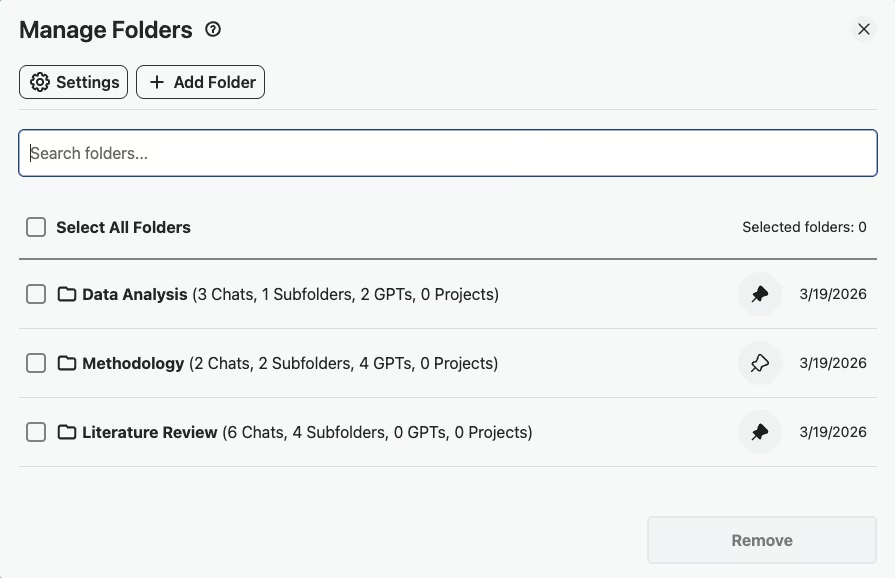
- Step 1: Create Research Project Folders
Set up folders like “Literature Review,” “Methodology,” and “Analysis” to mirror your research workflow and keep every conversation phase-specific.
- Step 2: Use Prompt Chaining for Systematic Summaries
Chain prompts together to build systematic literature summaries,ask ChatGPT to summarize a paper, then synthesize it with previous summaries, all in one structured flow.
- Step 3: Pin Conversations with Key Findings
When a conversation surfaces an important insight or breakthrough, pin it to the top of your sidebar so you can reference it quickly while writing.
- Step 4: Full-Text Search Across All Research Conversations
Search by author name, methodology, or keyword across every research conversation to find connections and prior analyses without re-reading everything.
- Step 5: Export as JSON or TXT for Your Papers
Export conversations as JSON for data analysis pipelines or as TXT to paste directly into paper drafts, grant applications, or research notes.
Success Story
A postdoc running a systematic review - organized 150+ ChatGPT research conversations by methodology (qualitative, quantitative, mixed). She exported her entire literature analysis as JSON for citation tracking.
Being able to search across all conversations for a specific author or methodology saved hours of re-reading.
What Researchers Say About AI Toolbox
“I'm doing a systematic literature review for my dissertation on neural plasticity. I created subfolders for each methodology type,fMRI studies, behavioral, computational models,and saved every ChatGPT summary there. When I needed to cross-reference papers across methods, the search pulled everything up instantly.”
- Dr. Yuki Tanaka, PhD Researcher in Neuroscience at Karolinska Institutet
“The export feature is incredibly useful for academic work. I organize my ChatGPT conversations by paper section,Introduction, Methods, Discussion,and export the relevant ones when I sit down to write. It's like having a research assistant that actually remembers everything.”
- Elena Vasquez, Postdoctoral Fellow at Johns Hopkins Applied Physics Lab
Frequently Asked Questions
How can researchers use ChatGPT more effectively?
Organization transforms ChatGPT from a chat tool into a research assistant. Create folders for each project or paper. Save literature summaries, methodology discussions, and analysis approaches. Build a searchable library of research conversations you can reference throughout your work.
Can I organize ChatGPT conversations by research project?
Yes! Create a folder for each research project with subfolders for literature review, methodology, analysis, and writing. Your entire research workflow stays organized and searchable.
How do I keep track of literature review conversations?
Create a Literature Review folder with subfolders for different themes or paper collections. When ChatGPT helps synthesize or summarize papers, add that conversation to the appropriate folder. Search across all conversations to find connections.
Can I export ChatGPT research discussions?
Yes! Export any conversation as TXT or JSON. Many researchers export summaries, methodology discussions, and outline drafts to add to their research notes or paper documents.
Is my research data safe with AI Toolbox?
AI Toolbox only stores folder names and conversation IDs locally in your browser. Your actual conversation content stays with OpenAI. We never access or store your research data.
Organize Your Research AI Today
Stop losing valuable research conversations. Build an organized system for your academic work.