
ChatGPT for Meeting Notes: Never Lose a Decision Again
Turn messy meetings into organized summaries. Organize by project, track action items, and search past decisions instantly.
Best for: Project managers organizing ChatGPT meeting summaries by team, date, and action items.
 Add to Edge
Start free | Trusted by 40,000+ professionals
The Meeting Notes Problem
You use ChatGPT to summarize meetings, extract action items, and clean up notes. But valuable meeting summaries get lost in ChatGPT's endless conversation list.
When someone asks "What did we decide about the Q2 budget?"-good luck finding that conversation from two months ago.
Organize Your Meeting Intelligence
AI Toolbox (formerly ChatGPT Toolbox) helps you organize every meeting conversation. Create project folders, pin recurring meetings, search past decisions, and export summaries for your team.
Organize by Project or Team
Create folders for each project, team, or recurring meeting. Keep standup notes separate from client calls, team syncs separate from strategy sessions.
Pin Regular Meetings
Weekly standup? Monthly all-hands? Pin your recurring meeting conversations for instant access when it's time to prepare or review.
Search Past Meetings
What did we decide about the Q2 budget? Search across all meeting conversations to find decisions, action items, and context.
Export Meeting Summaries
Export ChatGPT-generated meeting summaries as TXT files. Share with attendees, add to project docs, or archive for compliance.
How Professionals Use AI Toolbox for Meetings
- Create Meeting Folders - Set up folders for each project, team, or recurring meeting.
- Save Meeting Summaries - After ChatGPT generates a summary, add it to the right folder.
- Pin Regular Meetings - Pin your weekly standups and recurring meetings for quick access.
- Search for Decisions - When you need context, search across all meeting conversations.
- Export for Sharing - Download summaries to share with your team or add to project docs.
Meeting Scenarios
Meeting Summaries
- Organize by meeting type
- Save key decisions
- Export for distribution
- Track discussion points
Action Items
- Save action item lists
- Track assignments
- Search past commitments
- Export for task management
Meeting Prep
- Review past meetings
- Find previous decisions
- Prepare discussion points
- Reference context
Simple, Transparent Pricing
Start free, upgrade when you need more
Free
$0 /forever
- 2 Top-Level Folders (unlimited subfolders)
- Up to 2 Pinned Chats
- Search (up to 5 results)
- Media Gallery
- Sync across all devices
 Add to Chrome
Premium
$9.99 /month
- Everything in Free
- Unlimited folders and pinned chats
- Full prompt library
- Bulk export and unlimited bulk actions
Lifetime
$123$99 /one-time
- Everything in Premium
- Pay once - yours forever
- Office + remote access
- Priority 24/7 support
- All future updates
How Professionals Use AI Toolbox for Meeting Notes: Step-by-Step
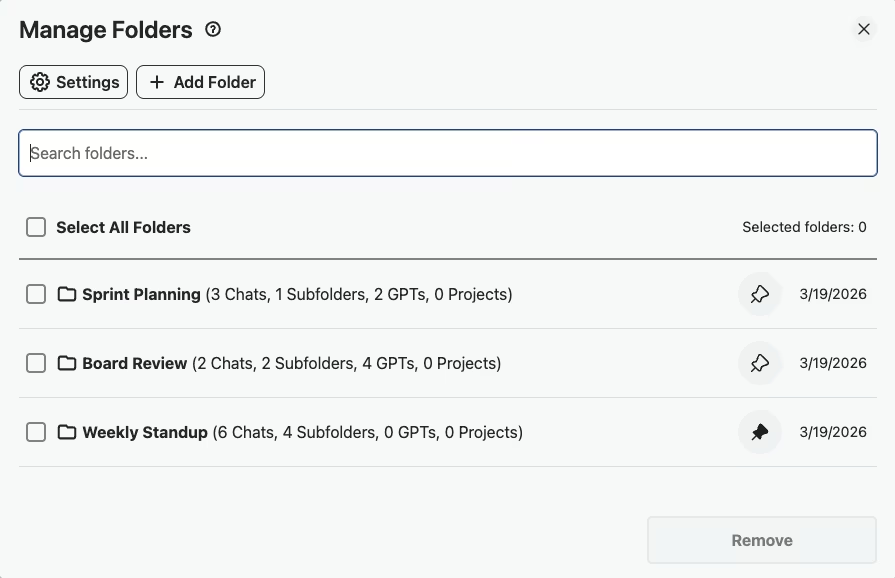
- Step 1: Create Recurring Meeting Folders
Set up folders like “Weekly Standup,” “Board Review,” and “1:1s” so every meeting summary is filed by type and easy to find later.
- Step 2: Paste Notes and Summarize Action Items
During or after a meeting, paste your raw notes into ChatGPT and ask it to extract a clean summary with action items, owners, and deadlines.
- Step 3: Pin the Current Week's Meeting Summaries
Pin this week's meeting summary conversations to the top of your sidebar so you can quickly reference action items throughout the week.
- Step 4: Search Past Notes for Unresolved Action Items
Before the next meeting, search your conversation history for open action items or past decisions to prepare your agenda and follow up on commitments.
- Step 5: Export the Week's Summaries as TXT
Export your meeting summaries as TXT files and share them via Slack, email, or your project management tool so the whole team stays aligned.
Success Story
A product manager - exports weekly standup and sprint review summaries into dated folders. Over 6 months, she built a searchable archive of 100+ meeting summaries with action items.
Searching for a decision made 3 months ago takes seconds instead of digging through Slack or Notion.
What Professionals Say About AI Toolbox for Meetings
“I run three product streams and have weekly syncs for each one. I paste the transcript into ChatGPT, get a clean summary with action items, and file it into the right project folder. Every Friday I export that week's meeting notes and share them with stakeholders. My PM workflow finally feels under control.”
- Sam Delgado, Senior Product Manager at Clearpath Analytics
“The search feature is a game-changer for meetings. Someone asked last week what we decided about the API migration timeline and I found the exact meeting summary from two months ago in about five seconds. Before Toolbox, that would have been a 20-minute email archaeology project.”
- Leah Brennan, Engineering Program Manager at Stackline Technologies
Frequently Asked Questions
How can I use ChatGPT for meeting notes?
Paste meeting transcripts or your rough notes into ChatGPT to generate clean summaries, extract action items, and identify key decisions. With AI Toolbox, organize these by project or meeting type, making them searchable and referenceable.
Can I organize ChatGPT meeting notes by project?
Yes! Create folders for each project, team, or recurring meeting type. Use subfolders for different phases or time periods. Your entire meeting history becomes organized and searchable.
How do I find what was decided in a past meeting?
Use AI Toolbox's search to find any decision, action item, or discussion point. Search by keyword, date context, or project name. No more digging through documents-find what you need instantly.
Can I share ChatGPT meeting summaries with my team?
Yes! Export any meeting summary as a TXT file. Share via email, Slack, or your project management tool. Use bulk export to download multiple meeting notes at once.
Is my meeting data secure?
AI Toolbox only stores folder names and conversation IDs locally in your browser. Your actual meeting content stays with OpenAI. We never access or store your meeting notes or business discussions.
Organize Your Meeting Notes Today
Stop losing decisions in chat history. Build an organized, searchable meeting archive.