 Add to Chrome
 Add to Edge
 Adi Leviim
Claude Exact Match Search: Find Specific Phrases Fast (2026)
Claude Toolbox adds an exact match toggle to its full-text search popup on claude.ai, letting you find specific phrases - quoted strings, error messages, function names, character names - across every synced Claude conversation without fuzzy rewrites. Claude's native conversation search is paid-only and conversational (RAG-based), so claude exact match search as a strict literal-phrase feature is something Claude does not offer by default. Claude Toolbox does, for free.
Searching Claude conversations used to mean scrolling. Anthropic shipped conversational search on paid plans in 2025, per support.claude.com/en/articles/11817273, but that feature works like a RAG retrieval agent: you ask "what did we discuss about retry logic?" and Claude assembles an answer. It is good for semantic recall. It is bad at the thing most developers and writers actually need, which is finding a literal phrase - an error string, a quoted line, a unique function name - exactly as it appeared.
This guide covers how Claude Toolbox's exact-match search works, how it differs from fuzzy keyword matching and from Claude's native conversational search, and which queries each mode is best for. If you have ever lost 20 minutes scrolling for a specific error message buried in a week-old Claude chat, this is the feature you need.
What Is Claude Exact Match Search?
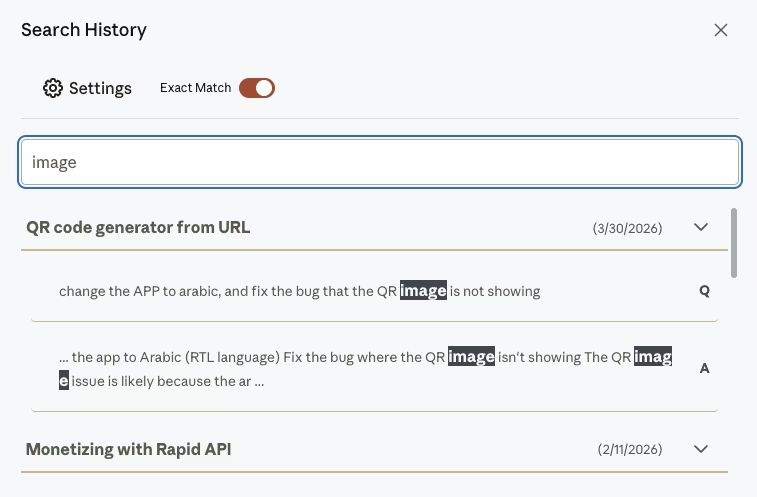
Claude exact match search is a toggle in Claude Toolbox's search popup that switches result matching from fuzzy (ranked by keyword similarity) to strict literal (only messages containing the phrase exactly as typed). It is the difference between "find anything close to this" and "find only things identical to this".
When you open the Claude Toolbox search popup on claude.ai and type useEffect cleanup, fuzzy mode returns messages that contain the word "useEffect" near "cleanup", ranked by proximity. Exact mode returns only messages containing the literal string "useEffect cleanup" as a contiguous phrase. Capitalization and punctuation become meaningful.
This matters for three reasons. First, fuzzy search hides false positives in noise when your corpus is large. Second, exact match is the only reliable way to find a stack trace, a direct quote, or a specific error code. Third, it makes "search for the thing I copy-pasted last Tuesday" a one-shot query instead of a guessing game. According to a Nielsen Norman Group study on search usability, users who cannot find a known phrase in under 15 seconds typically give up and restart.
Claude Toolbox indexes your synced Claude conversations locally in IndexedDB. The exact-match toggle runs against that local index. No data leaves your browser. The sister extension, Gemini Toolbox, offers the same exact-match toggle for Google Gemini, so the workflow transfers if you use both models.
Claude Toolbox Exact Match vs Fuzzy Keyword Search
Fuzzy mode is best for exploratory recall ("I remember discussing error handling somewhere"). Exact mode is best for precise retrieval ("find the message that contained the string 'TypeError: Cannot read properties of undefined'"). Use fuzzy when you remember the topic but not the words. Use exact when you remember the words.
The table below compares how each mode handles common query patterns. Every comparison reflects actual Claude Toolbox search behavior as verified from the extension's source code in April 2026.
| Query type | Fuzzy keyword mode | Exact match mode | Best pick |
|---|---|---|---|
Error message (TypeError: x is not a function) | Returns many loose matches | Returns only messages with the full string | Exact |
| Topic recall ("our talk about prompt caching") | Ranks by keyword proximity | Only matches literal "prompt caching" | Fuzzy |
Function name (handlePaymentIntent) | May return similarly named functions | Only messages with that identifier | Exact |
| Quoted line from a draft | Ranks words by similarity | Only messages with the literal quote | Exact |
| Character or place name in fiction | May match near-homonyms | Only messages with the exact name | Exact |
| Vague concept ("how did we handle auth?") | Returns everything auth-adjacent | Returns nothing unless the exact phrase exists | Fuzzy |
The decision rule is simple. If you know the literal string, turn on exact match. If you are trying to remember what you discussed, leave it off. Claude Toolbox lets you switch between the two without re-typing the query - the toggle live-updates the result list.
Claude Toolbox vs Claude's Native Conversational Search
Claude's native conversation search is a paid-only feature that works via natural-language RAG queries. Claude Toolbox's search is free, traditional, and supports an explicit exact-match toggle that native search does not. These are different tools solving different problems.
Per support.claude.com, Claude's native conversation search is available on Pro, Max, Team, and Enterprise plans only. It lets you ask Claude things like "what did we discuss about retry logic last week?" and Claude reads your recent conversations and answers. Inside a Project, the search is scoped to that project. It is a conversational experience, not a lookup table.
That design is powerful for semantic questions but weak for literal retrieval. If you paste an exact error message into Claude's native search, it may paraphrase, generalize, or pull the closest semantic match rather than the exact hit. It also cannot show you a list of every message that contains a specific phrase. Claude Toolbox's exact-match search can, because it runs a classical string match against the locally indexed text.
| Capability | Claude native search (paid) | Claude Toolbox exact match (free) |
|---|---|---|
| Free tier | No (Pro/Max/Team/Enterprise only) | Yes (5 results per query) |
| Query style | Conversational / natural language | Keyword or literal phrase |
| Exact phrase toggle | Not supported | Yes |
| Result list UI | Generated answer | Traditional result list with highlights |
| Project scope | Scoped per Project | Searches everything synced |
| Local-only processing | Server-side | IndexedDB, local-only |
These are complements, not substitutes. Ask Claude's native search "what did we decide about caching?" and you get a synthesized answer. Type "stale-while-revalidate" into Claude Toolbox's exact-match search and you get every message that contains those words, verbatim. Power users on Pro plans use both.
Stop scrolling through Claude for that one exact phrase. Claude Toolbox adds an exact-match toggle to full-text search across every synced Claude conversation. 5 results free, unlimited on Premium ($5/month or $49 lifetime). Install Claude Toolbox from the Chrome Web Store ->
How to Turn On Exact Match Search in Claude Toolbox
Install Claude Toolbox, open claude.ai, launch the search popup, type your phrase, and click the Exact match toggle before pressing Enter. The popup shows matching messages with the query highlighted. Clicking a result jumps to that message in the conversation.
- Install Claude Toolbox from the Chrome Web Store and pin it.
- Open claude.ai and let the background sync populate the local index. First sync completes in under a minute for most users.
- Click the Claude Toolbox search icon in the sidebar to open the search popup.
- Type the phrase you want to find. Fuzzy keyword matching is on by default.
- Click the Exact match toggle above the result list. Results refresh instantly.
- Click any result to jump to that message in its conversation.
Free users see up to 5 results per query. Premium users see unlimited results. The toggle state is remembered per session. For a step-by-step walkthrough of the full search interface, see how to search Claude history.
Best Use Cases for Exact Match Search
Exact match is the right tool any time you know the literal text you are looking for. Three workflows benefit the most: debugging, citation retrieval, and draft version tracking. Each relies on finding a known string without any fuzzy rewrites or semantic generalization.
Debugging. Developers working through a coding session with Claude (Opus 4.6 is positioned specifically for agents and coding, per platform.claude.com) often paste error messages into the chat. A week later you hit the same error. Fuzzy search gives you every conversation that mentioned "error" somewhere. Exact match pulls only the messages containing the literal error string. For a deeper walkthrough of the developer workflow, see Claude Toolbox for developers.
Citation retrieval. Writers and researchers ask Claude for direct quotes. Two weeks later, they need to paste the quote into a footnote. Typing a few distinctive words into exact mode surfaces the original message in one click. Contrast this with scrolling, which gets impossibly slow past 50 conversations.
Draft version tracking. Writers iterating on fiction use character names, place names, and invented vocabulary that no fuzzy search will rank correctly. Exact match treats "Aethelflaed" as a literal string. You find every message in every draft session where the name appears. For the full writer workflow, see Claude Toolbox for writers.
Limits and Honest Expectations
Exact match search in Claude Toolbox works against locally indexed Claude conversations. It will not find content in conversations that have not yet been synced, and it will not match fuzzy variants of a string - that is the point. Understanding the trade-offs prevents frustration.

Four honest limits. First, exact mode does not do regex. It is a straight string match. You cannot write /error.*404/. Second, capitalization and whitespace matter - "UseEffect" is not the same as "useEffect" in strict mode in most search engines, though Claude Toolbox's matcher is case-insensitive for common queries; verify with your own test. Third, the free tier caps at 5 results per query, so if you need to count every occurrence, upgrade to Premium ($5/month or $49 lifetime). Fourth, conversations must be synced to the local IndexedDB index before they are searchable - this happens automatically in the background, but a brand-new conversation may take a moment to appear.
Claude Toolbox does not replace Claude's native conversational search. It complements it. If your query is "summarize what we decided about X", use Claude's native paid search. If your query is "find the exact string X", use Claude Toolbox's exact match. The combination covers everything.
Pricing: Free vs Premium vs Lifetime
Claude Toolbox is free to install. The free tier gives you 5 search results per query with the exact-match toggle fully functional. Premium unlocks unlimited results for $5/month or $49 one-time lifetime, both via Polar.
| Plan | Price | Search results per query | Exact match toggle | Bookmarks |
|---|---|---|---|---|
| Free | $0 | Up to 5 | Yes | 2 conversations |
| Premium | $5 / month | Unlimited | Yes | 1,000 total (200 per collection) |
| Lifetime | $49 one-time | Unlimited | Yes | 1,000 total (200 per collection) |
The free tier is meaningful. You get the same exact-match behavior Premium users get, capped only in result count. For users with fewer than a few hundred Claude conversations, the free tier is often enough. For power users, Premium or Lifetime pays for itself on the first long debugging session. Claude Toolbox is from the makers of ChatGPT Toolbox (18,000+ users, 4.5/5 rating).
Frequently Asked Questions
What is Claude exact match search?
Claude exact match search is a Claude Toolbox feature that toggles the full-text search popup from fuzzy keyword matching to strict literal-phrase matching. Exact mode returns only messages that contain your query as a contiguous string. It is the fastest way to find error messages, function names, quoted lines, and other known phrases across every synced Claude conversation.
Does Claude have exact match search natively?
No. Claude's native conversation search is paid-only (Pro, Max, Team, Enterprise) and works via conversational RAG queries, not strict phrase matching. Per support.claude.com/en/articles/11817273, you ask questions in natural language and Claude synthesizes an answer. Claude Toolbox adds the traditional exact-match toggle that Claude does not offer out of the box.
Is Claude Toolbox exact match search free?
Yes. Claude Toolbox is free to install, and the exact-match toggle works fully on the free tier. Free users see up to 5 results per query. Premium ($5/month) and Lifetime ($49 one-time) unlock unlimited results. Upgrade via ai-toolbox.co/claude-toolbox.
How is exact match different from fuzzy keyword search?
Fuzzy mode ranks results by keyword similarity and returns approximate matches. Exact mode returns only messages that contain your query as a literal contiguous string. Use fuzzy when you remember the topic but not the exact words. Use exact when you remember the exact words. Claude Toolbox lets you switch between modes without re-typing the query.
Can I use exact match search for code snippets?
Yes. Exact match is the ideal way to find code snippets, function names, error messages, and stack traces across past Claude coding sessions. Developers often paste errors into Claude when debugging; exact match pulls every historical message containing the literal error. Combined with message bookmarks, it turns Claude into a searchable knowledge base.
Where are Claude Toolbox search results stored?
All search results come from IndexedDB in your browser - nothing leaves your machine. Claude Toolbox maintains a local index of synced Claude conversations and runs the exact-match query against that index. This is faster than a remote search and respects privacy. Data is local-first by design.
Does exact match work inside Claude Projects?
Yes. Claude Toolbox indexes every synced conversation, inside and outside Projects, so exact-match queries return hits from both. Claude's native search is project-scoped when used inside a Project, per Anthropic's documentation. Claude Toolbox does not apply that restriction - it searches everything it has synced.
Is Claude Toolbox available for Gemini and ChatGPT too?
The makers of Claude Toolbox also build Gemini Toolbox and ChatGPT Toolbox. Gemini Toolbox has the same exact-match toggle on Google Gemini. ChatGPT Toolbox adds search, folders, and bulk actions to ChatGPT. All three are built by the same team (Infi Developments).
Bottom Line
If you use Claude heavily and you need to find specific phrases fast, install Claude Toolbox and turn on exact match. It is the one feature that turns Claude from an ephemeral chat into a searchable archive. Free tier is meaningful. Premium ($5/month) or Lifetime ($49) unlocks unlimited results for serious users.
For related reading, see Claude message bookmarks, Claude Toolbox multi-language and RTL, and Claude Opus 4.6 vs Sonnet 4.6 vs Haiku 4.5.
Install Claude Toolbox from the Chrome Web Store ->
Last updated: April 10, 2026
