
Can't find anything in your ChatGPT sidebar? Here's the fix.
ChatGPT lists every conversation in one flat timeline. No folders, no nested topics, no search across messages. After 50 chats you scroll. After 200, you give up. AI Toolbox (formerly ChatGPT Toolbox) adds folders, pinned chats, and Cmd+Shift+F full-text search directly inside ChatGPT, so the sidebar stays usable forever.
 Add to Chrome
 Add to Edge
Free plan with 2 folders, 2 pins, 5 search results | Premium $9.99/mo | Lifetime $99
Why ChatGPT's sidebar gets unmanageable
OpenAI optimized ChatGPT's sidebar for a single use case: showing your most recent conversations in reverse chronological order. That works for the first 20 chats. It breaks at the 50-chat mark. By 200 chats, it is actively counter-productive.
Three structural limits cause the chaos:
- No folders or grouping. Every chat lives in one timeline, regardless of topic, project, or client.
- No real pinning. ChatGPT has limited pin support but no way to keep multiple key chats permanently at the top with any structure.
- Sidebar search is title-only. If you do not remember the chat's title verbatim, you scroll.
People hit the wall in different ways. Students juggle Math, History, and Biology in one flat list. Engineers mix bug-triage threads with feature-design discussions. Marketers cannot separate Q3 campaigns from Q4 planning. Researchers lose track of which long conversation contained the citation they need. The sidebar starts to feel like a stack of unsorted printouts on a desk.
The three-tool fix
AI Toolbox solves the chaos with three features that work together: folders for grouping, pinning for the chats you return to daily, and a search that scans every message you have ever sent or received.
1. Folders for grouping (search-to-add, no drag-and-drop)
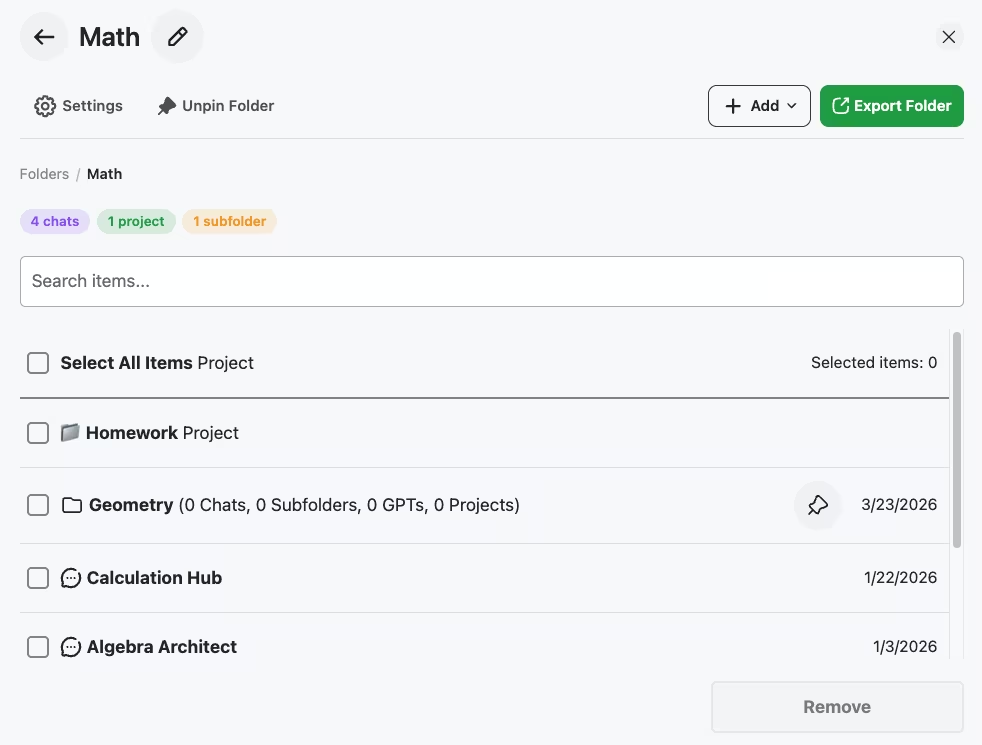
Create a folder for each context that matters: a school subject, a client, a project, a research topic. Folders can be nested (subfolders are unlimited on every plan, including Free). To add a chat, open the folder and use the in-folder search box: type part of the conversation name, GPT name, or project name, and select the result.
AI Toolbox folders deliberately do not use drag-and-drop. Search-to-add stays instant at hundreds or thousands of conversations, where drag-and-drop would force you to scroll through the full sidebar to find each chat you want to move.
2. Pins for the chats you keep returning to
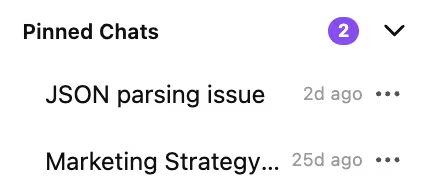
Pin the conversations you reference daily. They stay at the top of the sidebar in a separate Pinned Chats section with their own counter. Right-click any chat to toggle pin on or off. Free includes 2 pins; Premium is unlimited.
3. Full-text search with Cmd+Shift+F
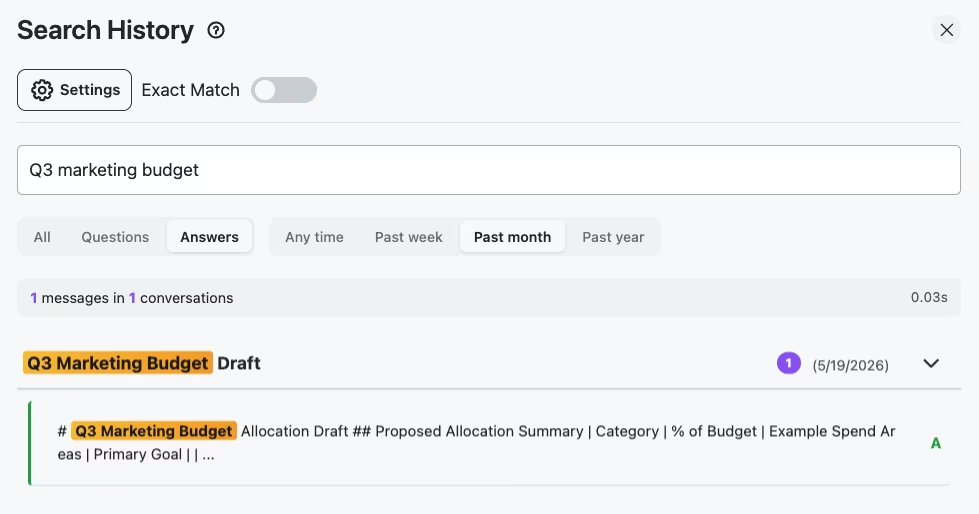
Press Cmd+Shift+F (Mac) or Ctrl+Shift+F (Windows) anywhere on chatgpt.com. The Search History modal opens. Type a query, pick a role filter (All / Questions / Answers), pick a date range (Any time / Past week / Past month / Past year), and toggle exact match for verbatim phrase matching. Results are message-level, not title-level: you see the exact sentence that matched, with its conversation and date.
On the screenshot at the top of this page, searching Q3 marketing budget with the Answers filter and Past month range returned exactly one message in 0.03 seconds, deep inside a multi-thousand-token conversation. That is the difference between scrolling for ten minutes and finding the answer in three seconds.
How to fix your ChatGPT sidebar in under 5 minutes
- Install AI Toolbox from the Chrome Web Store. Free, no credit card. Works on Chrome, Edge, Brave, Opera, and Arc. Firefox is not supported.
- Open ChatGPT. AI Toolbox features appear in the sidebar automatically. No setup screen, no account required.
- Create your first folders. Click the folder icon in the sidebar. Name folders after your real contexts (e.g. Math, Q3 Marketing, Client A, Personal Research). Then open each folder and use the in-folder search box to add conversations by name.
- Pin the chats you keep returning to. Right-click any conversation in the sidebar and pick Pin. They jump to the Pinned Chats section at the top.
- Search by content with Cmd+Shift+F. Forget titles. Just type what you remember from the message. The result you want is in the first three hits, almost always.
Frequently Asked Questions
ChatGPT lists every conversation in a single flat timeline. There is no native way to nest chats, pin more than a handful at the top, or filter by topic. Once you cross 50-100 conversations, scrolling becomes the only way to find anything. AI Toolbox adds folders, pins, and full-text search directly inside ChatGPT so the sidebar stays usable at any scale.
Full-text. Press Cmd+Shift+F (Ctrl+Shift+F on Windows) and AI Toolbox searches every message in every conversation, not just titles. You can filter by role (All / Questions / Answers) and by date (Any time / Past week / Past month / Past year), and toggle exact-match on for verbatim phrase searches. ChatGPT's native sidebar search only matches conversation names.
No, and that is a deliberate design choice. Conversations are added to folders via an in-folder search box: open the folder, type part of a conversation name (or GPT or project), and select the result. Search-to-add stays fast at hundreds or thousands of chats, where drag-and-drop would force you to scroll the full sidebar to find each chat.
Free includes 2 top-level folders with unlimited subfolders inside them, 2 pinned chats, and 5 search results per query. Premium ($9.99/month or $99 one-time Lifetime) unlocks unlimited folders, unlimited pins, and unlimited search results.
On AI Toolbox's servers, encrypted at rest, so your folders, pins and bookmarks sync across your devices, on the free plan too. The search index and your conversation content stay in your browser and are never stored on our servers. If you uninstall and reinstall the extension, your folder structure comes back once you sign in again, and your ChatGPT conversations stay safe on OpenAI's servers throughout.
Yes. AI Toolbox runs on every major Chromium browser: Chrome, Microsoft Edge, Brave, Opera, and Arc. Firefox is not supported because the codebase uses Chromium-specific extension APIs.
Install AI Toolbox and reclaim your ChatGPT sidebar
40,000+ users. 4.7/5 on the Chrome Web Store. Free forever for the core features. Premium starts at $9.99/month or $99 one-time Lifetime, with a 14-day money-back guarantee.
Also use Gemini or Claude? AI Toolbox has dedicated modules for both. See the Gemini module, the Claude module, or save with All Access Lifetime ($199) covering every module.