
Run a sequence of ChatGPT prompts automatically with AI Toolbox.
Most real ChatGPT workflows are not one prompt. They are five. Draft, critique, rewrite, polish, SEO-optimize. AI Toolbox (formerly ChatGPT Toolbox) chains up to 10 sequential prompts together: trigger any saved chain instantly with the .. shortcut, fill in {{variables}} once, and a floating progress bar pinned to the ChatGPT input shows the current step (Step 2/4) with Stop and Dismiss controls while it runs. Zapier and LangChain are developer tools that call APIs and require setup, code, or YAML, and they live outside the browser. AI Toolbox chains run directly inside chatgpt.com in your own browser, using your own ChatGPT account, with no API keys and no code.
 Add to Chrome
 Add to Edge
2 chains free | Unlimited chains on Premium $9.99/mo | Lifetime $99 one-time
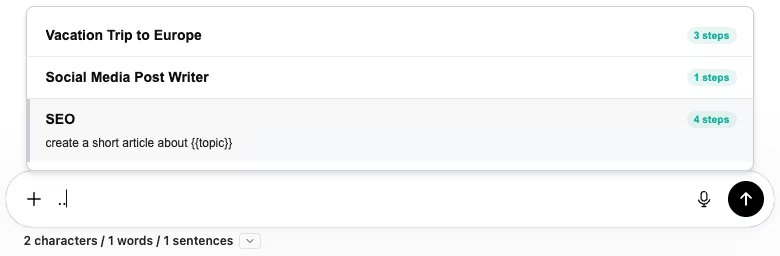
.. in ChatGPT to open the chain picker. Each chain shows its name, step count, and a preview of the first prompt.Why a chain beats one long prompt
The intuitive answer to a multi-step workflow is to bake everything into one giant prompt: “Draft a blog post about X. Then critique it. Then rewrite it. Then SEO-optimize it.” The problem with that approach is well-documented: ChatGPT tries to do all four tasks in one response, which fragments attention, blows out the context window, and produces shallow, formulaic output for each part.
Chains solve this by giving each step its own focused prompt and its own context window. Step 1's entire output becomes input for step 2. Step 2 has the full prior result to work with, undistracted by the steps that follow. The result of a 5-step chain is consistently better than a single 5-task megaprompt, while still being one click to trigger.
How chains work in AI Toolbox
Build a chain with up to 10 steps
Open the Chains panel and click New Chain. Each step is one ChatGPT prompt. Use {{variable}} placeholders anywhere you want to inject a value at runtime. Variables are shared across all steps automatically: {{topic}} in step 1 has the same value when step 2 references it.
Chains are most useful when each step has a single clear purpose. A typical content chain:
- Generate three angle options for
{{topic}}aimed at{{audience}}. - Pick the strongest angle and outline a {{word_count}}-word post.
- Draft the post.
- Critique the draft and list weaknesses.
- Rewrite based on the critique with SEO keyword
{{seo_keyword}}.
Trigger with .. and fill in the variables once
Inside any ChatGPT conversation, type .. at the start of the message input. A popup lists your saved chains with their step counts and a preview of the first prompt. Pick a chain.
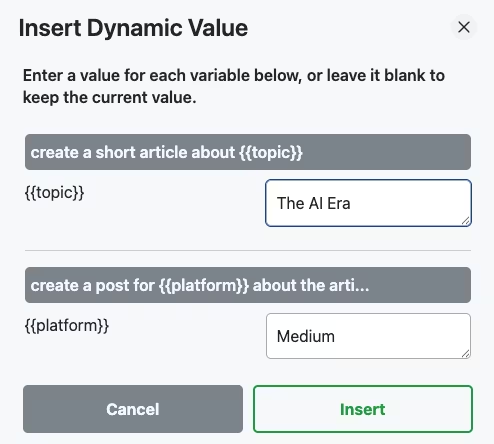
{{variable}} in the chain. Fill once, and the same value is reused everywhere the variable appears across all steps.Live progress, with Stop and Dismiss
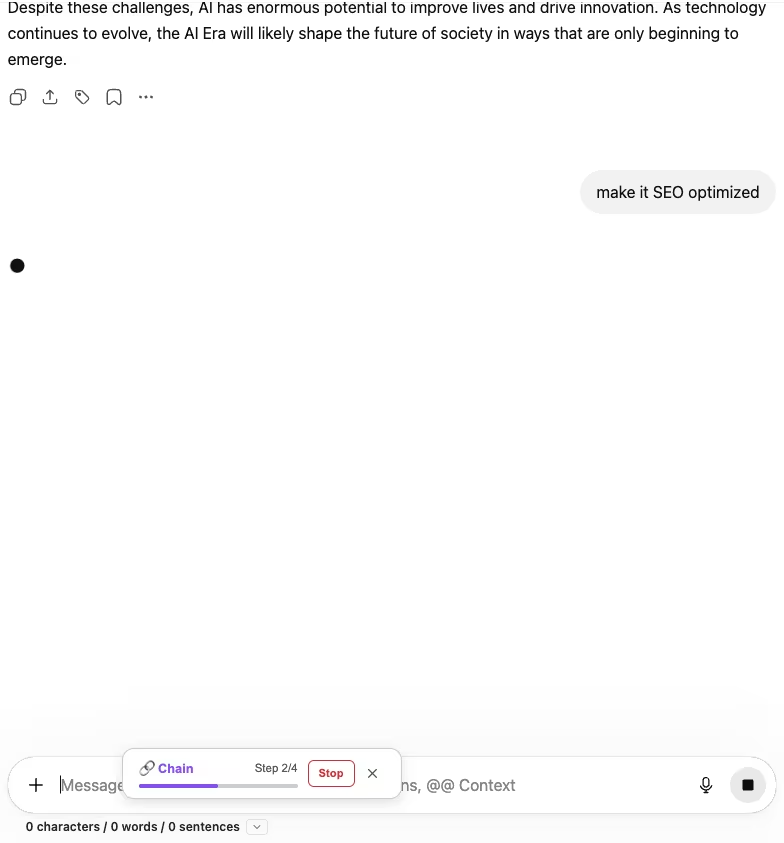
Once the chain starts, a progress indicator pinned to the ChatGPT input shows the current step (e.g. “Step 2/4”) with a progress bar, a Stop button, and a Dismiss X. Stop halts the chain at the current step and preserves all output so far. Dismiss hides the indicator while the chain keeps running in the background, so you can read prior responses without the overlay in the way.
How to build and run your first chain
- Install AI Toolbox from the Chrome Web Store. Free to install. The free plan includes 2 saved chains; Premium removes the limit.
- Open the Chains panel from the ChatGPT sidebar and click New Chain.
- Add steps one at a time. Up to 10. Each step is a single focused prompt. Use
{{variable}}placeholders for anything you want to fill in at runtime. - Save the chain with a clear name. The name appears in the
..popup and is searchable. - Trigger with
..inside any ChatGPT conversation. Fill the variables. Click Insert. Watch the progress overlay as each step runs.
Chains that pay back fastest
- SEO content pipeline. Topic angle → outline → draft → critique → SEO-optimized rewrite. Same five steps every time, swap
{{topic}}and{{seo_keyword}}per article. - Cross-platform content distribution. One source article, then one chain step per channel: Twitter thread, LinkedIn post, Instagram caption, newsletter intro, Medium repost.
{{platform}}stays variable. - Customer-research synthesis. Raw interview transcript → themes → quotes-per-theme → recommendations → one-page exec summary.
- Bug triage. Error log → root-cause hypotheses → reproduction steps → minimal fix → test plan.
- Trip planning. “Vacation Trip to Europe” with three steps for itinerary → logistics → packing list. Reuse with
{{destination}}and{{duration}}.
Frequently Asked Questions
No. Zapier and LangChain are developer tools that call APIs and require setup, code, or YAML. AI Toolbox prompt chains run directly inside chatgpt.com in your own browser, using your own ChatGPT account, with no API keys, no code, and no separate dashboard. They're the right tool when you want to automate multi-step ChatGPT work without leaving ChatGPT.
Up to 10 sequential prompts per chain. Each step's output becomes context for the next step automatically. Chains can also include {{variable}} placeholders that you fill in once at the start; the same value is reused across every step that references it.
Type .. at the start of a ChatGPT message input and a popup opens listing your saved chains, each with its name and step count. Pick one, fill in any {{variable}} placeholders, click Insert, and the chain runs end-to-end. A progress indicator shows the current step and overall completion.
Every chain run shows a Stop button next to the progress indicator. Click Stop and the chain halts at the current step. The output of completed steps stays in the conversation. You can also dismiss the progress indicator to keep the chain running in the background while you read prior responses.
In the cloud: chain definitions are stored on AI Toolbox's servers, encrypted at rest, so they sync across your devices, on the free plan too. The chain itself runs in your ChatGPT tab.
Single prompts force ChatGPT to do everything in one response, which usually means short, lower-quality output across each part. Chains let each step have its own focused prompt with its own context window. Step 1 produces a draft. Step 2 critiques the draft. Step 3 rewrites it. Step 4 polishes it. The final output is significantly better than asking for all four in one go.
Install AI Toolbox and automate your repeating ChatGPT workflows
40,000+ users. 4.7/5 on the Chrome Web Store. Save 2 chains for free, or get unlimited chains with Premium starting at $9.99/month or $99 one-time Lifetime. 14-day money-back guarantee, subject to refund policy.
Start with a single saved prompt first? See Saving reusable prompts with // and {{variables}}. For all four modules in one purchase, see All Access Lifetime ($199).