
Shared team workspace and centralized billing for an agency across ChatGPT, Claude, Gemini, and Grok, with AI Toolbox Teams.
Five contractors, five subscriptions, five separate invoices, zero shared organization. That is what most agencies look like a year into using AI tools seriously. AI Toolbox (formerly ChatGPT Toolbox) Teams is an extension layer on top of the AI accounts your team already uses across all four platforms (ChatGPT, Claude, Gemini, and Grok), replacing that mess with an admin dashboard, seat management, one invoice, team analytics, priority support, and a shared team prompt library across every platform. At $15/seat/month, or $12/seat/month billed annually (20% off), Teams adds the team layer without replacing any of the AI subscriptions your team already pays for. It is self-serve with a 14-day free trial, a 2-seat minimum, and it scales to 1000 seats.
$12/seat/month billed annually or $15/seat/month · 2-1000 seats · all four platforms (ChatGPT, Claude, Gemini, Grok) · 14-day free trial, self-serve
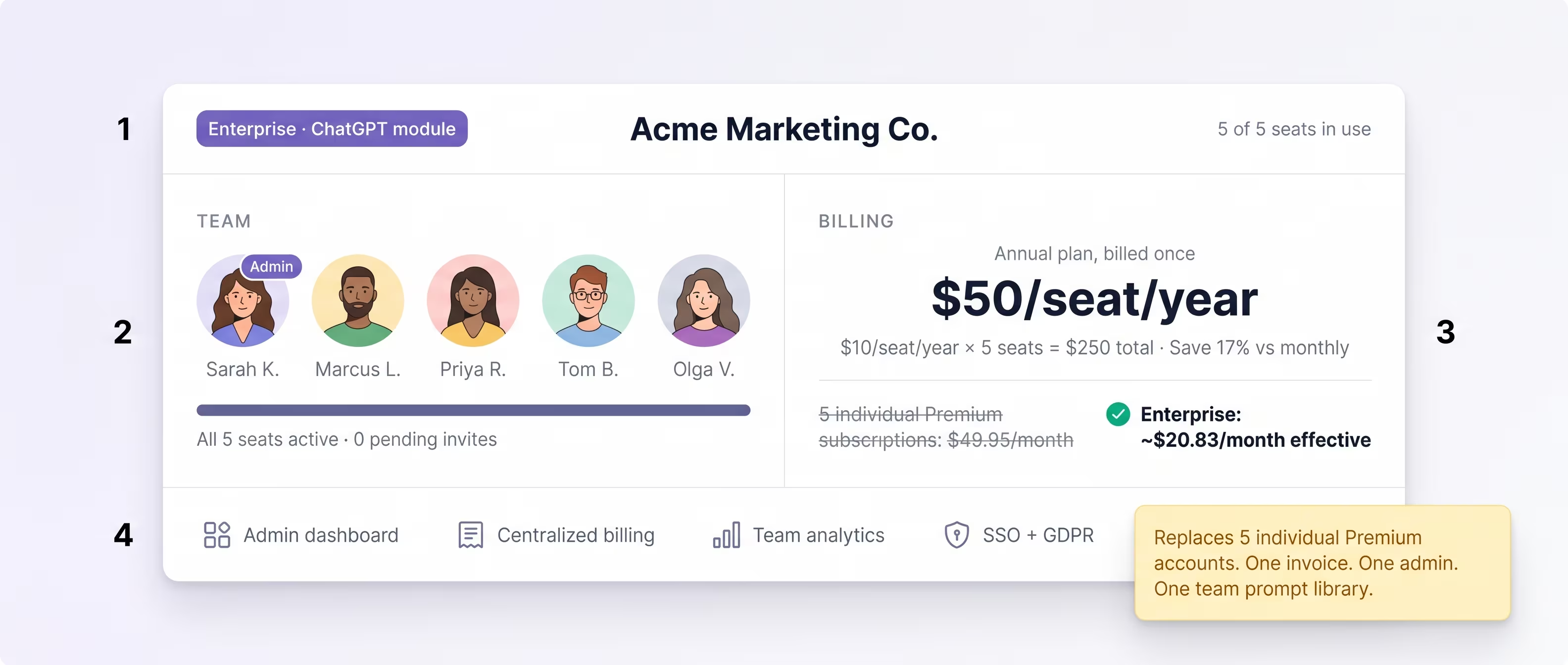
What an agency actually needs from an AI extension
Most agencies hit the wall at the same place. The first hire used ChatGPT. The second hire added Claude. Someone else prefers Gemini, and the research team lives in Grok. By the fifth contractor, every person has their own subscriptions, their own prompt library hiding in their own Notes app, and their own way of working that nobody else can see. Separate payments hit separate cards. Nobody knows what anybody else is doing across the AI tools.
The five pains that turn into urgent problems:
- Sprawling work across team members with no shared organization. The team prompt that took two weeks to refine lives on one person's laptop.
- Every contractor manages their own subscriptions. No centralized billing means no accounting visibility, no payment consolidation, no automatic offboarding when someone leaves.
- Departing team members keep their accounts. Months of accumulated workflow and any client-specific prompts walk out the door with them.
- No visibility into what the team uses AI for. Account managers cannot answer “how much of our delivery is AI-assisted now?”
- Onboarding a new hire means rebuilding their prompt library from scratch. The institutional knowledge captured in saved prompts does not transfer.
Individual Premium subscriptions cannot solve any of those. Each one is, by design, a single-person product. The agency-shaped problem needs an agency-shaped tool: one admin, one invoice, one shared team prompt library across every platform the team touches.
Five individual Premium accounts vs one Teams plan
Here is the math agencies typically run when they realize they have outgrown five individual subscriptions:
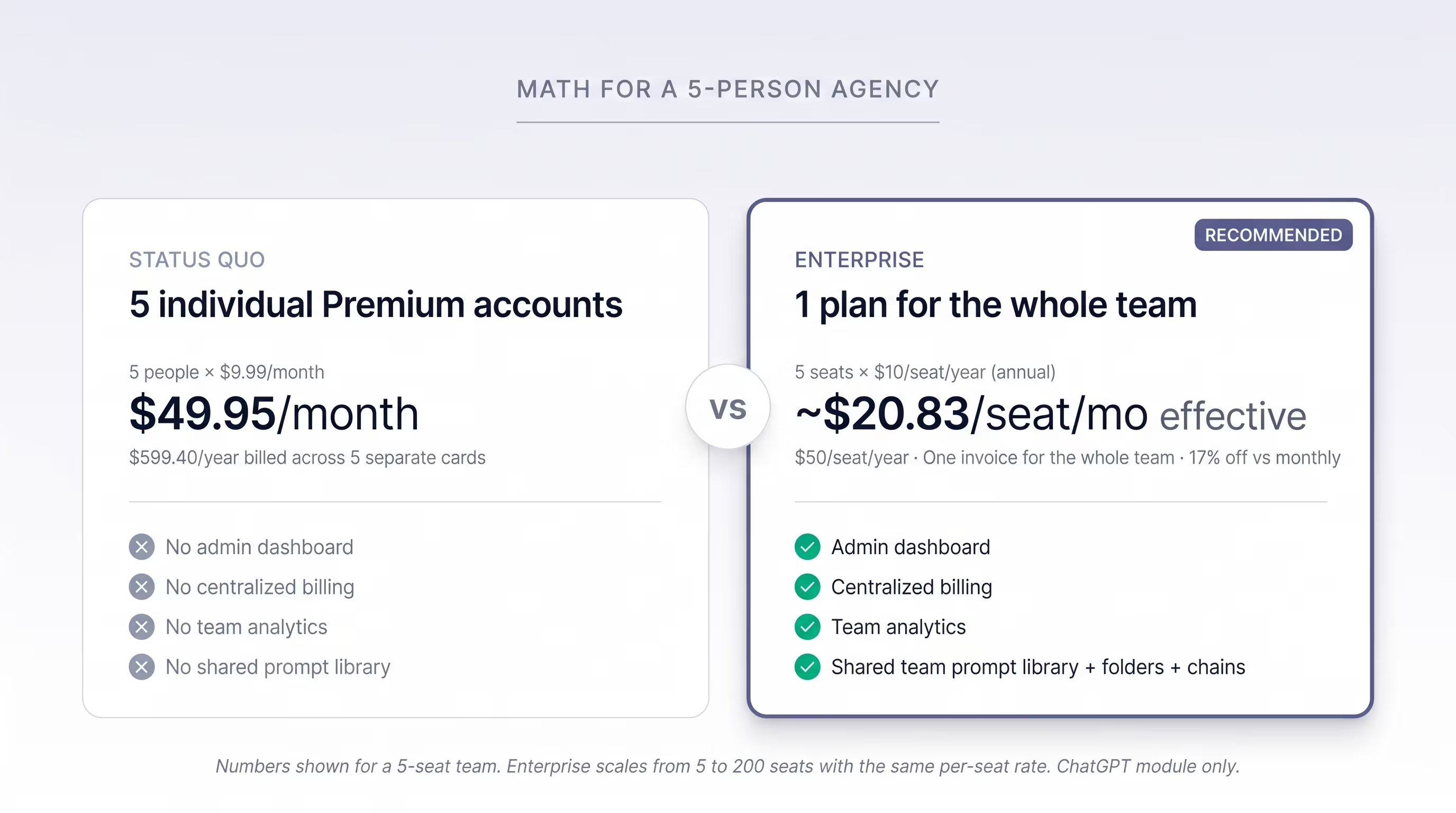
The math is honest. 5 individual Premium subscriptions cost $49.95/month ($599.40/year), across 5 separate cards, with no admin layer and one platform per seat. Teams on annual billing is $12/seat/month billed annually, which for 5 seats is $60/month ($720/year) on one invoice. That is about $10.05/month more than the five separate subscriptions, and for that difference the team gets an admin dashboard, centralized billing, team analytics, a shared team prompt library, and coverage across all four platforms (ChatGPT, Claude, Gemini, Grok) instead of one per seat. On monthly billing, Teams is $15/seat/month, or $75/month for 5 seats.
The number that flips most decisions is not the per-seat price, though. It is the centralized invoice: one finance entry, one payment card, one renewal date, one offboarding workflow. Most agencies switch the day they realize they have been doing payroll-shaped accounting for a handful of AI subscriptions. The 2-seat minimum means even a two-person shop can start today; the 5-person figure above is just an illustration.
Built on top of the AI tools your team already uses, not a replacement
This is the most common objection: “we already pay for ChatGPT, Claude, Gemini, and Grok, do we need this on top?” Yes, and they solve different problems. AI Toolbox Teams does not replace any of those subscriptions. It adds the team layer on top of all four.
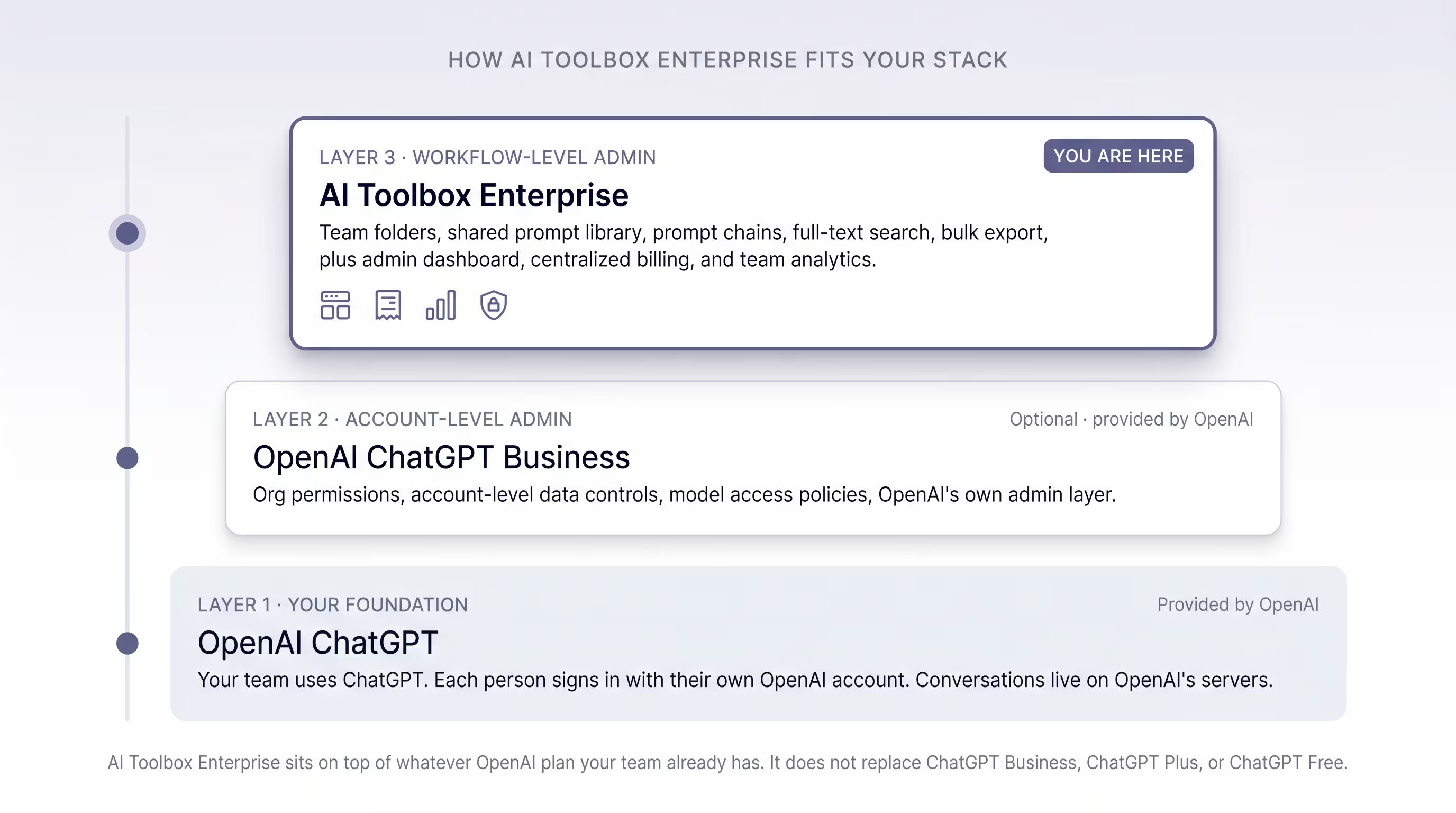
What each layer provides:
- The AI platforms (ChatGPT, Claude, Gemini, Grok). Model access and your team's actual conversations. Each person signs in with their own account on each platform. Conversations live on the providers' servers under their existing data controls.
- AI Toolbox Teams. The team-admin layer across all four platforms: a shared team prompt library with admin, editor, and viewer roles, an admin dashboard with seat usage and per-member activity, seat management with portable seats, per-platform identity management, centralized billing on one invoice, team analytics, and priority support.
The simplest test: if your agency uses AI daily but every contractor still manages their own prompts in their own Notes app, you have the foundation layer but no team layer. That is exactly the gap AI Toolbox Teams fills.
How to set up AI Toolbox Teams
- Start your free trial from the pricing page. Open the pricing page, choose the Teams plan, set your seat count (2-1000) and monthly or annual billing, and start the 14-day free trial. Checkout is self-serve; there is no contact-sales step and no waiting on a quote.
- Set per-platform identity and invite members. From the admin dashboard, set each member's per-platform email and their X handle for Grok, then invite them by email. Seats are portable, so you can reassign them later.
- Members install and sign in across all four platforms. Each member installs AI Toolbox on their own browser and signs in to the team. The team layer activates across ChatGPT, Claude, Gemini, and Grok using their own accounts on each.
- Build the shared team prompt library with roles. Admins and editors add prompts to the shared team prompt library across all four platforms; viewers read them. New hires inherit the entire shared library on first sign-in, which compresses onboarding from days to minutes.
- Track usage and reassign seats from the admin dashboard. Seat usage, per-member activity, and one consolidated invoice. When a member leaves, reassign their seat from the dashboard; the prompts they contributed stay with the team library.
When Teams is the right answer (and when it isn't)
Teams is the right fit if:
- You have 2 or more people using ChatGPT, Claude, Gemini, or Grok for client work, internal projects, or shared workflows.
- You want one invoice instead of N separate payment cards.
- You need visibility into who on the team is using which AI tools for what.
- You want institutional knowledge (shared prompts) to survive turnover, with portable seats so a departing member's shared prompts stay with the team.
- You want one shared prompt library that works the same across all four platforms.
Individual plans are the right fit if:
- You are a solo user or a 1-person setup. A per-module Premium or Lifetime account at $99 gives the same per-seat workflow features without a team-admin layer to manage.
- Your team uses AI casually and there is no shared workflow worth centralizing.
- You want all four modules for one person. In that case All Access Lifetime ($199) is usually a better fit than Teams.
Frequently Asked Questions
AI Toolbox Teams covers all four modules: ChatGPT, Claude, Gemini, and Grok. It is an extension layer on top of the AI accounts your team already uses on each platform, so every seat gets the team-admin features (admin dashboard, centralized billing, seat management, team analytics, priority support) and the shared team prompt library across all four platforms at once. There is no separate per-platform Teams purchase. Individuals who want a single platform can still use the per-module Premium or Lifetime plans, or the All Access Lifetime bundle ($199 one-time, all four modules plus every future module).
Yes. The Teams minimum is 2 seats, not 5 (the 5-person figure on this page is just a worked example). Teams scales from 2 up to 1000 seats, and larger teams cross into lower per-seat volume rates automatically. For a solo user, the per-module Premium or Lifetime plans at $99 give the same workflow features without the team-admin layer.
Reassign their seat from the admin dashboard. Seats are portable: when a member leaves, the prompts they contributed to the shared team prompt library stay with the team, not with the departing person. The vacated seat is immediately available to reassign to a new hire. There is no per-reassignment fee and no reset of team data.
Yes. Teams is self-serve with a 14-day free trial. You start the trial from the pricing page, choose your seat count (minimum 2) and monthly or annual billing, and the admin dashboard is live immediately. There is no contact-sales step and no waiting on a custom quote.
AI Toolbox keeps conversation content in each team member's own browser, never on AI Toolbox servers. Our infrastructure holds your team's seat and billing metadata plus what members build in the extension, such as folders, prompts and bookmarks, encrypted at rest so it syncs across devices. Your team's conversations and client work stay inside the AI accounts they already use on each platform (ChatGPT, Claude, Gemini, Grok), under those providers' own data controls.
Yes. You manage billing yourself from the team billing settings, no email required. Annual billing is $12/seat/month billed annually, monthly is $15/seat/month, so annual saves 20% per seat. Most agencies start monthly and switch to annual after the first quarter once usage stabilizes.
No. AI Toolbox Teams is an extension layer on top of whatever accounts your team already uses on ChatGPT, Claude, Gemini, and Grok. Each member keeps signing in with their own account on each platform; AI Toolbox adds the shared team prompt library, admin dashboard, seat management, centralized billing, and team analytics on top. It does not provide model access, account permissions, or the providers' own data controls; those still come from OpenAI, Anthropic, Google, and xAI.
Team-admin capabilities that individual subscriptions structurally cannot provide: (1) an admin dashboard with seat usage and per-member activity, (2) centralized billing on one invoice instead of N separate cards, (3) team analytics across all seats, (4) a shared team prompt library across all four platforms with admin, editor, and viewer roles, (5) seat management with portable seats (reassign a seat when someone leaves; their shared prompts stay with the team), and (6) per-platform identity management, where the owner sets each member's per-platform email and X handle for Grok. Plus priority support.
Two team AI workspaces of opposite shapes. Juma (app.juma.ai) is a standalone SaaS that replaces your AI tools with its own web UI, routing to GPT-5, Claude, and Gemini under the hood, with 700+ pre-built marketing Flows, 100+ integrations (Notion, HubSpot, Slack, Google Ads), and credit-based pricing: Free 300 credits/user/month, then a monthly credit ladder (Pro Starter $49/mo for 5,000 credits, Pro Small Team $147/mo for 15,000, Pro Big Team $490/mo for 50,000, Pro Agency $950/mo for 100,000), with Enterprise custom-quoted. AI Toolbox Teams instead adds a team layer on top of the AI tools your team already uses across all four platforms (ChatGPT, Claude, Gemini, Grok), keeping each member's native accounts and history, at $15/seat/month or $12/seat/month billed annually. Pick Juma to migrate the workflow into a new SaaS; pick AI Toolbox Teams to add the team layer on top of the tools you already use. Full comparison: /chatgpt-toolbox-competitors/chatgpt-toolbox-vs-juma-team-workspace-2026.
Start your Teams free trial
AI Toolbox is trusted by 40,000+ users across all modules, with a 4.7/5 Chrome Web Store rating. Teams covers all four platforms (ChatGPT, Claude, Gemini, Grok) and starts at $12/seat/month billed annually or $15/seat/month, with a 2-seat minimum, self-serve checkout, and a 14-day free trial.
Solo user? See per-module Lifetime pricing or All Access Lifetime ($199). Want the full Teams overview? See the Teams landing page.
Considering Juma's collaborative AI workspace instead? See the head-to-head: AI Toolbox Teams vs Juma: which is better for AI team workspaces. Juma is a standalone SaaS that replaces your AI tools with its own UI; AI Toolbox Teams is the extension layer on top of the accounts your team already uses across all four platforms.