
The Chrome extension that works across ChatGPT, Gemini, and Claude in one install.
One install, multiple modules. Unlike floating-sidebar assistants like Sider, Monica, and Merlin AI, which add an external chat window to every webpage, AI Toolbox (formerly ChatGPT Toolbox) is one install from the Chrome Web Store that enhances the native interfaces of chatgpt.com, gemini.google.com, and claude.ai with folders, full-text search, prompt libraries, and bulk export. One install, four modules, four native UIs enhanced. No floating overlay. No copy-paste between tabs. The host site stays the host site; we just give it the productivity layer it should have shipped with.
 Add to Chrome
 Add to Edge
One install | Free on all 4 modules | All Access Lifetime $199 (saves $197)
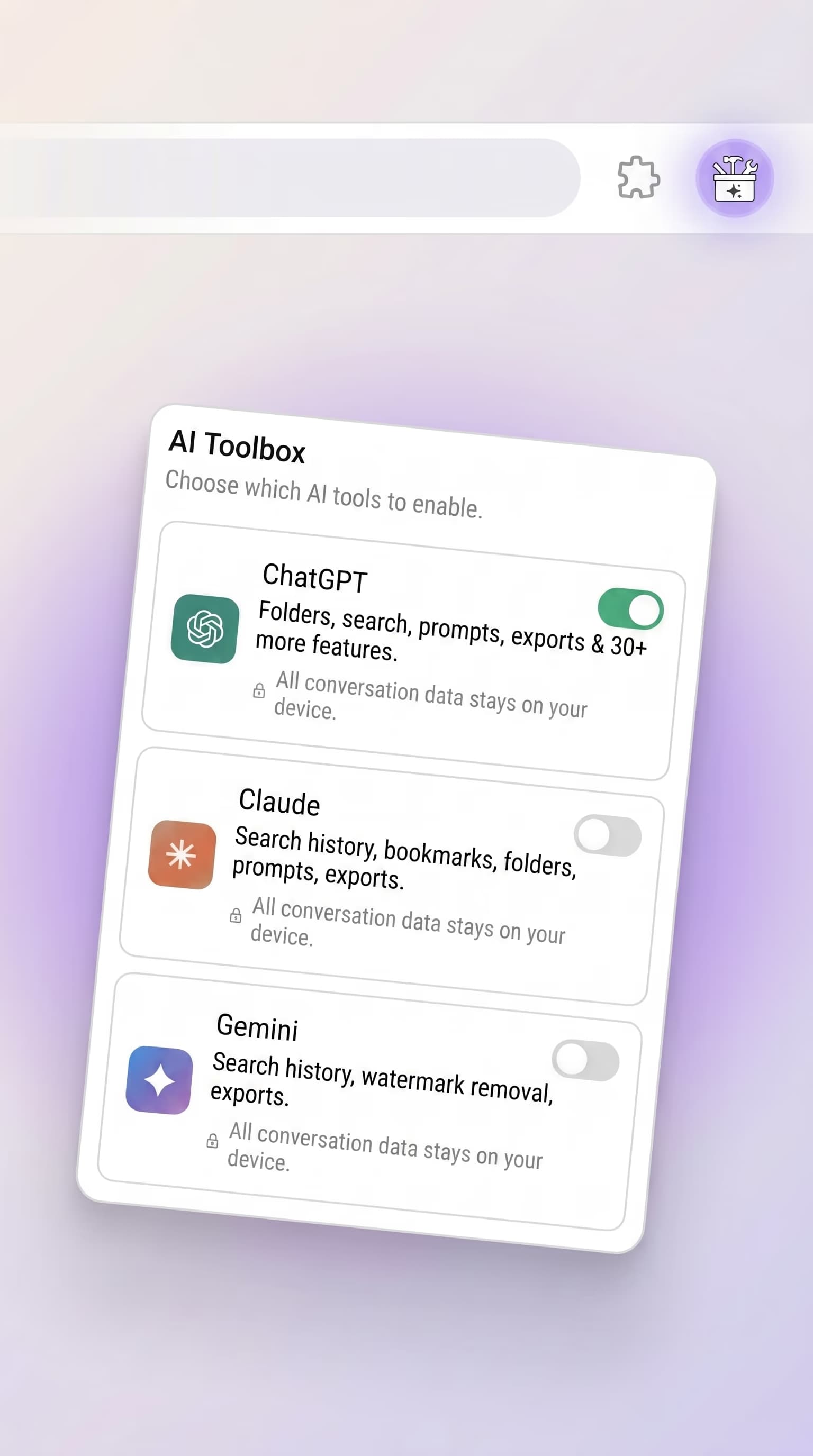
Deep integration, not a floating overlay
The category most people picture when they hear "multi-AI extension" is the sidebar overlay: a floating panel that sits on top of any webpage and lets you ask an AI a question. SideGPT, ChatHub, MaxAI, Monica, and a dozen others fit that shape. They are designed to bring AI to the rest of the web.
AI Toolbox is built the opposite direction. We don't bring AI to other sites; we make the AI sites themselves more usable. The folders panel is inside ChatGPT's actual sidebar. The full-text search bar is inside Gemini's actual chat history. Message bookmarks appear inside Claude's actual conversation view. You stay on the site you came to use, and the site grows new capabilities around you.
Both designs have legitimate use cases. If you want a single floating panel that answers questions on every webpage you visit, pick an overlay tool. If you spend hours per week inside chatgpt.com, gemini.google.com, or claude.ai and you want those sites to organize, search, bookmark, and export their own contents properly, pick AI Toolbox.
What deep integration looks like, one module at a time
ChatGPT module on chatgpt.com
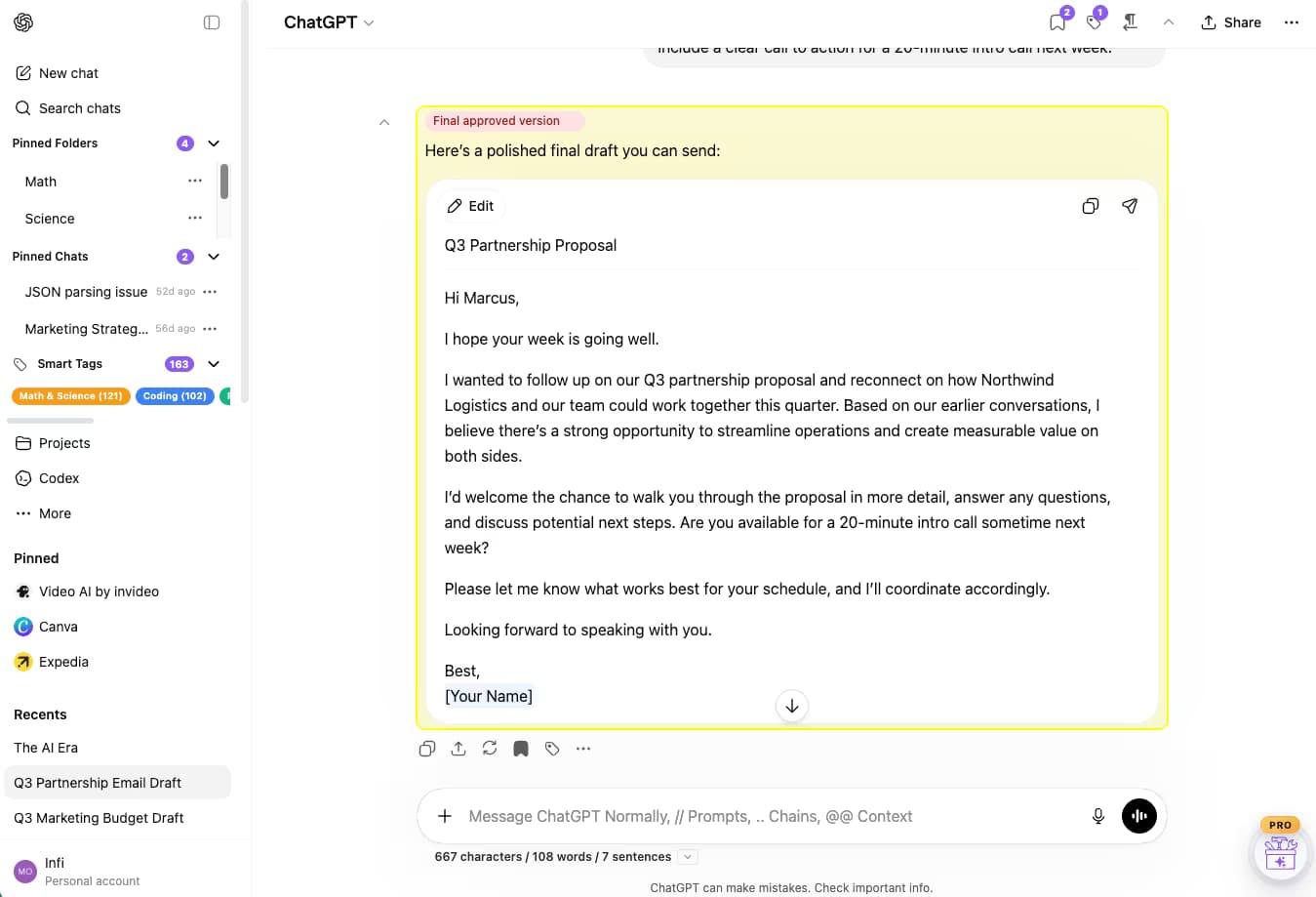
The ChatGPT module replaces the sidebar with one that does what a real workspace sidebar does. Folders (with subfolders) live where the chat list used to be. Pinned chats sit at the top with their own group. Smart Tags categorize chats automatically into Coding, Writing, Research, Math, and Business. Message-level Bookmarks let you flag the one assistant reply that mattered in a 40-message thread and color-label it (Final, Important, Reference). A Cmd+Shift+F full-text search box sits at the top of the sidebar. All of it is laid out in ChatGPT's own column grid, not a floating panel.
Gemini module on gemini.google.com
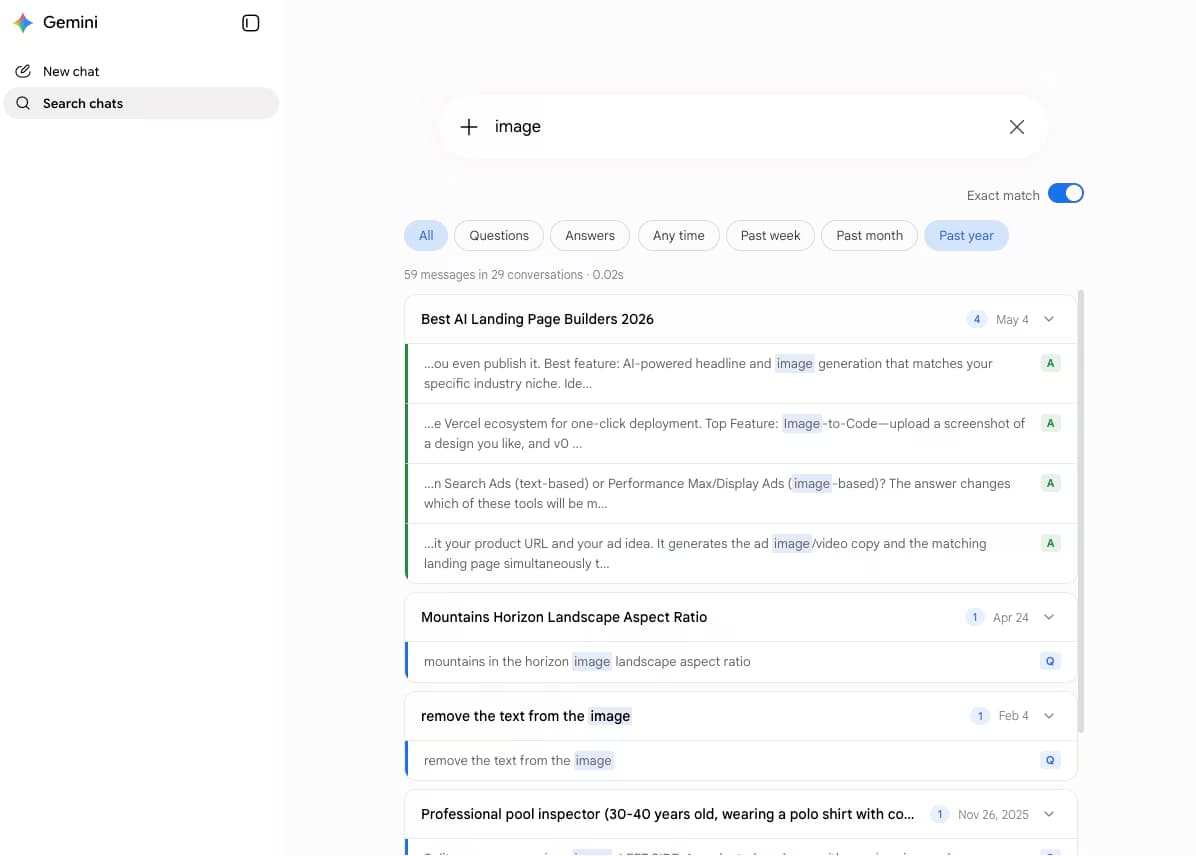
Gemini ships with chat history but no real search across it. The Gemini module adds a full-text search box that scans every message in every conversation. Premium adds an Exact Match toggle for phrase searches, role filters (Questions vs Answers), and time-range filters (Past week, Past month, Past year). Results are message-level, not conversation-level: you see the exact snippet that matched, with the query term highlighted, and one click jumps you to that message in context.
Claude module on claude.ai
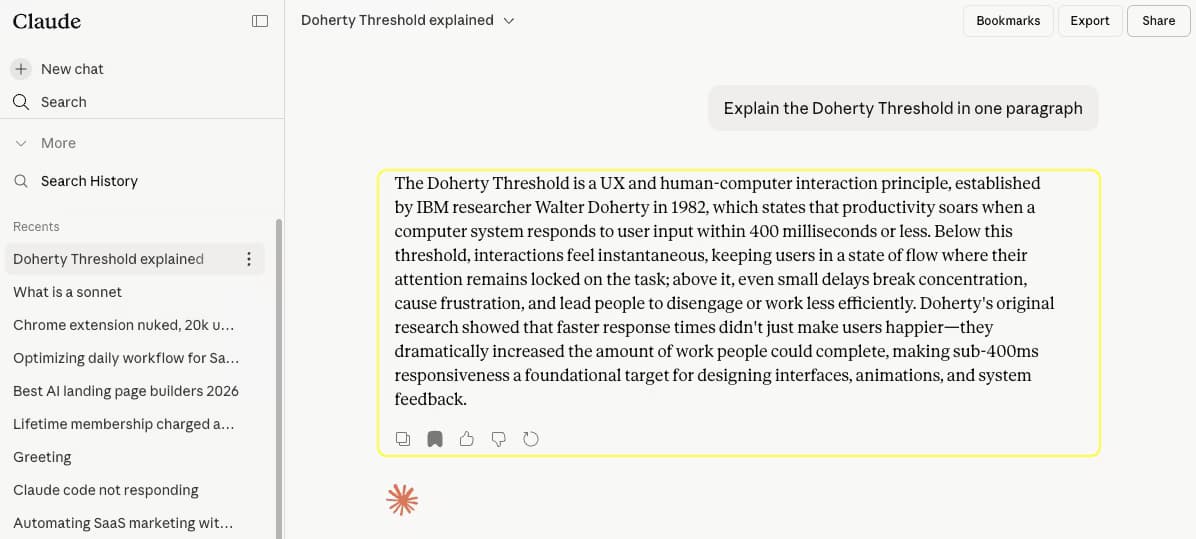
Claude has good search but no way to mark a specific message inside a conversation. The Claude module adds Message Bookmarks: bookmark any assistant message and jump straight back to it later. The bookmark sits visibly on the message in context, and a Bookmarks view lists every flagged message across every conversation. Folders, full-text search, and export (TXT free; Markdown, JSON, and PDF on Premium) round out the module so a heavy Claude user has the same workspace tools they have on ChatGPT.
Type 1 deep integration vs Type 2 floating sidebar, row by row
For buyers comparing categories, here is the same workflow expressed two ways. Type 1 (deep integration on official sites) is AI Toolbox. Type 2 (floating sidebar that follows you anywhere) is Sider, Monica, Merlin AI, ChatHub, MaxAI, SideGPT, and similar overlay tools.
| What you compare | Type 1: deep integration (AI Toolbox) | Type 2: floating sidebar (Sider, Monica, Merlin AI) |
|---|---|---|
| Where the UI lives | Inside the host site's own layout (chatgpt.com, gemini.google.com, claude.ai) | Floating panel on top of any webpage you visit |
| How many AI sites it enhances | 4 AI assistants in one install (ChatGPT + Gemini + Claude + Grok) | 0 (does not enhance the host AI sites; runs as a separate chat window) |
| Where conversations are stored | In the host AI's account (OpenAI, Google, Anthropic), indexed locally for search | Inside the overlay tool's own storage or a third-party API key |
| What the AI sees | The host site's full context, memory, tools, and uploads | Only the prompt you typed and any history the overlay maintains itself |
| Folders and bookmarks | Folders and message bookmarks organize chats inside ChatGPT, Gemini, and Claude themselves | Organize only chats that happened inside the overlay tool |
| Full-text search | Searches every message in every conversation in the host AI | Searches only conversations that happened inside the overlay |
| Bulk export | TXT, Markdown (with YAML frontmatter for Obsidian/Logseq), JSON, PDF, ZIP on every module (bulk export is Premium) | Varies by tool; usually limited to single-chat copy or one format |
| RTL layout (Arabic, Hebrew) | Yes, on all 3 host sites | Typically LTR-only; depends on overlay tool |
| Best for | Heavy users of ChatGPT, Gemini, or Claude who want those sites to behave like proper workspaces | Users who want a single floating AI assistant on every other webpage they visit |
| Examples | AI Toolbox (this product), Echoes (similar Type 1 peer with wider host coverage but shallower features) | Sider, Monica, Merlin AI, ChatHub, MaxAI, SideGPT |
The two product shapes are complementary, not competing. Many of our customers run AI Toolbox plus a separate overlay tool. We sit on chatgpt.com, gemini.google.com, and claude.ai; the overlay sits on everything else. If "one install across ChatGPT, Gemini, and Claude" means "I want all three sites organized and searchable in their own UI", AI Toolbox is the answer. If it means "I want one chat window I can call up from any tab", an overlay tool is the answer.
How to install once and use all four modules
- Install AI Toolbox from the Chrome Web Store. Free, takes 30 seconds. Works on Chrome, Edge, Brave, Opera, and Arc.
- Pin the icon. Click the puzzle-piece extensions menu in your toolbar, find AI Toolbox, click the pin icon. The AI Toolbox icon now stays visible next to the address bar.
- Open the popup. Click the pinned icon. You'll see three module toggles: ChatGPT, Gemini, Claude. All on by default. Toggle any off if you only want a subset.
- Visit a host site. Open chatgpt.com, gemini.google.com, or claude.ai. The matching module's UI is now injected into the site you opened, native to its layout.
- Use the host site normally. Everything you already do on ChatGPT, Gemini, or Claude works exactly as before; you now also have folders, search, bookmarks, exports, and a prompt library built into that site's own UI.
Pricing across all four modules
Free includes the core of every module on every site: 2 top-level folders with unlimited subfolders, search (first 5 results), 2 bookmarks, 2 saved prompts and 2 prompt chains, single-conversation TXT export on all four sites, and 5 of the 12 Prompt Library categories. Premium unlocks unlimited folders, all export formats (TXT, Markdown, JSON, PDF, ZIP), unlimited bookmarks, unlimited prompts and prompt chains, Voice Download (ChatGPT), and the full prompt library.
- Per-module Premium Monthly: $9.99 per month, for one module.
- Per-module Lifetime: $99 one-time, forever, for one module.
- All Access Lifetime: $199 one-time, forever, for all 4 modules and every future module added to AI Toolbox.
The math: four per-module Lifetimes cost $396. All Access Lifetime is $199. You save $197 and you're covered for every future module. 14-day money-back guarantee on Premium and Lifetime, subject to refund policy.
Frequently Asked Questions
One extension, one install from the Chrome Web Store. When you open the popup you get toggles for ChatGPT, Gemini, and Claude. Each module activates only on its target site (chatgpt.com, gemini.google.com, claude.ai, and x.com/i/grok plus grok.com for Grok), so the UI you see is always native to the site you're on. There is nothing to install separately.
Those tools are floating overlays. They sit on top of any webpage as a panel you can call up to ask an AI a question. AI Toolbox is the opposite design: it injects directly into the host site's own layout. Folders, bookmarks, search, exports, and prompt libraries appear inside ChatGPT's sidebar, inside Gemini's chat history, and inside Claude's conversation list. You're not pasting between windows; you're using the host product with more capability.
Four: chatgpt.com (the ChatGPT module), gemini.google.com (the Gemini module), claude.ai (the Claude module), and x.com/i/grok plus grok.com (the Grok module). Each module is purpose-built for its host. Folders work the same way conceptually, but the implementation is tuned to each site's DOM, message structure, and theming.
Most overlap (folders, full-text search, message bookmarks, Markdown export with YAML frontmatter for Obsidian/Logseq, prompt library). Every module exports to TXT/Markdown/JSON/PDF: single-chat TXT export is free on all four (ChatGPT, Gemini, Claude, and Grok), and the other formats and bulk ZIP export are Premium. Prompt chains run up to 10 steps on ChatGPT and up to 25 steps on the other modules. Module-specific features: ChatGPT has Voice Download and Custom Instructions presets. Gemini has model-aware search filters. Claude has artifact-aware export. Feature parity is a roadmap goal, not a hard rule today.
Chromium-based browsers: Chrome, Edge, Brave, Opera, and Arc. Firefox is not supported, because the Gemini and Claude host sites both rely on Chromium-specific behaviors that we lean on for the deep-integration features.
Free plan covers core features on every module. Premium per module is $9.99/month or $99 one-time Lifetime. If you want everything across all 4 modules forever, All Access Lifetime is $199 (saves $197 versus $99 per module times 4). 14-day money-back guarantee on Premium and Lifetime, subject to refund policy.
Not on All Access Lifetime. The $199 price covers every current and future module. When a new module ships (Perplexity, Mistral, etc.), it unlocks automatically for All Access holders. Per-module Lifetime customers stay on the module they bought.
Every AI Toolbox module, one payment
All Access Lifetime
Modules unlocked
AI Toolbox is a browser extension that adds folders, search, and export inside each AI. This unlocks all four modules, it is not an AI subscription. You keep using your own ChatGPT, Gemini, Claude, and Grok accounts.
- Every AI Toolbox module: ChatGPT, Gemini, Claude, and Grok
- New module added free when we add an AI platform (Grok joined at no cost)
- One extension, one payment, no subscription
- Priority 24/7 support across every module
14-day money-back guarantee. Pay once, own it forever.
Compare all plansInstall once. Use it on ChatGPT, Gemini, and Claude.
40,000+ users. 4.7/5 on the Chrome Web Store. One install, four deep-integration modules, free on every module to start. Premium per module at $9.99/month or $99 Lifetime. All Access Lifetime $199 covers everything forever and saves $197.
Want the per-module landing pages instead? See the ChatGPT module, the Gemini module, the Claude module, or jump straight to pricing.