
ChatGPT for Writers: Organize Your Creative AI Workflow
Turn ChatGPT into a creative writing partner. Organize brainstorms by project, save story ideas, and build a library of creative material.
Best for: Writers organizing ChatGPT drafts, creative prompts, and research by book, article, or client.
 Add to Edge
Start free | Trusted by 40,000+ users
The Writer's ChatGPT Problem
You use ChatGPT for brainstorming, character development, plot holes, dialogue experiments, and draft content. Creative gold gets generated-and immediately lost in an endless conversation list.
That brilliant plot twist? The character backstory that finally clicked? Buried somewhere in "Help me with my story..." chats you'll never find again.
Build Your Creative Writing Library
AI Toolbox (formerly ChatGPT Toolbox) helps you organize every creative conversation. Create project folders, save your best brainstorms, search past ideas, and export content for your manuscripts.
Organize by Project or Genre
Create folders for each book, story, or writing project. Keep your thriller separate from your romance, your novel separate from short stories.
Save Story Ideas
ChatGPT generates plot twists, character ideas, and dialogue. Save them in project folders instead of losing them in chat history.
Search Past Brainstorms
That character backstory you developed? The world-building details? Search and find any creative conversation instantly.
Export Drafts & Notes
Export ChatGPT-assisted drafts, outlines, and notes as TXT files. Add to your manuscript or writing software.
How Writers Use AI Toolbox
- Create Project Folders - Set up a folder for each book, story, or writing project.
- Organize by Element - Use subfolders for characters, plot, world-building, chapters.
- Save Creative Gems - When ChatGPT generates gold, add it to the right folder.
- Search for Inspiration - Stuck? Search past brainstorms for forgotten ideas.
- Export for Manuscripts - Download content to add to your writing software.
Writer Scenarios
Brainstorming
- Save plot ideas
- Organize character development
- Track world-building details
- Export creative notes
Drafting
- Organize by chapter
- Save dialogue experiments
- Track scene variations
- Export draft content
Editing
- Save revision notes
- Organize feedback sessions
- Track rewrite ideas
- Export polished content
Simple, Transparent Pricing
Start free, upgrade when you need more
Free
$0 /forever
- 2 Top-Level Folders (unlimited subfolders)
- Up to 2 Pinned Chats
- Search (up to 5 results)
- Media Gallery
- Sync across all devices
 Add to Chrome
Premium
$9.99 /month
- Everything in Free
- Unlimited folders and pinned chats
- Full prompt library
- Bulk export and unlimited bulk actions
Lifetime
$123$99 /one-time
- Everything in Premium
- Pay once - yours forever
- Write anywhere
- Priority 24/7 support
- All future updates
How Writers Use AI Toolbox: Step-by-Step
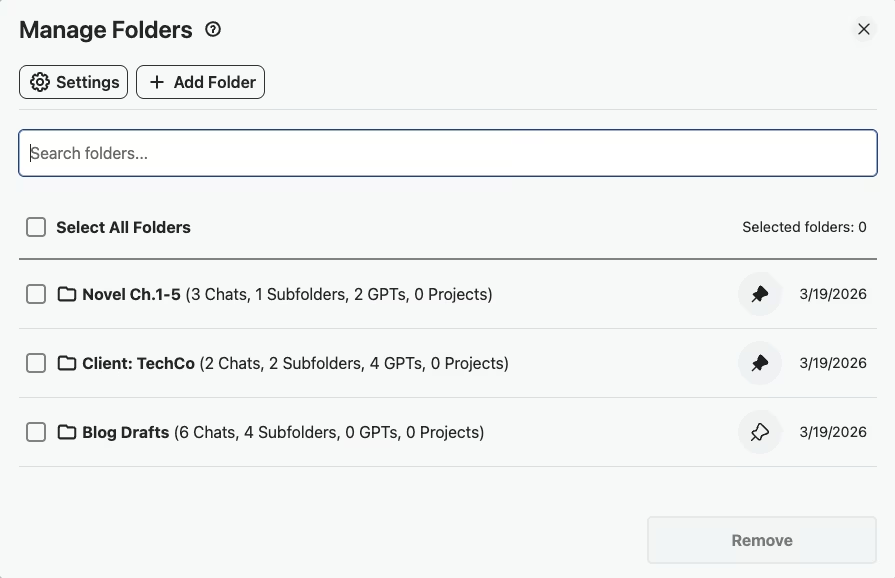
- Step 1: Create Per-Project Folders
Set up folders like “Client: TechCo Blog,” “Novel Draft,” and “Pitches” so every writing conversation is filed by project from the start.
- Step 2: Use Prompt Chaining for Your Writing Workflow
Chain prompts together to move from outline to draft to edit in sequence,each step builds on the last, keeping your entire writing flow in one organized thread.
- Step 3: Save Writing Style Templates
Save style-specific prompts like “Write in AP style” or “Match brand voice for TechCo” to your Prompt Library so you maintain consistency across projects.
- Step 4: Search Past Drafts to Reuse Successful Angles
Before starting a new piece, search your conversation history to find headlines, hooks, or structural approaches that worked well in previous projects.
- Step 5: Export Final Drafts as TXT for Client Delivery
When a draft is ready, export the conversation as TXT and paste the polished content into Google Docs or your client's preferred format for delivery.
Success Story
A content writer producing 15 blog posts per month - organized all drafts into client folders with subfolders per project. Using prompt chaining, she automated her research-to-outline-to-draft workflow.
Prompt chaining cut her per-article setup time from 20 minutes to under 3 minutes.
What Writers Say About AI Toolbox
“I freelance for about six clients at any given time, and each one gets their own folder. I use the prompt chaining feature to build out long-form blog posts section by section, and everything stays in the right client folder. My drafting workflow went from chaotic to actually manageable.”
- Jordan Reeves, Freelance Copywriter at Reeves Writing Co.
“I'm working on a novel and I have folders for Characters, Plot Threads, World Building, and each chapter draft. When I need to check if a detail is consistent, I search across all my folders and find it in seconds. The pin feature keeps my current chapter front and center.”
- Nadia Kurosawa, Fiction Author and Writing Workshop Instructor
Frequently Asked Questions
How can writers use ChatGPT more effectively?
Organization is the key to using ChatGPT as a creative tool. Create folders for each project. Save brainstorming sessions, character development, plot ideas, and draft content. Over time, you build a searchable library of creative material for each project.
Can I organize ChatGPT conversations by writing project?
Yes! Create a folder for each book, story, or writing project. Use subfolders for characters, plot, world-building, and chapters. Your entire creative workflow stays organized and searchable.
How do I save story ideas from ChatGPT?
When ChatGPT generates ideas you love, add that conversation to the right project folder. Pin your favorite brainstorming sessions for quick reference. Search across all projects to find forgotten gems.
Can I export ChatGPT drafts to my writing software?
Yes. Export any conversation as TXT, Markdown (with YAML frontmatter for Obsidian, Logseq, and any static-site generator), JSON, or PDF. Markdown is the best pick if you keep your drafts in Obsidian or a knowledge-base workflow. TXT pastes cleanly into Scrivener, Google Docs, or any plain-text editor. Use bulk export to download entire project conversations as a ZIP.
Will my creative work be safe?
AI Toolbox only stores folder names and conversation IDs locally in your browser. Your actual story content stays with OpenAI. We never access or store your creative work.
Organize Your Creative AI Today
Stop losing brilliant ideas. Build a library of creative material for all your projects.