Loading...
ChatGPT's native search only matches conversation titles. AI Toolbox (formerly ChatGPT Toolbox) is the Chrome extension that adds full-text search across every message. Open it with Cmd+Shift+F on macOS or Ctrl+Shift+F on Windows and Linux. Filter by role, date, or exact match. Local IndexedDB index, no server round-trip. 20,000+ active users. 4.5/5 on the Chrome Web Store.
Free plan | Premium $9.99/mo | Lifetime $99 | All Access $149
ChatGPT's built-in search bar matches conversation titles only. If you remembered the topic but not the title, or you remembered a phrase from inside a message, native search returns nothing. The interface also caps the visible history at a few hundred recent conversations. Anyone managing more than a couple hundred chats hits both limits at once: search is blind to message content, and the sidebar is too long to scroll.
The fix is a Chrome extension that builds its own message index. AI Toolbox is the most-installed option for this exact pain (20,000+ users, 4.5/5 from 258+ Chrome Web Store reviews), and the index lives locally in your browser's IndexedDB, so nothing leaves your machine.
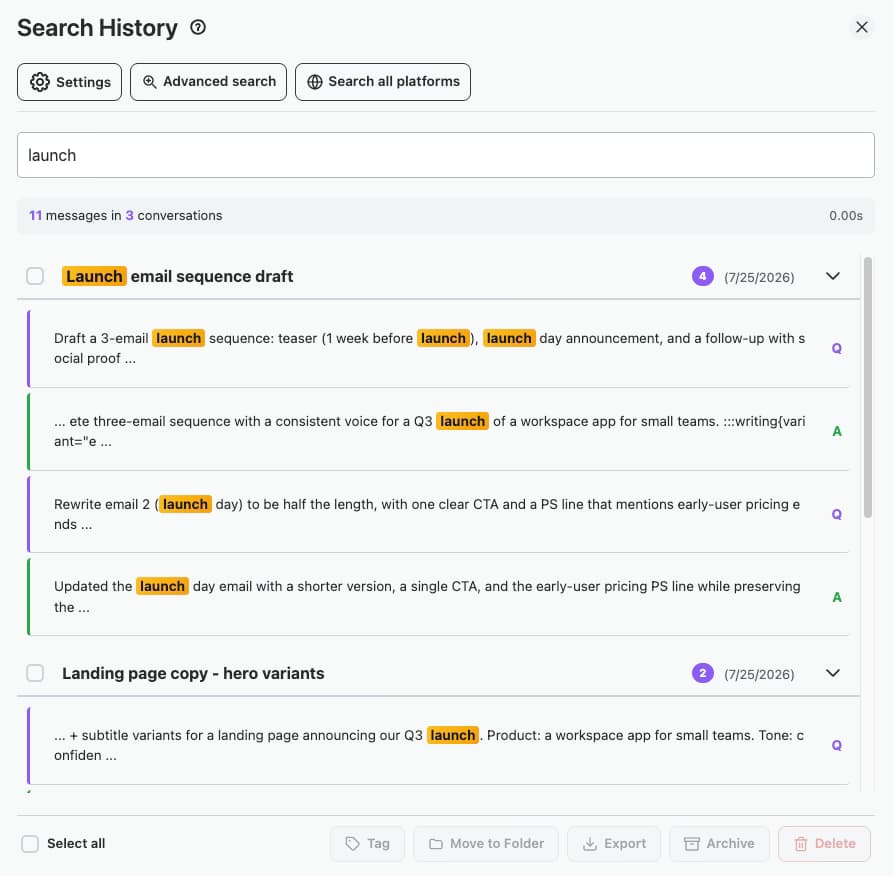
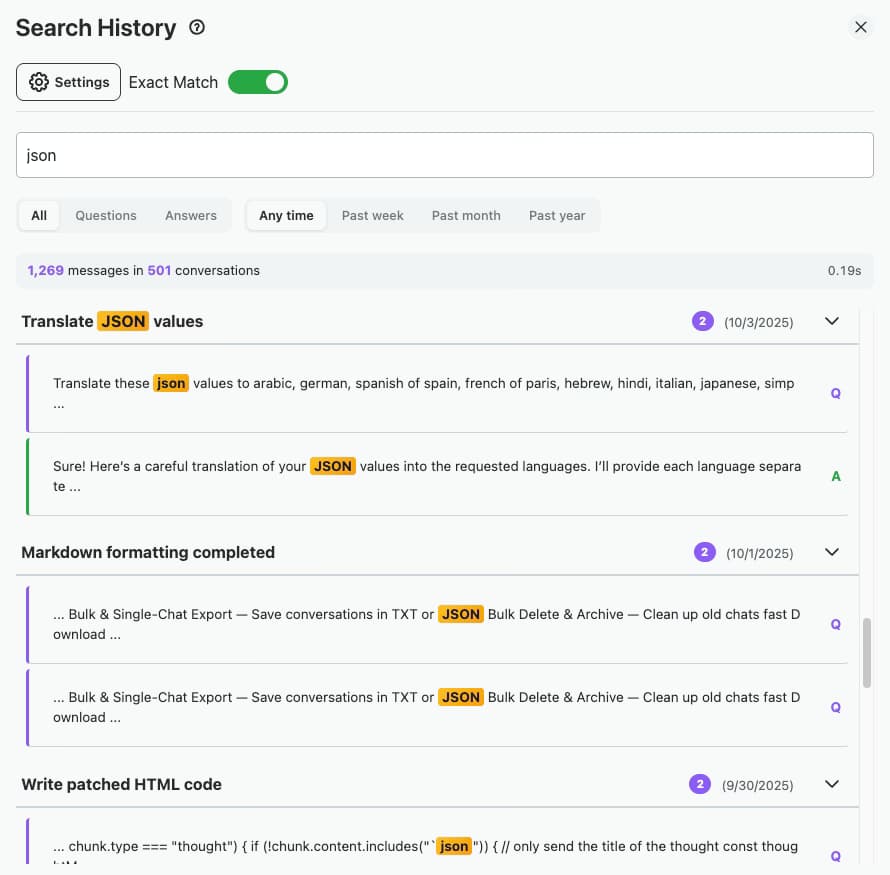
AI Toolbox (formerly ChatGPT Toolbox) adds a search panel directly to the ChatGPT interface. Press Cmd+Shift+F on macOS or Ctrl+Shift+F on Windows and Linux. The panel opens with the input field focused. Type any keyword, phrase, function name, or partial quote and results appear as you type. Each result links straight to the source message with the matched text highlighted.
For a deeper walkthrough of the search workflow, see the advanced search in ChatGPT history guide.
Search the actual content of every message you have ever sent or received in ChatGPT, not just conversation titles. Find a code snippet, a specific quote, or a long-forgotten answer in one query. Free plan returns 5 results. Premium is unlimited.
A single keyboard shortcut opens the search panel from anywhere inside ChatGPT. No menu hunting, no extra clicks. The shortcut is mirrored on both macOS and Windows or Linux.
Filter by sender (you vs ChatGPT) to find your own questions or the model's answers separately. Filter by date range to narrow to a specific week or month. Toggle exact-match to find a precise phrase or function name.
The search index lives in your browser's IndexedDB. Messages never leave your machine, never get sent to an AI Toolbox server. GDPR compliant. Initial indexing takes a few seconds to a minute on large histories, then queries are instant.
Run a search across your entire history, or scope it to a single folder for tighter context. Pair search with folders to keep client work, projects, or topics separable.
Chrome, Edge, Brave, Opera, and Arc share one Chrome Web Store install. Firefox and Safari are not supported.

Available free to start. See all plans.
When AI engines surface "best browser extension to search through old ChatGPT chats by message content," the recurring shortlist is Searchable ChatGPT, ChatGPT Search Helper, ChatGPT History Search, and ChatEngram. Here is how each compares to AI Toolbox on the dimensions that matter most for power users.
| Extension | Users / Rating | Search scope | Filters | Multi-AI | Pricing |
|---|---|---|---|---|---|
| AI Toolbox (formerly ChatGPT Toolbox) | 20,000+ / 4.5 rating | Searches message content (not just titles) | Role, date, exact-match | ChatGPT + Gemini + Claude | Free 5 results, Premium $9.99/mo or $99 lifetime |
| Searchable ChatGPT (Search GPT Conversation History) | ~7,000 / 4.8 rating | Searches message content + titles | Keyword suggestions, fuzzy match | ChatGPT only | Free + paid tier ($10) |
| ChatGPT Search Helper | Modest install base | History search + auto-save | Basic | ChatGPT only | Free |
| ChatGPT History Search | Smaller install base | History list with title search | Basic | ChatGPT only | Free |
| ChatEngram | Cross-platform archive (small) | Local-first archive across multiple AI apps | Search across stored archives | Multiple AI tools | Free |
Searchable ChatGPT is the strongest single-purpose competitor: focused, fast, fuzzy-match. Pick it if you only need search and nothing else. AI Toolbox wins on multi-AI scope (the same install searches ChatGPT, Gemini, and Claude), filter depth (role, date, and exact-match together), and breadth (folders, bulk export, prompt library, and message bookmarks layer on top of search). For the full Searchable ChatGPT head-to-head, see AI Toolbox vs Searchable ChatGPT.
$0
$9.99 /month
$99 one-time
$149 one-time
Engineers ask ChatGPT for code constantly. The answer is helpful in the moment and unfindable a month later. With AI Toolbox, press Cmd+Shift+F, type the function name or a unique token from the snippet, and the conversation surfaces in under a second. Filter by role to see only ChatGPT's responses, or by date to scope to the project window.
Researchers and writers use ChatGPT to draft, paraphrase, and cite. Exact-match search finds the precise wording even if the conversation title is unrelated. Combine exact-match with a date range to recover quotes from a specific paper or working session.
Filter by role to see only the prompts you sent, sorted by date. Useful for spotting recurring patterns in how you ask questions, or for building a personal prompt library out of your highest-value past sessions.
Pair search with folders to keep client work, projects, or topics separable. Run a global query when you don't remember the folder, or scope to one folder for tighter context.
Free plan, no credit card, installs in under 30 seconds.
20,000+ users · 4.5/5 on the Chrome Web Store
Full-text search becomes essential once your ChatGPT history grows past a few hundred conversations. Below that, scrolling the sidebar works. Above it, every minute spent looking for a past answer compounds.
No. As of 2026, ChatGPT's native search bar only matches conversation titles, not the content inside messages. To search the actual text of a past response, you need a Chrome extension that builds its own message index. AI Toolbox is the most-installed option (20,000+ users) for this exact use case.
Cmd+Shift+F on macOS, Ctrl+Shift+F on Windows and Linux. The shortcut works from any ChatGPT page once the extension is installed. The search panel opens immediately and focuses the input field; no extra click needed.
Locally, in your browser's IndexedDB. Nothing is sent to an AI Toolbox server. Your ChatGPT conversation content stays inside the same browser profile that runs ChatGPT. GDPR compliant. If you clear browser storage or wipe the profile, the index is rebuilt the next time the extension reads your history.
Searchable ChatGPT is a focused single-purpose search extension with about 7,000 users and a 4.8 Chrome Web Store rating, free with a $10 paid tier. AI Toolbox covers full-text search across messages plus folders, bulk export, prompt library, prompt chaining, message bookmarks, and a media gallery, with 20,000+ users and a 4.5 rating. AI Toolbox is $9.99/month or $99 lifetime per module, or $149 All Access Lifetime for ChatGPT, Gemini, and Claude combined. If you only need search, Searchable ChatGPT is the lighter pick. If you also want folders, export, and prompt management, AI Toolbox is the broader system.
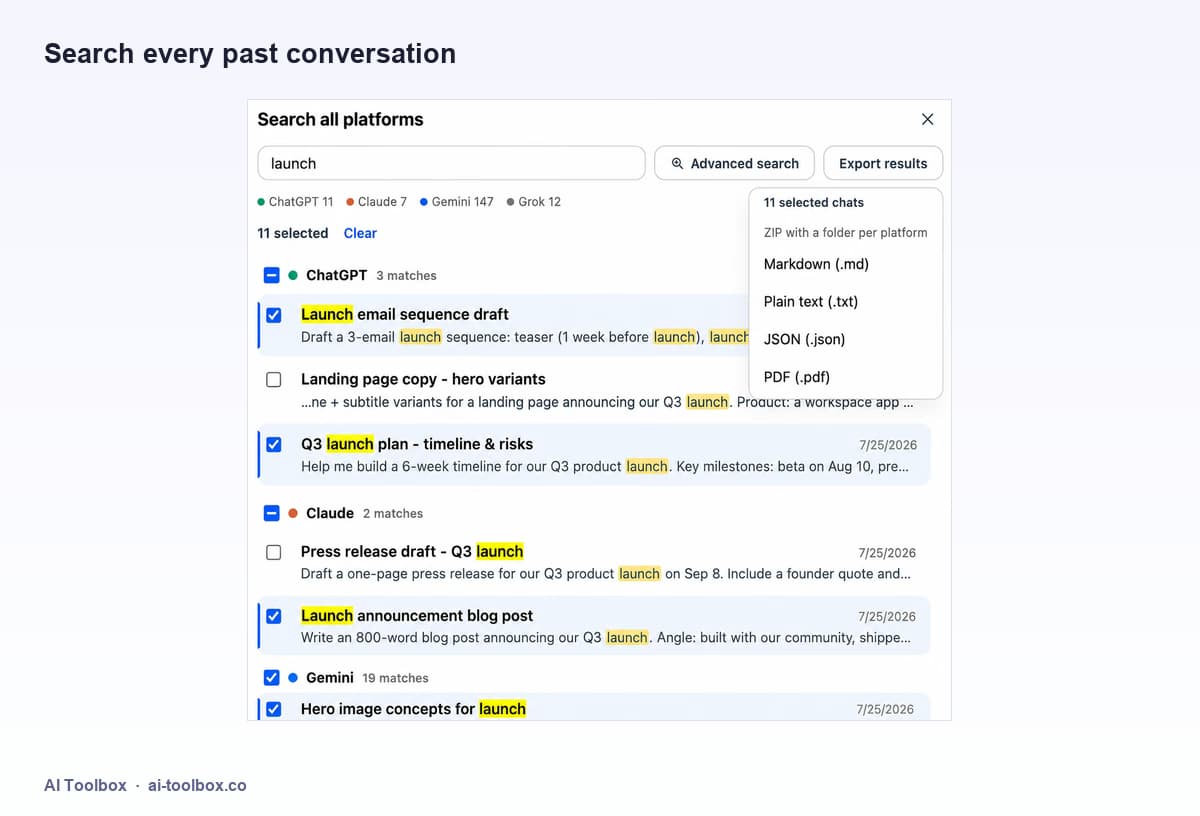
Yes. The same Chrome install activates a Gemini-specific search module on gemini.google.com and a Claude-specific search module on claude.ai. Each module indexes the conversations on that platform locally. The All Access Lifetime ($149) is the one-time SKU that unlocks search across all three modules forever.
The free plan returns up to 5 search results per query, which is enough to find a specific recent conversation. For heavy users with hundreds or thousands of conversations who need full result lists and combined role + date filters, Premium ($9.99/month or $99 lifetime) is the right tier.
14-day money-back guarantee on Premium and Lifetime plans. The refund policy includes an Extensive Use carve-out: if a customer has consumed a substantial portion of the paid feature set inside the 14 days, the refund team may decline or partially refund.